
How to Use: Ninebot KickScooter User Guide
Content
ninebot KickScooter
Introduction
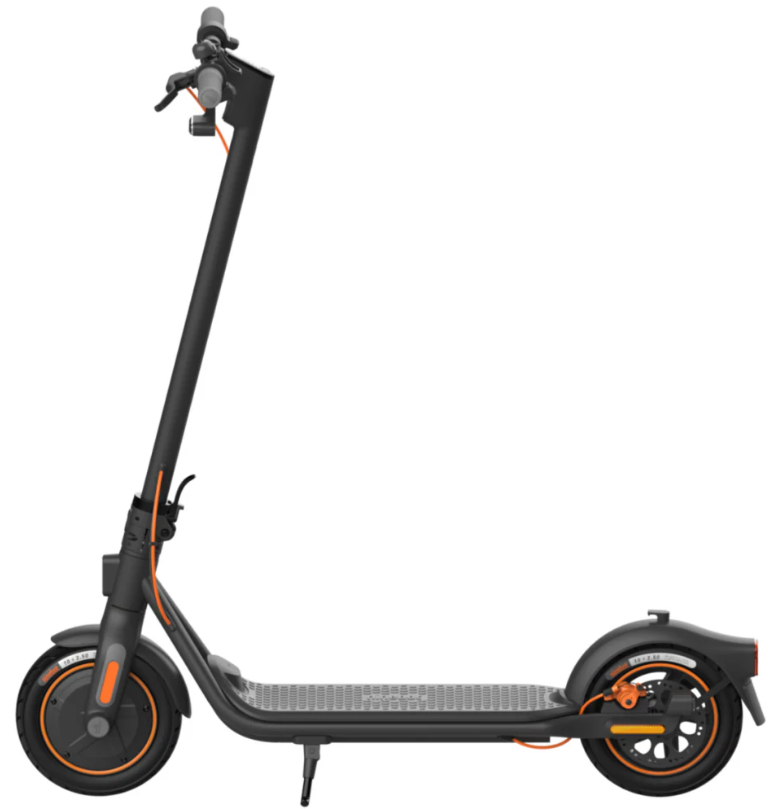
The Ninebot KickScooter by Segway is a cutting-edge electric scooter designed to combine performance, safety, and convenience for urban commuters and recreational riders alike. Equipped with powerful motors ranging from 300W to 350W, depending on the model, the KickScooter offers speeds up to 18.6 mph (30 km/h) and hill climbing ability up to 20%, making it ideal for navigating city streets and moderate inclines with confidence.e
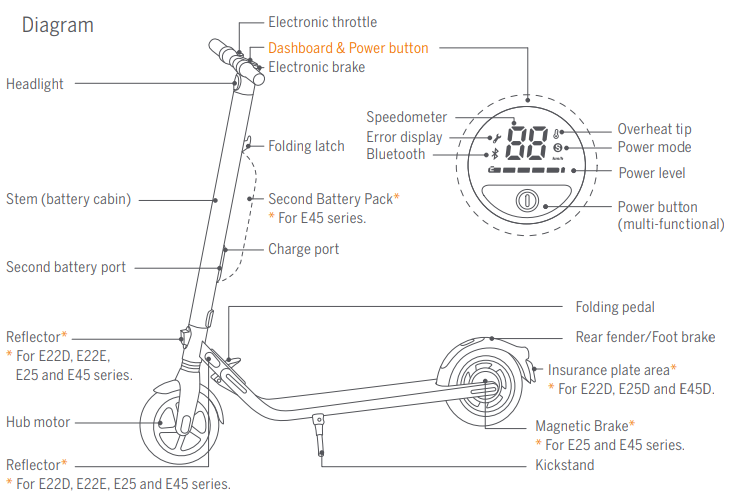
One of the key benefits of the Ninebot KickScooter is its impressive range, with some models like the MAX G30P providing up to 40 miles (65 km) on a single charge, minimizing range anxiety for daily commutes or longer rides. The scooter features robust 10-inch pneumatic tires that ensure a smooth ride and enhanced shock absorption, paired with an intuitive LED dashboard that displays speed, battery level, and riding mode for easy control.
Targeted towards riders aged 14 and above with a weight capacity up to 220 pounds (100 kg), the Ninebott KickScooter suits students, professionals, and urban explorers seeking a reliable, eco-friendly alternative to cars or public transport. Its foldable design and relatively lightweight frame (around 19 kg for the MAX model) enhance portability and storage convenience.
With estimated prices ranging from approximately €279 for entry-level models like the E2 to around $900-$1000 for premium models such as the MAX G30P, the Ninebot KickScooter is widely available through official Segway retailers and online stores worldwide. Its combination of high performance, safety features, and user-friendly design makes it a compelling choice in the growing electric scooter market.
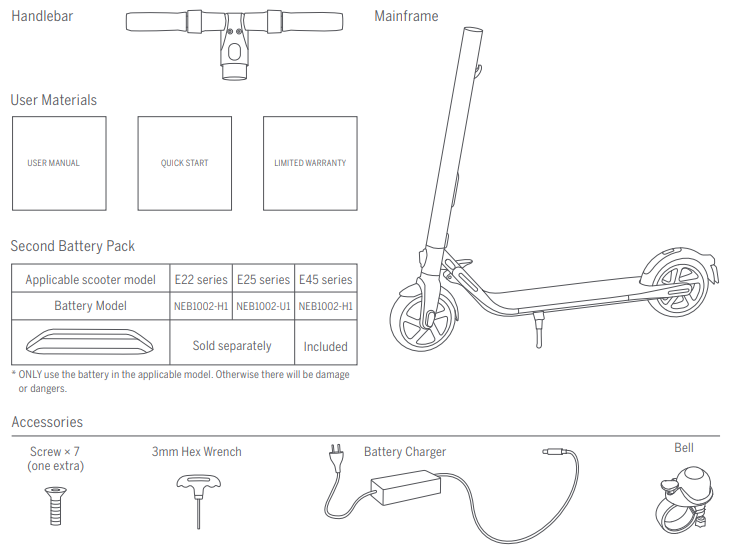
Packing List
Installing a Second Battery Pack
(optional)
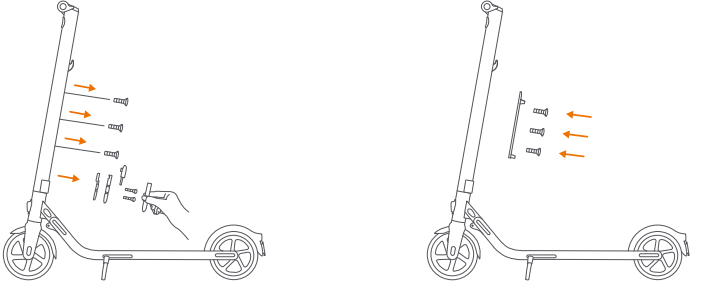
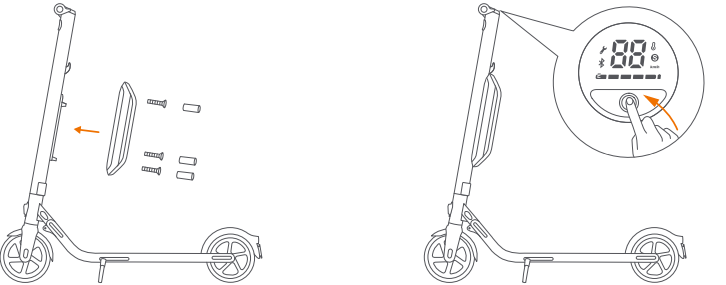
- Remove the three screws on the stem. Then, remove the cover near the charge port and remove the M3 screw.
Warning: Please use the screws provided with this product only. - Install the rail with the M4 (10mm) screws (3 pcs), provided with this product. Please make sure it is properly fixed.
- Install the external battery on the rail and fix it with the M4 (20mm) screws (2 pcs) and the M3 screw (1 pcs), provided with this product.
After they are properly installed, block the screw holes with the rubber stopper. - Verify that your KickScooter powers on and off.
Maintenance
Cleaning and Storage
Use a soft, wet cloth to wipe the mainframe clean. Hard-to-remove dirt can be scrubbed with a toothbrush and toothpaste, then cleaned with a soft, wet cloth.
NOTE
Do not wash your KickScooter with alcohol, gasoline, acetone, or other corrosive/volatile solvents. These substances may damage the appearance and internal structure of your KickScooter. Do not wash your KickScooter with a power washer or hose.
WARNING
- Make sure the KickScooter is powered OFF, the charging cable is unplugged, and the rubber cap on the charge port is tightly sealed before cleaning; otherwise, you may damage the electronic components.
- Store your KickScooter in a cool, dry place. Do not store it outdoors for extended periods of time. Exposure to sunlight and temperature extremes (both hot and cold) will accelerate the aging process of the plastic components and may reduce battery life.
Maintenance and removal of the battery
- Do not remove the battery. Removing the battery is complicated and can alter the operation of the machine: You can contact an authorized repairer if the product is still guaranteed. If the product is not guaranteed, you can contact any specialized repairer of your choice. You can ask for the list of the authorized repairers from the customer service.
- Do not store or charge the battery at temperatures outside the stated limits (see Specifications). Do not puncture the battery. Refer to your local laws and regulations regarding battery recycling and/or disposal. A well-maintained battery can perform well even after many miles of riding. Charge the battery after each ride and avoid draining the battery completely. When used at room temperature (70°F
[22°C]) The battery range and performance are at their best; whereas using it at temperatures below 32°F (0°C) can decrease range and performance. Typically, at -4°F (-20°C) range can be half that of the same battery at 70°F (22°C). Battery range will recover when the temperature rises. - More details are available in the App.
- Replace the Tires
- Tires supplied with the product are to be mounted on the wheel by a professional repairer. Removing the wheels is complicated, and incorrect assembly can lead to instability and malfunctions:
- Please contact an authorized repairer if the product is still under the manufacturer's guarantee. You can ask for the list of the authorized repairers from the customer service
- If the product is no longer under guarantee , you can contact any specialized repairer of your choice.
- Should you have questions, you can contact customer service
- NOTE
- Typically, a fully charged battery should retain charge for 120-180 days in Standby Mode. A low-power battery should retain charge for 30-60 days in Standby Mode. Remember to charge the battery after each use. Completely draining the battery may cause permanent damage to the battery. Electronics inside the battery record the charge-discharge condition of the battery; damage caused by
Over-discharge or under-discharge will not be covered by the Limited Warranty.
- Typically, a fully charged battery should retain charge for 120-180 days in Standby Mode. A low-power battery should retain charge for 30-60 days in Standby Mode. Remember to charge the battery after each use. Completely draining the battery may cause permanent damage to the battery. Electronics inside the battery record the charge-discharge condition of the battery; damage caused by
- WARNING
- Do not charge or use your battery if it is damaged or shows any traces of water. Do not attempt to disassemble the battery. Risk of fire. No user serviceable parts.
- Do not ride when the ambient temperature is outside the machine operation temperature (see Specifications) because low/high temperature will limit the maximum power/torque. Doing so could cause personal injury or property damage due to slips or falls.
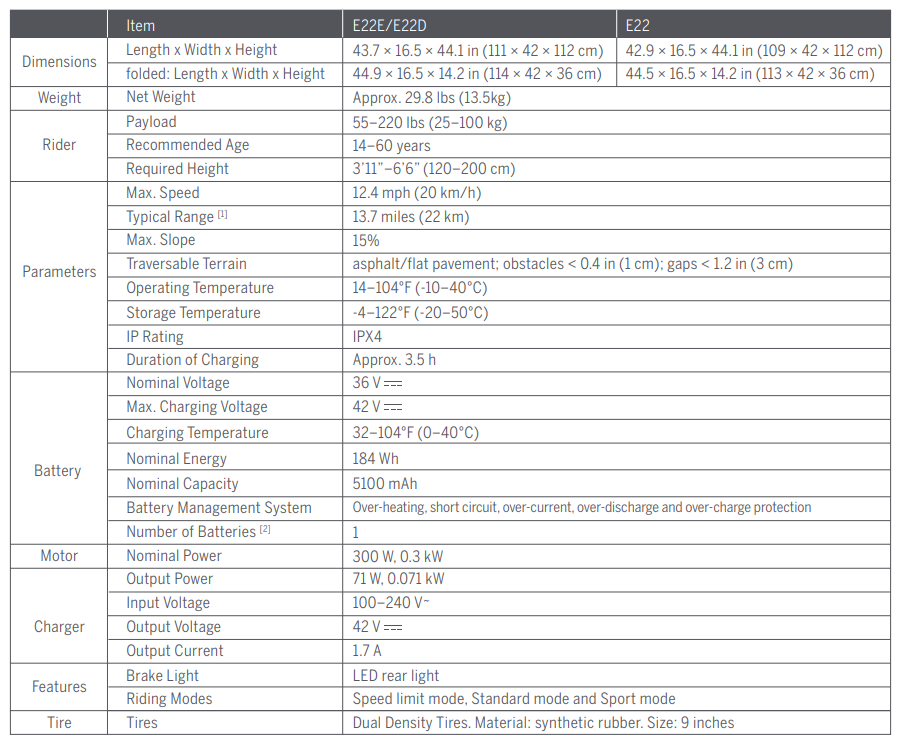
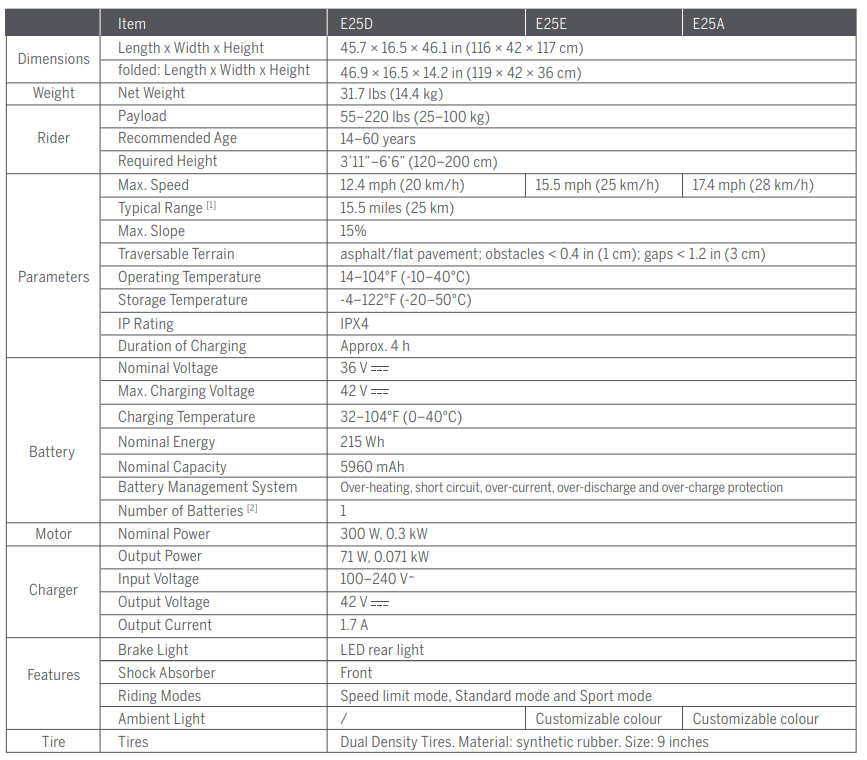
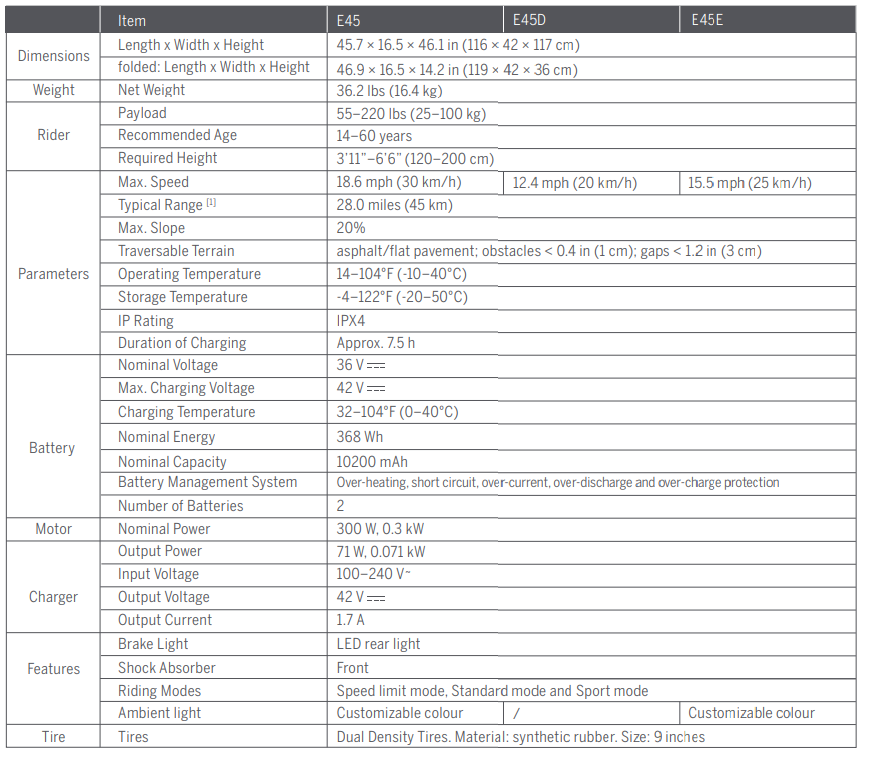
Specifications
Troubleshooting Common Issues with the Ninebot KickScooter
Users of the Ninebot KickScooter may encounter several common problems, which can often be resolved with simple solutions:
- Battery not charging: Check the charger and cable for damage, ensure the power source is working, and clean the charging port. Use only official chargers to avoid compatibility issues.
- Motor not responding or slow acceleration: Inspect for error codes on the LED dashboard. Common error codes include motor overheating or communication faults; resetting the scooter by powering off and on often helps. Avoid riding in extreme weather to prevent motor damage[
- Brakes not functioning properly: Verify both electronic front and mechanical or drum rear brakes. If braking feels weak, adjust brake tension or consult service if pads are worn.
- Display or LED dashboard issues: Restart the scooter and check for firmware updates via the Segway app. Persistent display errors may require professional repair.
Preventive measures include regular cleaning, avoiding water immersion beyond the scooter’s IPX4 or IPX5 rating, and adhering to the recommended weight and speed limits to prolong component life. The Ninebottt KickScooter typically includes a one-year warranty covering parts and labor, with extended options available through authorized dealers. For assistance, customers can contact Segway-Ninebot customer support or visit authorized service centers. EU customers may reach out to Segway-Ninebot Europe in Amsterdam.
Pros & Cons of the Ninebot KickScooter
Pros
- Long Range and Powerful Motor: Models like the MAX G30P deliver up to 40 miles of range and 350W motor power, allowing speeds up to 18.6 mph, suitable for long commutes and hilly areas
- Durable and Comfortable Ride: 10-inch pneumatic tires provide excellent shock absorption and stability, enhancing ride comfort on uneven terrain
- Smart Features: LED dashboard with speed, battery, and mode display, ay plus multiple riding modes (Eco, Standard, Sport) give the rider full control and information at a glance
- Foldable and Portable: Compact folding design and moderate weight (around 19 kg for MAX models) facilitate easy carrying and storage.
- Safety Features: Dual braking system with electronic front and mechanical or drum rear brakes ensures safe and reliable stopping power
Cons
- Price Point: Higher-end models can be relatively expensive compared to entry-level scooters, which may deter budget-conscious buyers
- Weight: At around 19 kg, some models may feel heavy for frequent lifting or long carrying distances
- Charging Time: Approximately 6 hours for a full charge can be longer than some competitors, requiring planning for daily use
- Legal Restrictions: Some models are not permitted on certain public roads or regions due to speed or power regulations, limiting usage options.
Overall, the Ninebott KickScooter offers excellent value for money with its combination of performance, build quality, and smart technology, although buyers should weigh the cost and portability factors compared to alternatives like the Ninebot ES2 or F2 models.s
Customer Reviews of the Ninebot KickScooter
Feedback from Ninebot KickScooter users is predominantly positive, praising its strong motor performance, long battery life, and comfortable ride. Many customers highlight the MAX G30P model’s extended range of over 40 miles as a standout feature for daily commuting.
Users often commend the scooter’s intuitive LED dashboard and reliable dual braking system, which enhance overall safety and ease of use. However, some common complaints include the scooter’s weight, making it less convenient for carrying over long distances, and the relatively long 6-hour charging time.
Star ratings typically range between 4 and 4.5 out of 5, reflecting high satisfaction with build quality and ride experience. Several testimonials recommend the Ninebot KickScooter for urban commuters seeking an eco-friendly, efficient travel option. Frequent issues mentioned relate mostly to firmware updates or occasional connectivity glitches, usually resolved with customer support assistance.
Faqs
How do I properly set up my ninebot KickScooter for the first time?
What should I do if my ninebot KickScooter won’t turn on?
How can I fix braking problems on my ninebot KickScooter?
Can I use the ninebot KickScooter app with any smartphone?
Why is my ninebot KickScooter not reaching its maximum speed?
What maintenance steps should I regularly perform on my ninebot KickScooter?
How do I troubleshoot unresponsive throttle on my ninebot KickScooter?
What should I do if my ninebot KickScooter displays an error code or warning light?
Tags
Leave a Comment