
Features & Specs: Noesis Florio F10 Pro Robotic Vacuum Cleaner User Manual
Content
noesis Florio F10 Pro Robotic Vacuum Cleaner Review and Product Manual
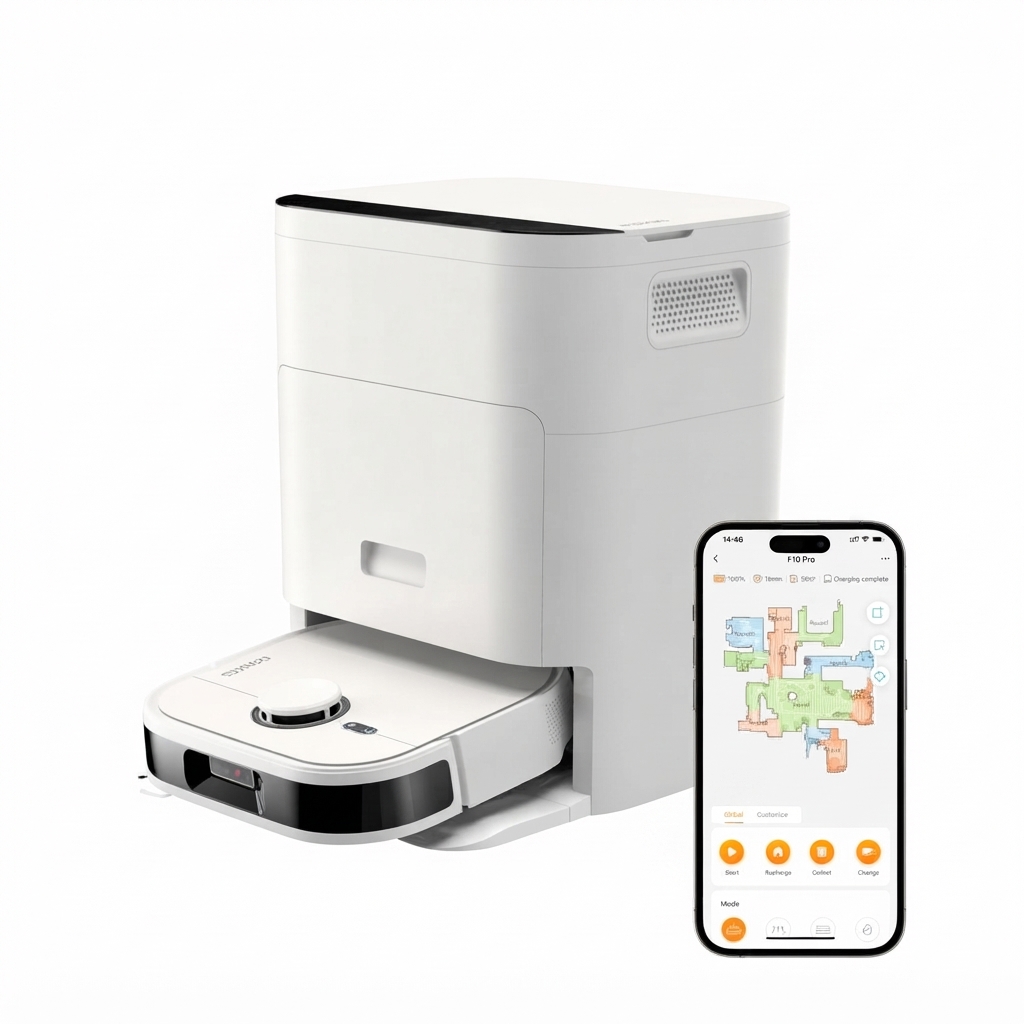
Introduction
The noesis Florio F10 Pro Robotic Vacuum Cleaner is a premium robot vacuum and mop combo designed for hands-free floor care in modern homes. It combines strong 5100 Pa suction, intelligent obstacle avoidance, and an automated dock system that handles dust collection, water refilling, and mop pad replacement. For homeowners who want a cleaner home with less daily effort, this model stands out for its self-emptying, self-maintaining design and its ability to move smoothly from carpets to hard floors.
This robot vacuum cleaner is especially appealing to busy families, pet owners, and anyone managing mixed flooring such as hardwood, tile, and area rugs. Its D-shaped body helps it clean edges and corners more effectively than many round robot vacuums, while the app-based controls make it easy to schedule cleaning, set no-go zones, and monitor progress remotely. The noesis Florio F10 Pro Robotic Vacuum Cleaner is also a strong option for users who want a robot mop with more advanced scrubbing performance than basic entry-level models.
Estimated pricing generally falls in the premium range, with typical availability around $1,599 to $1,799 depending on promotions and retailer stock. In some cases, refurbished or resale units may appear at lower prices. Availability is commonly strongest through major online marketplaces and the brand’s direct product channels. For shoppers comparing top robot vacuum and mop systems, this model competes with other high-end autonomous cleaners that emphasize docking automation, mapping accuracy, and low-maintenance operation.
Key Features at a Glance
- 5100 Pa suction for carpets, pet hair, and debris
- Robot vacuum and mop combo with advanced scrubbing action
- Self-emptying dock with automatic pad handling and water management
- Dual NeuralVision obstacle detection with camera and stereo-style sensing
- D-shaped design for improved corner and edge coverage
- Auto-lifting brush and mop for smoother transitions over rugs and carpets
Pros and Cons of the noesis Florio F10 Pro Robotic Vacuum Cleaner
- Pros: The 5100 Pa suction is powerful enough for daily debris pickup, pet hair, and deeper cleaning on carpets.
- Pros: The self-emptying and self-maintaining dock reduces manual upkeep, making it ideal for high-traffic homes.
- Pros: The mop system is more advanced than basic wet pads, with scrubbing motion designed to handle stuck-on dirt.
- Pros: Edge cleaning is a strong point thanks to the D-shaped chassis, which helps it reach corners better than many round robots.
- Pros: Smart mapping and app control make scheduling, room targeting, and routine automation convenient.
- Cons: The premium price makes it less accessible than budget robot vacuums or simpler robot mop models.
- Cons: The dock is large, so buyers need enough floor space for setup.
- Cons: Disposable mop pad management may not appeal to users who prefer reusable mop systems.
- Cons: Best value comes from homes that will use the full automation features; casual users may find cheaper alternatives more practical.
For value for money, this model is best suited to buyers who want a premium all-in-one floor cleaner rather than a basic robot vacuum. Compared with lower-priced alternatives, the noesis Florio F10 Pro Robotic Vacuum Cleaner offers more automation, stronger navigation features, and better edge coverage, but it also carries a noticeably higher upfront cost.
Customer Reviews and Real-World Feedback
Customer feedback is generally positive, with many users giving the noesis Florio F10 Pro Robotic Vacuum Cleaner ratings around 4.3 to 4.7 out of 5 stars for convenience, suction performance, and cleaning automation. One common testimonial theme is that it feels like a “set it and forget it” appliance for everyday floor care.
- Praise: “Excellent suction and great corner cleaning. The dock saves me a lot of time.”
- Praise: “The mapping is accurate and the app makes room-by-room cleaning easy.”
- Complaint: “It is expensive, especially compared with standard robot vacuums.”
- Complaint: “The base station takes up more room than expected.”
- Complaint: “Disposable mop pads are convenient, but they add ongoing maintenance cost.”
Buyers who want a premium robotic vacuum cleaner with strong automation, advanced mop functionality, and reduced hands-on maintenance are the best match for this model. Shoppers focused on simple vacuuming or lower-cost cleaning may prefer a more basic robot vacuum, but for all-in-one convenience, this model remains highly competitive.
Technical Highlights for Home Use
- Designed for mixed floor types, including hard floors, carpets, and rugs
- Built for autonomous mapping and scheduled cleaning routines
- Suitable for homes that need frequent dust pickup and mopping
- Helpful for pet owners dealing with hair and tracked-in dirt
- Useful for larger homes where automatic dock maintenance reduces effort
Frequently Asked Questions
Is the noesis Florio F10 Pro Robotic Vacuum Cleaner good for pet hair? Yes, its strong suction and anti-tangle-style brush design make it a practical choice for pet hair cleanup.
Does it work on carpets? Yes, it is designed to vacuum carpets and lift its mop components when transitioning to carpeted areas.
Is it worth the price? It is worth considering if you want premium automation, advanced mopping, and low-maintenance operation.
Faqs
How do I set up the noesis Florio F10 Pro Robotic Vacuum Cleaner for the first time?
Why is my noesis Florio F10 Pro Robotic Vacuum Cleaner not connecting to Wi-Fi?
What should I do if the noesis Florio F10 Pro Robotic Vacuum Cleaner keeps getting stuck under furniture?
How can I improve suction and cleaning performance on the noesis Florio F10 Pro Robotic Vacuum Cleaner?
Is the noesis Florio F10 Pro Robotic Vacuum Cleaner suitable for carpets and hard floors?
How do I maintain the noesis Florio F10 Pro Robotic Vacuum Cleaner for long-term use?
Why does the noesis Florio F10 Pro Robotic Vacuum Cleaner return to the dock too early?
What app settings should I adjust on the noesis Florio F10 Pro Robotic Vacuum Cleaner for better scheduled cleaning?
Leave a Comment