
Pairing & Setup: Nokia Power Earbuds Lite BH-405 User Manual
Content
Nokia Power Earbuds Lite BH-405
Introduction
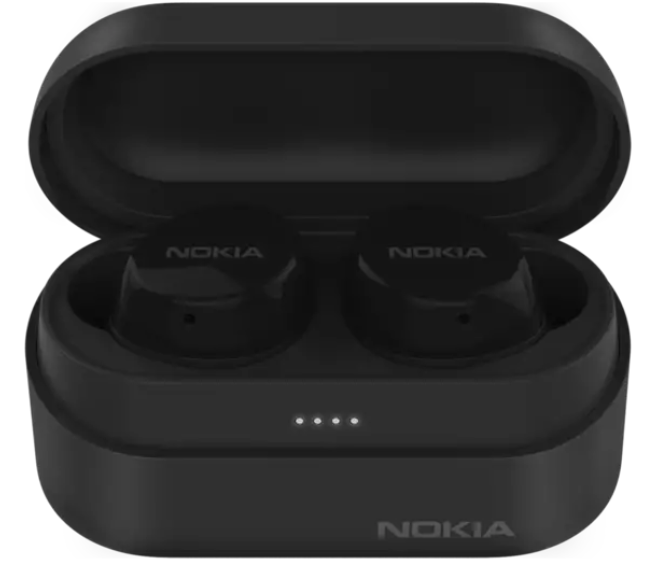
The Nokia Power Earbuds Lite BH-405 are a stylish, reliable, and affordable wireless earbud solution designed for music lovers, commuters, and active users. Featuring a sleek Nordic-inspired design, these earbuds deliver crisp sound, a comfortable fit, and impressive battery life. With IPX7 waterproofing, they’re perfect for workouts, outdoor adventures, or daily commutes, ensuring your music keeps playing no matter the weather. The compact charging case slips easily into your pocket or bag, making the Nokia Power Earbuds Lite BH-405 ideal for on-the-go listening.
Key benefits include universal Bluetooth 5.0 compatibility, touch controls for easy playback, and a 100% recyclable packaging design. Whether you’re streaming music, taking calls, or listening to podcasts, these earbuds offer a seamless experience. The Nokia Power Earbuds Lite BH-405 are available in multiple colors and typically retail between $40 and $60, making them a great value for budget-conscious buyers seeking quality wireless audio.
What's in the box
- Charging Case
- Earbuds (L/R)
- Ear Tips (5/M/L)
- USB Type-C cable
- Quick Start Guide
Specifications: Nokia Power Earbuds Lite BH-405
- Model: BH-405
- Driver Size: 6mm Graphene driver
- Bluetooth Version: 5.0
- Battery (Earbuds): 50 mAh (60 mAh in some sources)
- Battery (Charging Case): 600 mAh
- Playback Time: Up to 5 hours per charge, up to 35 hours with case
- Waterproof Rating: IPX7 (waterproof up to 1m for 30 minutes)
- Charging Port: USB Type-C
- Dimensions (Earbuds): 25 x 23 x 23.8 mm
- Dimensions (Case): 68 x 36 x 31 mm
- Weight: 48.4g (case + buds)
- Colors: Charcoal (Black), Snow, Fjord
- Included Accessories: 3 sizes of eartips (S, M, L), Type-C charging cable, charging case
- Compatibility: Any Bluetooth device
Compared to similar models, the Nokia Power Earbuds Lite BH-405 stand out for their long battery life, robust waterproofing, and eco-friendly packaging.
Product Overview
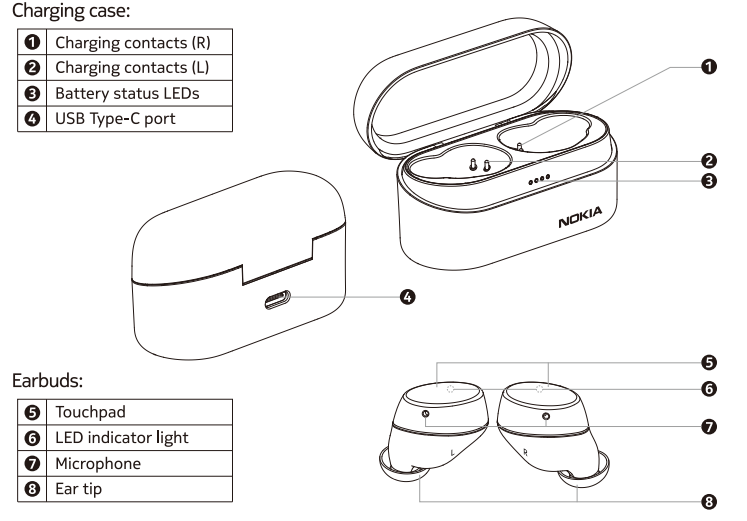
Pair and connect with Bluetooth
- Pairing with the device
- Turning on and Pairing:
When you take the earbuds out of the charging case, theythey earbuds will turn on and pair with each other automatically. When they have successfully paired, the LED indicator light of the right earbud will flash blue and red alternately,, and the earbuds are ready to connect with your Bluetooth® device. Connecting with your Bluetooth device:
Turn on Bluetooth in your device and choose "Nokia Power Earbuds Lite" from the Bluetooth menu to connect.
During the connection process, the LED indicator light on the right earbud will flash blue and red alternately.
The LED indicator lights of the earbuds will flash blue every 5 seconds when they are successfully connected via Bluetooth.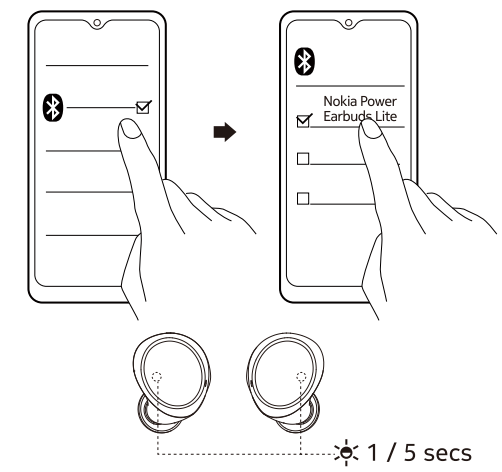
- Turning on and Pairing:
- After the initial pairing, the earbuds will automatically connect with your Bluetooth device whenever taken out of the charging case.
- The earbuds will automatically power off if there is no Bluetooth connection within 5 minutes.
Using your earbuds
Touch control:
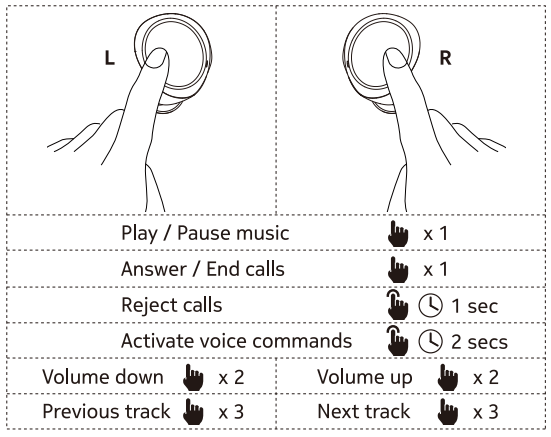
Additional controls:
- Manually power on and off:
Touch the touchpad of two earbuds for 3 seconds to manually power on; touch the touchpad of one earbud for 5 seconds to manually power off. - Use a single earbud:
You can single-use the right earbud. If the earbuds have been paired with your Bluetooth device before, the right earbud will automatically connect with your device when taken out of the charging case. - Reset to the original settings:
Put the earbuds back in the charging case (the LEDs will turn red) > Touch the touchpad of two earbuds for 5 seconds until the LEDs flash blue and red alternately for 3 times, indicating that the reset is successful.
Product and safety information
Remote control functions may vary depending on the model of your device and application. Soundtrack instructions do not respond to iOS devices. Since devices with Bluetooth wireless technology communicate using radio waves, they do not need to be in direct line-of-sight. Bluetooth devices must, however, be within 10 meters (33 feet) of each other, although the connection may be subject to interference from obstructions such as walls or from other electronic devices.
- Frequency Band: 2400 MHz - 2483 MHz
- Maximum Radio Frequency Power: -6-+4dBm
Take care of your device
Handle your device with care. The following suggestions help you keep your device operational.
- Keep the device dry. Precipitation, humidity, and all types of liquids or moisture can contain minerals that corrode electronic circuits.
- Do not use or store the device in dusty or dirty areas.
- Do not store the device in high temperatures. High temperatures may damage the device or battery.
- Do not store the device in cold temperatures. When the device warms to its normal temperature , moisture can form inside the device and damage it.
- Do not open the device other than as instructed in the user guide.
- Do not drop, knock, or shake the device or the battery. Rough handling can break it.
- Only use a soft, clean, dry cloth to clean the surface of the device.
- Do not paint the device. Paint can prevent proper operation.
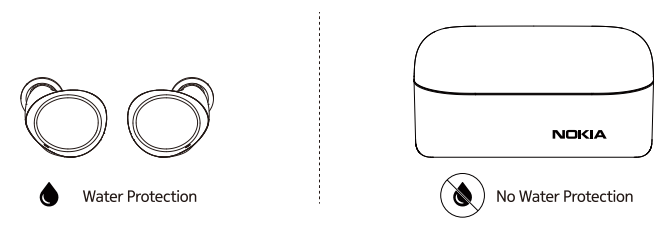
- The earbuds are featured with h a water protection level of IPX7. Water protection level is not a permanent condition and can decrease over time.
- The charging case is not water-resistant.
Troubleshooting: Nokia Power Earbuds Lite BH-405
- Earbuds not connecting: Ensure Bluetooth is enabled and reset the earbuds by holding the case button for 10 seconds.
- No sound or low volume: Check device volume, clean ear tips, and ensure earbuds are fully charged.
- Touch controls not working: Clean the touch surface and restart the earbuds.
- Charging case not charging: Use a different USB-C cable or charger.
- Earbuds not charging in case: Ensure earbuds are properly seated and the case is charged.
Preventive measures include regular cleaning and avoiding exposure to extreme temperatures. The Nokia Power Earbuds Lite BH-405 come with a standard 1-year warranty. For support, visit the official Nokia website or contact customer service.
Pros & Cons: Nokia Power Earbuds Lite BH-405
Pros
- Long battery life (up to 35 hours with case)
- IPX7 waterproof rating for durability
- Comfortable fit with multiple eartip sizes
- Universal Bluetooth 5.0 compatibility
- Eco-friendly, recyclable packaging
- Affordable price point
Cons
- The lid of the charging case feels slightly flimsy
- Touch controls may require an adjustment period
- Sound isolation is average
- The case battery capacity is slightly lower than some competitors
The Nokia Power Earbuds Lite BH-405 offer excellent value for money, especially for users prioritizing battery life and durability.
Customer Reviews: Nokia Power Earbuds Lite BH-405
Users consistently praise the Nokia Power Earbuds Lite BH-405 for their sound quality, comfort, and battery life. Many reviewers highlight the earbuds’ secure fit and waterproofing, making them ideal for workouts. The touch controls are appreciated, though some mention a learning curve. The charging case is noted for its compact design and intuitive LED indicators. Common complaints include occasional connectivity issues and the case lid’s durability. Overall, the Nokia Power Earbuds Lite BH-405 receive 4.2–4.5 star ratings, with most users recommending them for everyday use and active lifestyles.
Faqs
How do I set up the nokia Power Earbuds Lite BH-405 for the first time?
What should I do if my nokia Power Earbuds Lite BH-405 won’t connect to my phone?
Can I use nokia Power Earbuds Lite BH-405 with any Bluetooth device?
How do I control music and calls with nokia Power Earbuds Lite BH-405 touch controls?
What is the battery life and charging process for nokia Power Earbuds Lite BH-405?
Are nokia Power Earbuds Lite BH-405 sweat and water resistant for workouts?
How can I maintain and clean my nokia Power Earbuds Lite BH-405 to ensure longevity?
What should I do if one earbud of the nokia Power Earbuds Lite BH-405 is not producing sound?
Tags
More nokia manuals
Leave a Comment