
Pairing: Nomvdic Portable Speaker & Projector X300 User Manual
Content
Nomvdic Portable Speaker & Projector X300
Introduction
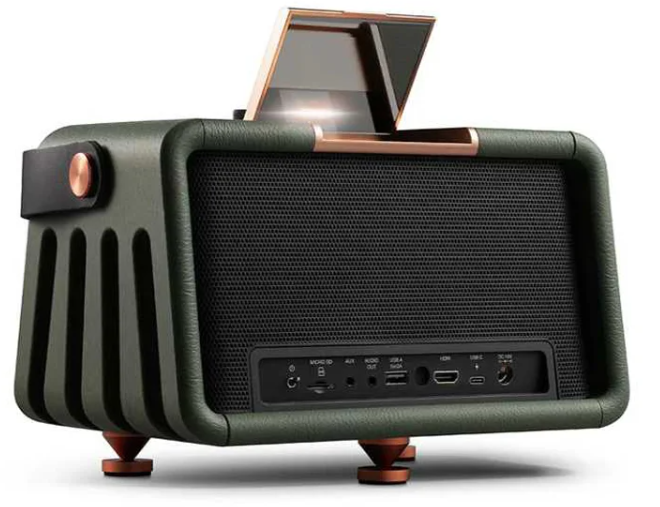
The nomvdic Portable Speaker & Projector X300 is a versatile and innovative device designed to combine the functions of a high-quality speaker and a projector, making it an ideal choice for both entertainment and presentation needs. This device is perfect for outdoor gatherings, camping trips, or even business presentations on the go. With an estimated price range of $250-$300, it offers great value for its multifunctional capabilities. The nomvdic Portable Speaker & Projector X300 is expected to launch in the summer of 2023, promising to revolutionize portable entertainment and presentation solutions.
The device is equipped with advanced technology to ensure clear audio and vibrant video projections. It features a compact design, making it easy to carry and set up in various environments. Whether you are looking to enhance your outdoor movie nights or need a reliable projector for presentations, the nomvdic Portable Speaker & Projector X300 is a compelling option.
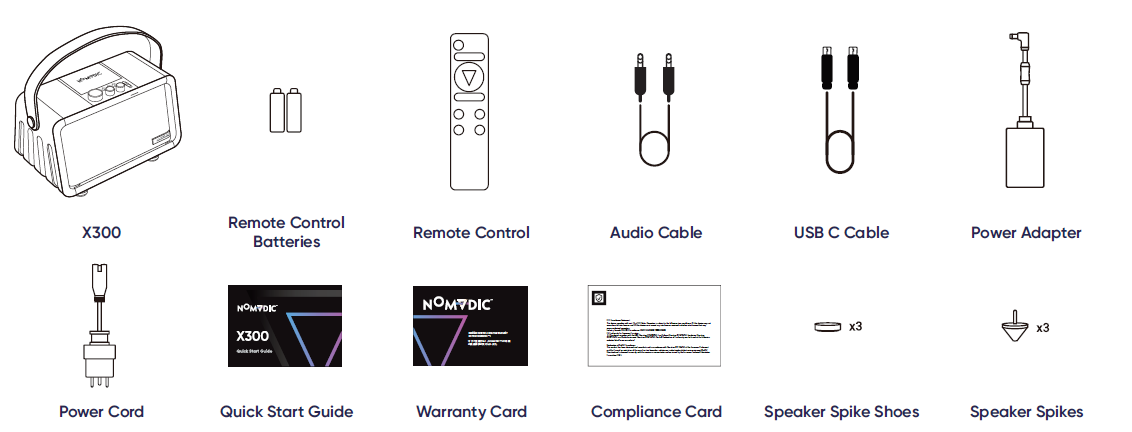
Package Contents
Product Overview
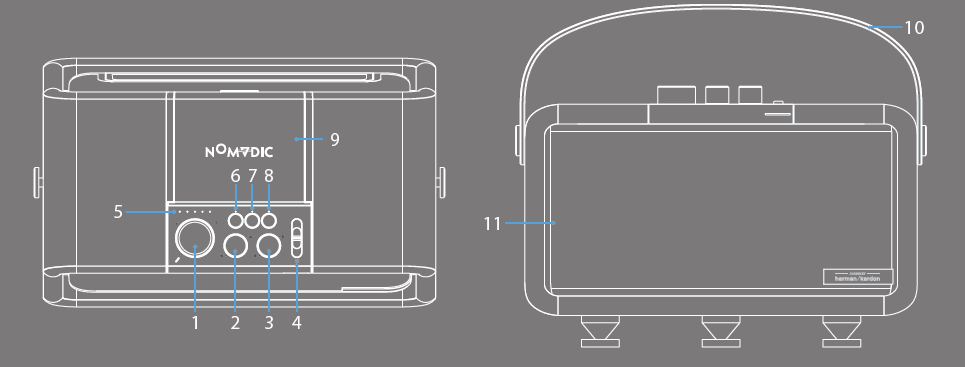
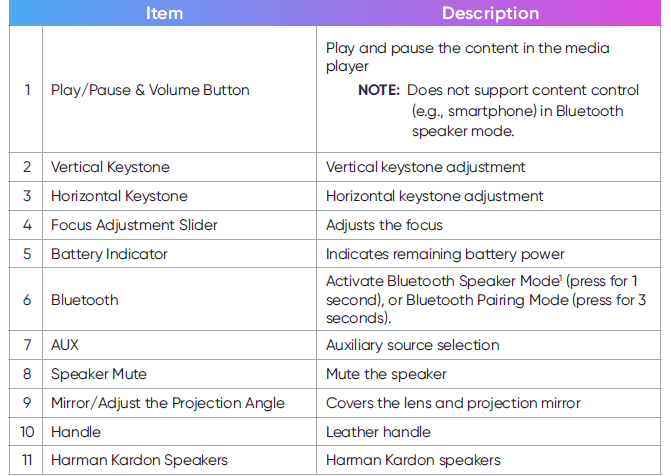
Projector
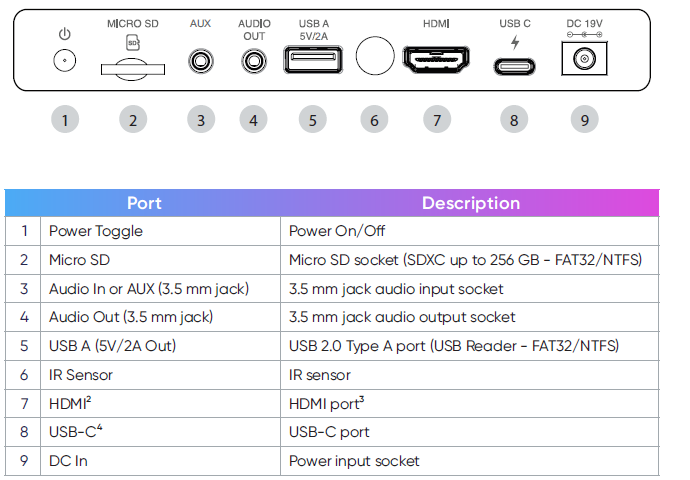
Connection Ports
Remote Control
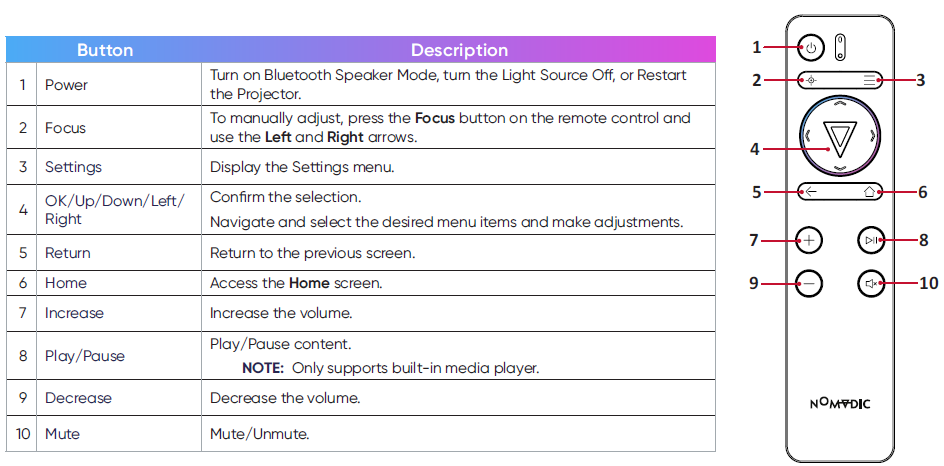
NOTE: You can also control the X300 with the NOMVDIC Remote Control App. To learn more, see page 30.
Remote Control - Effective Range
To ensure proper function of the remote control, follow the steps below:
- The remote control must be held at an angle within 30° perpendicular to the projector’s IR remote control sensor(s).
- The distance between the remote control and the sensor(s) should not exceed 8 m (26 ft.)
Remote Control - Replacing the Batteries
- Remove the battery cover from the bottom of the remote control by pressing the finger grip and sliding it across.
- Remove any existing batteries (if necessary) and install two AAA batteries.
- Observe the battery’s polarities as indicated.
- Replace the battery cover by aligning it with the base and pushing it back into position.
NOTE:
- Avoid leaving the remote control and batteries in excessive heat or a humid environment.
- Replace only with the same or equivalent type recommended by the battery manufacturer.
- If the batteries are drained or if you will not be using the remote control for an extended period of time, remove the batteries to avoid damage to the remote control.
- A battery subjected to extremely low air pressure may result in an explosion or the leakage of flammable liquid or gas.
- Avoid high or low extreme temperatures that a battery can be subjected to during use, storage, or transportation, and low air pressure at high altitude.
- Dispose of the used batteries according to the manufacturer’s instructions and local environment regulations for your region.
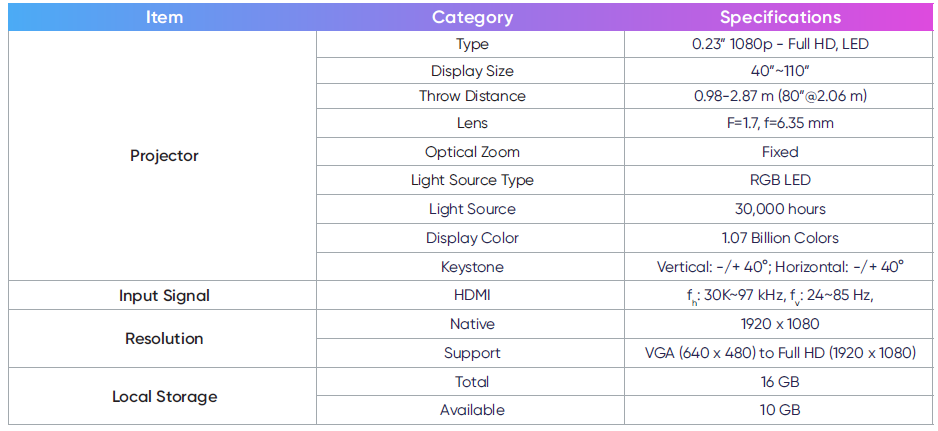
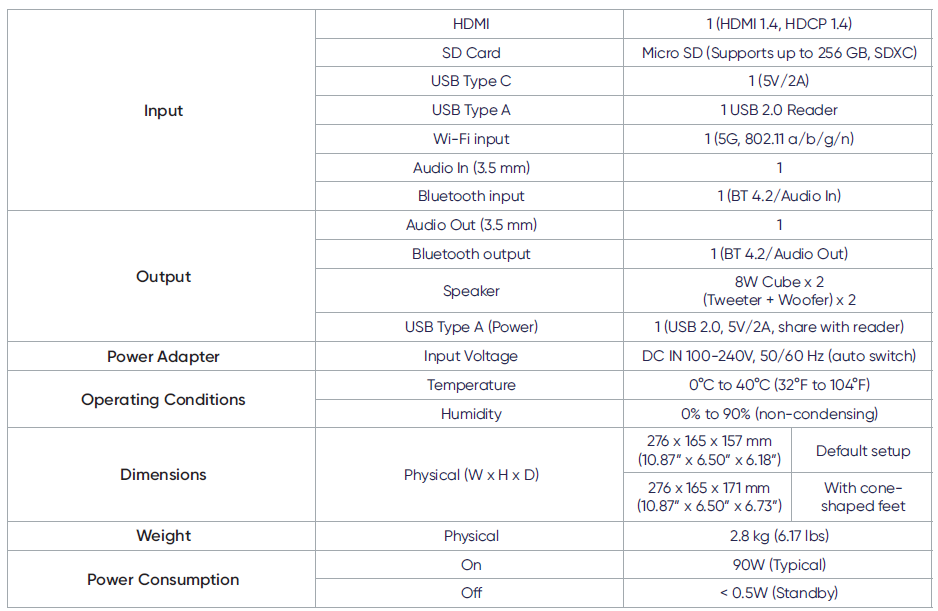
Specifications
- Speaker Specifications: 2 x 5W speakers, Bluetooth 5.0 connectivity, USB, AUX, and TF card slots.
- Projector Specifications: 1080p resolution, 3000 lumens brightness, LED light source with up to 30,000 hours of lifespan.
- Battery Life: Up to 6 hours of continuous use.
- Dimensions: 7.5 x 5.5 x 3 inches, weighing approximately 2.5 pounds.
- Additional Features: Built-in Wi-Fi, Android and iOS compatibility, remote control included.
Safety Precautions
Please read the following Safety Precautions before you start using the projector.
- Read all warnings and follow all instructions.
- Allow at least 20“ (50 cm) clearance around the projector to ensure proper ventilation.
- Place the projector in a well-ventilated area. Do not place anything on the projector that prevents heat dissipation.
- Do not place the projector on an uneven or unstable surface. The projector may fall over, causing personal injury or projector malfunction.
- Do not look straight at the projector lens during operation. The intense light beam may damage your eyes.
- Do not block the projection lens with any objects when the projector is in operation, as this could cause objects to become heated and deformed or even cause a fire.
- Do not attempt to disassemble the projector. There are dangerous high voltages inside, which may cause death if you should come into contact with live parts.
- When moving the projector, be careful not to drop or bump the projector on anything.
- Do not place any heavy objects on the projector or connection cables.
- Do not stand the projector on end vertically. Doing so may cause the projector to fall over, causing personal injury or projector malfunction.
- Avoid exposing the projector to direct sunlight or other sources of sustained heat. Do not install near any heat sources such as radiators, heat registers, stoves, or other devices (including amplifiers) that may increase the temperature of the projector to dangerous levels.
- Do not place liquids near or on the projector. Liquids spilled into the projector may cause it to fail. If the projector does become wet, disconnect it from the power supply and contact us to have the projector serviced.
- When the projector is in operation, you may sense some heated air and odor from its ventilation grill. It is a normal operation and not a defect.
- Do not attempt to circumvent the safety provisions of the polarized or grounding-type plug. A polarized plug has two blades with one wider than the other. A grounding-type plug has two blades and a third grounding prong. The wide and third blade are provided for your safety. If the plug does not fit into your outlet, obtain an adapter and do not attempt to force the plug into the outlet.
- When connecting to a power outlet, DO NOT remove the grounding prong. Please ensure grounding prongs are NEVER REMOVED.
- Protect the power cord from being treaded upon or pinched, particularly at the plug, and at the point where it emerges from the projector.
In some countries, the voltage is NOT stable. This projector is designed to operate safely within a voltage between 100 to 240 volts AC, but could fail if power cuts or surges of ±10 volts occur. In areas where the voltage may fluctuate or cut out, it is recommended that you connect.
Your projector through a power stabilizer, surge protector, and uninterruptible power supply (UPS).
- If smoke, an abnormal noise, or a strange odor is present, immediately switch the projector off and contact your dealer or NOMVDIC™. It is dangerous to continue using the projector.
- Use only attachments/accessories specified by the manufacturer.
- Disconnect the power cord from the AC outlet if the projector is not being used for a long period of time.
- Refer all servicing to qualified service personnel.
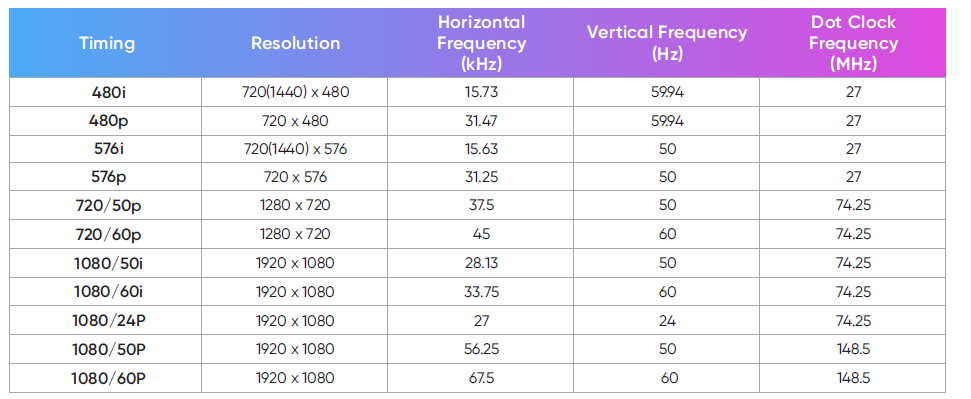
Timing Chart
HDMI Video Timing
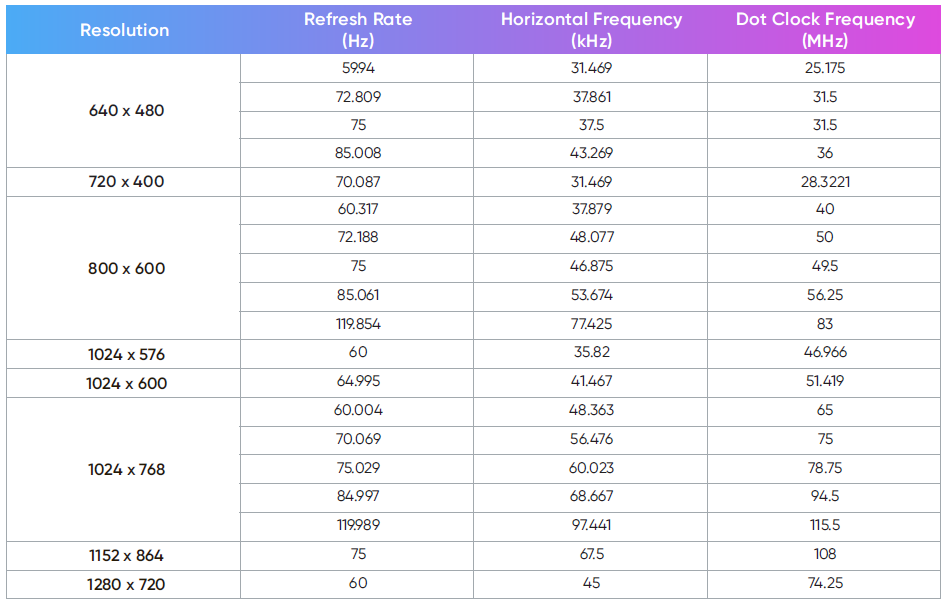
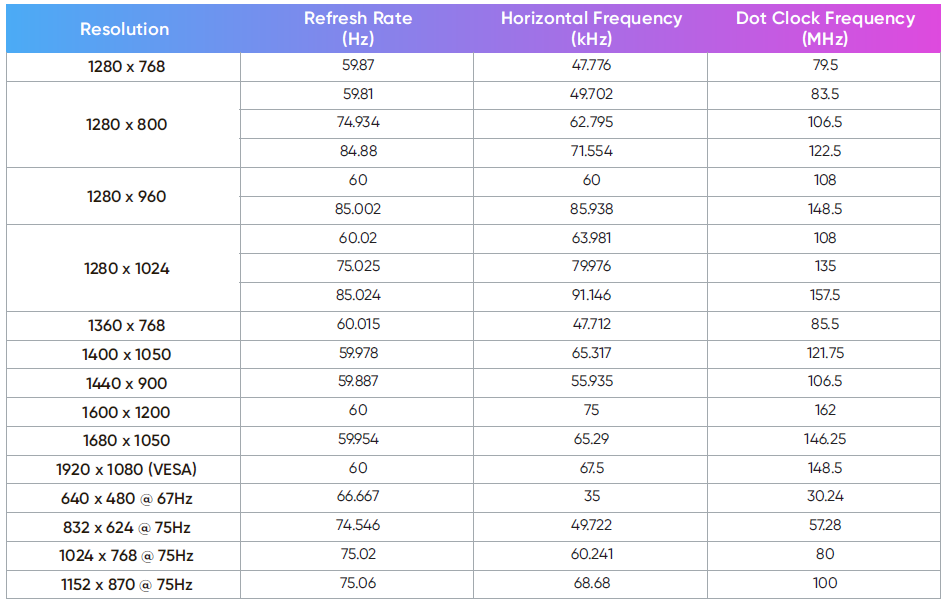
HDMI PC
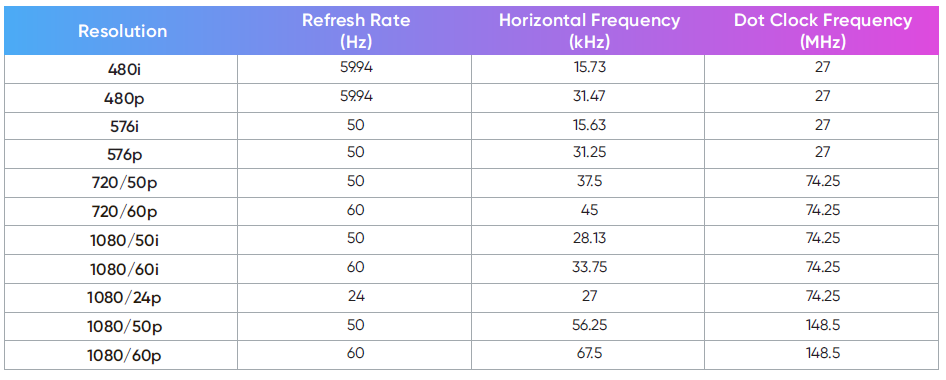
USB-C Timing
Maintenance
General Precautions
- Make sure the projector is turned off and the power cable is unplugged from the power outlet.
- Never remove any parts from the projector. Contact Customer Support when any part of the projector needs replacing.
- Never spray or pour any liquid directly onto the case.
- Handle the projector with care, as a darker-colored projector, if scuffed, may show marks more clearly than a lighter-colored projector.
Cleaning the Lens
- Use a canister of compressed air to remove dust.
- If the lens is still not clean, use lens-cleaning paper or moisten a soft cloth with lens cleaner and gently wipe the surface.
CAUTION: Never rub the lens with abrasive materials.
Storing the Projector
If you intend to store the projector for an extended period of time:
- Ensure the temperature and humidity of the storage area are within the recommended range.
- Retract the adjuster foot completely.
- Remove the batteries from the remote control.
- Pack the projector in its original packaging or equivalent.
Disclaimer
- It is not recommended the use of any ammonia or alcohol-based cleaners on the lens or case. Some chemical cleaners have been reported to damage the lens and/or case of the projector.
- NOMVDIC™ will not be liable for damage resulting from the use of any ammonia or alcohol-based cleaners.
Troubleshooting
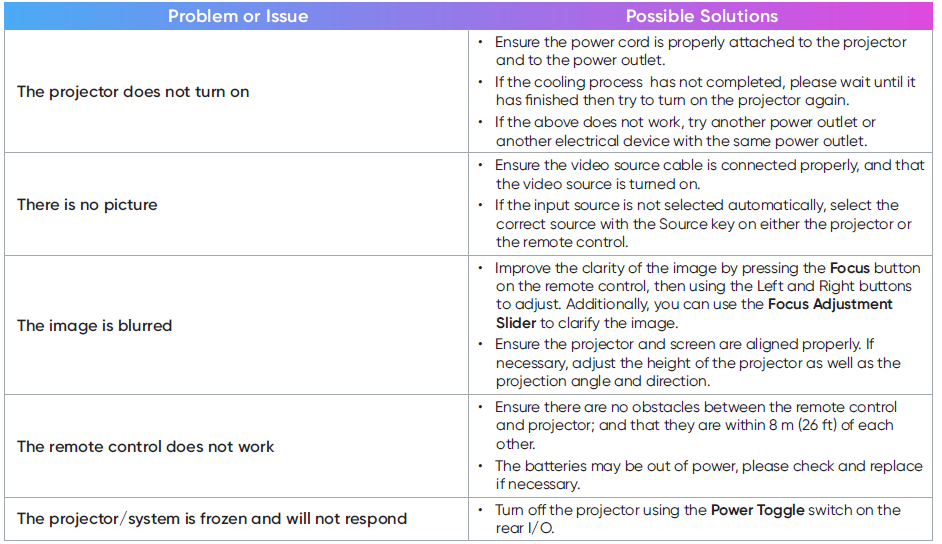
If you encounter issues with connectivity, ensure that your devices are properly paired and that the Bluetooth or Wi-Fi is enabled. For poor image quality, adjust the focus and ensure the projector is at an optimal distance from the screen.
If the speaker is not producing sound, check that it is properly connected and that the volume is turned up. Avoid exposing the device to extreme temperatures or moisture to prevent damage.
Instructions and warnings can be found in the user manual provided with the device.
This section describes some common problems that you may experience when using the projector.
Regulatory and Service Information
Compliance Information
This section addresses all connected requirements and statements regarding regulations. Confirmed corresponding applications shall refer to nameplate labels and relevant markings on the unit.
FCC Compliance Statement
This device complies with part 15 of the FCC Rules. Operation is subject to the following two conditions: (1) this device may
not cause harmful interference, and (2) this device must accept any interference received, including interference that may cause undesired operation. This equipment has been tested and found to comply with the limits for a Class B digital device, pursuant to part 15 of the FCC Rules.
These limits are designed to provide reasonable protection against harmful interference in a residential installation. This equipment generates, uses, and can radiate radio frequency energy, and if not installed and used in accordance with the instructions, may cause harmful interference to radio communications. However, there is no guarantee that interference will not occur in a particular installation.
If this equipment does cause harmful interference to radio or television reception, which can be determined by turning the equipment off and on, the user is encouraged to try to correct the interference by one or more of the following measures:
- Reorient or relocate the receiving antenna.
- Increase the separation between the equipment and receiver.
- Connect the equipment into an outlet on a circuit different from that to which the receiver is connected.
- Consult the dealer or an experienced radio/TV technician for help.
Limited Warranty
What does the warranty cover?
NOMVDIC™ warrants its products to be free from defects in material and workmanship during the warranty period. If a product proves to be defective in material or workmanship during the warranty period, NOMVDIC™ will, at its sole option, repair or replace the product with a similar product. Replacement Products or parts may include remanufactured or refurbished parts or components. The replacement unit will be covered by the balance of the time remaining on the customer’s original limited warranty. NOMVDIC™ provides no warranty for any third-party software, whether included with the product or installed by the customer, installation of any unauthorized hardware parts or components. (Please refer to: “What the warranty does not cover” section)
How long is the warranty effective?
- NOMVDIC ™ Projector
- 1-year Limited Warranty
- Remote Control
- 6-month Limited Warranty
- AC Adapter
- 6-month Limited Warranty
Who does the warranty protect?
This warranty is valid only for the first consumer purchaser.
What does the warranty NOT cover?
- This warranty excludes normal depletion of consumable parts such as batteries, power cord, 3.5 mm audio cable, and USB-C cable unless failure has occurred due to a defect in materials or workmanship, and, damage resulting from abuse, accident, modifications, unauthorized repairs, or other causes that are not defects in materials and workmanship.
- Any product on which the serial number has been defaced, modified, or removed.
- Damage, deterioration, or malfunction resulting from:
- Accident, misuse, neglect, fire, water, lightning, or other acts of nature, unauthorized product modification, or failure to follow instructions supplied with the product.
- Repair or attempted repair by anyone not authorized by NOMVDIC™.
- Damage to or loss of any programs, data, or removable storage media.
- Any damage to the product during shipment.
- Causes external to the product, such as electric power fluctuations or failure.
- Normal wear and tear.
- Failure of the owner to perform periodic product maintenance as stated in the User Guide, such as cleaning of user-cleanable projector filters.
- Any other cause that does not relate to a product defect.
- Hardware/Accessories/Parts/Components - Installation of any unauthorized hardware, accessories, or components. ͫ Damage to, or abuse of, the coating on the surface of the display through inappropriate cleaning as described in the product User Guide.
How to get service?
For information on obtaining warranty service, please contact hello@nomvdic.io. Please be prepared to provide the following information when obtaining service:
- The serial number of the product
- A copy of the dated sales slip
- Your name
- Email address
- Phone number
- Your shipping address
- A description of the problem you are experiencing
NOMVDIC™ is not responsible for any damages in transit by your shipper.
Insurance of the returning product is recommended should you experience any transportation claim from the carrier you select.
Pros & Cons
Pros:
- Multi-functional: Combines a high-quality speaker and projector in one device.
- Portable: Compact design and long battery life make it ideal for outdoor use.
- High-quality Audio and Video: Clear sound and vibrant projections.
- Multiple Connectivity Options: Bluetooth, USB, Wi-Fi, and more.
- Durable Design: Built to withstand various environments.
Cons:
- Limited Brightness in Bright Environments: May not perform well in very bright settings.
- No Built-in Screen: Requires an external screen or surface for projection.
- Weight: While portable, it may be slightly heavy for some users.
- No 4K Resolution: Limited to 1080p resolution.
Customer Reviews
Customers have praised the nomvdic Portable Speaker & Projector X300 for its versatility and performance. Many have found it to be a great value for the price, highlighting its ability to deliver both high-quality sound and clear projections. However, some users have noted that the device can be slightly heavy and that the brightness could be improved for use in very bright environments.
Common complaints include the need for an external screen and the lack of 4K resolution. Despite these minor drawbacks, the overall feedback has been positive, with many recommending it for both personal and professional use.
Faqs
How do I connect my device to the nomvdic Portable Speaker & Projector X300?
What is the battery life of the nomvdic Portable Speaker & Projector X300?
Can I use the nomvdic Portable Speaker & Projector X300 in bright environments?
Does the nomvdic Portable Speaker & Projector X300 come with a built-in screen?
How do I adjust the focus on the nomvdic Portable Speaker & Projector X300?
Is the nomvdic Portable Speaker & Projector X300 durable and portable?
What are the dimensions of the nomvdic Portable Speaker & Projector X300?
Can I connect multiple devices to the nomvdic Portable Speaker & Projector X300 at once?
What is the resolution of the projector on the nomvdic Portable Speaker & Projector X300?
How long does it take to charge the nomvdic Portable Speaker & Projector X300?
Leave a Comment