
Nvidia ConnectX-7 400G Adapter User Manual
Content
nvidia ConnectX-7 400G Adapter: High-Performance 400GbE and NDR InfiniBand Networking
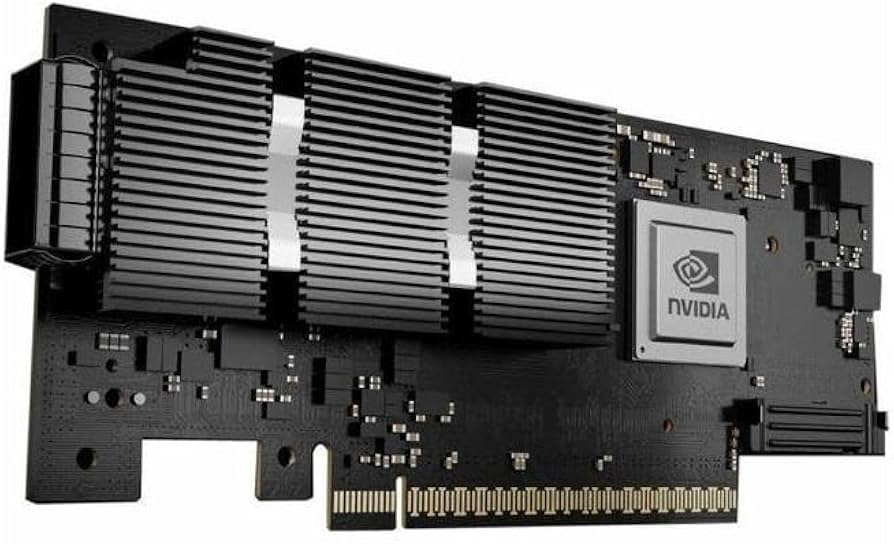
The nvidia ConnectX-7 400G Adapter is a next-generation high-speed network interface card built for modern AI clusters, high-performance computing, cloud data centers, and storage-heavy enterprise workloads. Designed for both Ethernet and InfiniBand environments, it delivers up to 400Gb/s bandwidth with support for 400GbE and NDR InfiniBand, making it a strong fit for latency-sensitive applications, distributed training, and large-scale virtualized infrastructure. With PCIe Gen 5.0 x16 support, single-port OSFP or QSFP112 variants, and flexible form factors such as HHHL, FHHL, and OCP 3.0, this adapter is engineered for performance, scalability, and deployment versatility.
One of the biggest advantages of the nvidia ConnectX-7 400G Adapter is its dual-protocol flexibility. Organizations can use it in Ethernet mode for high-throughput networking or switch to InfiniBand for ultra-low-latency computing fabrics. It is also available with features such as secure boot, crypto support on select models, and multi-host or socket-direct capabilities depending on the SKU. Typical pricing for the adapter starts around the mid-$1,400 range and can exceed $2,000 depending on configuration, bracket type, and feature set. Availability is generally broad through enterprise hardware resellers and major networking suppliers, though exact stock varies by model and region.
How to Troubleshoot a nvidia ConnectX-7 400G Adapter
If the adapter is not detected, first verify the PCIe Gen 5.0 x16 slot, power delivery, and firmware compatibility with the host system. A common issue is incorrect port speed negotiation, especially when using unsupported optics or cables; confirm that the transceiver matches the required OSFP or QSFP112 standard and that the switch is configured for 400GbE or NDR mode. If the adapter shows reduced throughput, update the firmware, check link training, and ensure the server BIOS has PCIe bifurcation and lane settings configured properly.
Typical error indicators may include link-down, initialization failure, or firmware mismatch messages such as adapter not initialized or port disabled. Fixes usually involve reseating the card, updating drivers, installing the latest firmware, and verifying that the operating system supports the device. To prevent recurring problems, keep the server BIOS, NIC firmware, and network drivers current, and use only certified optics and DAC/AOC cabling. Warranty support depends on the reseller and model, but many enterprise units include a 3-year warranty. For help, contact the vendor, authorized NVIDIA networking partners, or the original point of purchase.
Pros and Cons of the nvidia ConnectX-7 400G Adapter
Pros
- Extremely high bandwidth with 400GbE and NDR InfiniBand support for AI and HPC workloads.
- PCIe Gen 5.0 x16 interface reduces bottlenecks in modern servers.
- Flexible deployment options with single-port and multi-port variants, plus HHHL and OCP 3.0 form factors.
- Strong feature set on select SKUs, including secure boot, crypto support, multi-host capability, and socket direct support.
- Excellent value for large-scale infrastructure where throughput and latency matter more than upfront cost.
Cons
- High purchase price compared with 100GbE and 200GbE adapters.
- Requires compatible switches, optics, and server platforms to reach full performance.
- Some configurations are power-hungry and may need careful thermal planning.
- Overkill for small business networks or general office use.
- Alternatives such as 200GbE adapters or lower-tier SmartNICs may be more cost-effective for moderate workloads.
Customer Reviews of the nvidia ConnectX-7 400G Adapter
Users commonly rate the nvidia ConnectX-7 400G Adapter around 4.6 out of 5 stars for raw speed, reliability, and future-proofing. Buyers praise its smooth performance in AI training clusters, storage networks, and virtualization platforms, especially when paired with modern PCIe 5.0 servers and compatible switches. Many reviewers note that the adapter delivers impressive throughput and low latency with minimal tuning.
Frequent complaints focus on price, compatibility planning, and the need for enterprise-grade cabling and optics. A typical testimonial reads: “Outstanding performance once installed correctly, but not a plug-and-play upgrade for older systems.” Another common comment is: “Worth the investment for 400G deployments, but only if the rest of the infrastructure is ready.” For best results, this card is recommended for data centers, AI labs, and HPC teams rather than budget-conscious desktop users.
Faqs
How do I set up nvidia ConnectX-7 400G Adapter for the first time on a server?
What should I check if nvidia ConnectX-7 400G Adapter is not linking at full speed?
Which servers and operating systems are compatible with nvidia ConnectX-7 400G Adapter?
How do I optimize performance on nvidia ConnectX-7 400G Adapter for low-latency workloads?
Why is my nvidia ConnectX-7 400G Adapter showing errors or dropped packets?
Can nvidia ConnectX-7 400G Adapter be used for RDMA, storage, and virtualization at the same time?
What maintenance does nvidia ConnectX-7 400G Adapter need to stay reliable over time?
How can I tell if nvidia ConnectX-7 400G Adapter is the right upgrade for my network?
More nvidia manuals
Leave a Comment