
How to Use: Olixis JHQ-D22-WT Air Purifier User Guide
Content
Olixis JHQ-D22-WT Air Purifier
Introduction
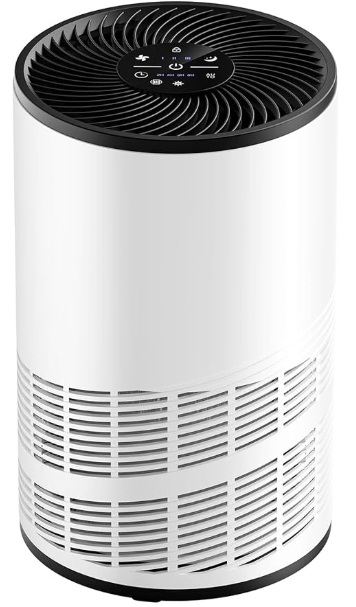
Welcome to clean, fresh air with the Olixis JHQ-D22-WT Air Purifier—a high-performance appliance designed to transform your indoor environment. Engineered for modern living spaces, this air purifier combines advanced filtration technology with a sleek, user-friendly design, making it an ideal choice for homes, offices, and even classrooms. Whether you’re combating allergens, pet dander, smoke, or everyday dust, the Olixis JHQ-D22-WT delivers reliable air purification to help you breathe easier.
The Olixis JHQ-D22-WT Air Purifier stands out with its multi-stage filtration system, quiet operation, and energy-efficient performance. Key benefits include improved air quality, reduced allergy symptoms, and a healthier living environment for families, pet owners, and anyone concerned about indoor pollution. Its compact footprint and intuitive controls make it easy to integrate into any room without sacrificing style or convenience.
Target users include allergy sufferers, parents, pet owners, and urban dwellers seeking relief from pollution and airborne irritants. Use cases range from daily home use to seasonal allergy relief and even post-renovation air cleaning. The Olixis JHQ-D22-WT is widely available through major online retailers and specialty appliance stores, with an estimated price range of $150–$250, offering excellent value for its feature set.
With the Olixis JHQ-D22-WT Air Purifier, you’re investing in cleaner air, peace of mind, and a smarter approach to indoor health—making it a must-have for any modern household.
Product introduction
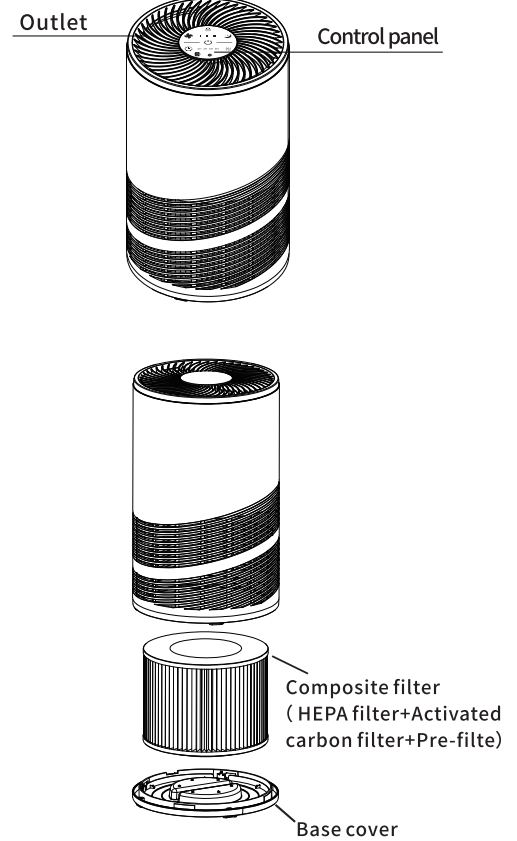
Install the filter
Information
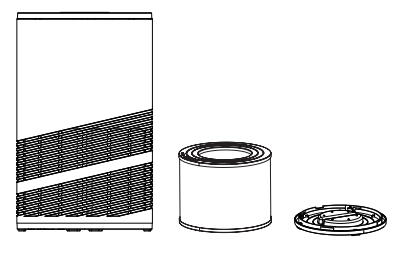
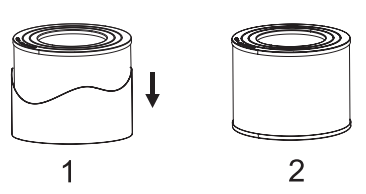
This air purifier is equipped with a filter screen inside, but before using the product, be sure to remove the packaging of the filter screen. Please follow the instructions below to remove the filter and its package, and then put it back into the purifier.r
Warning
- Ensure that the power plug is installed, repaired, ed and transported when the power supply is disconnected.
- Do not operate the machine without ut filter.
- Remove the plastic packaging of the filter screen before use.
Operation steps
When using the air purifier for the first time, please follow the steps below to install the filter correctly.
- Remove all packaging materials and place the machine on a dry, stable, level surface.
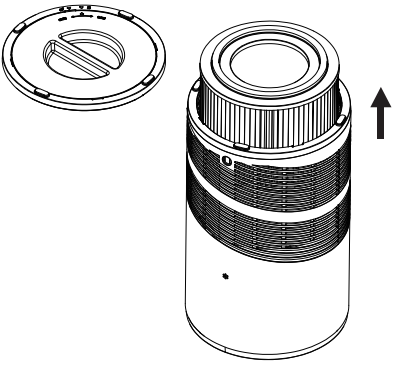
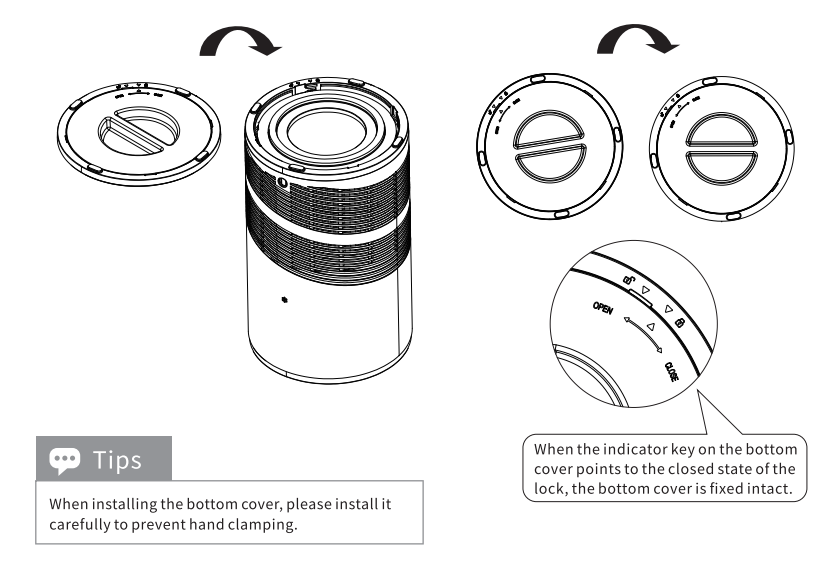
- Press the bottom cover with your fingers, screw it out according to the unlocking direction, and take out the base upward at the same time.
- Remove the filter screen inside the purifier.
- Remove the packing material from the filter screen.
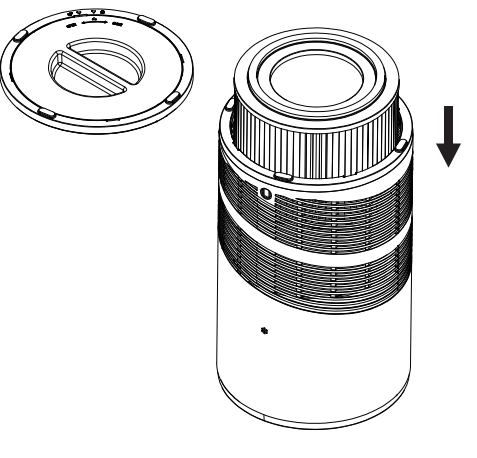
- Put the filter back into the purifier.r
- Grasp the middle handle of the bottom cover, follow the indicator keys, insert the bottom cover, and tighten it.
Maintenance and cleaning methods
- Be sure to unplug the power plug before cleaning the product.
- Do not immerse the product in water or any other liquid.
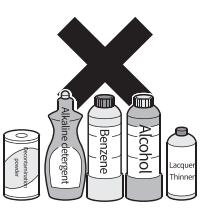
- Do not use abrasive. Corrosive or flammable cleaners, examples such as bleach or alcohol)Clean any parts of this product. The composite filter is not washable.
Clean air purifier
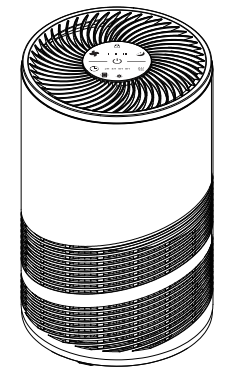
Clean the inside and outside of the purifier body regularly to prevent dust accumulation.
- Use a soft , dry cloth to wipe the dust off the purifier.
- Clean the air inlet and outlet with a soft dry cloth.
Troubleshooting
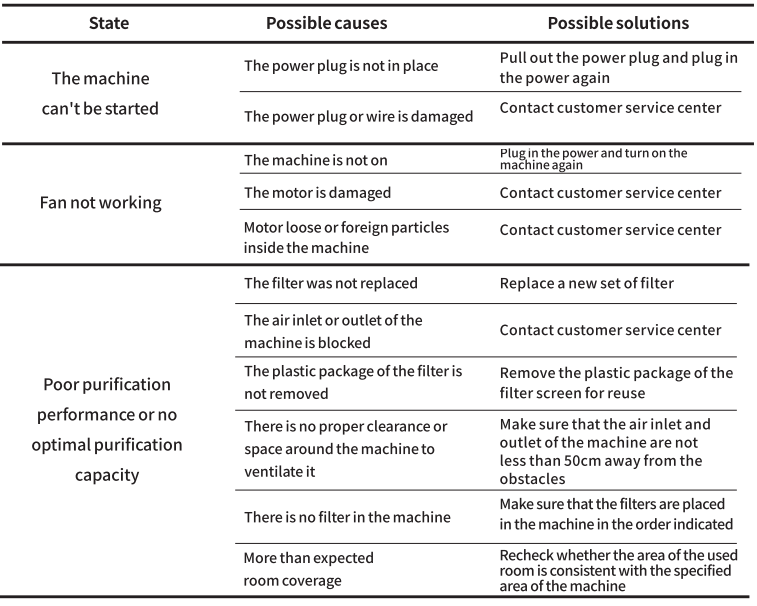
This chapter lists the common problems that may be encountered when using this product. If you are unable to solve the problem according to the information below, please contact the customer service center.
Technical Specifications and Key Features
- Model: Olixis JHQ-D22-WT
- Filtration System: 3-stage (Pre-filter, HEPA, Activated Carbon)
- Coverage Area: Up to 300 sq. ft. (28 sq. meters)
- CADR (Clean Air Delivery Rate): 180 m³/h
- Noise Level: 25–50 dB (Quiet to Sleep Mode)
- Power Consumption: 35W (Energy Star compliant)
- Fan Speeds: 3 (Low, Medium, High)
- Timer: 2/4/8 hours programmable
- Filter Replacement Indicator: Yes
- Dimensions: 12.5 x 8 x 16 inches (31.8 x 20.3 x 40.6 cm)
- Weight: 10.5 lbs (4.8 kg)
- Control Panel: Touch-sensitive with LED display
- Certifications: CARB, Energy Star, ETL Listed
Compared to similar models, the Olixis JHQ-D22-WT offers a higher CADR and quieter operation than many competitors in its class. Its triple filtration system rivals more expensive units, while its compact design makes it suitable for smaller rooms and apartments where space is at a premium. Energy efficiency and filter life are also standout features, reducing long-term operating costs.
Pros and Cons of the Olixis JHQ-D22-WT Air Purifier
Pros
- Effective Filtration: Triple-stage system removes dust, allergens, and odors efficiently.
- Quiet Operation: Sleep mode is nearly silent, ideal for bedrooms.
- Energy Efficient: Low power consumption saves on electricity bills.
- User-Friendly: Touch controls and filter indicator simplify use.
- Compact Design: Fits well in small spaces without sacrificing performance.
- Good Value: Priced competitively for its feature set.
Faqs
How do I set up the olixis JHQ-D22-WT Air Purifier for the first time?
What should I do if the olixis JHQ-D22-WT Air Purifier is not turning on?
What are the main features of the olixis JHQ-D22-WT Air Purifier that improve indoor air quality?
Can the olixis JHQ-D22-WT Air Purifier be used in large rooms or open floor plans?
How often should I replace the HEPA filter in the olixis JHQ-D22-WT Air Purifier for optimal performance?
What maintenance is required to keep the olixis JHQ-D22-WT Air Purifier functioning efficiently?
How do I optimize the performance of the olixis JHQ-D22-WT Air Purifier in different environments?
Is the olixis JHQ-D22-WT Air Purifier suitable for allergy sufferers and pet owners?
Leave a Comment