
How to Use: Onn 4K Pro Streaming Device Powered by Google TV User Manual
Content
onn 4K Pro Streaming Device Powered by Google TV: Complete Product Manual
Introduction
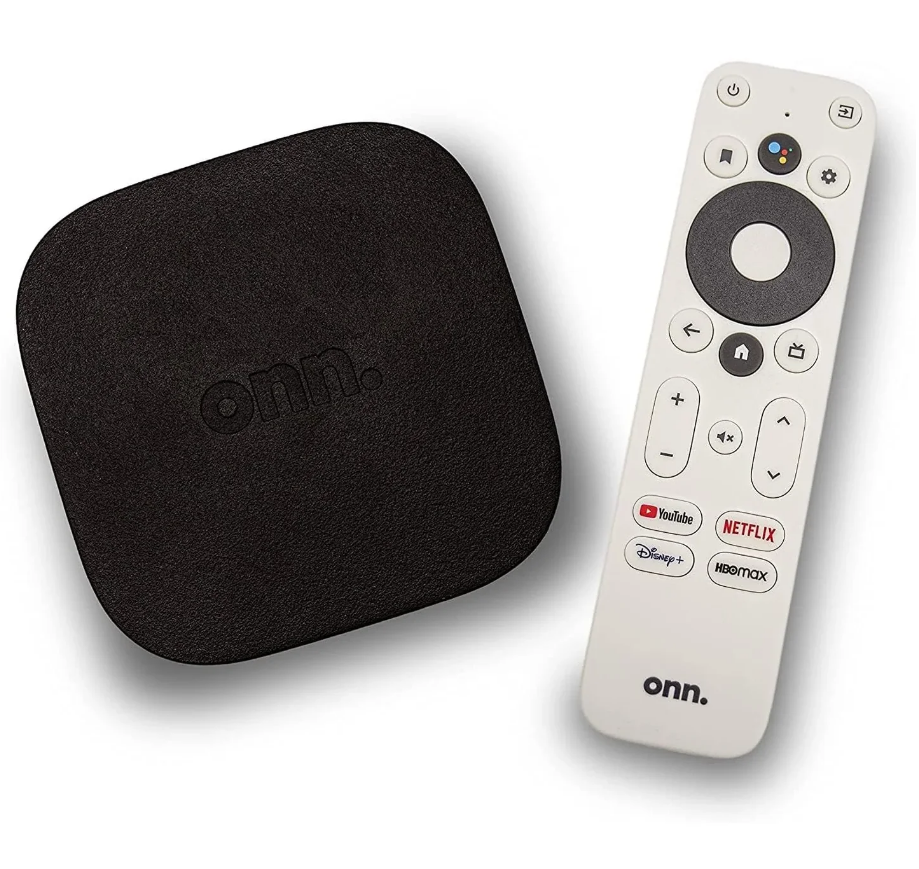
The onn 4K Pro Streaming Device Powered by Google TV is a budget-friendly streaming box built for users who want a fast, feature-rich upgrade over basic TV streaming sticks. It combines 4K UHD playback, Dolby Vision, Dolby Atmos, hands-free voice control, and a full Google TV interface in a compact home-theater device. With 32GB of internal storage, 3GB of RAM, Wi-Fi 6, Ethernet, and a USB 3.0 port, it offers more flexibility than many entry-level streamers and is especially appealing for cord-cutters, gamers, families, and anyone who wants a smoother smart TV experience.
This device is well suited for streaming Netflix, YouTube, Prime Video, Disney+, live TV apps, and local media from USB storage. Its included voice remote, built-in microphone support, and smart home integration make it a strong choice for users who want hands-free navigation and simple access to content. The onn 4K Pro Streaming Device Powered by Google TV is also popular with users who want a wired Ethernet option for stable 4K playback, especially in homes with weaker Wi-Fi coverage.
The estimated price range is typically around $49.88, though availability can vary by retailer and region. In many markets, it is primarily sold through Walmart and may be offered in limited stock depending on demand. For shoppers comparing streaming devices, this model stands out for its high value, generous storage, and premium features at a mid-range price.
Specifications
- Processor: Amlogic S905X4 quad-core chipset for efficient 4K streaming performance
- Memory: 3GB RAM for smoother app switching and multitasking
- Storage: 32GB internal storage, which is significantly more generous than many competing budget streamers
- Video Output: 4K UHD resolution with HDMI 2.0 and 4K60 support
- HDR Support: Dolby Vision for improved contrast and color depth
- Audio Support: Dolby Atmos for immersive surround sound output
- Connectivity: Wi-Fi 6, Bluetooth 5.0, and 10/100 Ethernet for flexible networking
- Ports: HDMI, USB-A 3.0, Ethernet, and power input
- Operating System: Google TV based on Android TV 12
- Remote Features: Voice remote with hands-free voice control and shortcut buttons
- Benchmarks and performance: Fast enough for quick app launches, stable 4K playback, and responsive menu navigation in real-world use
Compared with devices such as the Roku Ultra and Fire TV Cube, this model offers similar premium features at a lower price, while also providing more internal storage than many rivals in the same category.
Setup Guide
Setting up the onn 4K Pro Streaming Device Powered by Google TV is straightforward. First, connect the device to your TV using the included HDMI cable, then plug the power adapter into a wall outlet. If you want the most stable connection for 4K streaming, connect an Ethernet cable before starting the setup. Turn on your TV and select the correct HDMI input.
Follow the on-screen Google TV prompts to connect to Wi-Fi, sign in with your Google account, and choose your language and profile preferences. Pair the remote when prompted; if it does not pair automatically, hold the pairing button until the LED indicator flashes. You can also connect Bluetooth accessories such as headphones or game controllers through the settings menu.
For best results, keep the device in a well-ventilated area and avoid covering the vents. Do not place it near heat sources or inside tightly enclosed cabinets. If the device fails to start, verify power, HDMI input, and network settings before repeating the setup process.
Troubleshooting
Most issues with the onn 4K Pro Streaming Device Powered by Google TV can be fixed quickly with basic checks. If the screen is blank, confirm the HDMI cable is secure and that your TV is set to the correct input. If apps are buffering, switch to Ethernet or move the device closer to the router for a stronger Wi-Fi signal.
- Remote not responding: Replace the batteries, re-pair the remote, or restart the device
- No sound: Check TV audio output settings and confirm Dolby Atmos pass-through compatibility
- Slow performance: Clear app cache, remove unused apps, and restart the streaming device
- Network error: Restart the router, reconnect Wi-Fi, or use Ethernet for a more stable connection
- App crash or freeze: Update the app, clear storage, or perform a reboot
Common on-screen error messages usually relate to network or account sign-in problems rather than hardware failure. Preventive maintenance includes regular software updates, adequate ventilation, and periodic restarts. Warranty coverage and support options are typically handled through the retailer, so keep your receipt and packaging. For assistance, contact Walmart customer support or the manufacturer support channel listed in the product documentation.
Pros & Cons
Pros
- Strong value for money at roughly $50, especially for a Google TV streamer with 32GB storage
- Hands-free voice control and a feature-rich remote improve everyday convenience
- Wi-Fi 6 and Ethernet support help deliver stable 4K streaming
- Dolby Vision and Dolby Atmos provide a premium home-theater experience
- USB 3.0 port allows external storage or accessory use
- Good choice for users upgrading from older Chromecast or basic TV interfaces
Cons
- Ethernet is limited to 10/100 speeds rather than gigabit, which may matter for some advanced users
- Availability can be inconsistent depending on store stock
- Some users may prefer a more premium build or more advanced networking options from higher-priced alternatives
- Not as compact as a streaming stick, so it requires a bit more space behind the TV
For shoppers comparing alternatives, this device is often more compelling than cheaper sticks and more affordable than premium streamers, making it one of the best value options in the Google TV category.
Customer Reviews
Customer feedback for the onn 4K Pro Streaming Device Powered by Google TV is generally very positive, with many buyers praising its speed, storage, and easy setup. Average user sentiment is often around 4.5 out of 5 stars, with frequent compliments about the responsive interface and excellent remote features.
Typical praise includes comments such as, “It feels much faster than my old streamer,” and “The voice control and Ethernet port made a big difference in my living room setup.” Common complaints mention the limited wired network speed and occasional app glitches, though most users still consider it a strong purchase recommendation for the price.
Frequently mentioned issues include limited retailer availability and the need to restart the device after major updates. Overall, reviews suggest this is a smart buy for anyone wanting a reliable Google TV box with premium features at a budget-friendly price.
Faqs
How do I set up onn 4K Pro Streaming Device Powered by Google TV for the first time?
Why is my onn 4K Pro Streaming Device Powered by Google TV not connecting to Wi-Fi?
What internet speed do I need for smooth 4K streaming on onn 4K Pro Streaming Device Powered by Google TV?
How can I fix buffering and lag on onn 4K Pro Streaming Device Powered by Google TV?
Which TVs and accessories are compatible with onn 4K Pro Streaming Device Powered by Google TV?
How do I make apps load faster on onn 4K Pro Streaming Device Powered by Google TV?
How do I use voice search and Google Assistant on onn 4K Pro Streaming Device Powered by Google TV?
How should I maintain and troubleshoot onn 4K Pro Streaming Device Powered by Google TV over time?
Leave a Comment