
How To Use: Outlook EAM-IM001-PP-GN Countertop Ice Maker User Manual
Content
Outlook EAM-IM001-PP-GN Countertop Ice Maker
Introduction
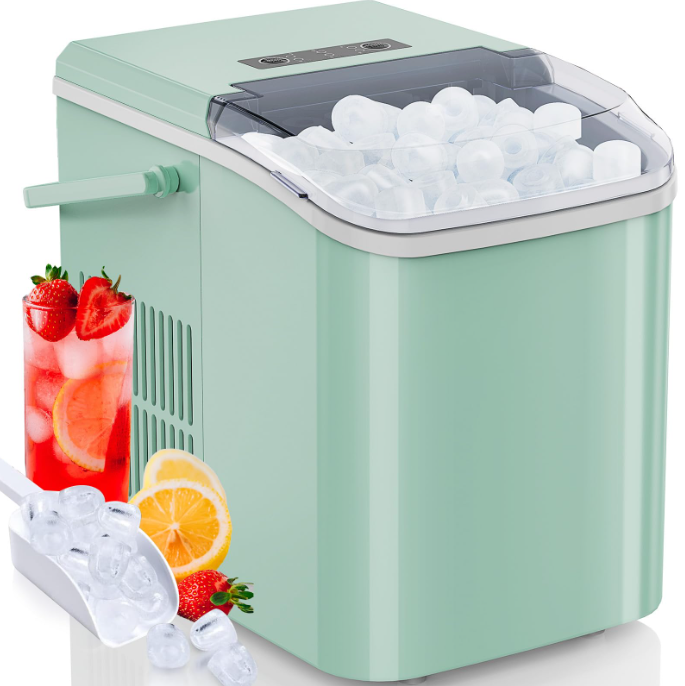
The outlook EAM-IM001-PP-GN Countertop Ice Maker is a compact and efficient appliance designed to provide fresh, ready-to-use ice quickly and conveniently. Perfect for home kitchens, small offices, and entertainment spaces, this countertop ice maker combines portability with powerful ice production, making it an essential tool for those who appreciate chilled beverages without the wait. Its modern green-toned design adds a stylish touch, complementing various interiors while saving valuable counter space.
With the ability to produce up to 12-15 kg of ice daily, the unit supports various use cases such as parties, home bars, outdoor gatherings, and quick access to ice for everyday hydration or culinary needs. The machine features easy-to-use controls, fast ice-making cycles as short as 6-8 minutes, and an automatic shut-off system to prevent overflow, ensuring user safety and convenience.
Targeted at consumers seeking a reliable, user-friendly countertop ice maker that delivers consistent performance, the outlook EAM-IM001-PP-GN is ideal for individuals who want high-quality ice without investing in bulky appliances or commercial-grade equipment. The price range typically falls between $150 and $250, positioning it competitively among similar portable ice makers available online and in retail stores.
PRODUCT INTRODUCTION
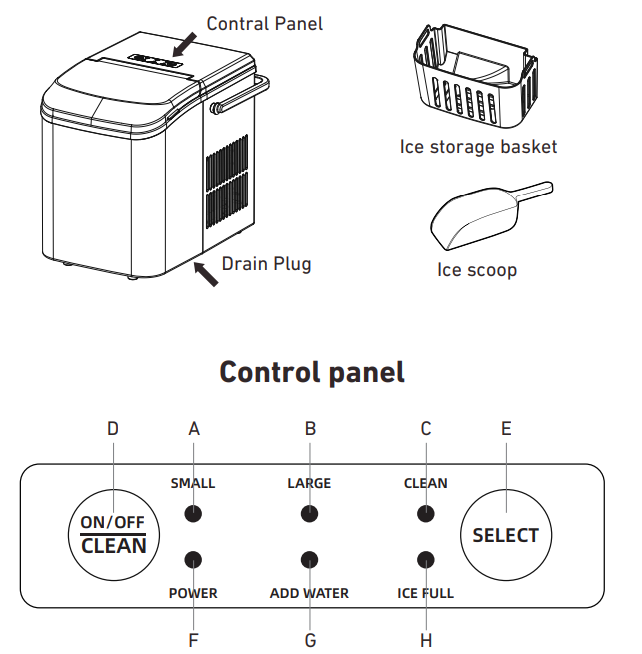
- Small ice indicator
- Large ice indicator
- Clean indicator
- ON/OFF button
- Select button
- Power indicator
- Add water indicator
- Ice full indicator
HOW TO USE YOUR ICE MAKER
When using for the first time (or not used for a long time), it is recommended to discard the ice cubes made in the first 4 cycles to ensure that the machine is thoroughly cleaned.
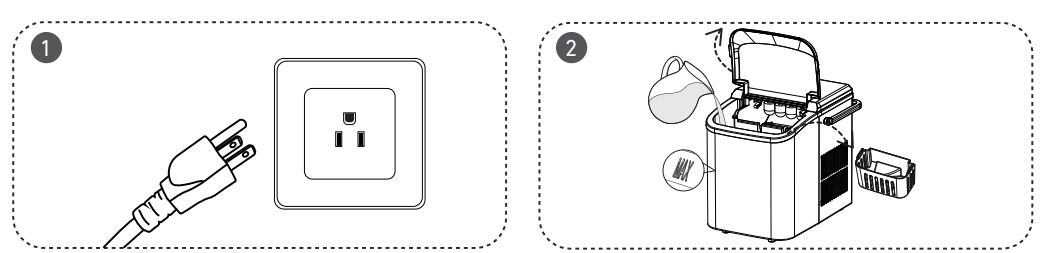
- Open the front cover, take out the ice basket, and pour potable water into the water tank (Do not exceed the MAX mark of the water level).
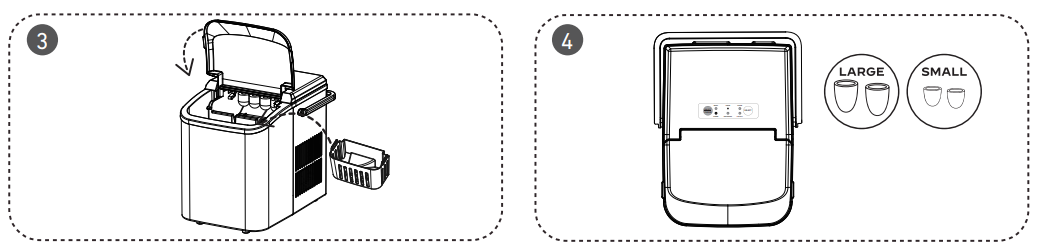
- Put back the ice basket. Make sure the water level is below the bottom of the ice basket, and then close the front cover.
- After plugging in, the appliance is in standby mode with the power indicator flashes green and the small ice indicator stable in green.
- Press the ON/OFF button once, and the appliance will start working in small ice cube mode by default, and the small ice indicator will be stable in green color.
- During the ice-making cycle, press the Select button to switch to large ice cube mode; the large ice cube indicator will turn on. The appliance has a power-off memory function. The previously running large/small ice cube mode before power-off will be automatically resumed after power-on.
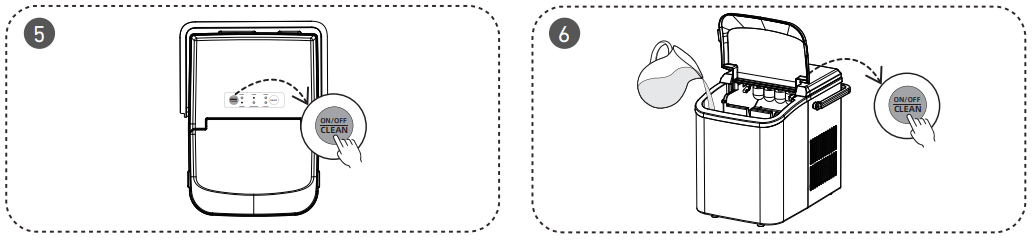
- In the standby mode, press and hold the ON/OFF button for 5 seconds. The appliance will enter self-cleaning mode, and the clean indicator turns red . After 15 minutes, self-cleaning mode ends, the appliance switches to standby mode, and the power indicator flashes.
TROUBLESHOOTING
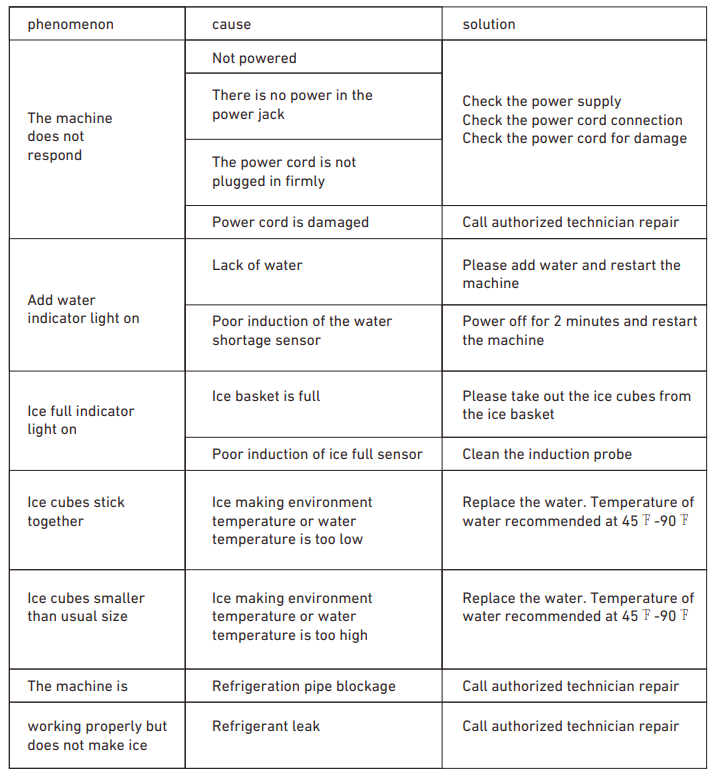
- If the machine breaks down, please wait for the machine to stop automatically. You can solve the problem by using the method in the table below. But don't disassemble, inspect,, or repair the machine without professional guidance.
- This machine has a self-checking function. If an error occurs, the ice-full and add-water indicator will flicker alternately, and the ice maker will stop working.
TECHNICAL PARAMETER
- Model
- WBJ-10A
- Applicable Climate Types
- SN/N/ST
- Grade of protection against electric shock
- Ⅰ
- Ice storage capacity
- 500g
- Water tank volume
- 1.5L
- Rated voltage/frequency
- 115V/60Hz
- Rated current
- 1.8A
- Refrigerant/Weight
- R600a/26g
- Type of thermal insulation
- EPS
- Net weight
- 7KG
- Product size
- 225mm*320mm*295mm
Pros & Cons of the outlook EAM-IM001-PP-GN Countertop Ice Maker
- Pros:
- Fast ice production cycle (6-8 minutes), ideal for quick refreshment needs.
- Compact, lightweight design fits easily on countertops without consuming much space.
- Automatic shut-off prevents water overflow, enhancing safety and ease of use.
- Produces clear, clean ice cubes suitable for drinks, cooking, and food preservation.
- Energy-efficient operation helps reduce electricity costs during frequent use.
- Cons:
- Ice storage capacity is moderate (typically around 1.5 lbs), requiring frequent emptying during heavy use.
- Limited ice size options compared to some advanced models offering multiple cube shapes.
- Plastic components may feel less durable compared to higher-end stainless steel alternatives.
- Does not include a built-in water filtration system; water quality affects ice taste.
- Compared to larger built-in ice machines, the daily output may be insufficient for large gatherings.
Customer Reviews & Feedback on the Outlook EAM-IM001-PP-GN Countertop Ice Maker
Users of the Outlook EAM-IM001-PP-GN Countertop Ice Maker generally praise its ease of use and compact form factor. Many highlight the rapid ice-making cycle as a major benefit, making it a go-to choice for spontaneous events or daily iced drinks. Customers appreciate the consistent cube quality and the convenience of having fresh ice without relying on freezer trays.
Common positive remarks include the quiet operation and the attractive design that fits well in modern kitchens. Some reviewers note that the energy consumption is reasonable given the frequent ice production.
On the downside, a few users mention the limited ice storage capacity, suggesting the need to empty the bin more often during parties. Others recommend pre-filtering water to improve ice clarity and taste. Occasionally, minor issues with condensation buildup have been reported,d but generally are easily managed with routine maintenance.
Overall, the product maintains a strong 4 out of 5-star rating on popular retail platforms, with many recommending it as a cost-effective and practical countertop ice maker option for home and small office use.
Faqs
How do I set up the outlook EAM-IM001-PP-GN Countertop Ice Maker for the first time?
What should I do if the outlook EAM-IM001-PP-GN Countertop Ice Maker is not turning on?
Why is my outlook EAM-IM001-PP-GN Countertop Ice Maker producing small or insufficient ice cubes?
How can I fix the ‘Add Water’ or ‘Ice Full’ light issues on the outlook EAM-IM001-PP-GN Countertop Ice Maker?
What routine maintenance does the outlook EAM-IM001-PP-GN Countertop Ice Maker require to ensure long-lasting performance?
Can the outlook EAM-IM001-PP-GN Countertop Ice Maker be used with hard water, and how does it affect its performance?
How do I troubleshoot if the ice tray in the outlook EAM-IM001-PP-GN Countertop Ice Maker is stuck and not ejecting ice properly?
What are the key features of the outlook EAM-IM001-PP-GN Countertop Ice Maker that enhance its usability?
Tags
Leave a Comment