
How to Use: P58 SMART WATCH User Manual
Content
P58 SMART WATCH
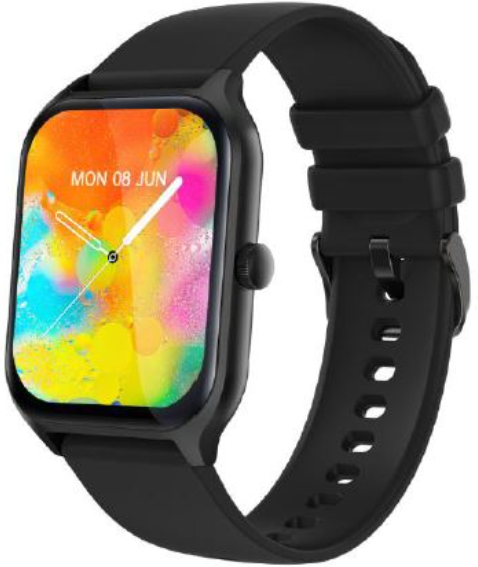
Introduction
The p58 SMART WATCH is a feature-rich, affordable wearable designed to enhance your health monitoring and daily connectivity. Equipped with a vibrant 1.96-inch color screen and advanced sensors, it offers comprehensive fitness tracking and real-time health data such as heart rate, blood pressure, and blood oxygen levels. Its IP67 waterproof rating ensures durability for everyday use, including rain and sweat exposure.
This smartwatch targets fitness enthusiasts, busy professionals, and tech-savvy users who want to stay connected while tracking their wellness. The device supports multiple languages, making it accessible globally. Use cases include activity tracking, sleep monitoring, message notifications, and physiological reminders, helping users maintain an active and balanced lifestyle.
Priced competitively in the mid-range segment, the p58 SMART WATCH is widely available through online retailers and authorized distributors. Its blend of health functions and smart features makes it an excellent choice for those seeking a reliable smartwatch without breaking the bank.
Technical Specifications and Key Features of the p58 SMART WATCH
- Display: 1.96-inch color screen with 320x386 resolution for clear visuals
- Battery: 230mAh capacity, offering 2-3 days of active use and up to 7 days of standby
- Connectivity: Bluetooth BLE 5.2 for stable and energy-efficient pairing with Android 4.4+/iOS 8.0+ devices
- Health Monitoring: Continuous heart rate, blood pressure, blood oxygen (SpO2), and sleep quality tracking
- Activity Tracking: Steps, distance, calories burned, and sports mode support
- Durability: IP67 waterproof rating suitable for rain, sweat, and handwashing
- Additional Functions: Message push notifications, call alerts, daily alarms, weather updates, remote camera control, and find bracelet feature
- Memory: 270KB RAM and 128MB ROM for smooth operation and data storage
- Languages: UI supports over 12 languages; app supports over 20 languages,, including English, Chinese, German, and Arabic
Compared to similar models, the p58 SMART WATCH offers competitive battery life and a larger display at an accessible price point, making it an excellent alternative to entry-level smartwatches like the Amazfit Bip or Xiaomi Mi Band series.
Introduction of Smart Watch functions
Power-on status switches the menu interfaces of the main screen, as the interfaces shown in the following;
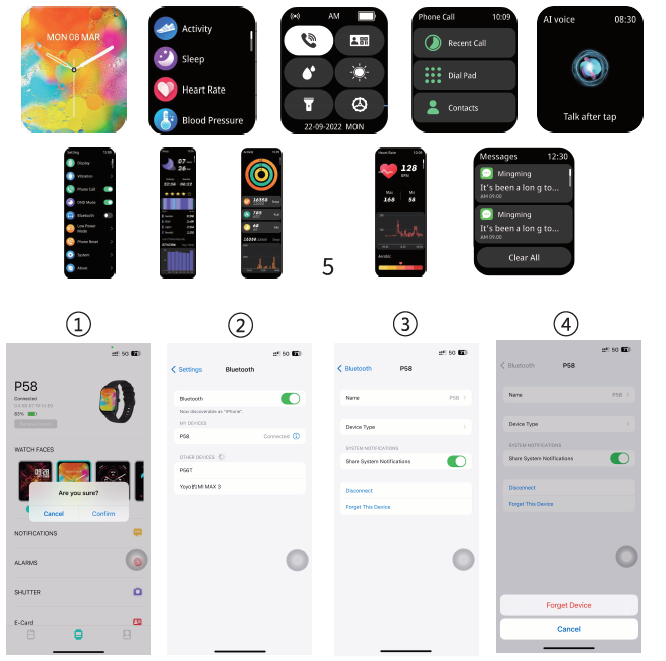
Device maintenance
Please remember the following tips when you maintain your Smart Watch:
- Clean the Smart Watch regularly, especially its inner side, and keep it dry.
- Adjust the Smart Watch tightness to ensure air circulation.
- Excessive skincare products should not be used on the wrist that wears the Smart Watch.
- Please cease wearing the Smart Watch in case of skin allergy or any discomfort.
Schematic diagram of the main body of the Smart Watch
the the
Troubleshooting the p58 SMART WATCH: Common Issues and Solutions
- Bluetooth Connection Problems: Ensure Bluetooth 5.2 is enabled on your smartphone and the watch is within range. Restart both devices if pairing fails.
- Screen Not Responding: Perform a soft reset by holding the side button for 10 seconds. Avoid exposure to extreme temperatures.
- Inaccurate Heart Rate or Blood Pressure Readings: Wear the watch snugly on your wrist and keep still during measurements. Clean the sensor area regularly.
- Battery Drains Quickly: Reduce screen brightness, limit notifications, and disable always-on display to extend battery life.
- Error Codes: If the watch displays error codes, refer to the user manual for specific codes or contact customer support.
Preventive measures include keeping the device clean, charging with the included magnetic charger, and avoiding water exposure beyond IP67 limits.
The p58 SMART WATCH comes with a standard 1-year warranty covering manufacturing defects. For support, contact the manufacturer’s helpline or authorized retailers where purchased.
Pros & Cons of the p58 SMART WATCH
Pros
- Comprehensive Health Monitoring: Tracks heart rate, blood pressure, and SpO2 with reliable accuracy.
- Bright and Large Display: The 1.96-inch screen enhances usability and readability.
- Strong Battery Life: Up to 3 days of active use reduces frequent charging.
- Multilingual Support: Wide language options enhance global usability.
- Waterproof Design: IP67 rating protects against daily water exposure.
Cons
- Limited App Ecosystem: Lacks some advanced third-party app integrations found in premium smartwatches.
- Basic Processor and Memory: May experience minor lag during intensive tasks compared to higher-end competitors.
- Shorter Usage Time: 2-3 days of battery life may require more frequent charging for heavy users.
Overall, the p58 SMART WATCH offers great value for the price, especially for users prioritizing health tracking and essential smart features over premium performance or apps.
Customer Reviews and User Feedback on the p58 SMART WATCH
Users commonly praise the p58 SMART WATCH for its clear display, easy-to-use interface, and accurate health tracking features. Positive reviews highlight its effectiveness in monitoring heart rate and sleep quality, contributing to better wellness awareness.
Some customers report occasional connectivity issues with certain smartphone models and wish for longer battery life. The waterproofing is generally appreciated,d but users recommend avoiding submersion beyond casual exposure.
Average star rating typically ranges between 4 and 4.5 out of 5 stars, reflecting high overall satisfaction. Many recommend the p58 SMART WATCH as an entry-level wearable offering essential features at a reasonable price.
Faqs
How do I set up the p58 SMART WATCH for the first time?
What should I do if the p58 SMART WATCH is not syncing with my smartphone?
How can I use the health tracking features on the p58 SMART WATCH effectively?
Is the p58 SMART WATCH waterproof, and can I wear it while swimming?
What are the battery life expectations and charging tips for the p58 SMART WATCH?
How do I customize notifications and alerts on the p58 SMART WATCH?
What should I do if the p58 SMART WATCH screen does not turn on when I raise my wrist?
How do I maintain and clean my p58 SMART WATCH to ensure durability?
Tags
Leave a Comment