
Setup & Usage: P96 Smart Watch Fitness Tracker User Manual
Content
p96 Smart Watch Fitness Tracker
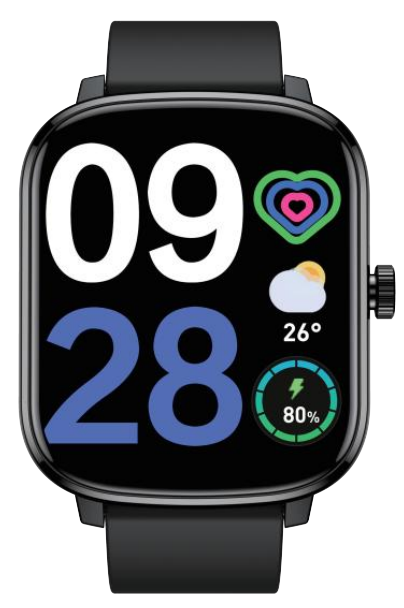
Introduction
The p96 Smart Watch Fitness Tracker is a versatile and affordable wearable designed to help users monitor their health and stay connected throughout the day. Featuring a large 1.85-inch full-touch color display, this smartwatch offers comprehensive fitness tracking capabilities such as heart rate monitoring, blood pressure and blood oxygen measurement, and sleep analysis. With over 110 sports modes, it caters to diverse fitness enthusiasts from casual walkers to active athletes.
Unique selling points include its AI voice control, customizable watch faces, music and camera control, as well as seamless compatibility with both Android and iOS devices via the proprietary GloryFit app. The watch automatically syncs time and notifications, allowing users to receive calls, messages, and weather updates directly on their wrist. Targeted at health-conscious men and women who want an all-in-one fitness companion at a budget-friendly price, the p96 Smart Watch typically ranges between $40 and $70, making it accessible through online retailers and select electronics stores.
Ideal for everyday use, fitness tracking, and lifestyle management, the p96 Smart Watch Fitness Tracker combines essential smartwatch functions with advanced health sensors to encourage an active and balanced lifestyle.
App Installation
Download App
- Please use the watch with the GloryFit App.
- You can download 'GloryFit' from App Store or Google Play, or by scanning the QR Code below:
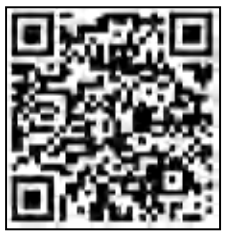
GloryFit App is compatible with:
- iOS 9.0 and above
- Android 5.0 and above
- Bluetooth 5.0 and above
Note: It only works with smartphones, not with tablets or personal computers.
Account Registration and Login
Register an account with an email. Please remember the account and password for the future login.
Device Pairing
It is required to turn on the Bluetooth and allow GloryFit to access the GPS on your smartphone during the pairing.
Warm Tip: Do not connect the watch directly Bluetooth list.
Operation Method:
- Open the app → 'Device' → click 'Add a new device' → 'Select device' to find the watch (P96) in the search list and click 'P96' to complete the pairing.
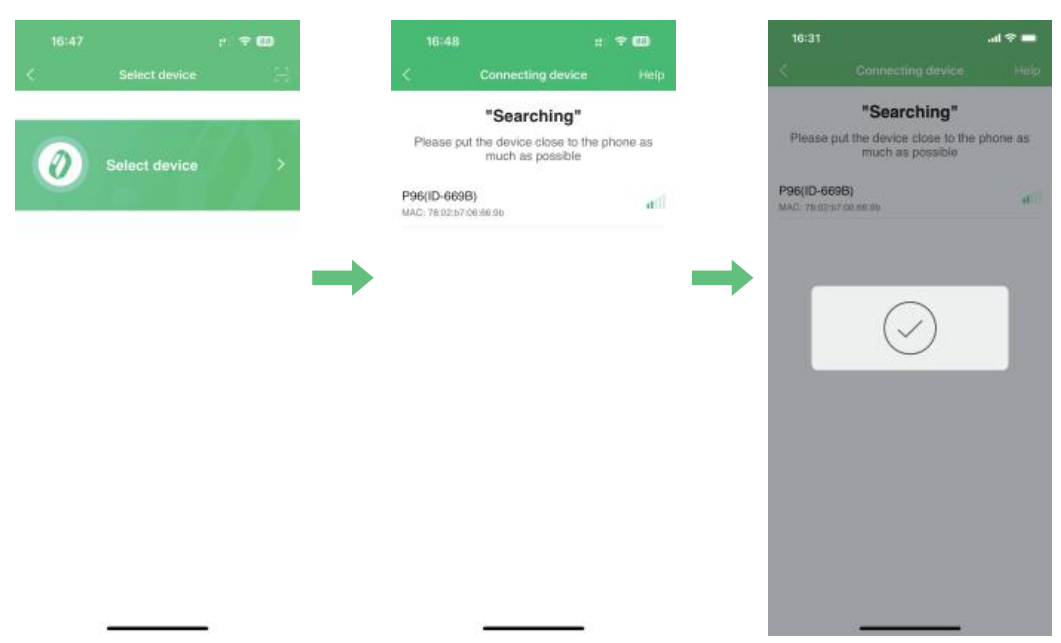
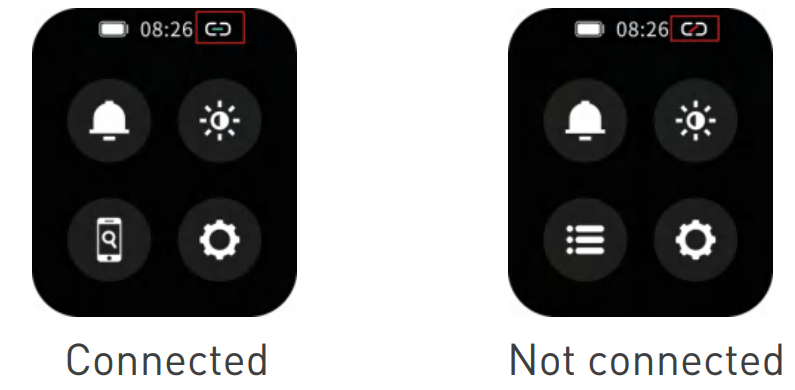
Note:
- Please follow the above operations to connect the watch correctly.
- Android phones must allow the app to obtain permissions and run in the background; otherwise, it will affect the user experience.
- During the connection process, please keep the distance between the phone and the watch within 1 meter and the enough battery power in the watch.
If the above operations don't work, please restore the watch to factory settings. Turn on Bluetooth and follow the above steps to connect again.
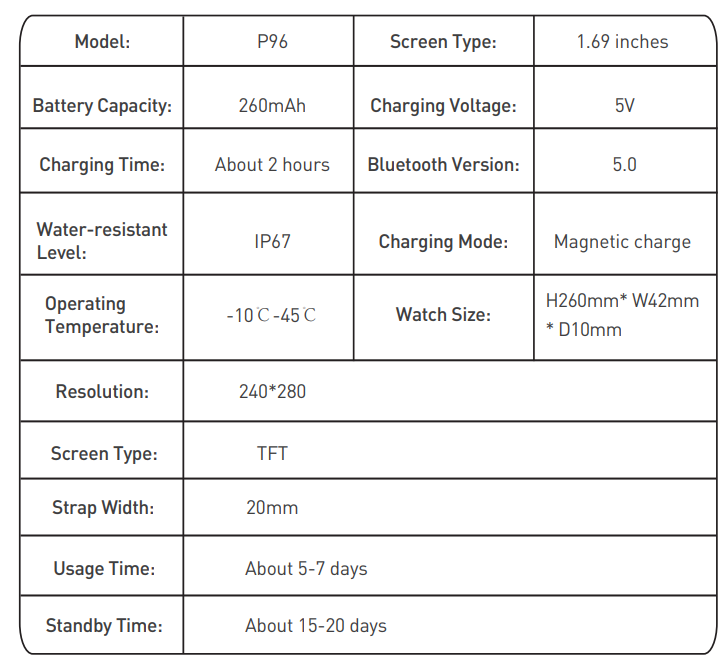
Product Specifications
Safety Warnings
- This product is not a toy - do not allow children or pets to play with this product. Always store the product out of reach of children. Choking can result if the device itself or the many small parts it contains are swallowed.
- The device, accessories, heart rate monitor sensor, blood oxygen measurement, and related measurement data are for general fitness and wellness purposes only. They are not for medical purposes, and are not intended to diagnose, monitor, treat, cure,e or prevent any disease or condition.
Troubleshooting the p96 Smart Watch Fitness Tracker
Common issues with the p96 Smart Watch include difficulty pairing with the phone, inaccurate sensor readings, and display responsiveness problems. To resolve pairing errors, ensure the GloryFit app is downloaded from a trusted source and Bluetooth is enabled on your phone. Unbind and reconnect the device if synchronization fails or time displays incorrectly. For inconsistent heart rate or blood pressure readings, verify the watch is worn snugly on the wrist and restart the device.
Error codes are generally app-related; for instance, connection timeouts can be fixed by closing and reopening the app or re-scanning the QR code for pairing. To prevent issues, keep the firmware updated regularly through the app, avoid prolonged exposure to water beyond IP rating limits, and charge the device with the supplied cable.
The p96 Smart Watch comes with a standard manufacturer's warranty covering defects for one year. For technical support, contact the customer service via the official seller’s website or the GloryFit app support section. Email and hotline details are usually provided in the product packaging or purchase receipt.
Pros & Cons of the p96 Smart Watch Fitness Tracker
Pros
- Comprehensive health tracking: Includes heart rate, blood oxygen, blood pressure, and sleep monitoring with over 110 sports modes.
- Wide compatibility: Supports both Android and iOS devices via the GloryFit app for seamless syncing and notifications.
- Affordable pricing: Offers excellent value for money compared to similar fitness trackers and smartwatches in its price range.
- Additional smart features: AI voice control, music and camera remote control, customizable watch faces, and weather updates.
Cons
- Accuracy limitations: Health sensors provide general monitoring but may lack medical-grade precision, especially blood pressure readings.
- App dependency: Full functionality requires the GloryFit app, which can occasionally have connectivity glitches.
- No onboard music storage: Music control depends on a connected phone; the watch cannot play music independently.
- Build quality: While functional, the materials and screen responsiveness may feel less premium compared to higher-end models.
Customer Reviews for the p96 Smart Watch Fitness Tracker
Users commonly praise the p96 Smart Watch for its affordability and broad fitness tracking features. Many appreciate the large, clear display and the variety of sports modes that accommodate different exercise routines. Several reviewers highlight the convenience of receiving calls and notifications on the wrist.
Common complaints include occasional inaccuracies in blood pressure and heart rate measurements and intermittent app connectivity issues. Some users mention the watch’s build feels slightly lightweight or plastic, ky but acknowledge this is expected at this price point. The average star rating hovers around 4 out of 5, with many recommending the p96 as a budget-friendly entry-level fitness tracker.
Overall, the watch receives strong recommendations for casual fitness users and those new to smart wearables seeking a multi-function device without a high investment.
Faqs
How do I set up the p96 Smart Watch Fitness Tracker for the first time?
What should I do if the p96 Smart Watch Fitness Tracker is not syncing time correctly with my phone?
How can I customize the screen brightness and screen-on time on my p96 Smart Watch Fitness Tracker?
Is the p96 Smart Watch Fitness Tracker compatible with both Android and iPhone devices?
How accurate is the health monitoring on the p96 Smart Watch Fitness Tracker, such as heart rate and blood pressure?
What steps can I take if the p96 Smart Watch Fitness Tracker is not tracking my steps accurately?
How do I maintain and care for my p96 Smart Watch Fitness Tracker to ensure optimal performance?
Can I customize notification settings and vibration intensity on the p96 Smart Watch Fitness Tracker?
Leave a Comment