
How to Use: Pelco Standard PTZ Cameras User Manual
Content
Pelco Standard PTZ Cameras: Complete Product Manual and Buyer’s Guide
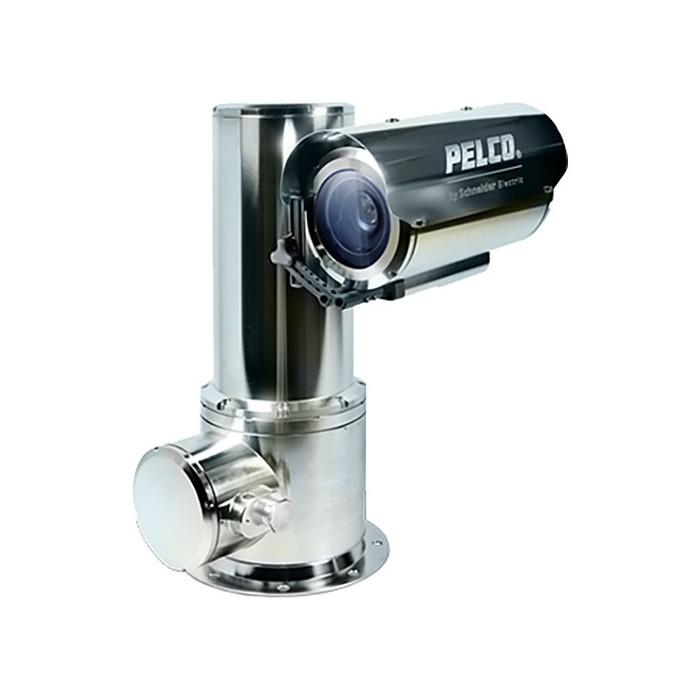
Introduction to Pelco Standard PTZ Cameras
Pelco Standard PTZ Cameras are professional-grade pan, tilt, and zoom security cameras designed for demanding surveillance environments where flexible coverage, remote control, and clear imaging matter most. Built for commercial, industrial, municipal, and critical-infrastructure use, these PTZ cameras are widely used in parking lots, campuses, warehouses, city streets, transportation hubs, and perimeter security installations. Their ability to rotate horizontally, tilt vertically, and zoom optically makes them a practical choice for monitoring large areas with fewer devices.
The main advantages of Pelco Standard PTZ Cameras include long optical zoom ranges, advanced low-light performance, rugged weatherproof housings, and support for modern IP video systems. Depending on the model, users can expect features such as up to 4K resolution, 30x to 40x zoom, IR or white-light night visibility, AI auto-tracking, and durability ratings such as IP66, IP67, and IK10. These capabilities make them especially valuable for security teams that need both wide-area awareness and detail capture in a single unit.
Typical pricing for Pelco PTZ models varies widely by series and configuration, with many standard units ranging from roughly $1,000 to $4,500, while specialized rugged or high-zoom versions can cost more. Availability is generally strong through authorized security distributors and enterprise resellers, though exact stock depends on the model and region. For organizations comparing professional PTZ surveillance options, Pelco Standard PTZ Cameras remain a strong choice for reliability, integration flexibility, and enterprise-ready performance.
Technical Specifications and Key Features of Pelco Standard PTZ Cameras
- Resolution options: HD 1080p to 4K, depending on the model
- Optical zoom: Commonly 18x, 30x, or 40x zoom for long-range identification
- Night performance: IR illumination, white-light options, and low-light sensor tuning
- Durability: Weather-resistant housings with IP66/IP67 sealing on many models
- Vandal resistance: IK10-rated enclosures available on selected versions
- Video compression: H.264 and H.265 support for efficient bandwidth use
- Connectivity: IP network integration, ONVIF support on many models, and PoE or 24 VAC power options
- Mounting styles: Wall, pendant, pole, corner, and ceiling mounts depending on deployment needs
- Smart functions: Auto-tracking, motion detection, analytics-ready platforms, and presets
- Environmental range: Some models are rated for extreme temperatures and outdoor exposure
Compared with many mid-range PTZ cameras, Pelco Standard PTZ Cameras typically focus more on rugged construction, enterprise integration, and long-term reliability than on low-cost entry pricing. They often outperform consumer and prosumer PTZ models in durability, image control, and support ecosystem depth.
Detailed Description: How Pelco PTZ Security Cameras Work
Pelco Standard PTZ Cameras work by combining a motorized camera head with remote control software or a security management system. Operators can pan left and right, tilt up and down, and zoom in or out to inspect distant objects without physically moving the camera. This makes them ideal for monitoring large sites where quick response and targeted observation are essential.
In real-world use, these cameras are often installed at facility entrances, along perimeters, above loading docks, around stadiums, and in transit terminals. Security personnel can save camera presets for key locations, automatically return to patrol paths, and track moving subjects when analytics are enabled. Rugged housings and aluminum-based construction on many models help them withstand rain, dust, vibration, and temperature swings.
Users generally appreciate the stable motor response, strong zoom clarity, and the ability to replace several fixed cameras with one PTZ unit. For operators, the experience is straightforward once presets and tours are configured, and image quality remains consistent in both daylight and nighttime monitoring scenarios.
Setup Guide: Installing and Configuring Pelco Standard PTZ Cameras
- Choose a mounting location with a clear field of view and stable structural support.
- Verify power requirements, network access, and compatibility with your video management system.
- Install the appropriate mount and secure the camera using the manufacturer’s hardware.
- Connect Ethernet, PoE, or 24 VAC power depending on the model.
- Assign an IP address, log in to the camera interface, and update firmware if needed.
- Configure presets, patrol routes, zoom limits, privacy masks, and image settings.
- Test pan, tilt, zoom, autofocus, and night mode before finalizing deployment.
For pairing and connectivity, confirm ONVIF or VMS compatibility if the camera will be integrated into an existing security platform. If video is unstable, check cable quality, network bandwidth, and power delivery. Avoid mounting the camera in locations where moving parts could be blocked by walls, signs, or nearby structures. Always follow electrical safety rules, use certified installers when possible, and ensure outdoor seals are fully tightened to maintain weather resistance.
Troubleshooting Pelco PTZ Cameras: Common Problems and Fixes
- No video signal: Check power, PoE output, cable continuity, and switch ports.
- Camera not moving: Verify preset lock, motor initialization, and PTZ control permissions.
- Poor night image: Adjust exposure, confirm IR or white light activation, and clean the dome or window.
- Blurry zoom: Run autofocus, inspect the lens surface, and confirm the camera is not vibrating.
- Network dropouts: Reduce bitrate, test the cable run, and review switch stability.
- Startup or firmware error: Reboot, reload firmware, and restore factory settings if needed.
Some models may display status alerts rather than traditional consumer-style error codes, so consult the camera interface or VMS logs for exact messages. Preventive maintenance should include regular lens cleaning, firmware updates, mounting checks, and cable inspections. Pelco provides product support and warranty coverage through authorized channels, and many cameras can carry warranty coverage of up to five years depending on the product family. For help, contact Pelco technical support through its official support line or regional service network.
Pros and Cons of Pelco Standard PTZ Cameras
Pros
- Strong optical zoom for identifying subjects at long distances
- Rugged build quality for outdoor and high-risk environments
- Enterprise-friendly integration with IP video systems and VMS platforms
- Useful analytics and auto-tracking options on supported models
- Good value for organizations replacing multiple fixed cameras with one PTZ unit
Cons
- Higher cost than entry-level PTZ cameras
- Installation is more complex than plug-and-play consumer models
- Advanced features may require proper tuning to perform well
- Some buyers may prefer simpler fixed cameras for stationary coverage
Overall, Pelco Standard PTZ Cameras offer strong value for money when durability, zoom range, and professional integration are priorities. Compared with lower-cost alternatives, they usually deliver better environmental protection and long-term operational consistency.
Customer Reviews and Real-World Feedback
Average customer sentiment for Pelco Standard PTZ Cameras is generally positive, with many users giving them 4 to 5 stars for image clarity, ruggedness, and dependable remote control. Security teams often praise the zoom performance and the ability to monitor large spaces with fewer cameras.
Common complaints focus on installation complexity, learning curve, and the premium price compared with budget PTZ options. One typical review summary reads: “Excellent zoom and very reliable in outdoor conditions, but setup took longer than expected.” Another frequently mentioned note is that the camera performs best when paired with a properly configured VMS and network infrastructure.
For buyers who need professional surveillance, Pelco Standard PTZ Cameras are a strong purchase recommendation, especially for commercial and municipal applications. They are best suited to users who value dependable performance, outdoor resilience, and advanced control over the lowest possible price.
Faqs
How do I set up pelco Standard PTZ Cameras for the first time?
Why is my pelco Standard PTZ Cameras not responding to pan, tilt, or zoom commands?
What network settings are needed for pelco Standard PTZ Cameras on an IP surveillance system?
How can I improve the zoom performance and image clarity of pelco Standard PTZ Cameras?
Which video management systems are compatible with pelco Standard PTZ Cameras?
How do I fix preset positions not saving on pelco Standard PTZ Cameras?
What maintenance steps help pelco Standard PTZ Cameras last longer outdoors?
How do I troubleshoot blurry night video on pelco Standard PTZ Cameras?
Leave a Comment