
Usage: Perfect Portions Nutritional Scale User Manual
Content
Perfect Portions Nutritional Scale
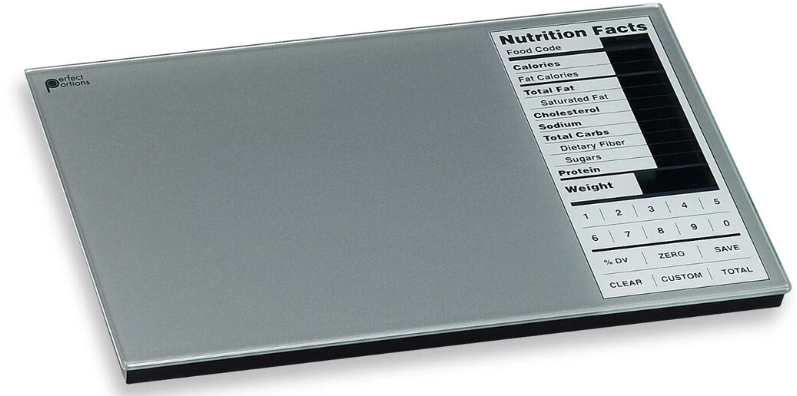
Introduction
Welcome to your new Perfect Portions Scale—a state-of-the-art Nutrition Scale that weighs your food and si-multaneously calculates the amount of 10 key nutritional elements:
- Calories
- Calories from Fat
- Carbohydrates (in grams)
- Protein (in grams)
- Fat (in grams)
- Saturated Fat (in grams)
- Fiber (in grams)
- Sugars (in grams)
- Cholesterol (in grams/milligrams)
- Sodium (in grams/milligrams)
Additionally, the scale will calculate the percent daily val-ue for the most of these elements based on a daily diet of 2,000 calories.
The Perfect Portions nutritional scale is designed to serve the needs of health conscious individuals who want to establish and maintain a healthy lifestyle. This means making a gradual change in your eating habits – becoming increasingly conscious of what you choose to eat and the implications for your health and sense of well being.
Although the Perfect Portions nutritional scale provides a convenient way to create a nutritious diet, perhaps a more important function is to help those who use it to monitor and manage food choices and portion sizes day by day. As the scale helps you to become familiar with the nutri-tional content of many common foods, you can learn to make decisions with confidence at the grocery store, in restaurants and other places where the scale isn’t avail-able. Our idea of portion size has been exaggerated by the huge quantities of food often served in restaurants. The scale will show the relationship between portion size and calorie and nutrient content and allow you to make better nutrition decisions for your family.
The Perfect Portions nutritional scale is a highly sensi-tive and accurate piece of equipment. It can measure the nutritional values for individual foods or entire meals. The scale also calculates and stores cumulative nutrient totals. Users may want to keep a journal to record their daily nutritional intake over time and to share the infor-mation with their physician or nutrition professional.
Specifications
The Perfect Portions Nutritional Scale offers a range of impressive features and capabilities:
- Weight Capacity: Up to 10 pounds (5 kg) or 10,000 grams
- Accuracy: Measurements down to 1 gram (0.1 ounces)
- Units: Supports both grams and pounds/ounces
- Nutritional Database: Includes information for 2,000+ foods
- Customization: Allows up to 99 custom food entries
- Display: LCD display for clear readability
- Power: Operates on included batteries with automatic power-off
- Operating Modes: Normal, Program, and Total modes
- Design: Glass-top surface for easy cleaning
Requires 2 AA batteries, included
- Maximum weight: 10 lb / 5 kg
- Resolution: 0.1 oz / 1 g
Compared to similar scales, the Perfect Portions Nutritional Scale stands out with its extensive nutritional database and high customization capabilities.
SCALE FUNCTIONS
TURNING THE SCALE ON AND OFF – Place the scale on a clean, level surface. Push the ON/OFF button located on the right side of the scale to turn the scale on. Push it again to turn it off. If you don’t make an entry for several minutes, the scale turns itself off automatically
WEIGHING ITEMS - When a food is placed on the scale, its weight will automatically appear next to the Weight heading in the display window. The weight can be displayed in either metric units (grams) or English units (pounds and ounces). To convert between met-ric and English units, press the G/OZ key on the right side of the scale.
WEIGH USING A CONTAINER – You may want to weigh foods or ingredients using a container such as a bowl or plate. In these situations, the ZERO function can be used to offset the weight of the container so that only the weight of the food is calculated by the scale. This is also commonly referred to as “tare”.
- To use the ZERO function, place the empty container on the scale and press the ZERO key. The weight reg-istered by the scale will return to zero. The scale will display “0” after the Weight heading and “ZERO SET” will be shown on the display.
- Then, when you place food in the container, only the food is weighed.
- If you want to reset the scale for a new measurement, remove all items from the scale and press ZERO again. The scale can also be reset by turning it off and then back on again.
Note: With each different container used, you should set a new zero weight.
Tip: If you place the empty container on the scale while the scale is turned off, the container weight will auto-matically be zeroed out when you turn the scale on.
ENTERING FOOD CODES – The food code is en-tered to tell the scale what is being weighed. Each food has been assigned a code number from 0001 to 1999. Find the food you want to weigh in the Food Code Booklet, arranged by category. Enter the Food Code number when the four digit Food Code number is blinking on the display. The display will show the nu-trient value for the amount of food you have placed on the scale. NOTE: If no food code has been entered, the nutrient values will not be displayed, except when in the TOTAL mode (see below for more information on cumulative data).
COMPUTING PERIODIC TOTALS – The scale al-lows you to keep a running total of your nutritional in-take by using the TOTAL function. NOTE: The TOTAL function is active when the word TOTAL appears near the bottom right corner of the display. The TOTAL key toggles between the display of cumulated totals and the nutrient values of the current food being weighed. When in the TOTAL mode, only the CLEAR function is available. You must always exit the TOTAL mode by pressing TOTAL again before you can access other functions. TIP: The word TOTAL will not be vis-ible near the bottom right corner of the display screen once you have exited the TOTAL mode.
TO ADD TO THE CUMULATIVE FOOD TOTAL: With food on the scale and the nutrients displayed, press SAVE. The values will be added to the cumulative food total. Press TOTAL to toggle into the TOTAL mode. Review the cumulative food total. Press TOTAL again to return to NORMAL mode.
TO CLEAR THE TOTAL: Press the TOTAL key to enter the TOTAL mode. Press and hold the CLEAR key for 3 seconds to zero the total (You would typi-cally clear the totals before making the first entry of the day).
CARING FOR YOUR SCALE
CLEANING – Your scale is not waterproof. Never im-merse the scale in water or place it in a dishwasher. To clean the scale platform, use a soft, slightly damp cloth or sponge. For stains or other residue, use a mild dishwashing soap. Never use harsh cleaners or treated cloths.
CHANGING THE BATTERY – Your scale uses two AA batteries. To change the batteries, open the bat-tery door on the bottom of the scale, remove the old batteries and replace them with the + end oriented as shown in the battery compartment.
Caution:
- Do not mix old and new batteries.
- Do not mix Alkaline, Standard (Carbon-zinc), or Rechargeable (Nickel Cadmium batteries).
- Please dispose of used batteries properly.
Troubleshooting
Common issues and solutions for the Perfect Portions Nutritional Scale:
- Incorrect Readings: Ensure the scale is on a flat surface and that batteries are not low.
- Error Codes: Refer to the user manual for error code explanations.
- Scale Not Turning On: Check that the battery pull-tab has been removed.
- Preventive Measures: Regularly clean the scale and handle it with care.
- Warranty and Support: Contact Greater Goods for warranty inquiries and support.
USE OF DATA
The scale contains data derived directly from a U.S. Department of Agriculture Data Base. While the scale is very sensitive and highly accurate, the nutritional content of foods can be variable. The data given is presumed to be accurate for the sample the
Govern-ment tested, but there can be significant variability in samples of the same types of food. For example, chocolate cake may be quite different because reci-pes vary from family to family and bakery to bakery. Similarly, the sugar content of fruits can vary consid-erably. On the other hand, certain quality-controlled foods, such as milk, won’t vary much in nutritional content, and others, such as butter, are naturally uni-form.
For these reasons, the nutritional values displayed by the scale should be considered as a very useful guide to good nutrition, but not as an absolute mea-sure. In most cases, the accuracy will be sufficient to support your dietary requirements. However, we can-not assume any liability related to the accuracy and completeness of the information provided, nor to the way in which the information is used by the consumer. Before beginning any diet management program, us-ers should consult with their physician or a registered dietitian.
MANUFACTURER’S WARRANTY
Your scale is warranted by the manufacturer against defects in materials and workmanship for five (5) years for the original purchaser from the date of pur-chase. Proof of purchase is required.
The warranty is void if the product has been subjected to mechanical damage or mistreatment, such as im-mersion. This warranty is in lieu of all other warran-ties, and limits the liability of the manufacturer. This warranty gives you certain legal rights and you may have other rights depending on which state the prod-uct was purchased.
If your scale is defective, please contact DMD, LLC toll-free at (866) 991-8494.
Pros & Cons
Pros:
- High Precision: Accurate measurements down to 1 gram.
- Extensive Database: Includes nutritional information for over 2,000 foods.
- Customization: Allows up to 99 custom food entries.
- User-Friendly: Easy-to-use interface with touchpad keys.
Cons:
- No Backlight: The LCD display lacks a backlight for better visibility in low light.
- Database Limitations: The database may not include all food types or updates.
The Perfect Portions Nutritional Scale offers excellent value for money, making it a top choice for those seeking precise nutritional tracking.
Customer Reviews
Users praise the scale for its accuracy and ease of use, especially for managing dietary needs. Common praise includes the extensive built-in database and customization options. However, some users mention the lack of a backlight as a drawback. Overall, the scale receives high ratings for its functionality and user experience.
Faqs
How do I set up the perfect portions Nutritional Scale for the first time?
What should I do if the perfect portions Nutritional Scale is not displaying accurate nutritional information?
Can I add my own food items to the perfect portions Nutritional Scale’s database?
Is the perfect portions Nutritional Scale compatible with mobile apps or other devices?
How do I use the tare function on the perfect portions Nutritional Scale for accurate meal prep?
What maintenance is required to keep the perfect portions Nutritional Scale functioning properly?
How accurate is the perfect portions Nutritional Scale in measuring food weight and nutrition?
What should I do if my perfect portions Nutritional Scale does not turn on or respond?
Tags
Leave a Comment