
Power Locus Wireless Kids Headphone P19 User Manual
Content
power locus Wireless Kids Headphone P19: Complete Product Manual and Buying Guide
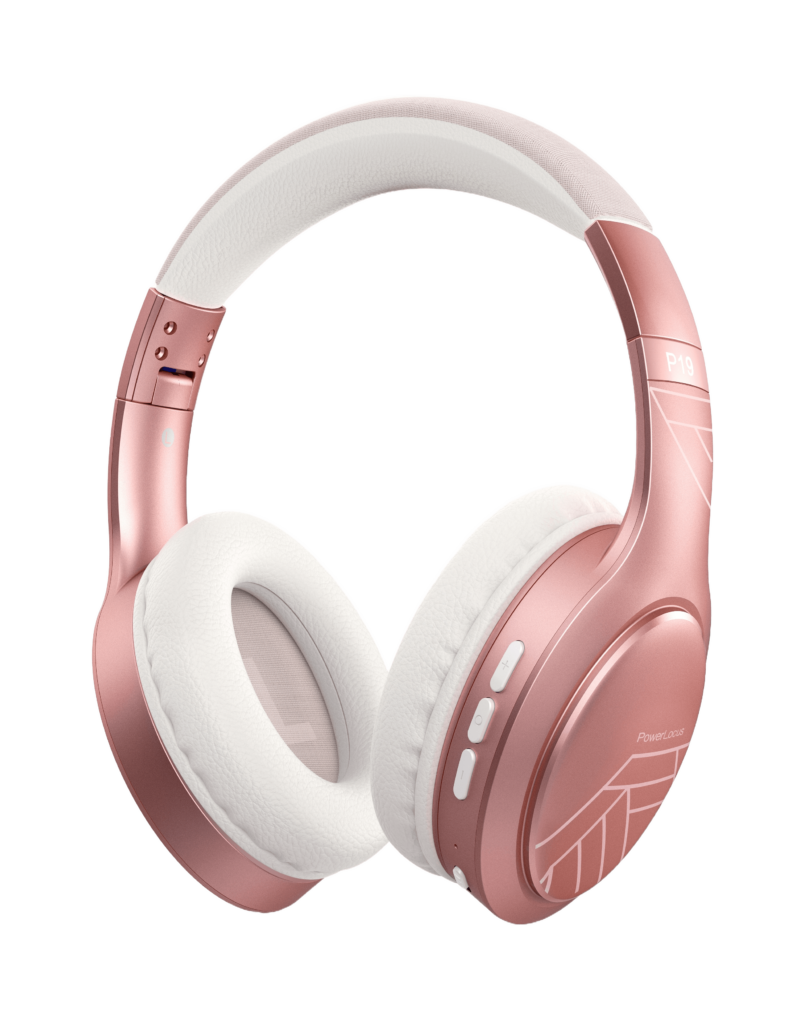
Introduction
The power locus Wireless Kids Headphone P19 is a kid-friendly over-ear Bluetooth headset designed for everyday listening, online classes, travel, and home entertainment. Built with a lightweight frame, soft ear cushions, and adjustable sizing, it aims to deliver comfortable all-day wear for children while keeping setup simple for parents. The P19 is especially appealing for families who want a wireless kids headphone with long battery life, a built-in microphone, and the flexibility of both wireless and wired listening.
One of the biggest advantages of the power locus Wireless Kids Headphone P19 is its balance of safety, convenience, and value. It supports Bluetooth 5.3 for stable connectivity, includes volume-limiting modes for kid-safe listening, and offers a foldable design that makes storage and transport easy. The 40 mm drivers provide clear stereo sound for music, videos, and school apps, while the built-in microphone helps with calls and remote learning. Parents also benefit from the long battery life and simple controls, which reduce the need for frequent charging or complicated setup.
This model is aimed at children, students, and families looking for a versatile wireless headset for school, travel, gaming, and casual use. The estimated price range is typically budget-friendly, around $10 to $25 depending on the retailer, color, and bundle options. Availability is generally good through online marketplaces and brand storefronts, with black, white, grey, and pink variants commonly listed.
Specifications
- Model: power locus Wireless Kids Headphone P19
- Connectivity: Bluetooth 5.3 wireless connection
- Wired option: 3.5 mm AUX support for backup listening
- Driver size: 40 mm dynamic drivers
- Frequency response: 20 Hz to 20,000 Hz
- Battery: 300 mAh rechargeable battery
- Playback time: Up to 70 hours in ideal conditions, with shorter real-world use depending on volume and connection settings
- Charging: USB-C charging, approximately 1.5 to 2 hours
- Weight: Around 170 g, making it lightweight for children
- Microphone: Built-in mic for calls and online learning
- Special features: Foldable design, adjustable headband, 3 EQ modes, volume-limiting safety modes
Compared with many other kids Bluetooth headphones, the P19 stands out for its longer battery life and Bluetooth 5.3 support. It is also more flexible than basic wired kids headsets because it can switch between wireless and wired modes when the battery runs low.
Setup Guide
Setting up the power locus Wireless Kids Headphone P19 is straightforward. First, fully charge the headset using the included USB-C cable before the initial use. Once charged, press and hold the power button until the indicator light flashes, which signals pairing mode. On your phone, tablet, laptop, or smart TV, open Bluetooth settings and select the headset from the available devices list. If you want a wired connection, plug in a compatible 3.5 mm AUX cable and the headset will work without Bluetooth.
For best results, choose the volume mode that matches your child’s age and environment. Use the lowest safe listening level for schoolwork and long sessions. If pairing fails, turn Bluetooth off and back on, restart the headset, and make sure no other nearby device is already connected. Keep the headset away from water, heat, and rough bending to protect the battery and internal components.
Safety warning: Do not let children listen at high volume for extended periods. Always supervise first-time use and check that the ear cups fit comfortably without excessive pressure.
Troubleshooting
If the headset will not power on, charge it for at least 20 to 30 minutes and try again. If Bluetooth pairing is unstable, delete the headset from your device’s saved Bluetooth list and reconnect from scratch. If audio is playing only in one ear, inspect the AUX cable connection or reset the headset by turning it off and back on. If the sound is too quiet, increase the volume on both the headset and the source device, then confirm that a low-volume safety mode is not enabled.
Common issues often come from low battery, outdated Bluetooth settings, or pairing conflicts with another device. There are no widely documented error codes for this model, so most problems are resolved through restart, recharge, and re-pairing. To prevent future issues, avoid over-discharging the battery, store the headset folded in a dry place, and clean the ear pads regularly.
Support is typically offered through the seller or brand warranty channel. A common package support policy includes a 2-year warranty and a 30-day return window, though coverage may vary by retailer. For help, check the order page, product listing, or the customer service contact details included with your purchase.
Pros & Cons
Pros
- Long battery life makes it practical for school days, travel, and home use.
- Lightweight design improves comfort for children during extended wear.
- Bluetooth 5.3 offers stronger, more reliable wireless performance.
- Volume-limiting modes add an extra layer of hearing protection.
- Foldable build makes the headset easy to pack in a school bag or suitcase.
- 3.5 mm wired support adds value when the battery runs low.
Cons
- Plastic construction may feel less premium than higher-priced alternatives.
- Sound quality is good for the price, but not ideal for audiophile listening.
- Some users may prefer physical buttons with more advanced controls.
- Battery claims can vary depending on volume and usage conditions.
For families seeking value for money, the power locus Wireless Kids Headphone P19 compares well against other budget kids headphones by combining wireless convenience, comfort, and safety features at a low price point.
Customer Reviews
Customer feedback for the power locus Wireless Kids Headphone P19 is generally positive, with many buyers giving it around 4 out of 5 stars. Parents commonly praise the long battery life, comfortable fit, and easy Bluetooth pairing. A frequent testimonial is that it “works great for school and travel” and is “light enough for my child to wear for hours.”
Common complaints usually mention that the sound is fine for casual use but not especially strong for bass-heavy music, and some users would like more premium materials. Buyers also note that battery performance depends on volume level and playback type. Overall, the headset is widely recommended for kids, students, and parents who want an affordable wireless headset with practical features and dependable everyday performance.
Faqs
How do I set up power locus Wireless Kids Headphone P19 for the first time?
Why is my power locus Wireless Kids Headphone P19 not connecting to Bluetooth?
What volume limit mode should I use on power locus Wireless Kids Headphone P19?
How long does the battery last on power locus Wireless Kids Headphone P19?
Can power locus Wireless Kids Headphone P19 work with school tablets and laptops?
Why does my power locus Wireless Kids Headphone P19 sound too quiet?
How do I clean and maintain power locus Wireless Kids Headphone P19 safely?
What should I do if one side of power locus Wireless Kids Headphone P19 stops working?
Leave a Comment