
How to Use: Princess Smart Glass Panel Heater Owner Guide
Content
Princess Smart Glass Panel Heater
Introduction
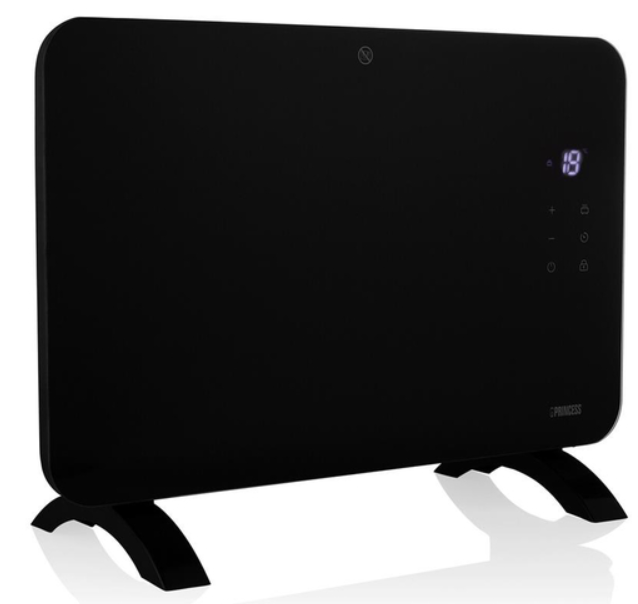
The Princess Smart Glass Panel Heater is a modern, energy-efficient heating solution designed for homes, offices, conservatories, and garden rooms. This sleek, glass-fronted electric heater combines smart technology with elegant design, offering both wall-mount and freestanding versatility to suit any interior décor..
Key benefits include Wi-Fi connectivity, allowing users to control heating via a dedicated app, voice commands (Amazon Alexa and Google Assistant), or the intuitive LED touch display. Ay The Princess Smart Glass Panel Heater features adjustable electronic thermostat control, programmable scheduling, and variable heat settings—helping you save energy by heating only the room you’re in. Safety is prioritized with overheat protection, tip-over protection, and a child safety lock, making it a reliable choice for families with children or pets. ets
With a robust IP24 splash-proof rating, this panel heater is suitable for bathrooms and other moisture-prone areas. Its carbon crystal or aluminium heating elements ensure fast, even warmth, while the slim profile (typically around 9 cm deep) maximizes space efficiency. The heater is available in both black and white finishes, with power options ranging from 1500W to 2000W, catering to different room sizes and heating needs. eeds
The target audience includes homeowners seeking a stylish, smart heating solution, as well as renters and business owners looking for flexible, easy-to-install electric heaters. Ideal use cases include living rooms, bedrooms, home offices, conservatories, and even garden studios.
Estimated prices range from £110 to €130, depending on the model and region, with wide availability through major retailers and online stores. Delivery options often include next-day shipping, ensuring quick access to efficient, smart heat. ing
In summary, the Princess Smart Glass Panel Heater stands out for its combination of smart features, safety, energy efficiency, and design flexibility—making it a top choice for modern, connected homes.
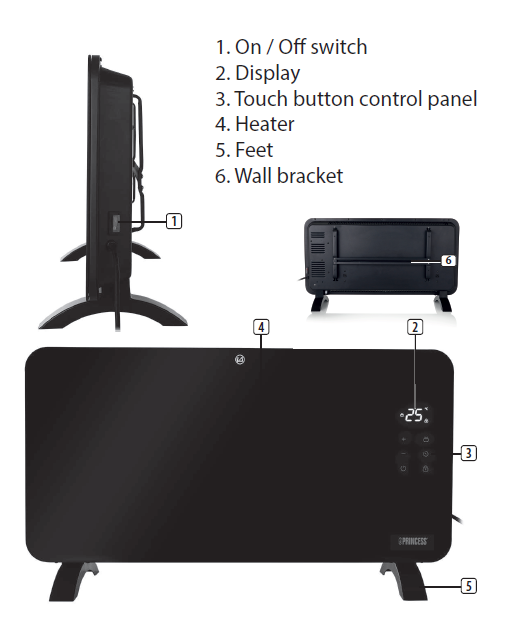
PARTS DESCRIPTION
BEFORE THE FIRST USE
- Place the device on a flat, stable surface and ensure a minimum of 15cm free space around the device. This device is not suitable for installation in a cabinet or for outside use.
- Put the power cable into the socket. (Note: Make sure the voltage which is indicated on the device matches the local voltage before connecting the device. Voltage 220V-240V 50/60Hz)
- When the device is turned on for the first time, a slight odour will occur. This is norma;, ensure adequate ventilation. This fragrance is only temporary and will disappear soon.
- During heating up and cooling down,, there may be some noises caused by the heater casing expanding and contracting. This is normal and does not indicate any fault.
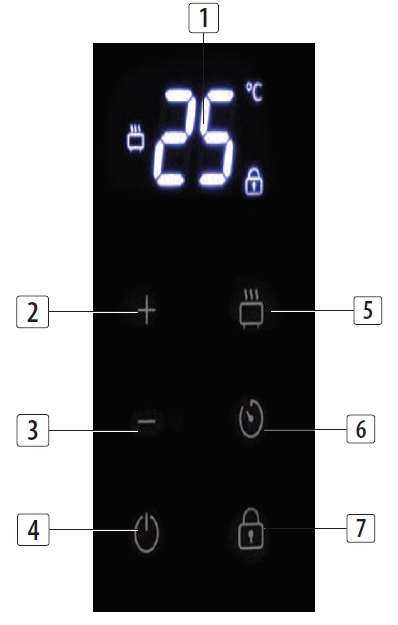
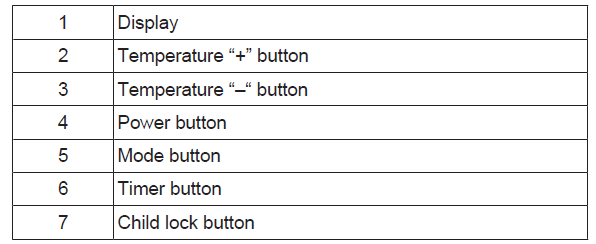
DISPLAY/TOUCH BUTTON FUNCTIONS
USE
- Push the On/Off switch on the side of the heater to turn the heater on.
- Press the power touch button to set the functions. The display will show what function is active.
- Use the mode button to adjust to low or high power. The upper symbol on the display is for high power, the lower one indicates the low power setting.
- Press the 'temperature up (+)' or 'temperature down (-)' buttons to regulate the temperature you desired temperature. The temperature can be set between 15°C and 35°C.
- Press the timer button to select the desired range between 1 hour to 24 hours. The set time will disappear after a few seconds.
- To enable the child lock HOLD down the lock button for 5 seconds,, and the lock symbol will appear on the display.
- To disable the child lock HOLD the lock button again for 5 seconds,s and the lock symbol will disappear.
- The child lock can be overridden by unplugging the heater or by switching it off using the main ON/OFF switch on the side of the device.
- Once the child lock is active,, you cannot operate any of the heater touch functions.
TIP-OVER PROTECTION
- Should the heater be tipped over during us,,e then the heater will automatically turn off.
- If the unit has been tipped over, ver then it cannot be turned on from the Climate app or via a smart speaker.
- To reset the unit, place it upright on a stable surface,, and the heater will automatically power on and connect to WiFi if previously set up. In around 2 minutes, the device will be ready to be controlled via the app or smart speaker again.
CHILD LOCK AND SMART SPEAKER
- If the child lock is active,, then voice control from a smart speaker will be disabled. You would need to disable the child lock to enable voice control.
- WARNING: Ensure the device cannot be operated by unsupervised persons.
USING THE HEATER WITH THE CLIMATE APP

- The heater can be used manually with its built-in controls, or you can use a smartphone or smart speaker to control it. Before you begin, ensure the Homewizard Climate app is downloaded. The Homewizard Climate app is available on Android and iOS.
Pair your heater to the Hothe meWizard Climate app
- Make sure your heater is powered.
- Open HomeWizard Climate APP.
- Create an account, or if you already have a HomeWizard account, please log in using those details.
- Click "Add new Climate Device" to add a new device.
- Select the device you want to connect.
- Follow the instructions on the app to connect the heater.
- To control your device with voice using a smart speaker,, please refer to the manufacturer's instructions on how to enable a skill through your device.
Technical Specification
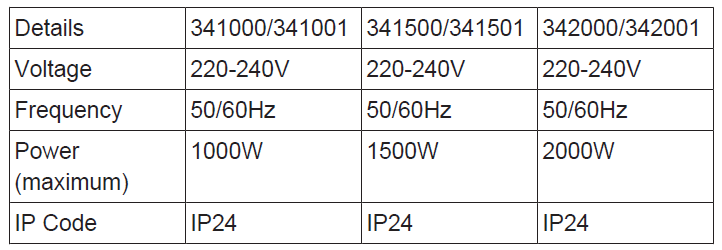
CLEANING AND MAINTENANCE
- Before cleaning, unplug the appliance and wait for the appliance to cool down.
- Clean the appliance with a damp cloth. Never use harsh and abrasive cleaners, scouring pads, sand, or steel wool,which damagee the device.
- Clean the two air outlets (above and below) by using a vacuum cleaner to remove dust from inside.
Princess Smart Glass Panel Heater Troubleshooting Guide
Common Problems and Solutions
- Heater Not Turning On: Check that the power outlet is working and the heater is properly plugged in. Ensure the child lock is disengaged and the unit is not in standby mode.
- No Wi-Fi Connection: Verify your router is on the 2.4 GHz band, as the heater does not support 5 GHz networks. Restart both the heater and your router, and ensure you are within range.
- App Control Issues: Update the Home Wizard Climate app to the latest version. Re-pair the heater if the connection drops persist.
- Overheating or Automatic Shutoff: This is a safety feature. Allow the unit to cool, check for blocked vents, and ensure proper clearance around the heater.
- Error Codes: Consult the user manual for specific error code meanings. Common codes relate to overheating, tip-over, or connectivity issues.
Preventive Measures
- Regularly clean the heater to prevent dust buildup, which can affect performance and safety.
- Ensure the unit is placed on a stable, level surface to avoid accidental tip-over.
- Use the heater in well-insulated spaces for optimal efficiency, as recommended by the manufacturer.
Warranty and Support
The Princess Smart Glass Panel Heater comes with a 2-year manufacturer’s warranty. For technical support, contact the UK team call 0345 230 1231 (Monday–Friday, 10 am4 pm). Spare parts and additional resources are available at the official Princess website.
Princess Smart Glass Panel Heater Customer Reviews
Users consistently praise the Princess Smart Glass Panel Heater for its sleek design, easy installation, and effective heating performance. Many highlight the convenience of app and voice control, allowing remote adjustments and scheduling for energy savings. The safety features, such as tip-over and overheat protection, are frequently mentioned as reassuring for households with children or pets.
Common complaints include occasional connectivity issues with the app and the need for a stable 2.4 GHz Wi-Fi network Some users note that the heater is best suited for small to medium-sized rooms, as its output may not suffice for larger, poorly insulated spaces.
Star ratings on retailer sites are generally high, with most users awarding 4 to 5 stars for design, functionality, and value. Testimonials often recommend the Princess Smart Glass Panel Heater for its modern look, smart features, and reliable performance, especially in home offices and conservatories.
If you prioritize smart home integration, safety, and stylish design, the Princess Smart Glass Panel Heater is a recommended choice. Be sure to check your Wi-Fi setup and room size to ensure optimal performance.
Faqs
How do I set up the princess Smart Glass Panel Heater for the first time?
What should I do if the princess Smart Glass Panel Heater is not heating properly?
Can the princess Smart Glass Panel Heater be controlled using voice commands?
What are the power and heating specifications of the princess Smart Glass Panel Heater?
How do I maintain and clean the princess Smart Glass Panel Heater to ensure optimal performance?
Is it possible to schedule heating times with the princess Smart Glass Panel Heater?
Does the princess Smart Glass Panel Heater include safety features for homes with children?
Can the princess Smart Glass Panel Heater be used in humid or splash-prone environments?
Leave a Comment