
Pro Charging System I36154815 Auto Detect Charger User Manual
Content
Pro Charging Systems I36154815 Auto Detect Charger Review and Manual
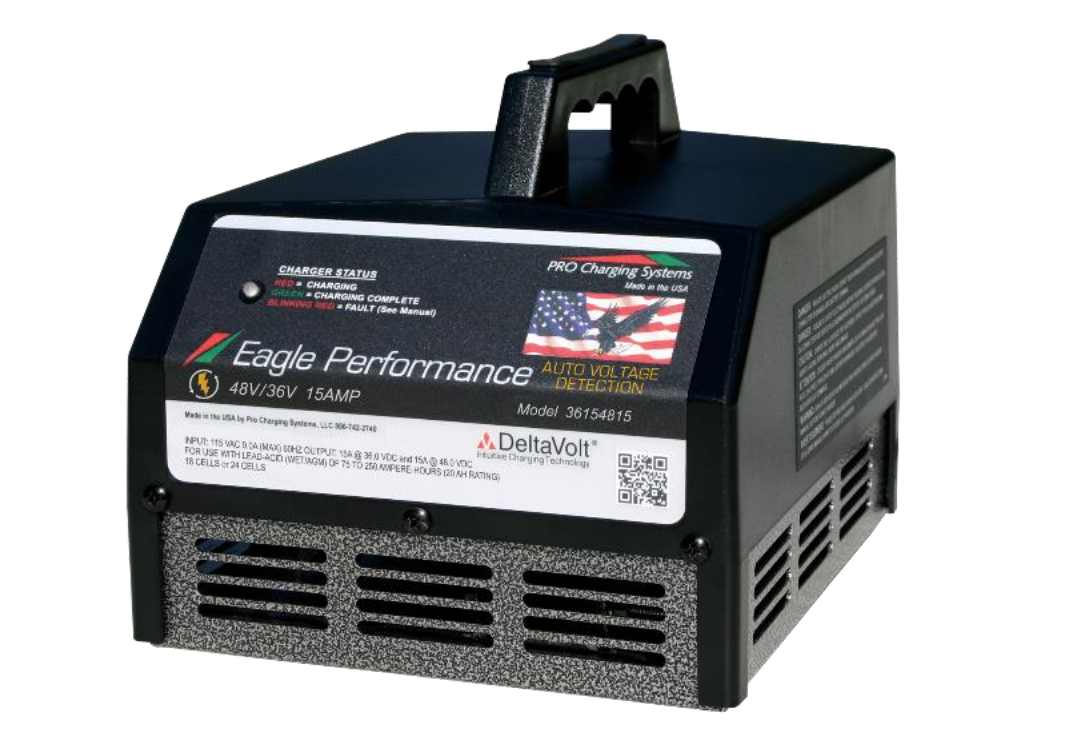
The pro charging system I36154815 Auto Detect Charger is a smart, portable battery charger built for golf carts and light-duty electric vehicles that use 36V or 48V lead-acid systems. It automatically detects the battery voltage, so users do not need to manually switch settings before charging. That makes it especially convenient for cart owners, fleet operators, and service shops that want a reliable plug-and-play charging solution with minimal setup.
One of the biggest advantages of the pro charging system I36154815 Auto Detect Charger is its 15-amp output, which provides steady charging performance while helping protect battery life through a multi-stage charging process. The charger is designed to work with flooded lead-acid, AGM, gel, and other supported battery types, and it can be configured for some lithium applications depending on the cable and setup. Interchangeable charge cables make it easier to use with different cart brands, including popular E-Z-GO, Yamaha, Star Car, and Club Car applications.
This charger is a strong fit for golf cart owners who want automatic voltage detection, maintenance charging, and a durable portable design. It is also useful for dealers and technicians who service multiple cart models and need one charger for different vehicles. Typical pricing for the pro charging system I36154815 Auto Detect Charger falls in the mid-range premium category, with market prices commonly landing around the high $400s to low $500s depending on the cable package and retailer. Availability is generally good through golf cart parts suppliers, battery specialists, and online retailers.
Technical Specifications for the Pro Charging System I36154815 Auto Detect Charger
- Model: I36154815 auto detect smart charger
- Voltage compatibility: Automatically detects 36V or 48V systems
- Output: 15 amps at 36V or 48V
- Input power: 120V AC, 60Hz
- Battery compatibility: Flooded lead-acid, AGM, gel, and select configured lithium setups
- Charging method: 5-stage smart charging with maintenance/float mode
- Low-voltage detection: Starts charging at very low pack voltage for recovery-friendly operation
- Connector system: Interchangeable cables with SB50-style output base
- Typical use cases: Golf carts, LSVs, fleet charging, garage charging, dealer service bays
- Approximate weight: About 17 to 20 lb depending on configuration
Compared with basic manual chargers, the pro charging system I36154815 Auto Detect Charger offers faster usability and less risk of incorrect voltage selection. Compared with many older 36V-only chargers, it is more flexible because it supports both 36V and 48V carts in one unit. Its closest competitors are other smart golf cart chargers with auto-sensing capability, but the interchangeable cable design gives this model an advantage for multi-brand environments.
Pros and Cons of the Pro Charging System I36154815 Auto Detect Charger
Pros
- Automatic voltage detection: No manual switching needed, which reduces setup errors and saves time.
- Versatile compatibility: Works across many golf cart brands when paired with the correct cable.
- Smart battery care: The multi-stage charging process and float mode help reduce overcharging and support longer battery life.
- Good value for multi-cart use: One charger can serve multiple vehicles, which is cost-effective for households, fleets, and repair shops.
- Portable design: Easy to move, store, and use in garages or maintenance areas.
Cons
- Premium pricing: It costs more than basic chargers, so budget buyers may prefer a simpler model.
- Cable-dependent setup: You may need the right interchangeable cable for your specific cart.
- Lead-acid focus: While adaptable in some cases, it is primarily designed for lead-acid battery systems.
- Not ideal for casual users on a tight budget: Better suited to users who value convenience, flexibility, and battery protection.
Overall, the pro charging system I36154815 Auto Detect Charger delivers strong value for money if you own more than one cart type or want a dependable smart charger with automatic detection. Cheaper alternatives exist, but they often lack the same versatility and charging intelligence.
Customer Reviews and Real-World Feedback on the I36154815 Auto Detect Charger
Customer feedback for the pro charging system I36154815 Auto Detect Charger is generally positive, with many users rating it around 4.5 out of 5 stars. Buyers frequently praise the automatic voltage detection, easy plug-and-play operation, and reliable charging performance on both 36V and 48V carts.
Common compliments include fast setup, compatibility with different cart brands, and the convenience of interchangeable cables. Many owners also like the maintenance mode, saying it helps keep batteries ready without constant monitoring.
Common complaints usually involve the price and the need to match the correct cable connector to the cart. A few users also note that it is best suited for lead-acid systems, so buyers should confirm battery compatibility before ordering.
- Recommended for: Golf cart owners, fleet managers, and technicians who want one smart charger for multiple carts.
- Best purchase choice: Users who value reliability, battery protection, and broad compatibility over the lowest price.
- Buyer tip: Confirm your cart’s connector style before purchase to ensure the right cable configuration.
Frequently Asked Questions About the Pro Charging System I36154815 Auto Detect Charger
What does auto detect mean?
Auto detect means the charger recognizes whether the connected system is 36V or 48V and adjusts output automatically.
Can it charge a dead battery?
It is designed to begin charging at low voltage, but severely damaged batteries may still need testing before use.
Is it good for golf carts?
Yes. It is especially popular for golf carts and LSVs because of its smart charging features and interchangeable cables.
Is the pro charging system I36154815 Auto Detect Charger worth it?
Yes, for users who want a dependable, flexible, and battery-friendly charger that works across multiple cart setups.
Faqs
How do I set up pro charging system I36154815 Auto Detect Charger for the first time?
Why is my pro charging system I36154815 Auto Detect Charger not detecting my device?
What devices are compatible with the pro charging system I36154815 Auto Detect Charger?
How can I tell if the pro charging system I36154815 Auto Detect Charger is charging at the right speed?
What should I do if the pro charging system I36154815 Auto Detect Charger gets hot during use?
How do I clean and maintain pro charging system I36154815 Auto Detect Charger safely?
What should I check if the pro charging system I36154815 Auto Detect Charger keeps stopping and starting?
How can I optimize the pro charging system I36154815 Auto Detect Charger for better long-term performance?
Tags
More pro charging system manuals
Leave a Comment