
Pro1 Technologies T721 Thermostat User Manual
Content
Pro1 Technologies T721 Thermostat Manual: Overview, Features, and Setup
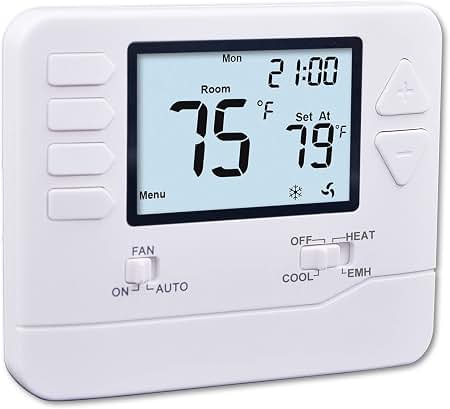
The pro1 technologies T721 Thermostat is a non-programmable digital thermostat designed for dependable everyday comfort control in residential heating and cooling systems. It is built for users who want simple operation, clear temperature readouts, and flexible compatibility with common HVAC setups, including 1 heat/1 cool conventional systems and 2 heat/1 cool heat pump systems. With its 4 square-inch LCD display, blue backlight, and glow-in-the-dark button, the unit is easy to read and operate in low light or at night.
This thermostat is especially well-suited for homeowners, landlords, maintenance teams, and HVAC installers who want a straightforward replacement thermostat without advanced scheduling features. The dual-power design supports battery or hardwire operation, while the universal sub-base and color-coded terminals make installation easier on many low-voltage systems. Additional features such as separate heating and cooling swing adjustments, room temperature calibration, and compressor delay protection improve comfort and system protection. The pro1 technologies T721 Thermostat also includes configurable electric or gas fan operation, making it adaptable to a wide range of equipment.
In most retail and distributor listings, the estimated price range is typically around $25 to $60, depending on seller, supply, and package contents. Availability is generally good through HVAC parts retailers, online marketplaces, and distributor channels. For shoppers seeking a reliable digital non-programmable thermostat with practical features and a simple interface, the T721 remains a strong value option.
Troubleshooting the Pro1 Technologies T721 Thermostat
If the thermostat display is blank, first check the two AA batteries, confirm the HVAC breaker is on, and verify that the unit is seated properly on the wall plate. If the screen is on but the system does not start, inspect the wiring connections at R, C, Y, W/E, G, and O/B as applicable, and confirm the system type is set correctly for conventional or heat pump operation.
Common issues include incorrect temperature readings, short cycling, compressor delay activation, or no heat/no cool response. A calibration offset may be needed if room temperature appears inaccurate. If the unit shows an error or appears unresponsive, power cycle the thermostat by removing batteries for a few minutes and checking that the control settings match the installed HVAC equipment. Specific error codes are not broadly published for every installation, so system behavior is often indicated by blinking icons or delayed equipment response rather than a dedicated numeric code.
Preventive maintenance is simple: replace batteries yearly, keep vents and nearby heat sources away from the thermostat, and verify the terminal screws remain tight during seasonal service. The T721 is backed by a 5-year warranty, and support is available through Pro1’s homeowner and technician resources. For assistance, the published toll-free support number is 888-776-1427, and product documentation is available through Pro1 thermostat manuals and installer guides.
Pros & Cons of the Pro1 Technologies T721 Thermostat
Pros
- Simple non-programmable interface that is easy for most users to operate.
- Compatible with 1 heat/1 cool conventional systems and 2 heat/1 cool heat pump systems.
- Large blue-backlit display improves visibility in dim spaces.
- Battery or hardwire power options increase installation flexibility.
- Separate swing settings help fine-tune comfort and reduce short cycling.
- Good value for money for basic thermostat replacement projects.
Cons
- Not programmable, so it lacks scheduling and energy-saving automation.
- No Wi-Fi or app control, unlike smart thermostat alternatives.
- Advanced users may prefer models with humidity control or remote access.
- Setup can be confusing if the HVAC system type is misidentified.
Compared with smart options such as Wi-Fi thermostats, the pro1 technologies T721 Thermostat is best for users who want dependable manual control rather than connected features. It offers strong value for replacement jobs, rental properties, and no-frills comfort control.
Customer Reviews for the Pro1 Technologies T721 Thermostat
User feedback for the pro1 technologies T721 Thermostat is generally positive, with many buyers rating it around 4 out of 5 stars for reliability, readability, and easy day-to-day use. Customers frequently praise the bright display, simple controls, and compatibility with many systems. One common testimonial theme is that it is an excellent “set it and forget it” thermostat for basic heating and cooling needs.
Common complaints usually focus on the lack of scheduling features, the absence of Wi-Fi connectivity, and occasional installation challenges when wiring is not clearly labeled. Some users also note that the thermostat is best suited for those who prefer manual operation over smart-home convenience. Despite these limitations, many reviewers recommend it for homeowners who want a straightforward replacement thermostat at a reasonable price.
If you need a reliable digital thermostat for a standard HVAC system, the T721 is often recommended as a practical purchase. If you want automation, remote control, or energy reports, a smart thermostat may be the better alternative.
Faqs
How do I set up the pro1 technologies T721 Thermostat for the first time?
What wiring compatibility should I check before installing the pro1 technologies T721 Thermostat?
Why is my pro1 technologies T721 Thermostat not turning the heating or cooling on?
How do I calibrate temperature settings on the pro1 technologies T721 Thermostat?
Does the pro1 technologies T721 Thermostat work with heat pump systems and auxiliary heat?
How can I improve energy efficiency with the pro1 technologies T721 Thermostat?
What should I do if the pro1 technologies T721 Thermostat display is blank or fading?
How do I maintain and clean the pro1 technologies T721 Thermostat for long-term reliability?
More pro1 technologies manuals
Leave a Comment