
Proscan PLDED4016A Television User Manual
Content
Proscan PLDED4016A Television Manual and Product Guide
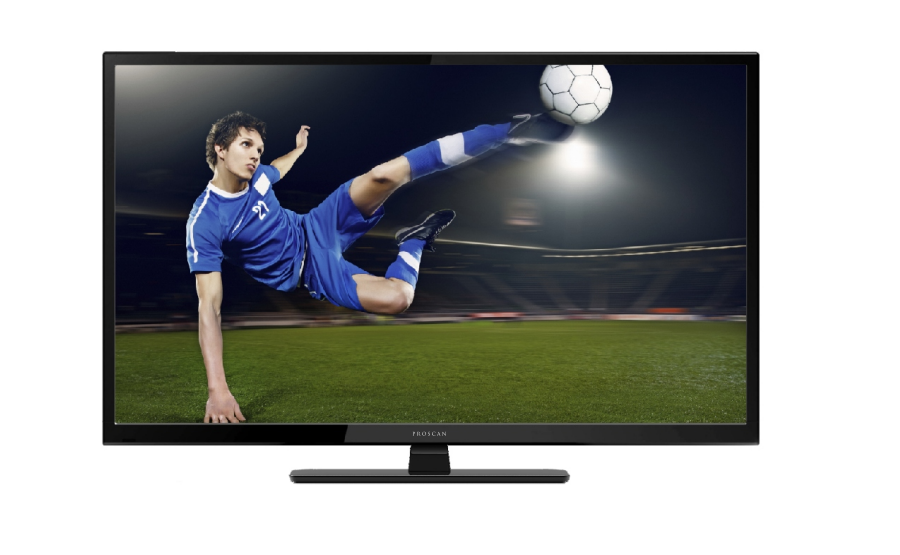
Introduction: Proscan PLDED4016A Television Overview
The Proscan PLDED4016A Television is a 40-inch Full HD LED TV designed for users who want a straightforward, affordable display for everyday viewing. With a 1080p resolution, 60Hz refresh rate, and a slim flat-screen design, it delivers reliable picture quality for cable TV, streaming devices, gaming consoles, and basic home entertainment setups. This model is especially appealing to budget-conscious buyers who need a practical television for bedrooms, guest rooms, dorms, offices, or secondary living areas.
One of the main advantages of the Proscan PLDED4016A Television is its wide range of physical connections, including HDMI, VGA, component, AV, headphone, coaxial, and RF inputs. That makes it useful for both modern and older devices, such as streaming boxes, DVD players, and legacy computers. The TV also includes a built-in digital tuner and wall-mount compatibility, which adds flexibility for different room layouts.
In today’s market, the estimated price range is typically budget-level, often found between $120 and $220 depending on seller, condition, and availability. The Proscan PLDED4016A Television is commonly available through online marketplaces, electronics resellers, and manual/archive sites, though stock may vary because this is an older model. For users looking for a simple 40-inch LED TV with essential features and dependable everyday performance, this model remains a practical choice.
Specifications: Proscan PLDED4016A TV Technical Details
- Screen size: 40 inches diagonal
- Display technology: LED
- Resolution: 1920 x 1080 Full HD
- Refresh rate: 60Hz
- Aspect ratio: 16:9
- Viewing angle: Wide-angle panel suitable for shared viewing
- Inputs: HDMI, VGA, YPbPr/component, AV audio/video, PC audio, headphone jack, coaxial, RF
- HDMI ports: Multiple HDMI inputs for streaming devices and consoles
- Built-in tuner: Digital ATSC tuner for over-the-air channels
- Mount compatibility: Wall-mount ready, 200 x 200 VESA pattern
- Color: Black finish
- Power: 120V AC input, low-wattage operation for its class
Compared with many entry-level 40-inch TVs, the Proscan PLDED4016A Television stands out for its combination of Full HD resolution and older-device compatibility. While newer smart TVs may offer built-in apps and Wi-Fi, this model focuses on core display performance and versatile wired connectivity. That makes it a better fit for users who prefer a simple TV without app clutter, especially for secondary rooms or basic media use.
Setup Guide: How to Install and Configure the Proscan PLDED4016A Television
Start by placing the TV on a flat, stable surface or attaching it to a compatible wall mount. If using a stand, secure both base components tightly before lifting the television. Keep the unit away from heat sources, direct moisture, and unstable furniture. For wall mounting, confirm that the mount supports the 200 x 200 VESA pattern and the weight of the set.
Next, connect your source devices. Use HDMI for streaming boxes, game consoles, or Blu-ray players for the best image quality. Use VGA for older computers and AV or component inputs for legacy media devices. Attach the antenna or coaxial cable if you plan to use over-the-air channels. After powering on the TV, follow the on-screen menu to select language, input source, picture mode, and channel scan settings.
If the remote does not respond, replace the batteries and check for a clear line of sight. If there is no picture, verify the input selection and confirm that cables are firmly seated. Avoid overloading power outlets, and unplug the unit during electrical storms. For first-time setup, complete a channel scan to ensure the built-in tuner finds available broadcasts.
Troubleshooting: Common Proscan PLDED4016A Problems and Fixes
If the television will not turn on, check the power cord, outlet, and remote batteries. Try pressing the physical power button on the unit to rule out remote failure. If the screen is on but there is no picture, the most common cause is an incorrect input source. Use the input menu to switch between HDMI, AV, VGA, or TV mode.
For poor picture quality, confirm that the connected device is set to a 1080p or compatible output resolution. If the image appears stretched, adjust the aspect ratio or picture size settings. Audio problems are often caused by muted volume, loose cables, or a device sending sound to an external output. If channels are missing, run a full tuner scan and check antenna placement.
There are no widely documented error codes specific to this model, so most issues are resolved through input verification, power cycling, and cable inspection. To reduce future problems, keep vents clear, avoid moisture, and use surge protection. Warranty coverage depends on seller and condition, since many units are sold through third-party retailers or refurbished listings. For support, check the seller’s service page, retail documentation, or product manual listing for replacement parts, remote control help, and basic troubleshooting assistance.
Pros and Cons of the Proscan PLDED4016A Television
Pros
- Affordable 40-inch Full HD TV for budget buyers
- Good selection of ports for both modern and legacy devices
- Simple interface that is easy to use for all skill levels
- Wall-mount compatible for flexible placement
- Suitable for bedrooms, guest rooms, offices, and dorms
Cons
- No built-in smart TV platform or popular streaming apps
- Limited advanced picture controls compared with premium brands
- Older design may not match modern ultra-slim televisions
- Availability can be inconsistent due to the model’s age
As a value-oriented display, the Proscan PLDED4016A Television is best for users who want reliable basics rather than premium smart features. Compared with newer 40-inch smart TVs from brands like TCL, Hisense, or Roku TV models, it offers fewer software features but stronger compatibility with older equipment. For buyers focused on low cost and simple operation, it remains a decent value.
Customer Reviews: What Buyers Say About the Proscan PLDED4016A Television
Customer feedback for the Proscan PLDED4016A Television is generally mixed to positive, with many users praising its affordability and straightforward setup. Common star ratings reported by buyers tend to fall around 3.5 to 4.2 out of 5 stars, especially when the unit arrives in good condition and includes the remote control.
Typical praise includes clear 1080p picture quality for the price, easy installation, and useful connectivity for older devices. Common complaints mention the lack of smart features, average built-in sound, and occasional issues with refurbished or seller-handled units. A typical testimonial style review says, “Works well as a bedroom TV and connects easily to my streaming box.” Another frequent comment is, “Great value, but the speakers are basic.”
For most buyers, this model is best recommended as a budget secondary TV rather than a premium home theater display. Users who want simple TV viewing, HDMI support, and dependable performance often find it meets expectations.
Final Buying Advice for the Proscan PLDED4016A Television
If you need an affordable 40-inch LED television with Full HD resolution, basic setup, and broad wired connectivity, the Proscan PLDED4016A Television is a solid entry-level option. It is especially practical for rooms where smart features are unnecessary and reliability matters more than premium extras.
Faqs
How do I set up the Proscan PLDED4016A Television for the first time?
Why is my Proscan PLDED4016A Television not showing a picture even though the power is on?
What devices are compatible with the Proscan PLDED4016A Television?
How do I improve picture quality on the Proscan PLDED4016A Television?
How do I scan channels on the Proscan PLDED4016A Television with the built-in ATSC tuner?
What should I do if the remote control for the Proscan PLDED4016A Television stops working?
Can I wall mount the Proscan PLDED4016A Television, and what size mount do I need?
How should I clean and maintain the Proscan PLDED4016A Television safely?
Leave a Comment