
Setup: Pxn Sense Elf S2 Gaming Earbuds User Manual
Content
Pxn Sense Elf S2 Gaming Earbuds
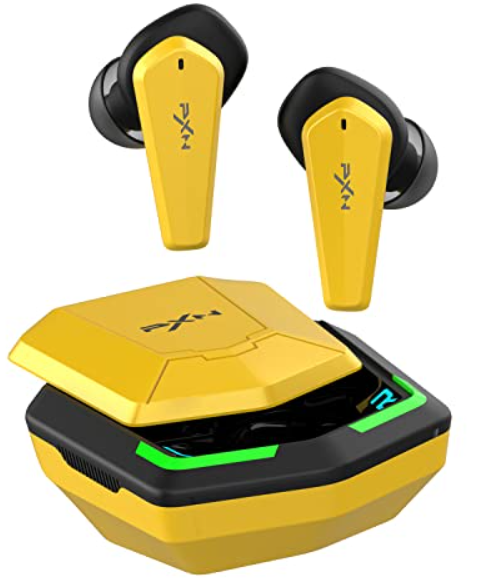
Introduction to pxn Sense Elf S2 Gaming Earbuds
The PXN Sense Elf S2 Gaming Earbuds are a cutting-edge solution designed to deliver immersive audio experiences tailored specifically for gamers and multimedia enthusiasts. These true wireless earbuds combine high-fidelity sound, low-latency Bluetooth connectivity, and ergonomic design, making them ideal for competitive gaming, casual entertainment, and on-the-go use. Featuring RGB lighting effects and a sleek, compact charging case, they also appeal to users who value both aesthetics and functionality.
Key benefits include a stable Bluetooth 5.2 connection ensuring minimal audio lag, a built-in microphone for clear voice communication, and customizable ear tips for a secure and comfortable fit during extended sessions. Their lightweight construction and IPX rating enhance portability and durability, making them suitable for indoor gaming, outdoor activities, or daily commuting.
The PXN Sense Elf S2 Gaming Earbuds target gamers seeking an affordable yet high-performance audio accessory that balances sound quality and convenience. They are compatible with Android, iOS, and most Bluetooth-enabled devices, expanding their usability across smartphones, tablets, and PCs. Priced approximately between $30 and $50 USD, these earbuds offer strong value and are widely available through online retailers and gaming accessory stores.
Specifications
- Product Name: PXN Sense Elf S2
- Connection: Wireless connection
- Input; DC 5V ≡ 1A
- Frequency Response: 20HZ - 20KHZ
- Maximum Wireless Range: 10 m (Barrier-free)
- Battery Life: About 5 hours
- Charging Method: About 1.5 hours (earbuds charging), About 2 hours (charging case + USB-C cable charging)
- Product Size: About 61.5 * 61.4 * 32 mm (charging case)
Compared to similar gaming earbuds in its price range, the pxn Sense Elf S2 stands out with its Bluetooth 5.2 technology and RGB customization, features often missing in budget wireless earbuds. Its low-latency performance helps reduce audio lag, a critical factor for gaming and video synchronization.
Overview & Package Contents
Package contents include PXN Sense Elf S2 Earbuds, 3 sizes of e-earbud tips ( M size tips are installed in the earbuds ), USB-C cable a, nd user manual.
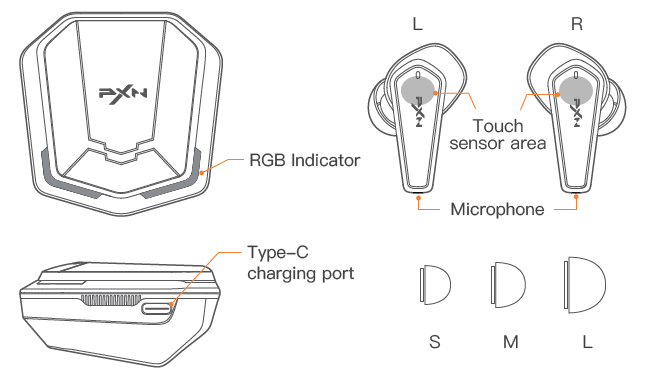
Auto Power ON & OFF
- Open the charging case and the earbuds will power ON automatically.
- Put the earbuds back in the charging case and close the case. The earbuds will power OFF and enter the charging state.
- If no connection to any smart device for more than 3 seconds after removing the earbuds from the charging case, the earbuds will power OFF automatically.
Manual Power ON & OFF
- Under the power OFF state, long-press the touch sensor area on the L & R earbuds simultaneously for 3 seconds to power ON. (Voice guidance: Power ON.)
- Under the power OFF state, long-press the touch sensor area on the L & R earbuds simultaneously for 5 seconds to power ON. (Voice guidance: Power OFF.)
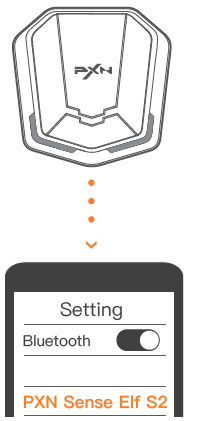
Connect Smart Device in Dual Earbud Mode
- For the first use, the earbuds indicator will keep on White for 2 seconds after removing from the charging case. (Voice guidance: Power ON.) L & R earbuds will pair automatically. (Voice guidance: Beep.) After successful pairing, the White and Blue indicator will flash alternately and enter the Bluetooth Search state. (Voice guidance: Pairing.) Now can connect with the smart device.
- Open the Bluetooth on the smart device and search for “PXN Sense Elf S2” to pair.
The earbuds will be paired with the smart device successfully. (Voice guidance: Connected.)
Connect Smart Device in Mono Earbud Mode
- Remove the L / R earbuds from the charging case and pair them according to the above dual earbud mode to complete the connection.
Auto-Reconnection
- Open the charging case, and the earbuds will automatically connect back to the last successfully connected smart device.
- The earbuds will be disconnected from the smart device when they are beyond the effective distance. (Voice guidance: Disconnected.) Return to the effective distance within 3 minutes, the earbuds and smart device will reconnect automatically.
TWS Pairing Connection of L & R Earbuds
When the earbuds leave the factory, the L & R earbuds have successfully completed TWS pairing under normal conditions, and the earbuds can be used normally after connecting with the smart device.
If you need to re-pair under special circumstances, please follow these steps:
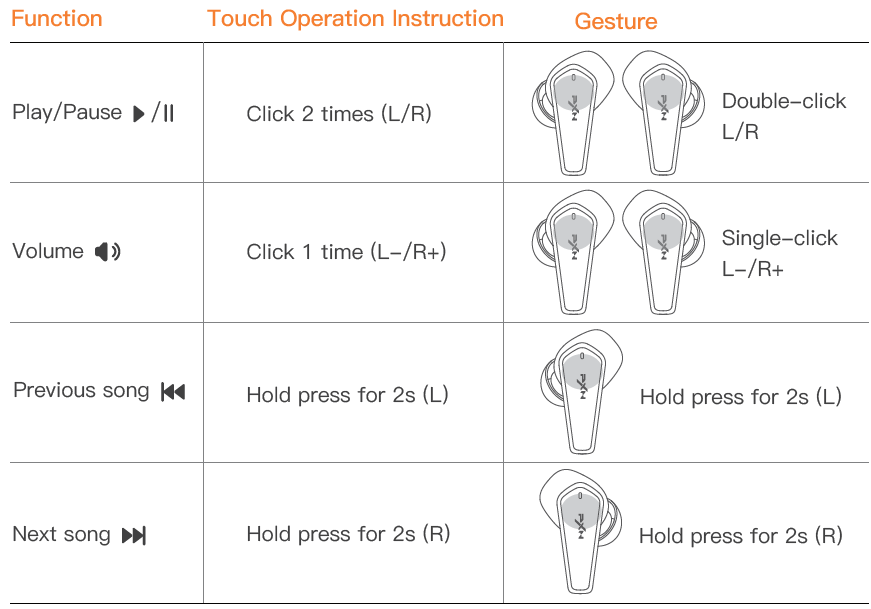
- Double-click the earbuds simultaneously when the L & R earbuds enter to the search state. The White indicator on the earbuds will enter the breathing flash state and start to pair.
- The indicator on the earbuds will flash in White and Blue alternately after successful pairing.
(Voice guidance: Beep.) Now can connect with the smart device.
Indicator State

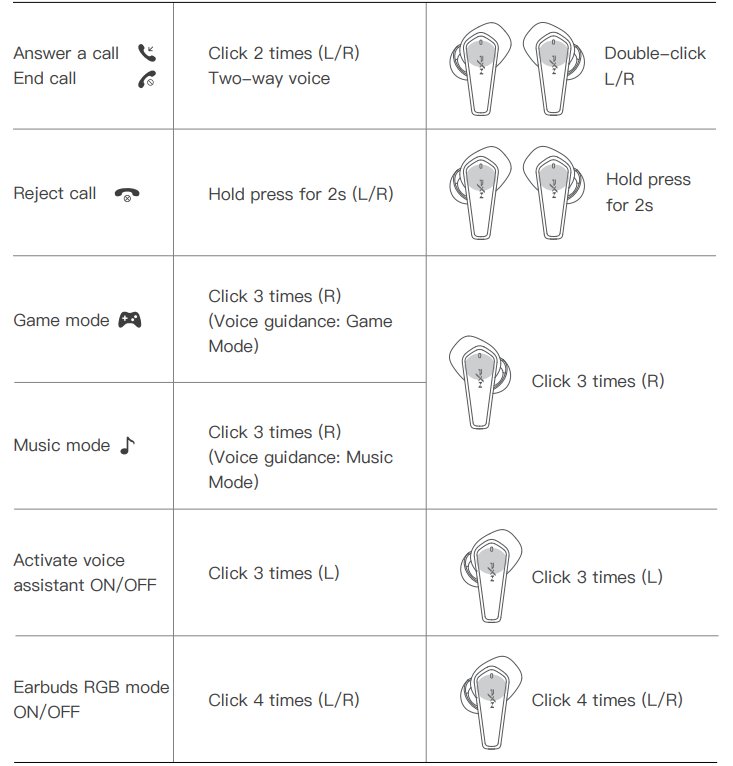
Charging
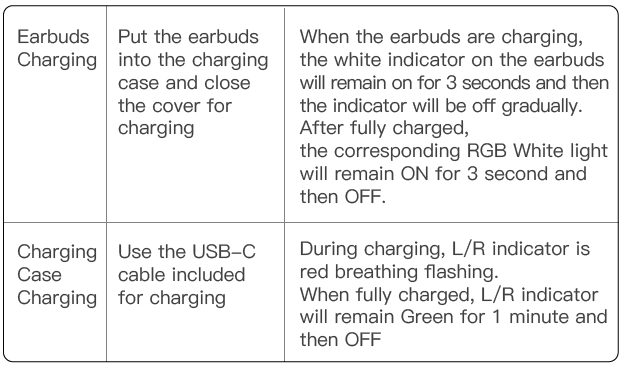
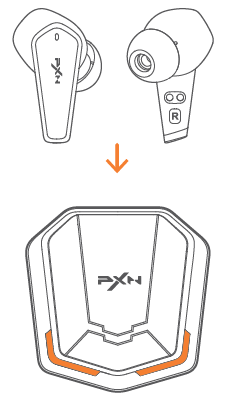
When using the charging case for charging for the first time, please put the earbuds back into the charging case and close the cover. Use the data cable included with this product to connect to the power supply for charging.
Troubleshooting Guide for pxn Sense Elf S2 Gaming Earbuds
- No Sound or Audio Dropouts: Ensure earbuds are fully charged. Reconnect Bluetooth by turning off and on both the earbuds and your device. Clear Bluetooth cache if persistent.
- Microphone Not Working: Check microphone permissions on your device. Clean any debris from the mic opening. Reset earbuds if necessary.
- Bluetooth Pairing Issues: Delete previous pairing records and attempt pairing again. Keep devices within 10 meters without obstacles.
- Earbuds Not Charging: Verify the USB-C cable and charging port are clean and undamaged. Use a compatible charger and avoid third-party cables.
- Preventive Measures: Store earbuds in the charging case when not in use. Avoid exposure to extreme temperatures or moisture beyond the IPX rating.
The PXN Sense Elf S2 comes with a standard manufacturer's warranty covering defects for one year. For support, users can contact PXN customer service through their official website or authorized dealers.
Pros & Cons of PXN Sense Elf S2 Gaming Earbuds
Pros
- Affordable Price: Offers excellent value with competitive features for under $50.
- Low Latency Bluetooth 5.2: Provides a stable wireless connection,, minimizing audio lag during gaming.
- Comfortable Fit: Multiple ear tip sizes ensure a secure and ergonomic fit for long sessions.
- RGB Lighting: Adds aesthetic appeal for gamers who enjoy visual customization.
- Good Call Quality: Built-in microphone supports clear voice chat in quiet environments.
Cons
- Limited Battery Life: Approximately 5 hours per charge may require frequent recharging for extended use.
- Microphone Sensitivity: May struggle in windy or noisy outdoor conditions due to mic placement.
- Sound Isolation: Passive noise cancellation only, less effective for very loud environments.
- Charging Case Size: Slightly bulkier compared to other true wireless earbuds in the market.
Customer Reviews and Feedback on pxn Sense Elf S2 Gaming Earbuds
Users commonly praise the PXNxn Sense Elf S2 Gaming Earbuds for their clear sound quality and reliable Bluetooth connection, often noting the impressive low latency for gaming and video synchronization. Many highlight the comfortable fit and attractive RGB lighting as standout features,, enhancing their gaming setup.
Some complaints focus on the microphone performance, especially outdoors or in noisy settings, and the relatively short battery life compared to premium models. Overall, the earbuds receive an average star rating of around 4 out of 5, with buyers recommending them for budget-conscious gamers seeking wireless convenience without significant compromise.
Purchase recommendations often emphasize their suitability for casual and semi-professional gaming, mobile use, and voice calls, while suggesting users manage expectations regarding battery duration and outdoor microphone clarity.
Faqs
How do I pair pxn Sense Elf S2 Gaming Earbuds with my gaming PC or console for the first time?
What should I do if my pxn Sense Elf S2 Gaming Earbuds won’t charge or hold a charge?
Can I use pxn Sense Elf S2 Gaming Earbuds for phone calls or voice chat during gaming sessions?
How do I adjust the audio settings or enable gaming-specific sound modes on pxn Sense Elf S2 Gaming Earbuds?
What is the wireless range of pxn Sense Elf S2 Gaming Earbuds, and will walls or obstacles affect connectivity?
How do I clean and maintain my pxn Sense Elf S2 Gaming Earbuds for long-lasting performance?
Why is there audio lag when using pxn Sense Elf S2 Gaming Earbuds for mobile gaming, and how can I reduce it?
Are pxn Sense Elf S2 Gaming Earbuds compatible with Xbox, PlayStation, or Nintendo Switch, and what are the limitations?
Tags
Leave a Comment