
Qcy T1 True Wireless Earbuds User Manual
Content
QCY T1 True Wireless Earbuds Product Manual
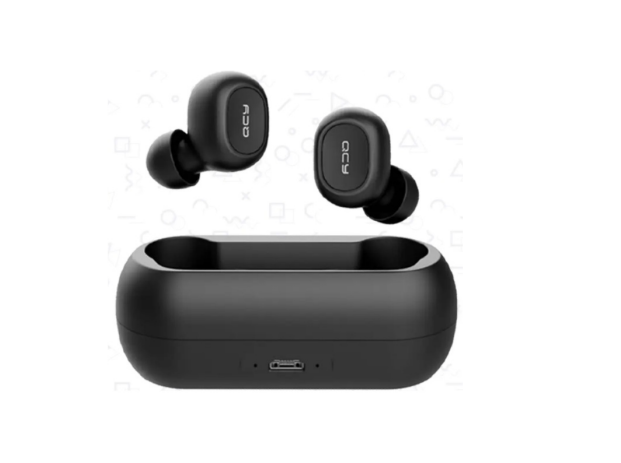
Introduction: QCY T1 True Wireless Earbuds Overview, Features, and Best Use Cases
The QCY T1 True Wireless Earbuds are a budget-friendly pair of true wireless earbuds designed for everyday listening, calls, commuting, and light workouts. Known for their simple setup, compact charging case, and reliable Bluetooth 5.0 connection, they remain a practical choice for users who want wireless convenience without paying premium prices. The earbuds support standard audio and call profiles, offer a lightweight in-ear fit, and deliver enough battery life for short trips, office use, and casual music sessions.
One of the strongest benefits of the QCY T1 True Wireless Earbuds is their balance of affordability and core functionality. They offer approximately 4 hours of music playback per charge, around 120 hours of standby time, and about 2 hours of charging time, making them suitable for users who need an easy everyday companion. The charging case adds extra portability and helps keep the earbuds powered throughout the day. These earbuds are especially appealing to students, commuters, first-time wireless audio buyers, and anyone searching for low-cost Bluetooth earbuds for calls and streaming.
In terms of availability, the QCY T1 True Wireless Earbuds are commonly found through online marketplaces and audio accessory retailers, with pricing typically sitting in the budget range of about $15 to $30 depending on region, seller, and package condition. They are best suited for casual listening, voice calls, podcasts, and basic mobile use. For users who want a straightforward, affordable, and compact wireless audio solution, the QCY T1 remains an easy entry-level option.
Specifications: QCY T1 True Wireless Earbuds Technical Details and Performance
- Model: QCY-T1 / T1
- Bluetooth Version: Bluetooth 5.0
- Wireless Range: Up to 10 meters in open space
- Supported Profiles: HFP, HSP, A2DP, AVRCP
- Earbud Battery Capacity: 3.7V 43mAh per earbud
- Charging Case Battery Capacity: 3.7V 380mAh
- Music Playback Time: Approximately 4 hours
- Standby Time: Approximately 120 hours
- Charging Time: Approximately 2 hours
- Battery Type: Li-ion
- Charging Input: 5V 500mA
- Driver Size: Commonly listed at 7mm in retail specifications
- Impedance: Commonly listed at 16 ohms in retail specifications
- Microphone: Built-in for hands-free calls
Performance-wise, the QCY T1 True Wireless Earbuds focus on stable connectivity and practical battery life rather than premium sound tuning or advanced noise cancellation. Compared with newer true wireless earbuds, they are simpler and more basic, but they remain competitive for voice calls and everyday music playback. Unlike higher-end models that include active noise cancellation, wireless charging, or app-based EQ controls, the QCY T1 emphasizes ease of use and value. For buyers comparing entry-level wireless earbuds, this model usually stands out for its low cost, compact design, and dependable Bluetooth performance.
Troubleshooting: Common QCY T1 Earbuds Problems and Fixes
If the QCY T1 True Wireless Earbuds do not connect properly, start by removing the earbuds from your phone’s Bluetooth memory and pairing them again from scratch. If one earbud does not sync with the other, place both earbuds back in the charging case, close the lid for a few seconds, then take them out together and retry pairing. If sound is missing from one side, check for low battery, dust on the charging contacts, or an interrupted pairing session.
- Pairing failure: Forget the device in Bluetooth settings, restart the earbuds, and reconnect.
- Only one earbud works: Reset both earbuds and make sure both are charged.
- Charging light stays on: Clean the contacts and confirm the case has power.
- Weak sound or dropouts: Stay within the 10-meter range and avoid obstacles.
- Low battery performance: Fully charge the earbuds and case before first use.
Some sellers and community guides refer to reset-style fixes rather than formal error codes, since the QCY T1 typically does not display on-screen error messages. Preventive care includes keeping the charging pins clean, storing the earbuds in the case when not in use, and avoiding moisture exposure. The product is generally covered by a 1-year limited warranty for eligible purchases from official channels, and support is available through QCY customer service at service@qcyearphone.com and +1(917) 204-6570.
Pros & Cons: QCY T1 True Wireless Earbuds Review
Pros
- Very affordable price point, making it strong value for money.
- Bluetooth 5.0 provides stable everyday connectivity.
- Compact charging case is easy to carry in a pocket or bag.
- Simple operation makes it beginner-friendly.
- Good for calls, podcasts, and casual music listening.
Cons
- Battery life is modest compared with newer true wireless earbuds.
- No active noise cancellation for noisy environments.
- Sound quality is functional rather than premium.
- Older design may feel basic next to modern alternatives.
- Limited feature set, with no advanced app controls on most variants.
For buyers seeking cheap wireless earbuds that simply work, the QCY T1 offers solid value. Compared with newer budget alternatives, it can feel dated, but its low cost and reliable core performance still make it attractive for backup use, kids, and casual everyday listening.
Customer Reviews: What Users Say About the QCY T1 True Wireless Earbuds
Typical user feedback for the QCY T1 True Wireless Earbuds is mixed but generally positive for the price. Many buyers praise the comfortable fit, easy Bluetooth pairing, and compact case, often rating the product around 4 out of 5 stars for value and portability. Common compliments mention decent call quality for casual use and a straightforward setup process.
Frequent complaints usually focus on battery life, occasional one-earbud sync issues, and sound quality that is good for the price but not impressive for audiophiles. A common recommendation is to buy the QCY T1 as a budget backup pair or entry-level wireless earbuds rather than a premium listening device. For users who want affordable true wireless earbuds for everyday tasks, the QCY T1 remains a practical purchase.
Faqs
How do I set up qcy T1 True Wireless Earbuds for the first time?
Why is one qcy T1 True Wireless Earbuds side not connecting or playing audio?
How do I reset qcy T1 True Wireless Earbuds when pairing keeps failing?
Are qcy T1 True Wireless Earbuds compatible with Android, iPhone, and laptops?
How can I improve the sound quality and reduce delay on qcy T1 True Wireless Earbuds?
What should I do if qcy T1 True Wireless Earbuds are not charging properly?
How long does the battery last on qcy T1 True Wireless Earbuds during calls and music?
How should I clean and care for qcy T1 True Wireless Earbuds to keep them working well?
Leave a Comment