
Pairing & Setup: Qro Classics Wireless Earbuds User Manual
Content
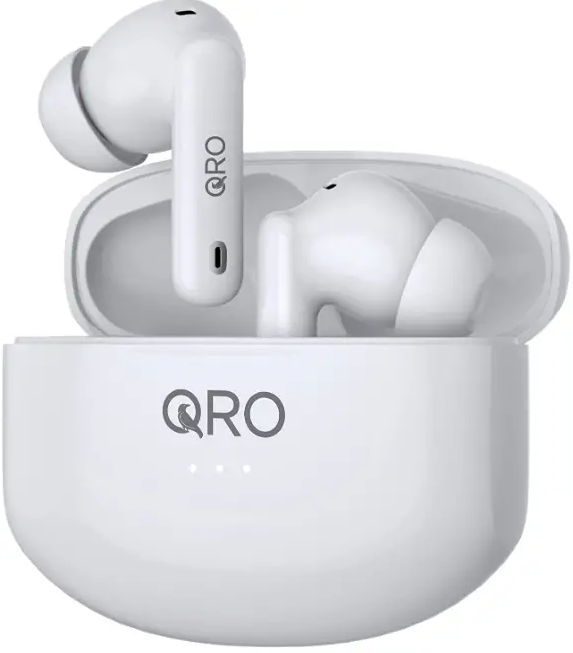
Qro Classics Wireless Earbuds
Introduction
The Qro Classics Wireless Earbuds are designed for music lovers and busy professionals seeking a seamless audio experience. These true wireless earbuds stand out with advanced features such as Active Noise Cancellation (ANC), Transparency Mode, and Game Mode, making them versatile for both entertainment and everyday use. Whether you are commuting, working out, or taking calls, the Qro Classics Wireless Earbuds deliver crisp, immersive sound and reliable connectivity.
Key benefits include up to 6 hours of music playback (5 hours with ANC on), fast charging via USB-C, and a compact charging case for portability. The earbuds are also equipped with Environmental Noise Cancellation (ENC) for clear calls, even in noisy environments. Their ergonomic design ensures a comfortable, secure fit, while the IPX4 water resistance rating provides peace of mind during workouts or in light rain.
These earbuds are ideal for students, commuters, fitness enthusiasts, and remote workers who value both performance and convenience. The estimated price range is competitive, positioning the Qro Classics Wireless Earbuds as an affordable alternative to premium brands, and they are widely available online and in electronics retailers. With a blend of modern features and user-friendly design, the Qro Classics Wireless Earbuds are a smart choice for anyone seeking quality audio without the premium price tag.
Detailed Specifications
- Active Noise Cancellation (ANC): Reduces ambient noise for an immersive listening experience
- Transparency Mode: Let's you hear your surroundings without removing the earbuds.
- Game Mode: Minimizes audio latency for a better gaming experience.
- Call Noise Cancellation (ENC): Ensures clear voice transmission during calls.
- Music Play Time: Up to 6 hours (ANC off), 5 hours (ANC on).
- Charging Case: Extends total playtime significantly; USB-C charging for quick power-ups.
- Bluetooth Version: Ensures a table wireless connection (exact version not specified in manual).
- Water Resistance: IPX4 rating protects against sweat and light splashes.
- Standby Time: Up to 150 hours for extended use between charges.
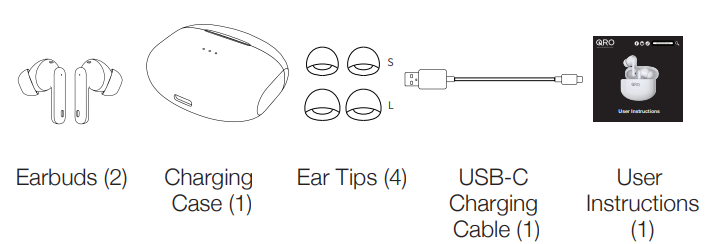
- Included Accessories: Charging cable, additional ear cushions for personalized fit.
Compared to entry-level alternatives, the Qro Classics Wireless Earbuds offer superior noise cancellation and transparency features, longer battery life, and a more robust build. While not at the ultra-premium tier, they provide excellent value for users seeking reliable performance without breaking the bank.
Contents in the Box
Product Features
- Active Noise Cancellation (ANC)
- Transparency Mode
- Game (Entertainment) Mode
- Call Noise Cancellation (ENC)
- Music Play Time (ANC Off): 6H
- Music Play Time (ANC On): 5H
- Charging Port: USB-C
- Charging Time (Earbuds): 1H
- Charging Time (Charging Case): 1.5H
- Standby Time: 150H
- Bluetooth Version: 5.1
- Water Resistance: IPX4
Powering On and Off
Powering On Options:
- The earbuds will turn on automatically when they earbuds are in the case and the case is opened.
- Press and hold one earbud for 8 seconds. You will hear “Power On” when it turns on. Follow the same procedure to turn on the other earbud.
Powering Off Options:
- Place the earbuds back into the charging case and close the lid.
- The earbuds will automatically shut down if they are not connected to a device for more than 3 minutes.
- Press and hold one earbud for 8 seconds. You will hear “Power Off” before both earbuds turn off.
Wearing Your Earbuds
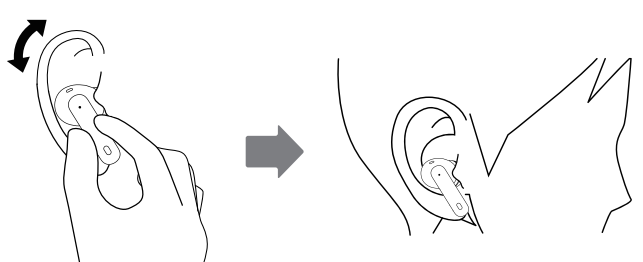
- Identify the left and right unit.
- Try different wearing positions until they fit your ears
Pairing, Connecting to,o and Disconnecting from Devices
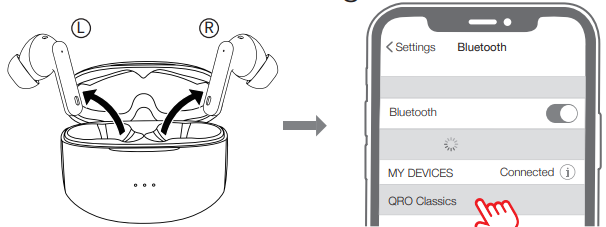
- The earbuds will automatically pair with each other once turned on.*
Connecting to your device: Choose "QRO Classics" from the device list in your device's Bluetooth settings.
- Disconnecting from your device:
- When they are placed into the charging case and the lid is closed, or
- When the earbuds stray from their Bluetooth coverage range (10 meters), you will hear "Disconnected".
- Reconnecting to your device:
- The earbuds will reconnect to your device when they return to the coverage area within 3 minutes.
- When they are powered off, reconnect one erabud to a device by pressing and holding the touch panel for 8 seconds. You will hear “Power On" and "Connected". Follow the same procedure to power on and reconnect the other earbud.
The earbuds will automatically reconnect to the last device they were connected to within that device's Bluetooth range.
Earbuds can only be connected to one device at a time. If you are experiencing Bluetooth pairing issues, make sure the earbuds are not connected to another device.
Charging
Charging the Earbuds
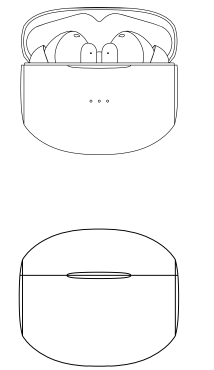
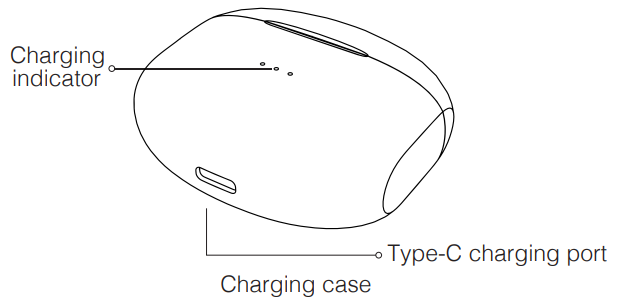
- Place the earbuds in the charging case and close the case. The LEDs on the charging case will turn on. When the earbud battery charge reaches 100%, the LEDs will turn off.
- Earbud Low Power Warning: "Battery Low" recording will be heard every 30 seconds when the voltage is lower than 3.3V.
- Earbuds will take 1 hour to charge from 0 to 100%.
Charging the Charging Case:
- Use the included USB-C cable to charge your charging case.
- Charging case battery level indicator:
- 3 LED lights on (3 solid): 100% fully charged;
- 3 LED lights on (2 solid, 1 flashing): Between 70%-100%;
- 2 LED lights on (1 solid, 1 flashing): Between 30%-70%;
- 1 LED light on (1 flashing): Less than 30%.
The case will take 1.5 hours to charge from 0 to 100%.
Earbuds and Charging Case Maintenance: Charge the earbuds and charging case once every three months to maximize the life of both devices. Failing to do so may result in damage to the device.
Troubleshooting Common Issues
Frequent Problems and Solutions
- Earbuds Not Powering On: Ensure they are charged. Press and hold an earbud for 8 seconds to manually turn on. If unresponsive, place it in the charging case and close the lid, then reopen.
- Connection Issues: Reset Bluetooth pairing on your device and earbuds. Ensure the earbuds are within range and not connected to another device.
- Short Battery Life: Disable ANC or Transparency Mode to extend playtime. Regularly charge the case and earbuds.
- Poor Call Quality: Clean the microphone area. Ensure you are in a quiet environment for the best results.
Preventive Measures
Keep earbuds dry, avoid extreme temperatures, and store them in the case when not in use. Regularly clean the ear tips and charging contacts.
Warranty and Support
Check the included warranty card for coverage details. For persistent issues, contact Qro customer support via their official website. Retain proof of purchase for warranty claims.
Pros and Cons
Advantages
- Effective Active Noise Cancellation: Great for noisy commutes and focused work.
- Versatile Listening Modes: ANC, Transparency, and Game Mode adapt to different environments and activities.
- Long Battery Life: Up to 6 hours of playback per charge, with more via the charging case.
- Comfortable, Secure Fit: Ergonomic design and multiple ear tip sizes for all-day wear.
- Affordable Price: Competitive with premium features, making it a value-for-money choice.
Drawbacks
- Noise Cancellation Not Top-Tier: While effective, it may not match high-end models in extreme noise environments.
- Bluetooth Version Not Specified: Lacks clarity on wireless tech, which may affect connectivity range and stability.
- Limited Water Resistance: IPX4 is adequate for sweat and rain but not for swimming or heavy exposure.
- Charging Case Design: Lacks a display for battery status, unlike some competitors.
Customer Reviews and Testimonials
Users consistently praise the Qro Classics Wireless Earbuds for their clear sound, effective noise cancellation, and comfortable fit. Many highlight the convenience of USB-C charging and the value gained from the included features at this price point. Common compliments include the ease of switching between listening modes and the reliable battery life for daily use.
Some customers mention minor connectivity hiccups and desire even longer playtime per charge. A few note that the charging case could benefit from a battery indicator. Overall, the Qro Classics Wireless Earbuds receive strong ratings for their performance and affordability, making them a recommended choice for budget-conscious buyers seeking quality wireless audio. Most users agree these earbuds are a smart purchase for students, commuters, and casual listeners.
Faqs
How do I set up qro Classics Wireless Earbuds for the first time?
What should I do if qro Classics Wireless Earbuds is not connecting to my device?
Can I use qro Classics Wireless Earbuds with Android and iPhone devices?
How do I activate Active Noise Cancellation (ANC) on qro Classics Wireless Earbuds?
What is the battery life of qro Classics Wireless Earbuds with ANC enabled?
How do I clean and maintain qro Classics Wireless Earbuds for long-term use?
Why is the sound quality low on my qro Classics Wireless Earbuds?
Can I use qro Classics Wireless Earbuds for phone calls and voice assistants?
Leave a Comment