
How to Use: Quintessence Harmonizer User Manual
Content
Quintessence Harmonizer
Introduction
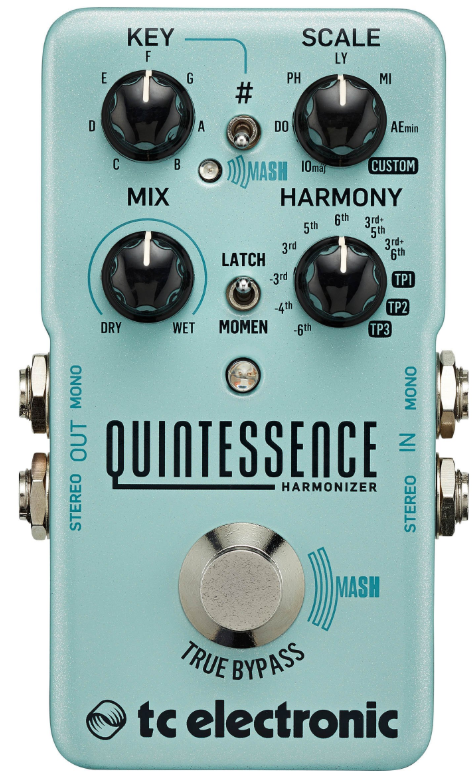
The TC Electronic Quintessence Harmonizer is a state-of-the-art intelligent harmony pedal designed for guitarists seeking studio-quality vocal and instrumental harmonies at their feet. Combining breakthrough MASH technology with the versatility of TonePrint editing, the Quintessence Harmonizer offers two-voice stereo harmonies that track your playing with remarkable precision—perfect for genres ranging from classic rock and country to progressive metal and beyond.
Key benefits include analog-dry-through for signal integrity, latch/momentary footswitch modes, and a compact, road-ready design. The MASH expressive footswitch allows for real-time pitch bending and dynamic harmony control, while three TonePrint slots let you load custom scales and intervals for truly personalized sounds. The pedal’s easy-access controls include Key, Scale, Mix, and Harmony knobs, making complex harmonies accessible even for beginners. With its true bypass switching, stereo I/O, and high-quality components, the Quintessence Harmonizer is a professional-grade tool for live performance, recording, and practice.
Target users include solo performers, session players, and bands needing lush, in-tune harmonies without extra musicians. Real-world applications span lead guitar harmonizing, vocal doubling, and creative sound design. The estimated price range is around $119 USD, and the pedal is widely available at major music retailers and online stores.
Specifications
- Bypass mode: True Bypass (default) /Buffered Bypass, switchable
- Input connector: 2 x ¼" TS, unbalanced, mono
- Input impedance: 1 MΩ
- Output connector: 2 x ¼" TS, unbalanced, mono
- Output impedance: 1 MΩ
- Output connector: 2 Standard ¼” jacks – mono/TS with automatic mono/stereo sensing
- Output impedance: 100 Ω
- Power input: Standard 9 V DC, centre negative >300 mA (power supply not included)
- Battery Option: 9 V (battery not included)
- USB: port Mini USB connector for firmware updates
- Dimensions: (H x W x D) 72 x 122 x 50 mm (2.8 x 4.8 x 2.0")
Unpacking
Your TC ELECTRONIC effect pedal box should contain the following items:
- Your TC ELECTRONIC effect pedal
- 1 USB cable (Type A to Mini-B)
- 1 TC ELECTRONIC sticker
Inspect all items for signs of transit damage. In the unlikely event of transit damage, inform the carrier and supplier.
If damage has occurred, keep all packaging, as it can be used as evidence of excessive handling force.
True Bypass
Here at TC, we have a simple philosophy: When you are using one of our products, you should hear something great – and if you don’t, you shouldn’t hear it at all. This is why this pedal sports True Bypass. When it is bypassed, it is really off and has zero influence on your tone, resulting in optimum clarity and zero loss of high end.
Sometimes, it is advisable to switch an effect pedal from True Bypass to Buffered Bypass mode. For more information, see “6.2 Switching the pedal from True Bypass to Buffered Bypass”.
Setting up
Connect a 9 V power supply with the following symbol to the DC input socket of your TC ELECTRONIC effect pedal.
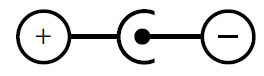
This product does not come with a power supply. We recommend using TC ELECTRONIC’s PowerPlug 9 (sold separately).
- If no power supply is available, you can run this product using a battery. For more information on changing batteries, see “7.2 Changing the battery”.
- Plug the power supply into a power outlet.
- Connect your instrument to the in jack on the right side of the pedal using a 1⁄4" jack cable.
- Connect the out jack on the left side of the pedal to your amplifier using a 1⁄4" jack cable.
Controls
Maintenance
Updating the firmware
TC may provide updates for the built-in software of your pedal, the firmware. Updating your TC pedal’s firmware requires.
- A computer running Microsoft Windows or OS X with a standard USB interface
- The specified DC power supply for your pedal.
Preparing the firmware update
- Download the newest firmware from the “Support” page for your TC pedal. There are updaters for Microsoft Windows (these are ZIP archives containing the firmware installer) and for OS X (these are disk image files containing the firmware installer).
- Unplug all cables (including the power supply) from your TC pedal.
- Connect the pedal to your computer using a USB cable.
- Press and hold the footswitch on your TC pedal. If your TC pedal has more than one footswitch, press and hold the leftmost footswitch.
- Insert the DC power supply plug.
- The LED on your pedal should turn green. If your TC pedal has more than one LED, the leftmost LED should turn green. This indicates that the pedal is ready to receive the software update.
- Release the footswitch.
- Your TC pedal will now be recognized as an updatable device.
Applying the firmware update
- Quit all MIDI-related applications (e.g., your DAW) on your computer and launch the firmware updater you have downloaded in step 1.
- In the firmware updater app, select your TC pedal from the drop-down list under the “STEP 1” heading.
- When the “Update” button under the “STEP 2” heading turns green, click it.
- The updated firmware will now be transferred to your TC pedal. Wait for the progress bar to reach 100%. When the update procedure is complete, the pedal will automatically restart.
Changing the battery
If you need to change the battery of your TC ELECTRONIC effect pedal, proceed as follows:
- Unscrew the thumb-screw on the back of the pedal and detach the backplate.
- Unmount the old battery and attach the new battery to the battery clip, making sure the polarity is correct.
- Remount the back-plate.
Notes regarding batteries
- Batteries must never be heated, taken apart,, or thrown into fire or water.
- Only rechargeable batteries can be recharged.
- Remove the battery when the pedal is not being used for a long period of time to save battery life.
- Always dispose of batteries according to local laws and regulations.
Troubleshooting
While the Quintessence Harmonizer is built for reliability, users may encounter occasional issues. Common problems include harmony tracking glitches, which can often be resolved by adjusting input levels, ensuring clean power (9VDC center-negative), and checking cable connections. If harmonies sound out of tune, verify the Key and Scale settings match your song, and consider updating the pedal’s firmware via USB.
There are no specific error codes, but if the pedal becomes unresponsive, a power cycle usually restores functionality. For persistent issues, try resetting to factory settings using the TonePrint editor. Preventive measures include regular firmware updates, using isolated power supplies, and avoiding extreme temperatures.
The product comes with a standard manufacturer’s warranty, though coverage details may vary by region. For support, contact TC Electronic’s customer service or visit their official website for troubleshooting guides and firmware updates. Always keep your purchase receipt for warranty claims. If issues persist, authorized service centers can provide professional repair options.
Pros & Cons
Advantages
- Expressive MASH Technology: Pressure-sensitive footswitch enables dynamic pitch bending and harmony articulation, adding a new level of expressiveness to your performance.
- Customizable Scales and Intervals: TonePrint editor and three memory slots allow for deep customization, including exotic scales and user-defined harmony intervals.
- Natural Tracking: Advanced pitch detection delivers smooth, musical harmonies even with fast playing.
- Analog-Dry-Through: Preserves your original tone while adding harmonies in parallel].
- Compact and Durable: Small footprint, robust construction, and easy battery access make it ideal for gigging musicians.
Limitations
- Learning Curve: While intuitive, the full range of features may require time to master, especially for custom scale programming.
- Power Supply Not Included: Requires a 9VDC center-negative adapter, sold separately.
- No MIDI Control: Lacks MIDI connectivity for advanced integration with digital setups.
- Limited to Two Voices: While sufficient for most applications, some users may desire more harmony voices.
Compared to alternatives like the Electro-Harmonix Pitch Fork or Boss Harmonist, the Quintessence Harmonizer stands out for its expressiveness and customization, though it may cost slightly more than basic harmonizers.
Customer Reviews
User feedback for the Quintessence Harmonizer highlights its natural-sounding harmonies, responsive tracking, and the creative potential of the MASH footswitch. Many praise the pedal’s ability to handle fast, intricate passages without glitches—ideal for lead guitarists and solo performers. The TonePrint customization and compact design are also frequently mentioned as standout features.
Common complaints include the initial learning curve for custom scale programming and the lack of an included power supply. Some users note that while the pedal excels at classic intervals (thirds, fifths, sixths), truly exotic scales require extra setup. Star ratings consistently average 4.5/5, with testimonials emphasizing the pedal’s value for money and professional sound quality.
Purchase recommendations stress the Quintessence Harmonizer’s suitability for players seeking expressive, studio-quality harmonies in a portable format. It is especially recommended for those who value hands-on control and tonal versatility.
Faqs
How do I set up the quintessence Harmonizer for the first time?
What should I do if the quintessence Harmonizer is not producing harmony effects?
How can I customize harmony intervals and scales on the quintessence Harmonizer?
Is the quintessence Harmonizer compatible with all guitar types and amplifier setups?
What are the main features of the MASH footswitch on the quintessence Harmonizer?
How can I optimize the performance of my quintessence Harmonizer during live performances?
What maintenance is required to keep the quintessence Harmonizer functioning properly?
Can I use the quintessence Harmonizer with other effect pedals in my pedalboard?
Tags
Leave a Comment