
How to Use: Rabbit R1 Voice Activated Assistant Device Step by Step Guide
Content
Rabbit R1 Voice-Activated Assistant Device
Introduction
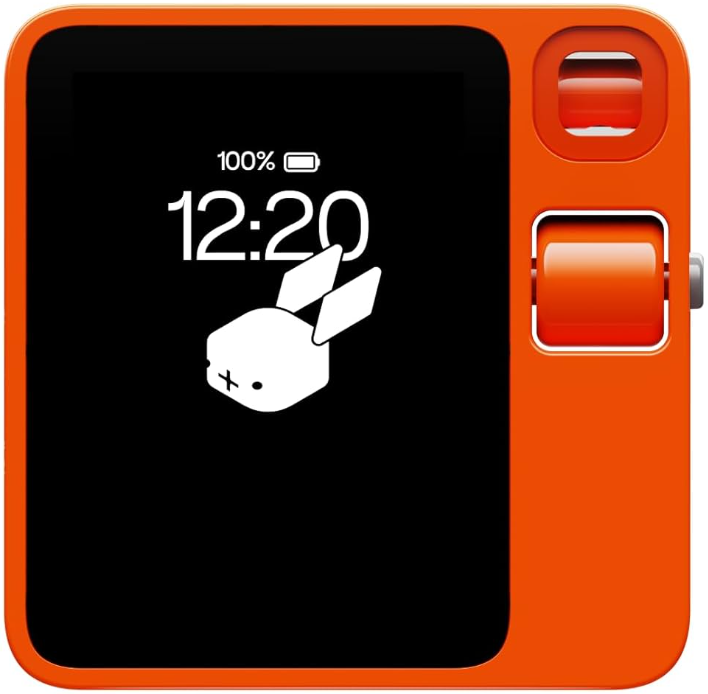
The Rabbit R1 is a revolutionary personal AI assistant designed to simplify your daily tasks with its powerful voice command and touch interaction capabilities. This compact device is perfect for anyone looking to streamline their daily routines, from setting reminders to accessing web services like ordering food delivery or booking rides. The R1 is powered by an advanced operating system, Rabbit OS, which integrates with Large Action Models (LAM) to take actions on behalf of the user across various web interfaces. It also partners with leading AI vendors to enhance user experience. Targeted at tech-savvy individuals and those seeking convenience, the Rabbit R1 is available starting at USD 199, plus taxes and shipping. It is a great option for those looking for an AI assistant that fits in their pocket. The device supports both Wi-Fi and cellular connections, ensuring seamless internet access.
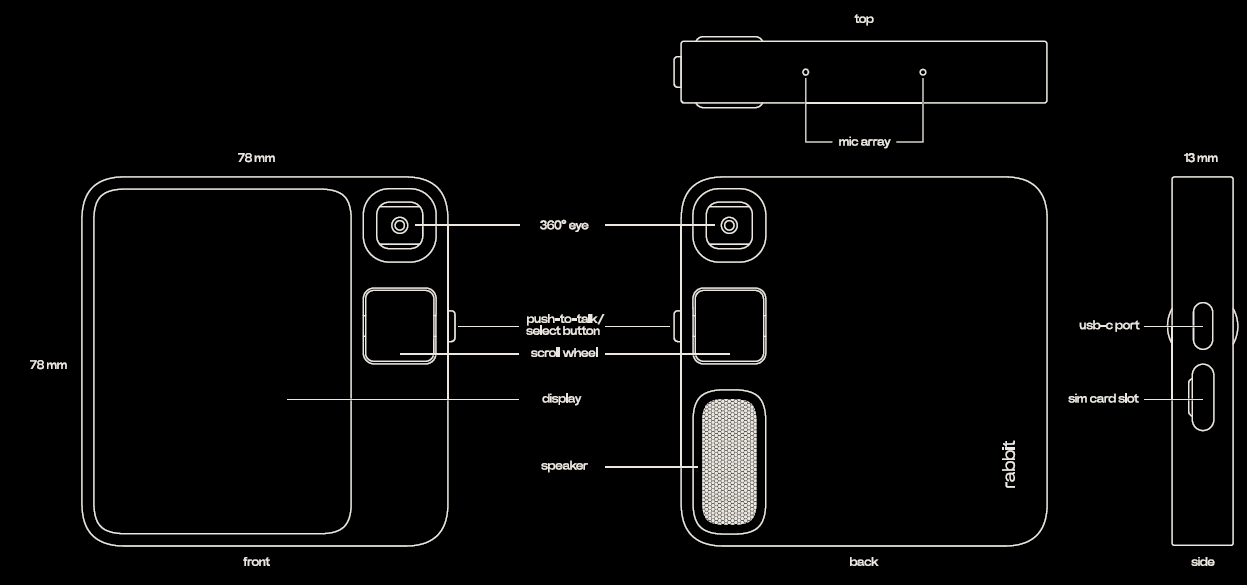
hardware overview
specifications
- dimensions 78mm*78mm*13mm / 3in*3in*0.5in
- weight 115g
- battery Li-Po 1000 mAh, non-removable
- connectivity detailsBluetooth 5.0 / Wi-Fi with 2.4GHz + 5GHz / 4G LTE
- color leuchtorange
- speaker output 2W
- audio input dual microphone array
- display 2.88-inch LCD touchscreen
- processor MediaTek MT6765 Octa-core (Helio P35)
- max cpu frequency 2.3GHz
- memory 4GB
- storage 128GB
- location magnetometer and GPS motion sensor,, accelerometer er, and gyroscope
- operating temperatures 0°C °C- 45 °C
- °C or 32ºF - 113ºF
- charging and expansion USB-C connectorphoto resolution 8MP, 3264x2448 video resolution 24fps, 1080p empty SIM card slot (unlocked)
r1 basics
- Settings navigate to the settings card from the deck located in the home menu, or access it from the quick settings tab. Quick settings swipe down from the top edge of the screen, to pull down the quick settings tab. From here,, you can quickly access the camera, keyboard,
- quick home while on any card, swipe up from the bottom edge of the screen
- device language head to the settings card, find the“device” option, then tap the language option and choose your language. This will change both the device language and the language of ice interactions. You can also say change the language to Spanish.
- Troubleshoot if your R1 becomes unresponsive. Click the PTT button 5 times in quick succession to reconnect it to the cloud system, or click the PTT button 88 times in quick succession to shut down the device.
- OTAs over-the-air (OTA) updates are released periodically and sent automatically to your device. Make sure your R111 is connected to a network and a power source to get the best OTAs.
- Sleep mode while on the home screen, press the PTT button once to enter sleep mode. To wake the device from sleep mode, press the PTT button once. go tosettings > display > auto-slee
- r-cade r-cade rewards you for each action you perform with your r1. Once you collect enough carrots, scroll down twice from the home screen to play the gashapon game and find new
device controls
learn the different methods available to control and interact with your device. r1 supports touch, text, and voice inputs. swipe, tap, click, and spin
touch
- Rabbit R11 now supports touch on its LCD. Swipe and tap to explore our playful card-inspired interface. Here are a few tips and tricks for touch inputs: swipe down from the top edge of the screen to reveal the quick settings. From here, you can get quick access to the camera, settings, keyboard, and screen lock. Swipe up from the bottom edge of the display to quickly go back to the main screen.
voice
- Use your voice to control your device settings and give your device commands. Try these:
- “Turn the brightness to 50%.”
- “Turn the volume down a bit.”
- “Navigate to Wi-Fi settings.”
- “Change the time zone to Central Time.”
text
- If you’re shy and don’t want to talk, try using the text input from the quick settings menu, to type up any questions or commands. Try these:
- Type “turn the brightness to 10%.”
- type “turn the volume up a bit.”
- Type “open Wi-Fi settings.”
- Type “change the time zone to Eastern time.”
unlimited AI functions
With R1, you get unlimited access to the best AI models available. From using your voice to get answers to all of your questions and talking to R1 in multiple languages, to turning on the camera to understand your surroundings,, learn how to use R1's AI functions below.
*internet connection required,
ask anything
- Ask unlimited questions and get unlimited answers, whether you’re at home or on the go. rabbitOS will pick the correct tools for any question you may have, so you don’t have to.
- Press and hold the PTT button to speak to your R1 using your everyday language.
- When you're done speaking your prompt, release the button to let R1 do its work.
- Ask follow-up questions, and your R1 will understand what you’re referring to without having to specify the exact details again. Try questions like these:
- “What movies are out in theaters right now?”
- “If my dining nook is 7 feet wide, what’s the widest table I can fit in that space?”
- “At what temperature and for how long should I bake 4 boneless chicken thighs?”
- “I’m feeling sad today. Can you cheer me up?”
identify objects
- Use r1‘s camera to superpower your visual searches, translate or transcribe text, and understand your surroundings.
- Turn on the camera, point to any object, and ask questions like these:
- pointing at a 3d printer: “What make is this, and how much does this cost?”
- pointing to a t-shirt with Spanish text: “What does this say in English?”
- pointing at a movie poster: “When did this movie come out, and who are the top cast members?”
- pointing at a flower: “What kind of flower is this, and does it require a lot of sunlight and water?”
bidirectional translation
instantly translate between more than 100 languages. To start the translator, hold PTT and ask R1 to translate between any two languages. Or manually select them from the translation card, then hold PTT while speaking, and R1 will translate your conversation. Try these:
- “Translate between English and Spanish.”
- “Translate between Mandarin and English.”
AI recording
record unlimited audio samples and meetings,, and access unlimited transcripts and summaRabbitholebbithole. Try these:
- “start a new recording”
- “Record this meeting”.
Agentic AI function
At Rabbit, we are always building. By giving R1 users access to our newest experimental features — including the latest updates to our cross-platform general AI agent system — we can iterate faster and deliver more value to you.
*Note that setting up the following features on a desktop computer will offer the best experience.
creations
- With creations, you can make simple tools, games, or other experiences right there on your R1. Just tell the agent what you want, and it will custom-build it for you in minutes.
- Open the creations card on your R1 and try these:
- “make a level I can use for a quick DIY construction project”
- “create a dinosaur-themed calculator”'
- “Can you build a snake game, but instead of a snake, make it a mouse eating cheese?”
intern
- Intern is your on-demand team of AI agents that turns your ideas into finished work. Build projects, automate tasks, and more with your own human-level AI interns.
- Describe a task using your natural language, answer any follow-up questions your intern asks, and then watch your intern get to work for you.
- Open the intern card on your R1 and try these:
- “Help me build a website for my flower shop business”
- “I need a detailed research report on the history of bagels in New York City.
agentic AI features
LAM playground
LAM playground lets you ask your personal AI agent to navigate websites, check information, and take actions on any digital interface on your behalfNotete that you must be logged in to your personal online accounts through Rabbithole to perform some tasks.
Teach mode beta
Teach mode lets you create customized AI agents to do specific tasks for you. In Rabbithole, record yourself performing a specific task on any website so your personal agent can do similar tasks for you in the future. Y You can record your own lessons or replay community lessons in Rabbithole.
Note that you must be logged in to your personal online accounts through Rabbithole to perform some tasks.
Troubleshooting the Rabbit R1
Here are some common issues and their solutions:
- No Internet Connection: Ensure Wi-Fi or cellular data is enabled. Restart the device if necessary.
- Microphone Issues: Check if the microphone is muted or obstructed. Clean the microphone area.
- App Crashes: Restart the device or uninstall and reinstall the problematic app.
For more complex issues, Rabbit Inc. offers a comprehensive warranty and support options through its website and customer service channels. Users can reach out to them directly for assistance.
Pros and Cons of the Rabbit R1
Pros
- Convenience: Compact design with voice and touch control.
- AI Capabilities: Integrates LAM for automated tasks and services.
- Customizable Interface: Users can personalize their experience with generative AI.
Cons
- Learning Curve: Requires initial setup and understanding of AI features.
- Price: It may be costly for some users compared to other voice assistants.
- Availability: Limited shipping regions currently.
Customer Reviews for the Rabbit R1
The Rabbit R1 Voice-Activated Assistant Device has received positive feedback for its innovative AI features and user-friendly interface. Users praise its ability to handle complex queries and provide personalized recommendations. However, some users note that the initial setup can be confusing,, and the device's availability is limited in certain regions. It has a rating of 4.5 out of 5 stars on Best Buy, with users appreciating its versatility and compact design.
For those considering purchasing the Rabbit R1, it is recommended for those who value AI-driven automation and are willing to explore its advanced features. While it may not be the most affordable option, its unique capabilities make it a strong contender in the AI assistant market.
Faqs
How do I set up my rabbit R1 Voice Activated Assistant Device for the first time?
What should I do if my rabbit R1 Voice Activated Assistant Device is not responding to voice commands?
Can the rabbit R1 Voice Activated Assistant Device connect with other smart home devices?
What are the key hardware features of the rabbit R1 Voice Activated Assistant Device that enhance its performance?
What are the battery life expectations and charging recommendations for the rabbit R1 Voice Activated Assistant Device?
How do I maintain and care for my rabbit R1 Voice Activated Assistant Device to ensure longevity?
Is the rabbit R1 Voice Activated Assistant Device compatible with popular apps like Spotify and Uber?
How can I optimize the performance of my rabbit R1 Voice Activated Assistant Device for faster AI responses?
Leave a Comment