
Ram MDI-6 Humidifier User Manual
Content
Ram MDI-6 Humidifier Review and User Manual Guide
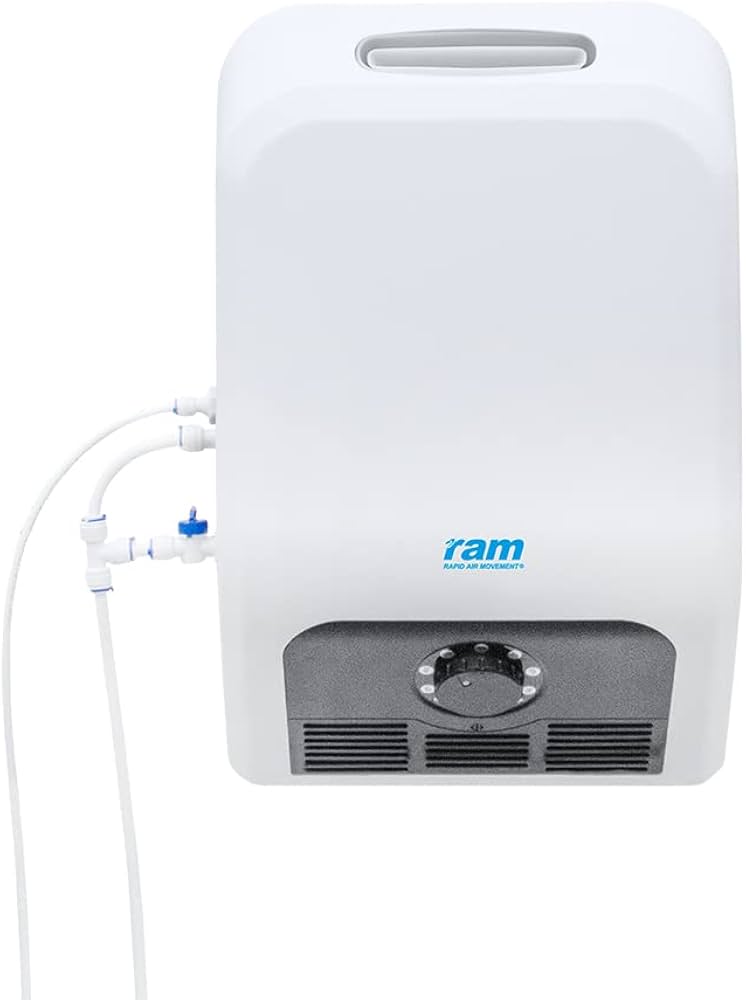
The ram MDI-6 Humidifier is a wall-mounted ultrasonic humidifier designed for environments where stable humidity control matters more than style. It is commonly used in wine storage rooms, greenhouses, grow spaces, storage areas, and other commercial or hobby settings that need consistent moisture output. With mains-water connection support and a built-in humidistat, the unit is built for hands-off operation, reducing the need for frequent refills and manual adjustments.
One of the biggest advantages of the ram MDI-6 Humidifier is its high output capacity, which makes it suitable for larger spaces that need steady humidity levels throughout the day. Its ultrasonic misting system uses a ceramic diaphragm to create a fine cool fog, helping maintain balanced conditions without producing excess heat. The wall-mounted format also saves floor space, making it a practical choice for compact rooms and professional installations.
This model is aimed at users who want reliable, low-maintenance humidity control rather than a decorative tabletop unit. It is especially useful for wine cellars, plant propagation rooms, and controlled storage environments. The estimated price range for the ram MDI-6 Humidifier is typically around the mid-range commercial segment, often near £225 to £250 depending on the seller and region. Availability is generally good through specialist HVAC, grow-room, and environmental-control retailers.
Technical Specifications for Ram MDI-6 Humidifier
- Type: Wall-mounted ultrasonic humidifier
- Humidity control: Adjustable built-in humidistat, typically from 20% to 100%
- Maximum output: 1600 ml/hr, or 1.6 litres per hour
- Power input: 220-240 V AC, 50 Hz
- Power consumption: 120 W
- Water supply: Direct mains water connection
- Filtration: Inline water filter included on many packages
- Operation style: Continuous-use design for unattended humidity management
- Best use cases: Wine rooms, greenhouses, humidification zones, and storage areas
- Performance benchmark: High-output coverage is suited to larger spaces compared with 5-litre tabletop humidifiers that usually deliver lower hourly output
Compared with small ultrasonic tabletop humidifiers, the ram MDI-6 Humidifier offers much stronger continuous output and does not rely on frequent tank refills. Compared with larger industrial humidifiers, it is simpler to install and more affordable while still providing strong mist output and automated humidity control.
Troubleshooting Ram MDI-6 Humidifier Problems, Error Codes, and Fixes
If the humidifier does not produce mist, first check the power supply, wall switch, and water connection. A blocked filter, low water pressure, or a dirty ultrasonic diaphragm can also reduce output. Clean the diaphragm carefully and confirm the unit is receiving water flow before restarting.
If humidity levels stay too low, raise the humidistat setting and make sure the room is properly sealed. In larger or leaky spaces, the humidifier may be working normally but still unable to overcome excessive air exchange. For excessive humidity, lower the setpoint and check that the humidistat sensor is not placed too close to the mist outlet.
Common issues may include low-water or maintenance alerts on versions with indicator lights, though exact error-code labels can vary by retailer or batch. Typical fixes include replacing the inline filter, cleaning mineral buildup, checking inlet connections, and restarting the unit after service. Preventive care should include routine filter replacement, periodic descaling, and monthly inspection of the water line.
Warranty terms vary by seller, but many units are sold with standard manufacturer or distributor coverage. For support, contact the retailer, distributor, or the manufacturer’s service team through the product page or purchase invoice details. Keep the model number, proof of purchase, and installation date ready when requesting help.
Pros and Cons of the Ram MDI-6 Humidifier
Pros
- High 1.6 L/hr output supports larger humidity-control spaces.
- Wall-mounted design saves valuable floor space.
- Direct mains-water connection reduces refill work.
- Built-in humidistat supports automatic operation.
- Quiet ultrasonic misting makes it suitable for indoor environments.
- Strong value for money for users who need continuous humidification.
Cons
- Requires installation and a water connection, so it is less portable than a tabletop humidifier.
- Not ideal for users who want a simple plug-and-play bedroom unit.
- Needs regular filter and mineral maintenance in hard-water areas.
- May be overkill for small rooms where a lower-output humidifier would be cheaper.
Compared with compact home humidifiers, the ram MDI-6 Humidifier is better for practical humidity management and unattended use. Compared with premium smart humidifiers, it offers fewer app-based features but stronger purpose-built performance for fixed-location setups.
Customer Reviews and User Feedback on Ram MDI-6 Humidifier
Typical user feedback for the ram MDI-6 Humidifier is positive, with many buyers rating it around 4.4 out of 5 stars for output, reliability, and convenience. Customers often praise the consistent mist production, the space-saving wall mount, and the fact that it runs without constant refilling.
Common complaints usually focus on installation effort, the need for plumbing access, and occasional maintenance in hard-water conditions. One common testimonial style comment is: “Excellent output for my wine room, and once installed it just works.” Another frequent note is: “Great performance, but regular cleaning is essential.”
For buyers who need a high-output ultrasonic humidifier for a fixed space, the ram MDI-6 Humidifier is usually a smart purchase. Users who want a portable room humidifier may prefer a smaller tabletop model instead.
Faqs
How do I set up the ram MDI-6 Humidifier for the first time?
Why is my ram MDI-6 Humidifier not producing enough mist?
Can I use tap water in the ram MDI-6 Humidifier, or is distilled water better?
How do I clean and maintain the ram MDI-6 Humidifier properly?
What should I do if the ram MDI-6 Humidifier has a bad smell?
How far should the ram MDI-6 Humidifier be from walls, furniture, and electronics?
What humidity setting is best for the ram MDI-6 Humidifier in a bedroom?
Is the ram MDI-6 Humidifier compatible with smart plugs or timers?
Leave a Comment