
Rand Mcnally TND Tablet 1050 User Manual
Content
Rand McNally TND Tablet 1050 Product Manual
Introduction
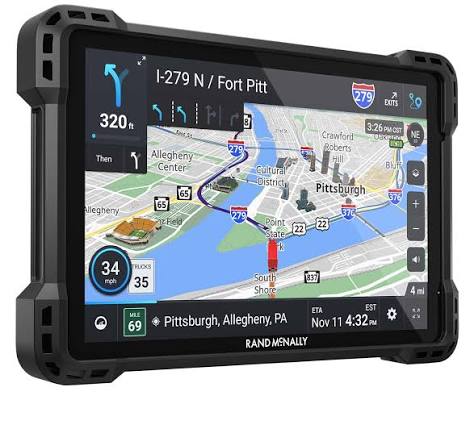
The Rand McNally TND Tablet 1050 is a large-screen truck GPS designed for professional drivers who need dependable navigation, route planning, and driver-focused tools in one rugged device. Built around a 10-inch high-definition display, this truck navigation tablet makes maps, alerts, and route guidance easier to read at a glance, which is especially useful during long-haul driving, complex dock approaches, and high-traffic interstate travel.
One of the biggest advantages of the rand mcnally TND Tablet 1050 is its truck-specific routing. Instead of using standard car navigation, it is designed to support commercial driving needs such as truck-relevant road data, vehicle-aware route guidance, and tools that help drivers stay on approved roads. It also includes a built-in camera, multiple mounting options, and a removable tablet guard for added durability in demanding cab environments.
This model is ideal for owner-operators, fleet drivers, regional haulers, and delivery professionals who want a dedicated truck GPS with a large screen and practical navigation features. It is also suitable for drivers who prefer a tablet-style interface over smaller standalone GPS units. Estimated pricing for the rand mcnally TND Tablet 1050 is typically in the mid-to-upper range for truck navigation devices, with a common retail range around $700 to $800 depending on seller, bundle, and availability. Stock can vary by retailer, and availability is often better through truck-accessory sellers, online marketplaces, and Rand McNally product channels.
Specifications: Rand McNally TND Tablet 1050 technical details
- Display: 10-inch high-definition touchscreen for large, easy-to-read maps and menus.
- Navigation type: Truck-specific GPS routing with commercial-driver-focused road data and guidance.
- Camera: Built-in camera for capturing images and supporting driver documentation tasks.
- Mounting options: Includes multiple mounting styles such as suction cup, screw-down, and ball mount bracket.
- Power: Vehicle charger included; quick-start materials list a 5V/5A charger.
- Connectivity and ports: USB-C, micro HDMI, and microSD card slot for expansion and accessory use.
- Protection: Comes with a removable tablet guard and anti-glare screen protector.
- Use case performance: Designed for cab visibility, route readability, and truck navigation rather than general entertainment.
- Benchmarks and positioning: The larger screen and truck-focused data place it above smaller models such as 5-inch or 7-inch truck GPS units for visibility and ease of use.
Compared with smaller commercial navigation devices, the rand mcnally TND Tablet 1050 stands out for its 10-inch display, broader viewing area, and more tablet-like workflow. Drivers who want a larger interface often prefer it over compact truck GPS units, while users who need a lighter, less expensive option may consider smaller Rand McNally tablets instead.
Troubleshooting: Common problems and fixes for Rand McNally TND Tablet 1050
- Device will not power on: Check the vehicle charger, USB-C cable, and power source. Try another outlet or ignition setting, then hold the power button for several seconds.
- GPS signal is weak or delayed: Move to an open area, remove obstructions near the windshield, and allow extra time for satellite lock after startup.
- Maps are not loading correctly: Restart the tablet, confirm available storage, and check for software or map updates when connected to Wi-Fi.
- Touchscreen is unresponsive: Clean the screen, remove gloves or moisture interference, and perform a restart if the issue continues.
- Mount feels loose: Re-seat the mount, tighten the connection points, and verify the surface is clean before reinstalling.
- Possible error messages: Messages related to GPS, storage, or update failures are usually fixed by restarting, freeing memory, or reinstalling updates.
Preventive maintenance helps avoid most issues. Keep the screen clean, update maps regularly, avoid extreme heat in the cab when parked, and use the protective guard during daily operation. Warranty and support options are available through Rand McNally’s support channels, with customer help commonly offered by phone and email. For assistance, users can contact Rand McNally support at 877-446-4863 or use the company’s support website and contact page for GPS tablet help.
Pros & Cons of the rand mcnally TND Tablet 1050
Pros
- Large 10-inch display: Excellent for route visibility, especially in busy cab environments.
- Truck-focused navigation: Designed for commercial drivers who need practical routing tools.
- Multiple mounting options: Easier to install in different vehicle setups.
- Durable design: Includes a removable guard and rugged tablet-style construction.
- Helpful for long hauls: Better readability reduces eye strain on extended trips.
Cons
- Higher cost: More expensive than smaller truck GPS alternatives.
- Large size: May feel bulky in compact cabs or crowded dashboards.
- Learning curve: Drivers new to tablet-style GPS units may need time to adjust.
- Best for truckers only: Less practical as a general-purpose tablet.
Overall value for money is strongest for drivers who want a dedicated truck GPS with a big screen and commercial routing features. Compared with smaller alternatives, the rand mcnally TND Tablet 1050 offers better visibility and more cab-friendly usability, but the premium price may not suit casual users or drivers who only need basic navigation.
Customer Reviews: What drivers say about the Rand McNally TND Tablet 1050
Customer feedback for the Rand McNally TND Tablet 1050 is generally positive, with many drivers praising the large display, truck-specific routing, and sturdy build. A typical rating pattern for satisfied users is around 4 out of 5 stars, especially from professional drivers who value visibility and route clarity on long drives.
Common praise includes easy-to-read maps, helpful mounting choices, and a layout that works well in a truck cab. Common complaints often mention the price, occasional software quirks, and the size of the device for smaller dashboards. One recurring comment from users is that the tablet performs best when kept updated and mounted securely.
Purchase recommendation: this model is a strong choice for professional truck drivers who need a large-screen GPS and are willing to pay more for convenience and visibility. It is less ideal for light-duty drivers or buyers looking for a budget navigation device.
Frequently Asked Questions
Is the rand mcnally TND Tablet 1050 good for truck drivers?
Yes. It is built specifically for truck navigation, with a large screen and commercial-focused routing tools.
What comes in the box?
Typical box contents include the 10-inch navigation device, powered magnetic mount connector, multiple mounting options, vehicle charger, USB-C cable, and screen protector.
Where can I get support?
Support is available through Rand McNally’s customer help channels, including phone support at 877-446-4863 and the company’s official support resources.
Faqs
How do I set up rand mcnally TND Tablet 1050 for the first time?
Why is my rand mcnally TND Tablet 1050 not finding GPS signal, and how can I fix it?
What should I do if rand mcnally TND Tablet 1050 freezes, runs slowly, or apps crash?
How do I update maps and software on rand mcnally TND Tablet 1050?
Can rand mcnally TND Tablet 1050 work with truck-specific routing and vehicle settings?
How do I connect rand mcnally TND Tablet 1050 to Bluetooth, Wi-Fi, or a phone hotspot?
What are the most useful features of rand mcnally TND Tablet 1050 for long-haul drivers?
How should I clean and maintain rand mcnally TND Tablet 1050 for reliable daily use?
Tags
Leave a Comment