
Setup & Pairing: Redmi Buds 3 Earbuds User Manual
Content
Redmi Buds 3 Earbuds
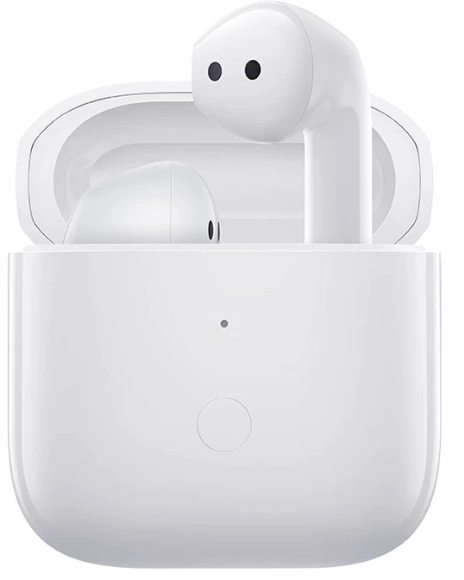
Introduction
The Redmi Buds 3 Earbuds deliver a premium wireless audio experience at an affordable price. Designed for music lovers, commuters, and everyday users, these true wireless earbuds combine lightweight comfort with advanced features like high-resolution sound, dual-mic noise cancellation, and long battery life. With a sleek semi-in-ear design and a compact charging case, Redmi Buds 3 Earbuds are perfect for on-the-go listening, calls, and workouts.
Key benefits include a Qualcomm® QCC3040 Bluetooth® chipset for stable connectivity, 12mm dynamic drivers for rich audio, and IP54 dust/water resistance for durability. The earbuds weigh just 4.5g each, ensuring hours of comfortable wear. Whether you're streaming music, taking calls, or gaming, Redmi Buds 3 Earbuds offer reliable performance and crisp sound quality.
Available in glossy white, these earbuds are priced around $48 and are widely available through Xiaomi’s official channels and major retailers. Ideal for students, professionals, and casual listeners, Redmi Buds 3 Earbuds are a smart choice for anyone seeking value-packed wireless audio.
Specifications: Redmi Buds 3 Earbuds
- Name: Wireless Earphones
- Model: M2104E1
- Frequency Band: 2402–2480 MHz
- Max RF Output Power: < 20 mW
Earbuds
- Dimensions: 40.7 × 16.9 × 18.7 mm
- Net Weight (per earbud): Approx. 4.47 g
- Wireless Range: 10 m (in an obstacle-free environment)
- Cell Capacity (per earbud): 35 mAh
- Input: 5 V=70 mA
- Cell Type: Lithium-ion polymer cell
- Wireless Connectivity: Bluetooth 5.2
Charging Case
- Model: M2104E1
- Dimensions: 49.6 × 49.6 × 24.5 mm
- Battery Capacity: 310 mAh
- Input: 5 V=500 mA
- Output: 5 V=150 mA
- Battery Type: Lithium-ion polymer battery
- Storage Temperature: 0 °C to 45 °C
- Operating Temperature: 5 °C to 40 °C
- Service Life: 1 year
Compared to similar models like Soundpeats Air 3, Redmi Buds 3 Earbuds offer better battery life and a more comfortable fit, making them a top pick in the budget TWS segment.
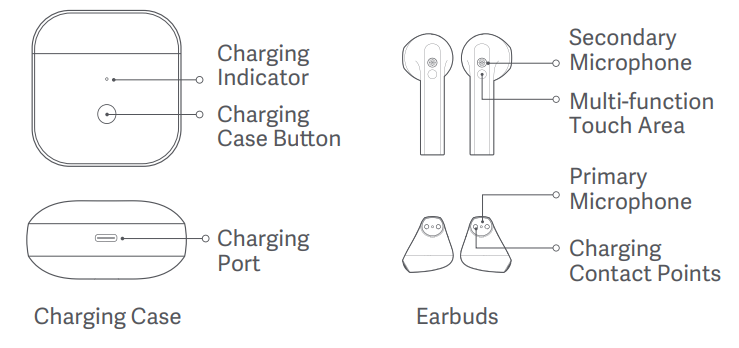
Product Overview
Important Safety Information
- Do not attempt to disassemble, repair, or modify the product, as this may cause fire or even completely damage the product.
- Keep the product's indicator away from the eyes of children and animals while the product is in use.
- Do not use this product during thunderstorms. Thunderstorms may cause the product to malfunction and increase the risk of electric shocks.
- Do not disassemble, puncture, or crush the product nor expose it to fire.
- Please stop using the product immediately and seek medical assistance if the contact area on your skin shows signs of redness or swelling.
- To prevent possible hearing loss, do not use high volume for long periods of time.
- This product is not a toy and may contain small parts. Please keep them out of the reach of children.
- Disposal of a battery into fire or a hot oven or water, or other liquids, or mechanically crushing or cutting of a battery, which can result in an explosion.
- Leaving a battery in an extremely high temperature surrounding environment that can result in an explosion or the leakage of flammable liquid or gas.
- A battery subjected to extremely low air pressure that may result in an explosion or the leakage of flammable liquid or gas. Product information and certification marks are located in the Charging Case.
- Do not put the battery in the trash that is disposed of in landfills. When disposing of the battery, comply with local laws or regulations. Replacement of a battery with an incorrect type that can defeat a safeguard (such as catching fire, explosion, leakage of corrosive electrolyte, etc).
- = The symbol indicates DC voltage.
- This device is equipped with a built-in battery that can not be removed or replaced. Do not disassemble or modify the battery by yourself. Only use certified chargers supplied by qualified manufacturers.
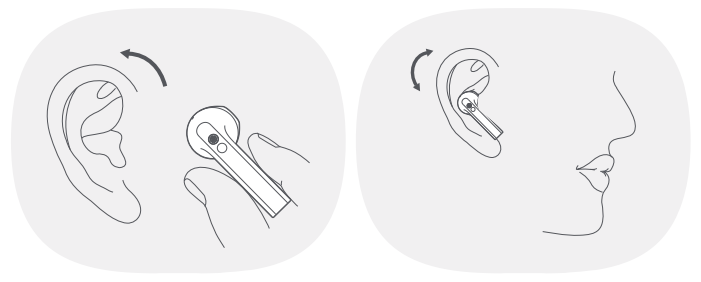
Wearing
- Gently place the earbud into your ear canal, then adjust it to a comfortable position.
- During calls, make sure to point the primary microphone towards your mouth for clearer calls.
Charging
Before use, please remove the protective film from the contact points on both earbuds and fully charge the charging case and the buds.
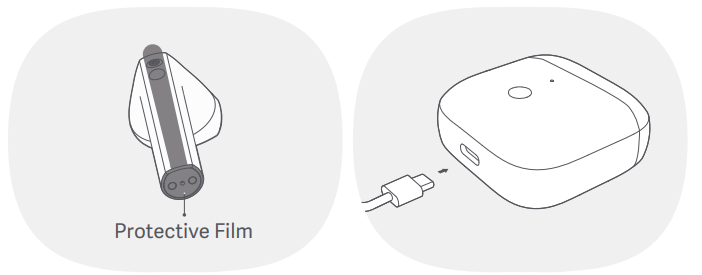
- Connect the charging cable to the charging case and keep the earbuds inside the case to charge simultaneously.
- When the charging case is not fully charged, its indicator is white. When it is fully charged, its indicator is off.
Turning On
- When the buds are in the charging case, open the lid to automatically turn them on.
- When putting the earbuds into the charging case while they are turned off, the earbuds will be automatically turned on.
Connection First-time
Both earbuds will enter the awaiting connection mode when the charging case's lid is opened. After enabling the phone's Bluetooth, search for and tap 'Redmi Buds 3' to connect the earbuds to the phone.
Note: If the earbuds cannot be connected, place them back into the charging case, close the lid, and repeat the above operation.
Reset Earbuds
If the earbuds cannot connect properly, please follow the steps below to reset them.
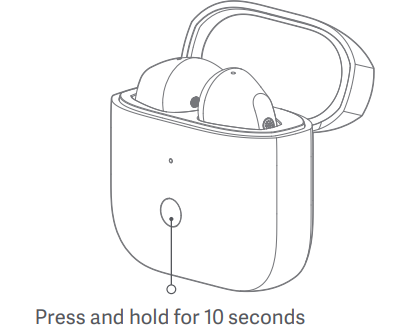
Open the lid of the charging case and place both earbuds in the case. Press and hold the charging case button for 10 seconds, and the charging case's indicator will blink white for 3 seconds and turn off, indicating the earbuds have been reset successfully (the connection records between the left and right earbuds, and the earbuds and the phone have been cleared).
Function Overview
Answer/End calls
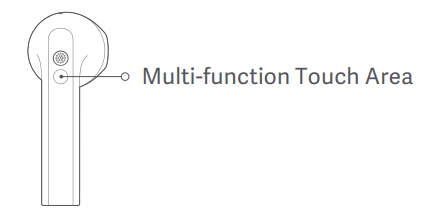
Double-tap the left/right earbud's multi-function touch area to answer a call,; and tap the left/right earbud's multi-function touch area three times to decline or hang up the call.
Play/Pause Music
- Method 1: Remove the earbuds to pause the music and wear the earbuds to start playing the music.
- Method 2: Press and hold the left/right earbud's multi-function touch area to pause/play the audio.
Play next track/previous track.
When playing audio, double-tap the earbud's multi-function touch area to play the next track, and then tap the earbud's multi-function touch area three times to play the previous track.
Answer a Second Call
Double-tap the left/right earbud's multi-function touch area to put the ongoing call on hold and answer the incoming call, and tap the left/right earbud's multi-function touch area three times to hang up the current call and answer the call on hold.
Switch between single/dual bud mode.
When both buds are connected successfully, they are in dual-bud mode. If you place one of the buds back into the charging case and close its lid, the other bud will automatically enter the single-bud mode. When removing the second bud from the charging case, the dual-bud mode will automatically be restored again.
Fast Pairing
Place the earbuds into the charging case and close its lid. Make the sure the Mi/Redmi phone's Bluetooth is enabled and hold it close to the charging case, then open the case's lid and follow the on-screen instructions to connect the phone to the earbuds.
Note: To use the feature to quickly connect, please update your Mi/Redmi phone to the latest stable version. Then open Additional settings in your phone's Bluetooth settings to enable Pair compatible devices. This feature is currently only supported by some Mi/Redmi phones.
Automatic connection
When the earbuds are in the charging case, opening the lid of the charging case will automatically connect the earbuds to the most recently used Bluetooth device. If the earbuds are not connected to any device, they will automatically enter the awaiting connection state.
Wearing detection
The built-in optical sensor can detect the earbud's wearing state in real-time, and it can detect when the earbud is in the ear. For example, if the device the earbuds are connected to is paused, wearing the earbuds will start the music, and removing the earbuds will pause the music.
Note: Once the weather is cold outdoors and your hands become dry, the buds may not function when touching them.
Troubleshooting Redmi Buds 3 Earbuds
- Earbuds not connecting: Ensure Bluetooth is enabled and reset the earbuds by holding the charging case button for 10 seconds.
- Poor sound quality: Clean the earbud nozzles and check for firmware updates.
- One earbud not working: Place both earbuds in the case and recharge; if the issue persists, reset the device.
- Charging case not charging: Use a compatible USB Type-C cable and check for debris in the port.
- Call audio issues: Ensure the microphones are unobstructed and update your device’s audio settings.
Preventive measures include regular cleaning and avoiding exposure to water beyond IP54 limits. Redmi Buds 3 Earbuds come with a 2-year warranty. For support, contact Xiaomi customer service or visit the official website.
Pros & Cons of Redmi Buds 3 Earbuds
Pros
- Lightweight, comfortable semi-in-ear design
- High-resolution sound with 12mm drivers
- Dual-mic noise cancellation for clear calls
- Long battery life (up to 20 hours with case)
- IP54 dust and splash resistance
- Affordable price point
Cons
- No active noise cancellation (ANC)
- Touch controls can be sensitive
- Limited color options
Redmi Buds 3 Earbuds offer excellent value for money, especially for users prioritizing comfort and battery life over advanced ANC features.
Customer Reviews: Redmi Buds 3 Earbuds
Redmi Buds 3 Earbuds have received positive feedback for their comfort, sound quality, and battery life. Users praise the lightweight design and clear call performance, with many giving 4.5-star ratings. Common complaints include occasional connectivity issues and the lack of ANC. Most reviewers recommend these earbuds for casual listening and daily use, noting their reliability and value compared to higher-priced alternatives.
Faqs
How do I set up my redmi Buds 3 Earbuds for the first time?
What should I do if my redmi Buds 3 Earbuds are not connecting to my phone?
Can redmi Buds 3 Earbuds be used with non-Xiaomi devices?
How do I use the touch controls on redmi Buds 3 Earbuds?
What is the battery life of redmi Buds 3 Earbuds and how do I maximize it?
How do I clean and maintain my redmi Buds 3 Earbuds to ensure longevity?
Why is my redmi Buds 3 Earbuds microphone not picking up my voice clearly during calls?
What features make redmi Buds 3 Earbuds suitable for daily use and workouts?
More redmi manuals
Leave a Comment