
Reeray R6 Bone Conduction Headset User Manual
Content
reeray R6 Bone Conduction Headset: Product Manual and Buying Guide
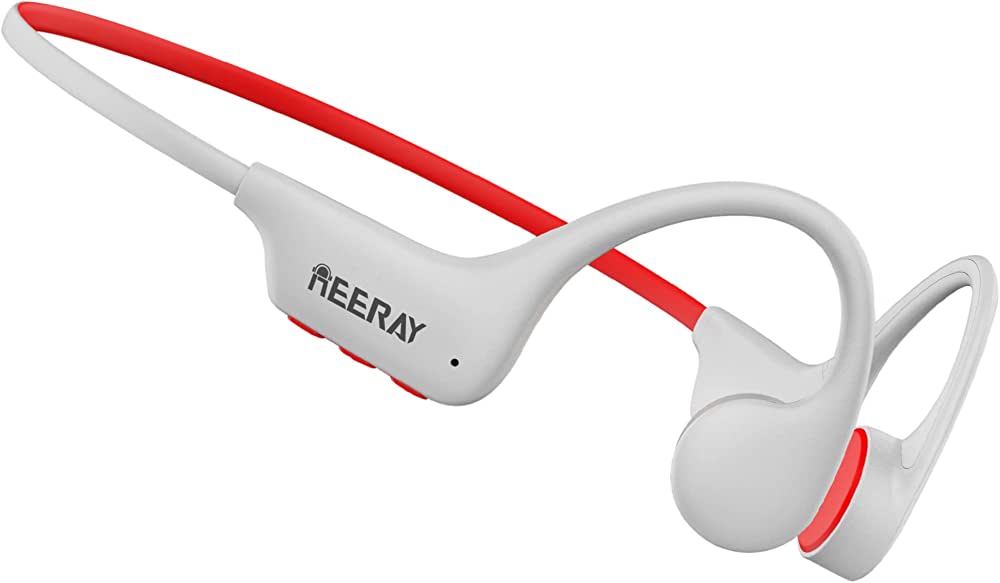
The reeray R6 Bone Conduction Headset is built for users who want open-ear listening, reliable Bluetooth performance, and all-day comfort in a sports-friendly design. It uses bone conduction technology to transmit sound through the cheekbones, keeping the ear canals open so you can stay aware of your surroundings while running, cycling, commuting, or working outdoors. That makes it especially appealing for athletes, office users who want situational awareness, and anyone who dislikes traditional in-ear earbuds.
One of the biggest selling points of the reeray R6 Bone Conduction Headset is its practical feature set: Bluetooth 5.3, IP68 waterproofing, built-in 16GB memory for standalone MP3 playback, and support for common audio formats such as MP3, APE, and FLAC. The headset also offers up to 10 hours of playback at moderate volume, around 240 hours of standby time, and a quick 2-hour charging cycle. For users looking for a bone conduction headset with both wireless and offline music options, this is a strong value-focused choice.
In terms of availability, the reeray R6 Bone Conduction Headset is commonly sold through online marketplaces and electronics resellers. The estimated price range is typically around $40 to $60, depending on seller, region, and promotions. That places it below many premium open-ear alternatives while still offering useful features like onboard storage, waterproofing, and a lightweight sports-oriented form factor.
Specifications for the reeray R6 Bone Conduction Headset
- Model: reeray R6 bone conduction headset
- Audio technology: Bone conduction transducer for open-ear listening
- Bluetooth version: 5.3
- Wireless range: Up to 10m / 33ft
- Battery capacity: 180mAh
- Playback time: Up to 10 hours at 70% volume
- Standby time: About 240 hours
- Charging time: About 2 hours
- Water resistance: IP68 waterproof rating
- Built-in memory: 16GB for MP3 player mode
- Supported audio formats: MP3, APE, FLAC
- Call compatibility: HSP, HFP, A2DP, AVRCP support
- Microphone sensitivity: -42dB
- Charging input: 5V / 100mA
Compared with many basic bone conduction headphones, the reeray R6 Bone Conduction Headset stands out because it includes 16GB of internal storage, letting users listen without carrying a phone. Against higher-priced rivals, it is more budget-friendly, though premium models may deliver stronger microphones, richer sound tuning, or more advanced companion app features.
Pros and Cons of the reeray R6 Bone Conduction Headset
Pros
- Open-ear safety: Ideal for outdoor runners and cyclists who need to hear traffic and nearby sounds.
- Built-in 16GB memory: Useful for phone-free workouts, long walks, and travel.
- IP68 waterproof design: Strong protection for sweat, rain, and demanding training sessions.
- Bluetooth 5.3: Offers modern wireless stability and efficient power use.
- Good value for money: Combines sports features and offline playback at a lower price than many premium open-ear headphones.
Cons
- Sound isolation is limited: Open-ear design is not suited for noisy environments where deep bass and sealed audio matter.
- Audio quality is functional, not audiophile-grade: Bone conduction emphasizes clarity and awareness over full-range richness.
- Microphone performance may be average: Better for casual calls than office-grade conferencing.
- Shorter battery life than some rivals: Ten hours is solid, but a few competitors offer longer runtime.
- Best for specific use cases: Less ideal for users who want immersive music or maximum passive noise blocking.
For budget-conscious buyers comparing open-ear sports headphones, the reeray R6 Bone Conduction Headset offers a balanced feature set, though premium alternatives may justify their higher cost with improved tuning and call quality.
Customer Reviews for reeray R6 Bone Conduction Headset
User feedback is generally positive, with many owners giving the headset around 4 out of 5 stars for comfort, portability, and outdoor awareness. Common praise focuses on the open-ear fit, easy Bluetooth pairing, and the convenience of built-in memory for workouts without a phone.
- What users like: “Great for running because I can hear traffic and still enjoy music.”
- What users like: “The 16GB storage is a big plus for gym sessions.”
- Common complaint: “Sound is clear, but bass is weaker than regular earbuds.”
- Common complaint: “Call quality is fine outdoors, but not perfect in windy areas.”
Purchase recommendations are strongest for runners, cyclists, hikers, and anyone who wants an open-ear Bluetooth headset with MP3 capability. If you want deep bass, full noise isolation, or studio-style sound, a traditional wireless earbud may be a better fit than the reeray R6 Bone Conduction Headset.
Faqs
How do I set up the reeray R6 Bone Conduction Headset for the first time?
Why is my reeray R6 Bone Conduction Headset not pairing with Bluetooth?
Does the reeray R6 Bone Conduction Headset work with iPhone, Android, and laptops?
How can I improve sound quality on the reeray R6 Bone Conduction Headset?
What should I do if the reeray R6 Bone Conduction Headset has low volume or uneven audio?
How long does the reeray R6 Bone Conduction Headset battery usually last, and how should I charge it?
Can I use the reeray R6 Bone Conduction Headset for running, cycling, or outdoor workouts?
How should I clean and maintain the reeray R6 Bone Conduction Headset?
Leave a Comment