
Pairing & Usage: Reflect Ace Bluetooth Calling Fitness Smartwatch User Manual
Content
Reflect Ace Bluetooth Calling Fitness Smartwatch
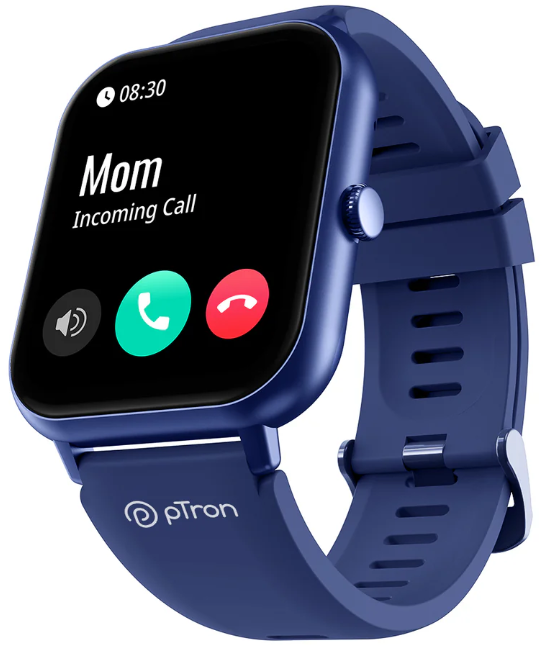
Introduction
The Reflect Ace Bluetooth Calling Fitness Smartwatch is a versatile wearable device designed for fitness enthusiasts, tech-savvy users, and anyone seeking seamless connectivity on the go. This smartwatch combines advanced health monitoring features with Bluetooth calling capabilities, allowing users to stay connected without reaching for their phones. It stands out with its intuitive touch interface, real-time fitness tracking, and high-quality call audio, making it ideal for workouts, daily activity tracking, and on-the-move communication.
Key benefits include continuous heart rate monitoring, sleep analysis, multi-sport modes, and the ability to make and receive calls directly from the watch via Bluetooth. Its sleek, durable design suits both casual and active lifestyles. The reflect ace smartwatch supports notifications from various apps, ensuring you never miss important messages while exercising or commuting.
Targeted at fitness lovers, busy professionals, and tech enthusiasts, this smartwatch meets diverse needs from health tracking to hands-free communication. Priced competitively in the mid-range segment, around $70 to $120, it offers excellent value for its feature set. The product is widely available through online retail channels and select electronics stores, making it accessible for worldwide users seeking a reliable fitness and communication companion.
Specifications of the Reflect Acee Bluetooth Calling Fitness Smartwatch.
- Display: 1.69-inch TFT touch screen with 240x280 pixels resolution
- Connectivity: Bluetooth 5.0 for calling and device sync
- Health Monitoring: Continuous heart rate sensor, blood pressure estimation, ECG function, sleep tracking, and blood oxygen (SpO2) measurement
- Sports Modes: Multiple exercise modes,s including walking, running, cycling, and more
- Battery Life: Up to 7 days on a single charge with typical use, magnetic USB charging
- Compatibility: Supports Android 5.0+ and iOS 10.0+ with a dedicated WearHealth app
- Additional Features: Call answering/rejecting on the watch, music control, sedentary reminder, alarm clock, weather updates, and notification alerts for SMS and social media apps
- Water Resistance: IP67 rating – splash and dust resistant
Compared to similar products like the FITVII Nexa or S5 Smartwatch, the reflect ace excels in Bluetooth calling quality and comprehensive health sensors, including ECG and SpO2, which are less common in competitors within the same price range[1][2][3].
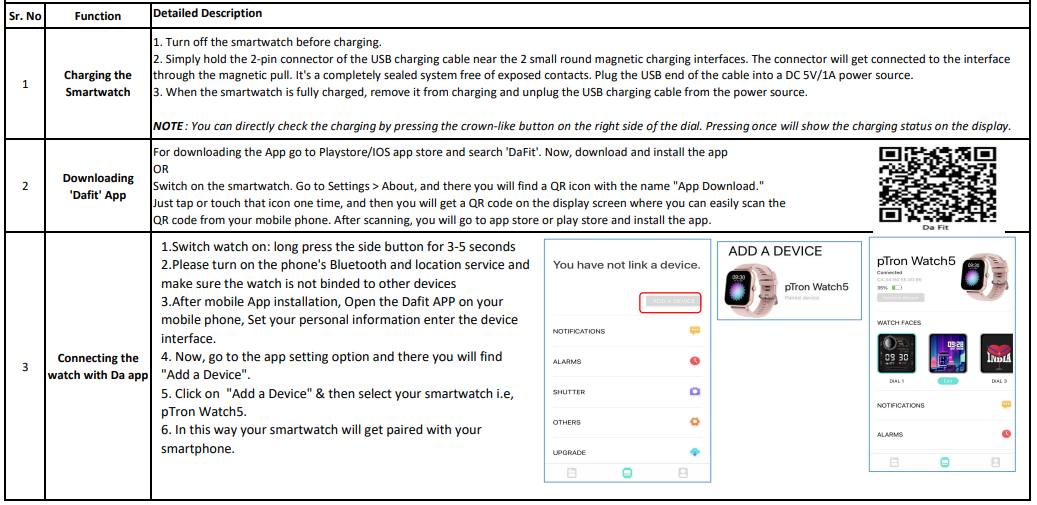
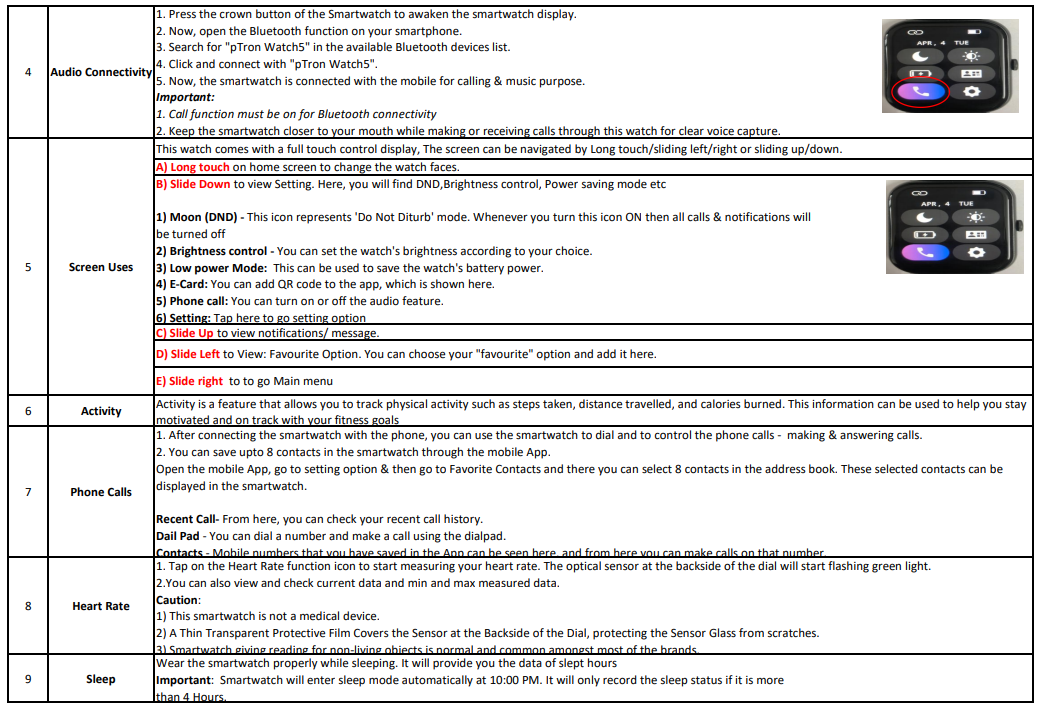
Function

Troubleshooting the Reflect Ace Bluetooth Calling Fitness Smartwatch
- Problem: The Watch is not pairing with the phone.
Solution: Ensure Bluetooth is enabled on your phone, restart both devices, and reconnect using the WearHealth app. Remove previous pairings if any conflicts arise. - Problem: Incoming calls are not showing on the watch.
Solution: Check app permissions to allow call notifications, confirm Bluetooth calling is active, and that your phone is within range (10m). - Error Codes: If the watch displays a “Sensor Error,” clean the sensor area and ensure skin contact; reboot the watch if persistent.
- Preventive Measures: Regularly update the WearHealth app, keep the watch charged between 20%-80% for battery longevity, and avoid exposure to water beyond splash resistance.
- Warranty & Support: Comes with a 12-month limited warranty covering manufacturing defects. For support, contact customer service via the official WearHealth app or the retailer’s support line.
Pros & Cons of the Reflect Ace Bluetooth Calling Fitness Smartwatch
- Pros:
- Clear and reliable Bluetooth calling directly from the watch.
- Comprehensive health metrics, including ECG and blood oxygen.
- Long battery life supporting up to a week on moderate use.
- User-friendly WearHealth app with cloud data sync.
- IP67 water resistance is suitable for daily wear and light exercise.
- Cons:
- Limited third-party app integration compared to premium brands.
- Screen brightness may be less visible in direct sunlight.
- No built-in GPS; relies on phone GPS for tracking routes.
- A magnetic charger can be less secure during movement.
- Some users may find the watch strap less durable over time.
Overall, the reflect ace offers excellent value for money by combining fitness tracking and Bluetooth calling in a single device, outperforming many budget smartwatches in call quality and health features, though advanced users may prefer GPS-enabled alternatives and more app support.
Customer Reviews of the Reflect Ace Bluetooth Calling Fitness Smartwatch
Users praise the Reflect Ace Bluetooth Calling Fitness Smartwatch for its reliable call quality and accurate heart rate monitoring. Many highlight its usefulness during workouts and daily activities without needing to carry a phone. Ratings commonly range from 4 to 4.5 stars out of 5.
Common praises include the intuitive app interface, long battery life, and comfortable design. Some users report occasional Bluetooth connection drops and difficulty reading the screen in bright sunlight. A few mention that the health data should not replace medical devices, but appreciate the wellness insights provided.
Most customers recommend the watch for anyone seeking a budget-friendly fitness tracker with call functionality, especially for sports and casual use. Frequent updates from the WearHealth app have also improved stability and added features over time, enhancing user satisfaction.
Faqs
How do I set up the reflect ace Bluetooth Calling Fitness Smartwatch for the first time?
What should I do if my reflect ace Bluetooth Calling Fitness Smartwatch is not connecting to my phone?
Can the reflect ace Bluetooth Calling Fitness Smartwatch make and receive calls independently?
What fitness tracking features does the reflect ace Bluetooth Calling Fitness Smartwatch offer?
Is the reflect ace Bluetooth Calling Fitness Smartwatch compatible with both Android and iOS devices?
How can I optimize battery life on my reflect ace Bluetooth Calling Fitness Smartwatch?
What maintenance steps should I follow to keep my reflect ace Bluetooth Calling Fitness Smartwatch in good condition?
Why does the reflect ace Bluetooth Calling Fitness Smartwatch sometimes show inaccurate sensor readings?
Tags
Leave a Comment