
Setup & Usage: Remington Omniblade Multi-Pro HG5000 User Manual
Content
Remington Omniblade Multi-Pro HG5000
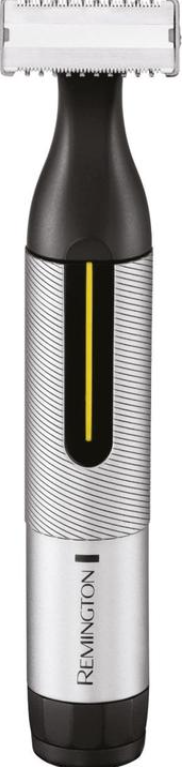
Introduction
The Remington Omniblade Multi-Pro HG5000 is a versatile, high-performance grooming tool designed for men seeking an all-in-one solution for their personal care needs. This multifunctional trimmer caters to hair clipping, beard trimming, body grooming, and precise detailing, such as nose and ear hair removal. Engineered with a sharp stainless steel blade cutting down to 0.15 mm, the Omniblade delivers close, comfortable trims without the irritation typical of traditional razors, making it ideal for sensitive skin.
Its intuitive design includes 11 interchangeable attachments, enabling users to easily switch between different grooming tasks from head to toe. With full waterproof capabilities, this trimmer is perfect for wet or dry use, offering convenience for cleaning and grooming in the shower. The device targets men who prioritize efficiency, versatility, and quality in their grooming routine, including frequent travelers needing a compact yet powerful trimmer.
Pricing for the Remington Omniblade Multi-Pro HG5000 generally falls within the mid-range segment, providing excellent value considering its premium features and long-lasting blades guaranteed for up to 5 years. It is widely available through online retailers and specialty beauty stores worldwide, making it accessible to a broad audience.
Specifications of Remington Omniblade Multi-Pro HG5000
- Blade Technology: Stainless steel stamped and ground blade, guaranteed sharpness for 5 years
- Cutting Lengths: Minimum 0.15 mm (close shave), maximum 9 mm
- Attachments: 11 interchangeable heads, including precision combs (0.5-5 mm), 4 fixed combs, body hair trimmer, nose and ear trimmer, facial cleaning brush
- Power: Rechargeable battery with up to 60 minutes cordless runtime; USB charging capability
- Waterproof: 100% waterproof design for wet & dry use
- Dimensions & Weight: 191 mm height, 130 mm width, 70 mm depth; weight approximately 0.52 kg
- Display: LED charge indicator
- Warranty: 5 years standard plus 1 year extra with online registration
Compared to similar multifunction trimmers, the HG5000 stands out with its extremely close-cut capability (0.15 mm) and the longevity of its blades, which surpass many competitors that typically offer 1-2 year blade warranties. Its waterproof feature and extensive attachment set make it a comprehensive grooming kit rather than just a basic trimmer.
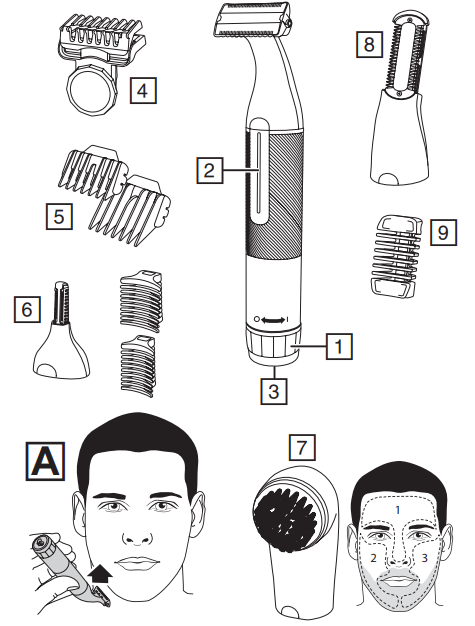
PARTS
- On/Off switch
- Charging indicator light
- Charger connector
- Adjustable precision comb
- Fixed guide combs (7, 9, 12, 16mm)
- Micro trimmer
- Facial cleansing brush attachment
- Body blade attachment
- Body blade comb
Not shown:- USB charging cable
- Travel pouch
ATTACHMENTS
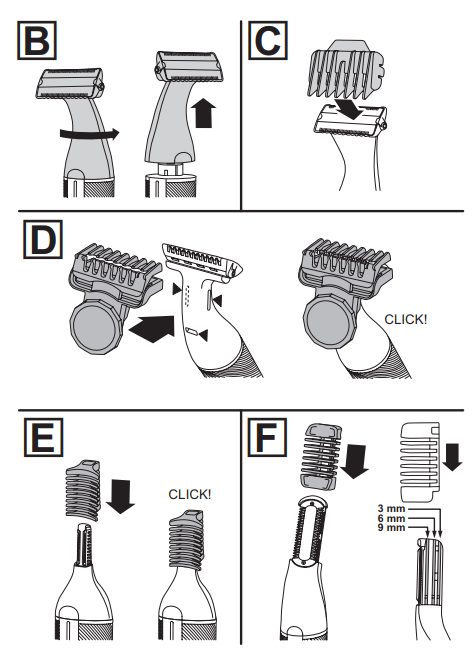
TO FIT AND REMOVE ATTACHMENTS (FIG. B)
Ensure that the device is switched off before fitting or removing attachments.
- To remove, rotate the attachment anti-clockwise until it unlocks and then lift it off.
- To fit, place the desired attachment on top of the device and rotate the attachment clockwise to lock it into place.
FITTING AND REMOVING FIXED GUIDE COMBS (FIG. C)
To Fit
- Hook the front of the guide comb over the blade.
- Press the back of the guide comb down until it clicks into place.
To Remove
- Lift the tab on the back of the guide comb upwards until it comes free from the blade. FITTING AND REMOVING THE ADJUSTABLE PRECISION COMB (FIG. D)
- Clip the adjustable comb over the blade as shown, ensuring that the three tabs on the comb fit into the notches on the back of the blade (shown by the s marks).
- The 0.5 - 5 mm comb can be adjusted in 0.5mm increments simply by turning the wheel until the desired setting is shown on the scale. Turn the wheel clockwise for a longer length and anticlockwise for a shorter length.
- To remove, lift the back of the comb upwards and lift it off the blade.
INSTRUCTIONS FOR USE
Switch the product on by rotating the on-off switch to the I mark.
Always comb your beard or moustache with a fine comb before you start trimming.
TO TRIM THE BEARD
- Select your desired trimming length comb. If you are trimming for the first time, start with the maximum trimming length setting.
- Turn the unit on.
- Place the flat top of the comb against the skin.
- Slowly slide through the hair. Repeat from different directions as necessary.
- If hair builds up in the trimmer comb during the trimming process, switch the unit off, pull off the comb,b and brush the hair off.
TO GET A SHAVEN LOOK
- To trim any length of beard or stubble hair for a clean, shaven look, ok then follow the above steps without a comb attached to the blade head.
- Place the flat top of the blade against the skin and slowly slide through the hair against the direction of growth.
- Shave in an upwards direction when shaving under the chin (Fig. A).
TRIMMING AND EDGING
- Hold the device with the back side of the blade facing you with no combs attached.
- Start with the blades resting lightly against your skin, and use motions toward the edge of the beard line to trim to the desired locations in the facial area.
- Shape as desired.
TRIMMING WITH SHAVING GEL
- Follow the same instructions as dry shaving if using shaving gel.
- Caution: After use with shaving gel, please rinse the blade under warm water to clean away any excess gel and debris.
BODY HAIR MAINTENANCE
Attachments
Body blade attachment
Body hair maintenance: Trimming to length
- Fit the body blade attachment.
- Body hair can be trimmed to 3 different lengths (3, 6, and 9 mm). Select the desired length by sliding the comb into one of the three slots on the side of the attachment (Fig. F).
- Place the flat side of the attachment against the skin.
- Slowly slide the trimmer through the hair in the direction of hair growth.
- Use slow, well-controlled movements.
Body hair maintenance: Removal
- Remove the comb from the body blade attachment and go over the areas where you want to remove the body hair.
- Stretch the skin with your free hand to make the hairs stand upright.
- Use light pressure and shave against the direction of hair growth.
- DETAILED NOSE, EYEBROW, W, AND EAR HAIR TRIMMING
Attachments
Micro trimmer
Nose and ear:
- Fit the micro trimmer.
- Insert the attachment gently into the nostril or ear.
- Gently move the attachment in and out while rotating the body of the groomer at the same time.
- Don’t insert the attachment more than 6 mm.
- Wash the attachment after each use.
Eyebrow:
- Slide the desired eyebrow comb attachment (3 or 6 mm) over the trimmer head (Fig. E).
- Carefully guide the attachment to remove any stray or longer hairs from the eyebrow.
- To completely remove hair, let the attachment touch the skin, then move over the desired area.
FACIAL CLEANSING BRUSH
Attachments
Facial Cleansing Brush
- Moisten the brush bristles by running them under water. NOTE: DO NOT use the brush head whilst completely dry as this can cause skin irritation.
- Dampen your skin with water and apply face wash onto your skin. Alternatively, apply your face wash directly onto the brush.
- We recommend cleansing with the Facial Cleansing brush in 3 sections:
T-Zone (1), Right side (2), and Left side (3). - Switch on using the On/Off button.
- Place the facial brush directly onto your skin.
- Gently glide the brush over the skin and beard in circular motion,s avoiding the delicate eye area.
- NOTE: Try to avoid applying too much pressure with the brush when directly on the skin.
CARE FOR YOUR GROOMER
Care for your product to ensure a long-lasting performance. We recommend that you clean your groomer after each use.
AFTER EACH USE
- Brush any accumulated hair from the groomer and attachment heads.
- The easiest and most hygienic way to clean the groomer is by detaching the head from the groomer's body and rinsing the head with warm water.
- Place one or two drops of cutter oil or sewing machine oil on the blades.
- Turn the device on to distribute the oil evenly, and wipe off any excess oil.
Troubleshooting for Remington Omniblade Multi-Pro HG5000
- Device not charging: Ensure the USB cable is securely connected; try different power sources. If the battery fails to hold a charge, contact support for battery replacement.
- Blade not cutting efficiently: Clean blades regularly under running water and oil them if needed. Replace blades if dull after extended use beyond the warranty period.
- Attachments not fitting properly: Check for debris or misalignment; clean attachment slots.
- LED indicator issues: Reset the device by turning it off and on; if it persists, contact Remington support.
- Preventive measures: Always clean and dry after use, store in the provided bag, and avoid dropping the device.
The Remington Omniblade Multi-Pro HG5000 comes with a 5-year warranty plus an additional year if registered online, covering manufacturing defects. For further assistance, Remington customer support is reachable via official website contact forms and authorized service centers worldwide.
Pros & Cons of Remington Omniblade Multi-Pro HG5000
- Pros:
- Exceptional blade sharpness and longevity up to 5 years
- Wide range of 11 attachments for versatile grooming needs
- Waterproof design supports wet and dry use, easy cleaning
- Compact and ergonomic design with a premium metallic finish
- Up to 60 minutes of cordless runtime with USB charging convenience
- Close-cut capability to 0.15 mm for smooth shaving without irritation
- Cons:
- Does not achieve as smooth a shave as a traditional razor blade
- Relatively heavier than some ultra-light trimmers (0.52 kg)
- Some users report longer charging times
- Performance may vary on extremely thick or coarse hair
This balance of high precision and multifunctionality provides excellent value compared to alternatives lacking either blade sharpness or attachment variety. For users prioritizing a near-razor shave with grooming versatility, the HG5000 is a top contender.
Customer Reviews of Remington Omniblade Multi-Pro HG5000
Users commonly praise the Remington Omniblade Multi-Pro HG5000 for its sharp blades that maintain efficiency over time and its extensive grooming attachments, which make it a convenient all-in-one tool. Many highlight the waterproof feature as a standout, allowing easy rinsing and wet shaving. The ergonomic design and solid build quality also receive positive feedback, with frequent mention of its comfortable handling and stylish appearance.
Common complaints include the slight coarseness compared to traditional razors and the longer charging duration. Some users with very thick beards find it less effective for close trimming but still appreciate its versatility. Overall, the product maintains a strong 4 to 4.5-star average rating on retail platforms, with recommendations for purchase, especially for those seeking an affordable, comprehensive grooming set.
Faqs
How do I set up the Remington Omniblade Multi-Pro HG5000 for the first time?
What should I do if the Remington Omniblade Multi-Pro HG5000 is not cutting smoothly?
Can I use the Remington Omniblade Multi-Pro HG5000 for wet and dry grooming?
How do I clean and maintain the Remington Omniblade Multi-Pro HG5000 for optimal performance?
What attachments are included with the Remington Omniblade Multi-Pro HG5000 and how do I use them?
Is the Remington Omniblade Multi-Pro HG5000 suitable for thick or coarse hair?
How long does the battery last on the Remington Omniblade Multi-Pro HG5000 and how do I maximize runtime?
What is the warranty coverage for the Remington Omniblade Multi-Pro HG5000 and how do I register for the extra year?
More remington manuals
- How to Use: Remington AC8820 Keratin Protect Dryer 2200 User Manual
- Usage: Remington Omniblade HG1000 User Manual
- Setup: Remington AS5860 Botanicals Rotating Air Styler User Manual
- Setup: Remington Omniblade Face HG2000 User Manual
- Setup: Remington AC9140 PRO-Luxe Dryer User Manual
- Usage & Setup: Remington Omniblade Face & Body HG3000 User Manual
Leave a Comment