
Setup: Remington Reveal Diamond Microdermabrasion MD3000 User Manual
Content
Remington Reveal Diamond Microdermabrasion MD3000
Introduction
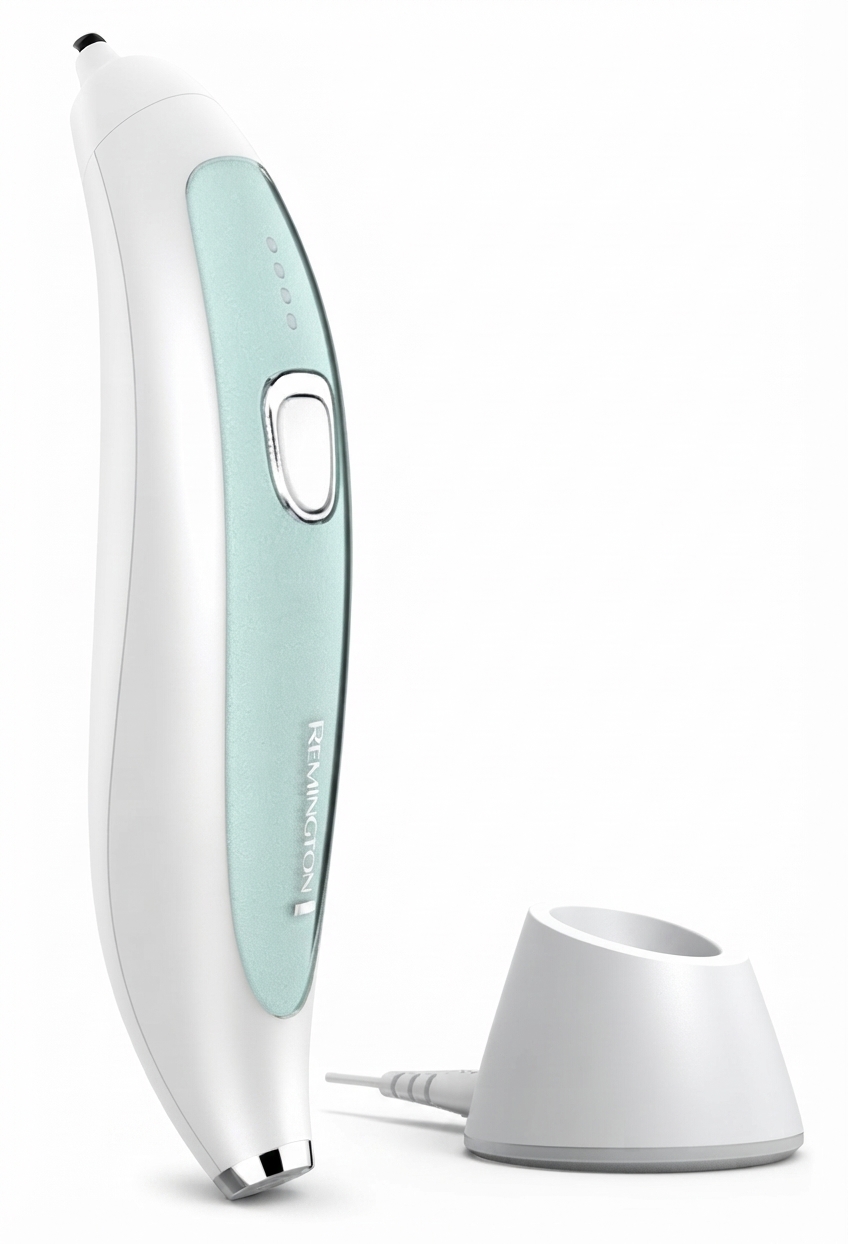
The Remington Reveal Diamond Microdermabrasion MD3000 is a cutting-edge skincare device designed to deliver professional-grade microdermabrasion treatments at home. It offers a non-invasive way to exfoliate dead skin cells, promote renewal, and reveal smoother, brighter, and more youthful-looking skin. With its advanced diamond-tip technology and customizable settings, this device targets fine lines, uneven texture, and dullness, making it ideal for users seeking effective skin rejuvenation without costly salon visits.
Key benefits include three interchangeable diamond tips with antimicrobial housing for hygienic use, four adjustable intensity levels to suit different skin sensitivities, and a cordless rechargeable design allowing up to 90 minutes of operation. The device is suitable for a broad audience, ranging from skincare enthusiasts to individuals with sensitive or aging skin looking to improve tone and firmness. Its portable design enables convenient treatments anytime, anywhere.
Priced typically between $90 and $130, the Remington Reveal MD3000 is widely available through online retailers and specialty beauty shops. Its combination of performance, ease of use, and durability offers excellent value within the competitive home microdermabrasion market.
Specifications and Features of Remington Reveal Diamond Microdermabrasion MD3000
- Diamond Tips: Three washable, magnetic diamond grit tips (Normal, Sensitive, Precision) with antimicrobial housing for safe, hygienic exfoliation
- Speed Settings: Four adjustable microdermabrasion intensity levels with LED indicators for precise control
- Power Source: Cordless, rechargeable lithium-ion battery supporting up to 90 minutes of continuous use
- Charging: Quick charge capability; can be charged with or without the charging station.d
- Design: Ergonomic, lightweight, ht wh,ite, and mint green device with easy-to-clean diamond frames
- Performance: Professional-grade diamond microdermabrasion comparable to salon treatments, designed for home use
- Antimicrobial Technology: Special coating on tips to inhibacterialeria growth and enhance device longevity
- Comparison: Offers better hygiene and multi-tip versatility compared to some single-tip or non-magnetic home microdermabrasion devices
GETTING ACQUAINTED WITH THE REVEAL MICRODERMABRASION DEVICE
WHAT IS MICRODERMABRASION?
- Microdermabrasion is the process of removing the outermost layer of dead skin , which in turn stimulates the growth of a fresh new skin layer, which restores skin radiance and improving skin tone.
- The Microdermabrasion process utilizes diamond grit tips to loosen the dead skin cells,s coupled with vacuum suction to pull the dead skin cells off the skin.
- The vacuuming process has a secondary function of stimulating blood flow at the outer skin level. , ABOUT YOUR DEVICE
The REVEAL Microdermabrasion Device includes three different diamond tips to enable you to personalise your treatment. Fig. 1.
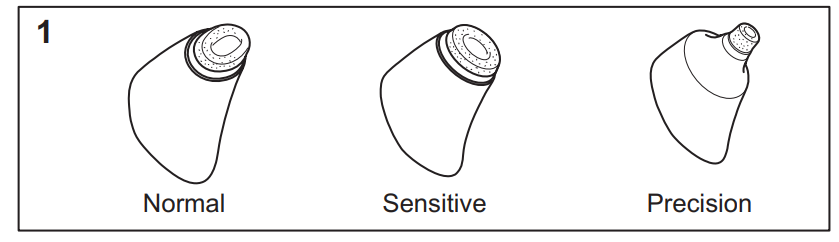
- NORMAL Diamond Tip – For non-sensitive areas of the face and neck.
- SENSITIVE Diamond Tip – For delicate areas or sensitive skin.
- PRECISION Diamond Tip – For precise treatment of smaller areas such as the nose and otherharder-to-reachh parts.
The REVEAL Microdermabrasion Device also includes four vacuum level settings to allow the user to choose safe, comfortable, and effective combinations that work for their skin type.
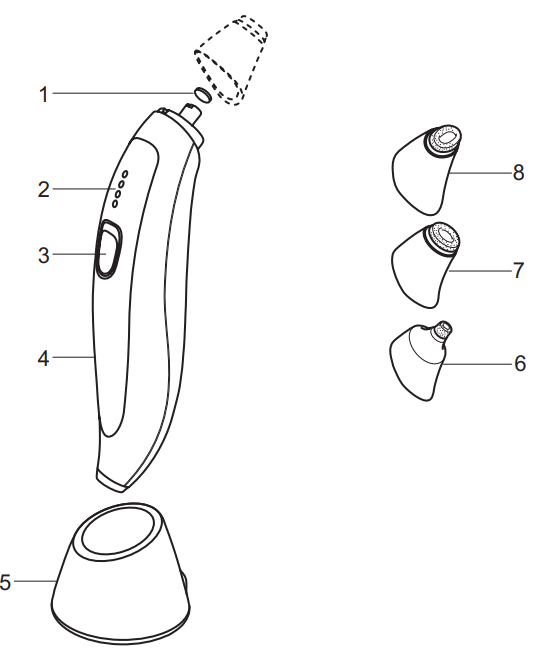
KEY FEATURES
- Replaceable Filter
- LED Power Level Indicator
- Power Level Switch
- Ergonomic Handle
- Charging Stand
- Precision Diamond Tip
- Sensitive Diamond Tip
- Normal Diamond Tip
- Replacement Filters (Not Shown)
- Storage Pouch (Not Shown)
- Power Adaptor (Not Shown)
- Cleaning Brush (Not Shown)
GETTING STARTED
Be patient when first using your REVEAL Microdermabrasion Device, as with any new product, it may take a little while to familiarise yourself with it. Take the time to acquaint yourself with your Microdermabrasion Device, as we are confident you will receive years of enjoyable use and complete satisfaction.
INSTRUCTIONS FOR CHARGING
- Always ensure that your hands, Microdermabrasion Device, Charging Stand, and Adaptor are dry before charging.
- Before using the Microdermabrasion Device for the first time, fully charge the Microdermabrasion Device.
- A full charge will take 4 hours.
- Ensure the device is switched off.
Insert the Charging Adaptor into the base of the Charging Stand. Fig 2.
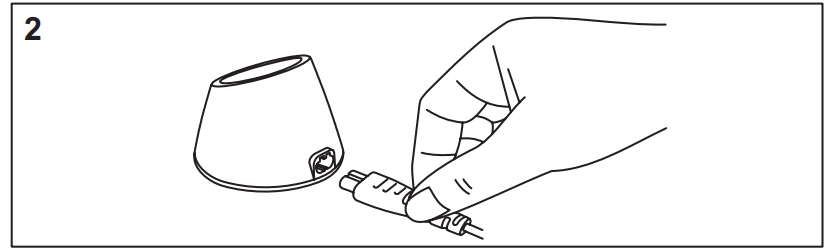
- Plug the Charging Adaptor into the wall socket.
- Place the Microdermabrasion Device onto the Charging Stand. The devicewill need to be oriented so the keyed socket at the end of the device fits into the plug of the Charging Stand.
- The LED lights will begin to light sequentially to indicate that the Microdermabrasion Device is charging. 9 When the Microdermabrasion Device is charged, all the LED lights will remain solid for a minute and then will go off to indicate a full charge. A full charge will take 4 hours.
- One full charge will provide up to 90 minutes of cordless usage time , depending on the speed setting selected.
NOTE: If the battery charge is low, all four LED lights will flash in unison to indicate the device needs to be recharged.
QUICK CHARGE FUNCTION:
- The Microdermabrasion Device is also equipped with a quick charge function.
- To utilise this function, charge the Microdermabrasion Device for 5 minutes.
- This will provide approximately 1 or 2 uses.
INSTRUCTIONS FOR USE
- The device is suitable for dry use only. Do not use in the shower or bath.
- NOTE: Depending on your skin type, as the Microdermabrasion process utilises diamond tips coupled with vacuum suction, you may experience some reddening or increased sensitivity after your treatment. This is considered perfectly normal and usually diminishes within a few hours.
- TIP: As reddening can occur after treatment, it is recommended to carry out the treatments at the end of the day.
- It is therefore strongly recommended that you perform a patch trial on the inside of your forearm to feel how the device works and to see the reaction of the skin.
- TIP: It is also advised to carry out this first trial treatment with the Sensitive Diamond Tip using the west setting.
- Once familiar with the Device and its effect on your skin, you can personalise your treatment by adjusting the settings and selecting the appropriate tip.
- In use, you will feel the Diamond Tip against your skin and a gentle suction sensation from the vacuum setting.
- Adverse reactions are rare, but if skin becomes unduly inflamed or irritated, stop using the device immediately.
HOW TO USE
- Remove all packaging from the device.
- For your convenience, the device is fitted with a filter for your first treatment.
TIP: It is recommended that you always check that there is a filter in place before you commence treatment. - Select your chosen diamond tip to begin your treatment routine.
NOTE: The tips are clearly wrapped for cleanliness and need to be removed before use. They attach to the device magnetically and must be fully engaged to provide the best suction performance. - Wash and towel-dry your face before use.
- Pull your hair back from your face and secure it with a headband or ponytail.
- Turn the device on by pressing the power switch.
- Select the desired suction level:
- The Microdermabrasion Device will automatically start on the lowest suction level.
- The suction levels are adjusted by repeated presses of the power switch.
- The LED lights will light up to indicate what suction level the device is on. One LED light indicates the lowest setting. Four LED lights indicate the highest setting.
- Press and hold the switch again when you want to turn the device off.
TREATMENT ROUTINE
- The treatment routine for your face will take about 3 minutes to complete.
Plan to spend 20 to 30 seconds in each area, following the suggested stroke direction as indicated by the arrows. Fig. 3.
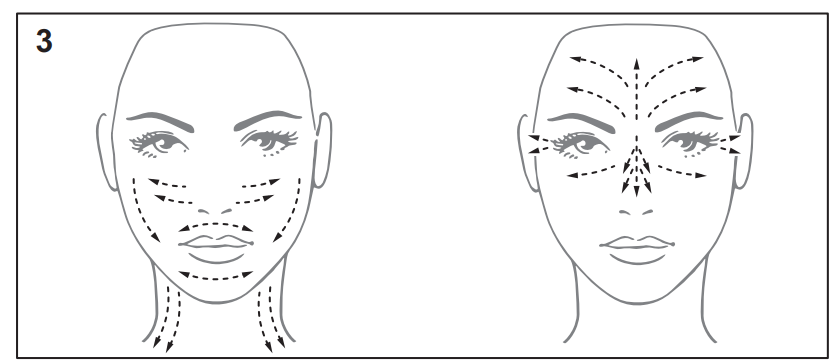
- NOTE: The exact treatment time will vary depending on your skin type and which zone you are treating.
- Do not repeatedly move the diamond tip over the area you are treating e.,g. a,fter moving the diamond tip over an area once, move to the next untreated area.
- For best results, ensure that the diamond tip of the device is flat and in full contact with the skin.
- Do not press the diamond tip hard against the skin, but allow the diamond tip to do all the work for you.
- During treatment, you should feel a gentle suction effect as the diamond tip moves across the skin.
- It is normal to notice the slight coarseness of the diamond tip in use, but it should never cause discomfort.
TREATMENT TIPS:
- Select the correct Diamond Tip for the area of the face you are treating.
- Keep the diamond suction tip in contact with the skin at all times and ensurethatp the tip is moving. , NOTE: Do not allow the tip to stop in the same spot, as the prolonged suction could result in pulling blood to the skin surface and result in excessive reddening, soreness , or bruising.
- It may help to hold your skin taut with the other hand during treatment.
- Never use the high suction settings on the delicate skin areas around your eyes.
- Never use the device directly underneath your eyes or on your eyelids.
- Do not use the device over moles, tattoos, and permanent make-up.
- Always use the diamond suction tip in the recommended direction as shown on the illustration.
POST TREATMENT:
- Rinse your face with cold water to remove any additional dead skin cells.
- Apply your favourite nourishing moisturizing cream to the entire treated area.
- Avoidusing acid-basedd moisturizing creams.
- Apply sunscreen to the treatment area if you plan to go outdoors. Avoid sunbathing soon after treatment.
FREQUENCY OF TREATMENTS:
- With Microdermabrasion, it is important to allow enough time between treatments for new skin cells to regenerate on the surface of the skin to reveal healthy-looking and glowing skin. This will vary from person to person depending on age and skin type.
- It is also important to allow time between treatments so you can assess your skin and determine the appropriate time for your next treatment.
- For this reason, it is recommended not to exceed one or two treatments a week.
FITTING AND REPLACING FILTERS
- The Microdermabrasion treatment process removes dead skin cells from the outer surface of your skin. The device is equipped with disposable filters that collect the skin particles during treatment.
- For your convenience, the device is fitted with a filter for your first treatment,t and replacement filters are included in the pack.
- For optimum hygiene and product effectiveness, it is important to replace the filter after every use and to place a new and unused filter into the device before each treatment.
- NOTE: Be certain there is always a fresh filter in the device while in use. Use of the device without a filter would draw the skin particles into the pump mechanism and shorten the life of the device and invalidate the warranty.
TO REPLACE THE FILTER:
- Remove the Tip from the Handle.
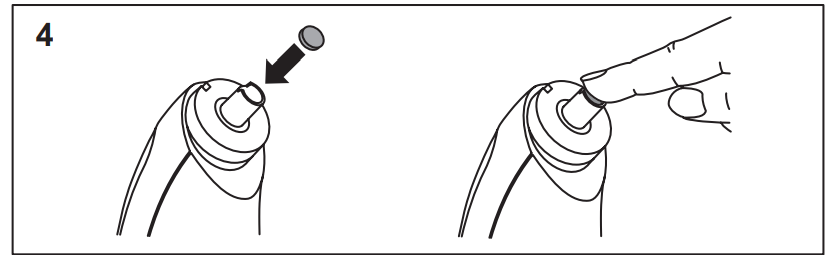
- Using your fingertip, remove the circular black filter from the end of the suction tube and discard it.
- Place a new filter into the suction tube and gently press it into place with your fingertip. Fig. 4.
CHANGING THE DIAMOND TIPS
The tips are clearly wrapped for cleanliness, and this needs to be removedbeforeo first use. They attach to the device magnetically and must be fully engaged to provide the best suction performance.
Removing or Changing the Diamond Tips
- Hold the Microdermabrasion Device with one hand.
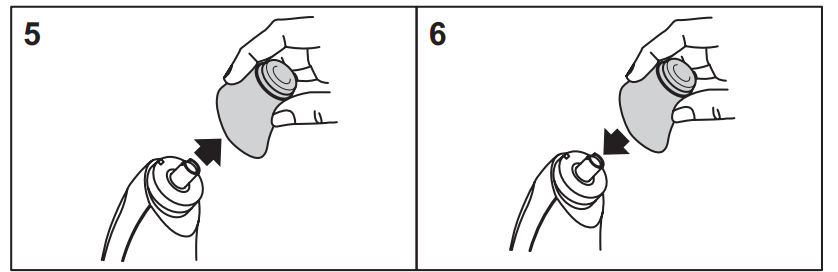
- With the other hand, gently pull the Diamond Tip upwards until it comes off. Fig 5.
- To replace, gently position the Diamond Ti,p and the magnetic force will pull it into place. Fig 6.
CLEANING AND MAINTENANCE
- NOTE: The handle of the Microdermabrasion Device is not waterproof. Do not submerge the handle or hold it under running water to clean.
- To ensure long-lasting performance and cleanliness of your Microdermabrasion device, clean the diamond tips and handle after each use.
- Ensure the Microdermabrasion Device is switched off before cleaning.
- Remove the diamond tip and brush away excess skin cells with the cleaning brush provided. When removed, the tips can be rinsed under running water to clean. Allow to air dry.
- NOTE: The Diamond Tips may accumulate skin cells over time, reducing their effectiveness. If this happens, then the Diamond Tips can be periodically cleaned using water enhanced with an alcohol based barber’s cleaning solution.
- Use caution with the diamond tips to prevent damage. Avoid dropping the tips. Do not use harsh chemicals, scouring pads , or abrasive cleaning agents on the tips.
- Do not clean the device or any of the components in the dishwasher.
- CAUTION: Ensure all parts are dry before connecting the charger to a wall socket.
STORAGE
- Store your device in a clean, dry place and out of the reach of children.
- Do not store the device way while it is wet from cleaning. Allow to air dry before storing.
- Avoid storing the abrasive tips where other items can come in contact and damage them.
Troubleshooting Common Issues with the Remington Reveal Diamond Microdermabrasion MD3000
- Device won’t start: Check battery charge; ensure device is fully charged andthe power button is pressed correctly.
- Low suction or exfoliation: Clean diamond tips thoroughly; replace worn tips if necessary.
- LED indicators not working: Reset the device by powering off and on; contact support if the issue persists.
- Error codes: No specific error codes; device issues typically relate to power or tip condition.
Preventive maintenance includes regular cleaning of tips and device storage in a dry environment. The Remington Reveal MD3000 comes with a limited warranty covering manufacturing defects, and customer support is available via the official Remington website or authorized retailers.
For technical assistance, customers can contact Remington support through their website or authorized service centers.
Pros and Cons of Remington Reveal Diamond Microdermabrasion MD3000
Pros
- Three interchangeable diamond tips with antimicrobial coating ensure versatile and hygienic use.
- Four intensity levels provide customizable treatment for all skin types, including sensitive skin.n
- Rechargeable and cordless design offers up to 90 minutes of operation for flexibility.
- LED indicators enhance user control and feedback during treatments
- Competitive price point compared to professional microdermabrasion devices
Cons
- May require multiple sessions to see significant skin improvements
- Not suitable for use on irritated, sunburned, or broken skin
- Replacement diamond tips may incur additional cost
- Some users report a slight learning curve to maintain consistent pressure and technique
Customer Reviews and Feedback on Remington Reveal Diamond Microdermabrasion MD3000
The Remington Reveal Diamond Microdermabrasion MD3000 receives predominantly positive reviews for its effectiveness in improving skin texture and radiance. Users praise the device’s ease of use, comfortable grip, and the variety of diamond tips catering to different skin sensitivities. Many highlight the noticeable softening of fine lines and reduction in dullness after consistent use.
Common complaints include initial device cost and the necessity for patience to see visible results. A few users mention minor skin redness after treatment, which usually subsides quickly. Overall, the device averages around 4 to 4.5 stars across major retail platforms, with recommendations emphasizing its value as a home microdermabrasion solution.
Frequent reviewers recommend starting on the lowest speed setting and gradually increasing intensity to minimize irritation while maximizing benefits.
Faqs
How do I set up the Remington Reveal Diamond Microdermabrasion MD3000 for the first time?
What should I do if the Remington Reveal Diamond Microdermabrasion MD3000 is not turning on?
How often should I replace the diamond tip on the Remington Reveal Diamond Microdermabrasion MD3000?
Can I use the Remington Reveal Diamond Microdermabrasion MD3000 on sensitive skin?
How do I clean and maintain the Remington Reveal Diamond Microdermabrasion MD3000?
What are the key features that make the Remington Reveal Diamond Microdermabrasion MD3000 different from other microdermabrasion devices?
Is the Remington Reveal Diamond Microdermabrasion MD3000 compatible with all skin types?
How can I optimize the performance of my Remington Reveal Diamond Microdermabrasion MD3000 for better skin results?
More remington manuals
- Setup: Remington Reveal Beauty Trimmer MPT4000C User Manual
- Setup: Remington Reveal Wet & Dry Rotating Body Brush BB1000 User Manual
- Setup: Remington SonicFresh Total Clean SFT-100 User Manual
- Setup: Remington Reveal Facial Cleansing Brush FC1000 User Manual
- Setup: Remington Remington SonicFresh Total Clean SFT-150 User Manual
- Setup: Remington Reveal Heated Eyelash Curler EC300 User Manual
Leave a Comment