
Resmed AirMini AutoSet Travel CPAP User Manual
Content
ResMed AirMini AutoSet Travel CPAP: Compact Portable Therapy for Frequent Travelers
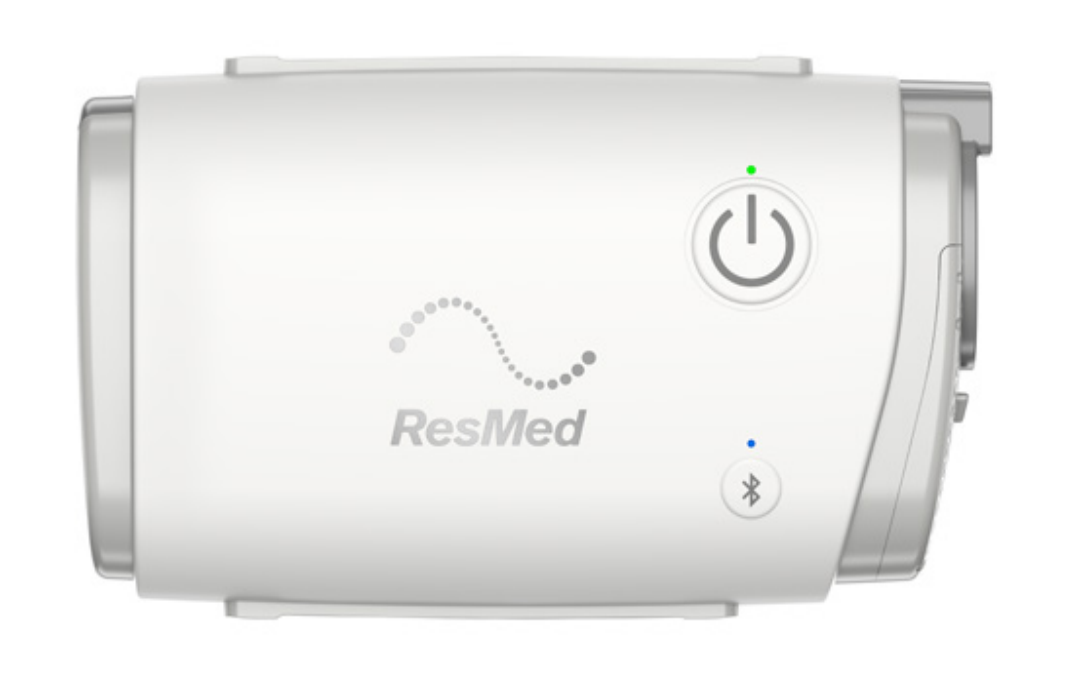
The ResMed AirMini AutoSet Travel CPAP is one of the most compact portable CPAP devices available, built for users who need reliable sleep apnea therapy without carrying a full-size machine. Designed as a travel-first APAP system, it combines AutoSet pressure adjustment, optional CPAP modes, and waterless humidification technology in a lightweight body that weighs about 300 grams. Its small footprint makes it easy to pack in a carry-on, weekend bag, or business travel kit while still delivering consistent therapy performance.
This travel CPAP is especially appealing to people who fly often, go on road trips, or want a dedicated backup machine for home use. The device works with compatible ResMed masks and is managed through the AirMini app, which adds convenience for setup, therapy tracking, and comfort settings. A major selling point is its compact design paired with features usually found in larger devices, including AutoSet, AutoSet for Her, and CPAP therapy modes. The waterless HumidX system also helps reduce the hassle of carrying distilled water during travel.
Typical pricing for the resmed AirMini AutoSet Travel CPAP falls in the premium portable CPAP range, often around $900 to $1,000 USD for the device alone, while bundled kits may cost more depending on the included mask and accessories. Availability is generally strong through ResMed stores and authorized medical retailers, though mask compatibility and accessory selection should be checked before purchase.
Technical Specifications and Key Features
- Device type: Portable APAP/CPAP travel machine
- Therapy modes: AutoSet, AutoSet for Her, CPAP
- Pressure range: 4 to 20 cm H2O
- Dimensions: Approximately 136 mm x 84 mm x 52 mm
- Weight: About 300 g
- Power input: 100–240V, 50–60Hz
- Typical power consumption: Around 6.3 W
- Peak power consumption: Up to 27 W
- Connectivity: Bluetooth support with AirMini app control
- Humidification: Waterless HumidX and HumidX Plus compatibility
- Noise level: Roughly 29 dB in published product data
- Travel compatibility: Designed for portability and airline use
Compared with larger home CPAP machines, the AirMini is much smaller and easier to travel with, but it requires compatible masks and accessories. Against other travel CPAP models, it stands out for its refined app integration, waterless humidification option, and ResMed AutoSet technology.
Step-by-Step Setup Guide for the ResMed AirMini AutoSet Travel CPAP
Setting up the resmed AirMini AutoSet Travel CPAP is straightforward once the correct mask and tubing are available. Start by connecting the power supply firmly to the device and then plugging it into a wall outlet. Make sure the power indicator is lit before moving to the next step. Next, attach the gray end of the AirMini tubing to the machine and connect the other end to your compatible mask system.
If you use HumidX or HumidX Plus, open the connector, insert the cartridge with the correct side facing down, and lock the connector closed again. Then install the AirMini app on a compatible smart device and pair the machine over Bluetooth. If pairing fails, confirm that Bluetooth is enabled on both the phone and the machine, and press the Bluetooth button on the device for several seconds until the indicator flashes blue.
Before therapy, check mask fit using the app’s mask-fit function and verify that ramp settings match your comfort level. For safety, keep vents unobstructed, avoid using damaged tubing, and never operate the machine in wet conditions. If pressure feels delayed, confirm that Ramp is enabled and allow time for pressure to build.
Troubleshooting Common AirMini Problems and Fixes
Most issues with the resmed AirMini AutoSet Travel CPAP are related to setup, connectivity, or mask fit. If the machine does not power on, check that the power supply is fully inserted and that the outlet is working. If Bluetooth pairing fails, ensure the phone’s Bluetooth is turned on, confirm the AirMini indicator is flashing blue, and restart both the app and the device.
- Weak or no airflow: Check that the tubing is fully connected and that the air path is not blocked.
- Mask leak: Reseat the mask, adjust headgear, and use the app’s mask-fit feature.
- Ramp feels too long: Turn Ramp off or shorten the setting in the app.
- Power light off: Reinsert the power plug and try another outlet.
- App not detecting device: Restart Bluetooth, close the app, and reconnect.
Preventive care includes cleaning accessories regularly, checking the filter, and using only compatible masks and tubing. ResMed typically offers a 2-year warranty on the device, and support is available through authorized ResMed customer service channels and local medical equipment suppliers. For help, use the official ResMed support portal or contact the retailer that supplied the unit.
Pros and Cons of the ResMed AirMini AutoSet Travel CPAP
Pros
- Extremely compact and lightweight, ideal for frequent travel
- AutoSet technology adapts pressure automatically for comfort and therapy support
- Waterless humidification reduces packing hassle
- Bluetooth app control improves convenience and setup
- Strong brand reputation and broad support ecosystem
- Good value for travelers who need a premium portable CPAP
Cons
- Requires compatible ResMed masks and accessories
- Smaller tubing and proprietary parts can increase replacement costs
- No traditional heated humidifier tank
- App dependence may frustrate users who prefer physical controls
- Higher price than basic portable CPAP alternatives
Compared with alternative travel CPAP machines, the AirMini offers one of the best combinations of size, therapy modes, and app-based control. It is especially attractive for users who prioritize portability over all-day comfort features found on larger home units.
Customer Reviews and Real-World Feedback
Customer feedback for the resmed AirMini AutoSet Travel CPAP is generally positive, with many users rating it around 4 to 5 stars for portability and travel convenience. Frequent praise focuses on the tiny size, easy packing, and reliable therapy performance. One common comment is that it feels like a “full CPAP experience in a travel-sized package.”
Common complaints include the proprietary tubing, the learning curve for pairing the app, and the cost of compatible masks and HumidX cartridges. Some users also mention that the device is best suited to travel rather than as a primary home machine. Overall, buyers who travel regularly tend to recommend it strongly, while budget-focused shoppers may prefer a less expensive portable CPAP alternative.
Faqs
How do I set up resmed AirMini AutoSet Travel CPAP for the first time?
Which masks are compatible with resmed AirMini AutoSet Travel CPAP?
Why is my resmed AirMini AutoSet Travel CPAP not starting automatically?
How does the resmed AirMini AutoSet Travel CPAP adjust pressure during sleep?
Does resmed AirMini AutoSet Travel CPAP work without water, and how does HumidX help?
How do I troubleshoot air leaks on resmed AirMini AutoSet Travel CPAP?
What should I do if resmed AirMini AutoSet Travel CPAP feels too noisy or uncomfortable?
How often should I clean and maintain resmed AirMini AutoSet Travel CPAP?
More resmed manuals
- Resmed VPAP-ST Noninvasive Ventilator User Manual
- Resmed C-Series Tango Positive Airway Pressure Device User Manual
- Resmed AutoSet Adaptive Servo-Ventilator User Manual
- Resmed S8 Series II Positive Airway Pressure Device User Manual
- Resmed ClimateLineAir 11 Heated CPAP Tube User Manual
- Resmed AirSense 10 CPAP Machine AirFit N20 Mask User Manual
Leave a Comment