
How to Use: Resmed AirSense 10 Autoset User Manual
Content
ResMed AirSense 10 AutoSet Product Manual and Buyer’s Guide
Introduction
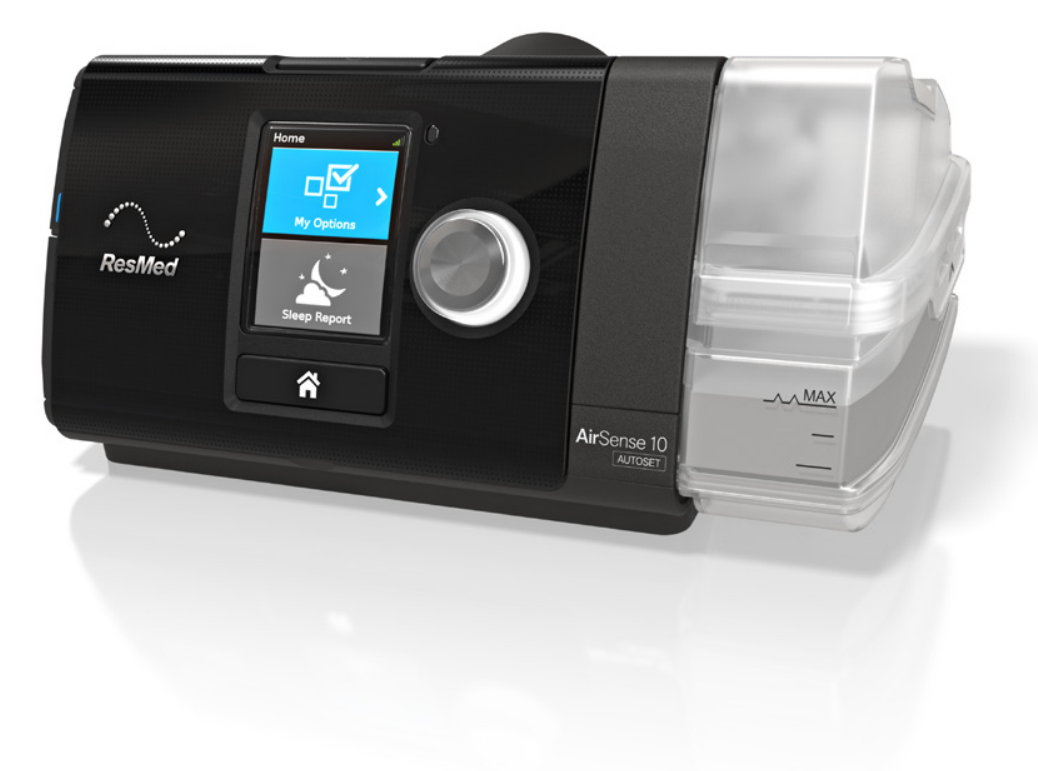
The ResMed AirSense 10 AutoSet is a premium auto-adjusting CPAP device designed to deliver comfortable, personalized sleep apnea therapy with minimal effort. It automatically responds to changes in breathing throughout the night, making it a strong choice for users who want reliable pressure support without constant manual adjustments. Built-in humidification, quiet operation, and an intuitive interface make the AirSense 10 AutoSet especially appealing to first-time CPAP users, long-term therapy patients, and anyone upgrading from a basic fixed-pressure machine.
One of its biggest advantages is the combination of auto-adjusting pressure technology and integrated comfort features. The device is commonly used for obstructive sleep apnea therapy, home treatment, and travel-friendly daily use. It also supports heated tubing and climate control accessories for better moisture management, which can help reduce dryness and improve compliance. The compact design, bright display, and easy-to-use controls make setup and nightly use straightforward.
In 2026, the ResMed AirSense 10 AutoSet typically falls in the mid-to-premium price range, with many retail listings placing it roughly between $650 and $900 depending on package contents, humidifier accessories, and supplier availability. Availability remains good through sleep therapy retailers, medical equipment stores, and online sellers, though pricing can vary based on region and prescription requirements. For users comparing the AirSense 10 AutoSet vs newer models, the device remains a popular value-focused option thanks to its proven reliability and strong feature set.
Specifications
- Device type: Auto-adjusting CPAP machine for obstructive sleep apnea therapy
- Pressure range: 4 to 20 cm H2O
- Operating modes: AutoSet and CPAP support
- Humidification: Integrated HumidAir heated humidifier compatibility
- Tube support: ClimateLineAir heated tubing and standard tubing options
- Noise level: Approximately 26.6 dBA, making it quiet enough for most bedrooms
- Dimensions: About 4.57 x 10.04 x 5.91 inches with water tub
- Weight: About 44 oz with the water chamber
- Connectivity: Cellular connectivity for therapy data and remote monitoring support
- Comfort features: AutoRamp, SmartStart, ambient light sensor, and event detection
- Power: 90W power supply with worldwide voltage support on many packages
Compared with similar auto-CPAP devices, the ResMed AirSense 10 AutoSet is known for stronger ecosystem support, quieter operation, and a more refined user experience than many entry-level alternatives. It is often compared with the Philips DreamStation series and newer ResMed models, but it remains a highly practical choice for users who want dependable performance without moving to a more expensive flagship device.
Setup Guide: How to Set Up the ResMed AirSense 10 AutoSet
Start by placing the machine on a flat, stable surface near your bed, with enough space around the back and sides for airflow. Connect the power supply, attach the air tubing to the outlet, and install the humidifier water tub before filling it with distilled water only. Avoid overfilling the chamber and make sure all parts are fully dry before use. Assemble the mask according to the manufacturer’s instructions, then connect it to the tubing.
Use the on-screen menu to configure therapy settings, including ramp time, humidity level, tube type, and mask type. If your unit includes climate control, enable heated tube settings for better temperature and moisture management. Many users also benefit from AutoRamp, which starts at a lower pressure and increases once sleep onset is detected. If cellular connectivity is active, the machine may automatically transmit therapy data to your provider.
For safety, never use the device near water, in dusty environments, or with damaged tubing. If the mask leaks heavily, adjust the fit before starting therapy. If the machine does not power on, confirm the outlet, cable, and power brick are securely connected. If condensation appears in the tube, reduce humidity or increase tube temperature.
Troubleshooting the ResMed AirSense 10 AutoSet
Common issues usually involve airflow, humidity, leaks, or power. If the machine feels like it is not delivering enough pressure, check whether ramp is active, verify the mask seal, and make sure the tubing is not kinked. If dryness occurs, increase humidity settings or use heated tubing. If water collects in the hose, lower the humidity level or raise the tube temperature to reduce rainout.
- Mask leak: Refit the mask, replace worn cushions, and check the headgear tension.
- Noise or vibration: Confirm the device is level and the tubing is not touching a wall or headboard.
- No power: Test the outlet, inspect the cable, and ensure the power supply is seated correctly.
- Therapy feels weak: Review ramp settings and confirm the machine is in the correct therapy mode.
- Condensation in tubing: Use climate control, lower humidity, or warm the room slightly.
Error prompts on the display often point to setup or accessory problems rather than major hardware failure. If a warning persists after checking the basics, contact the seller, provider, or ResMed support through the official customer service channel listed with your region’s warranty paperwork. Preventive care includes regular filter replacement, weekly cleaning of the water tub and tubing, and keeping the device dust-free.
Pros and Cons
Pros
- Automatic pressure adjustment improves comfort during changing sleep positions and breathing patterns.
- Integrated humidification helps reduce dryness, mouth irritation, and nasal discomfort.
- Quiet operation makes it a good fit for light sleepers and shared bedrooms.
- Easy-to-read display and simple controls make daily use straightforward.
- Strong value for money for users who want proven performance without buying the newest flagship model.
Cons
- Bulkier than travel-specific CPAP devices.
- Requires regular cleaning and water chamber maintenance.
- Price can be higher than basic fixed-pressure alternatives.
- Some buyers may prefer newer connectivity or smaller footprints found in newer models.
For most users, the ResMed AirSense 10 AutoSet offers an excellent balance of comfort, reliability, and feature depth. It is especially attractive for patients comparing CPAP machine reviews and looking for a dependable long-term solution.
Customer Reviews
Typical user feedback for the ResMed AirSense 10 AutoSet is strongly positive, with many owners rating it around 4.5 out of 5 stars. Users frequently praise the quiet motor, automatic pressure changes, and comfortable humidification. One common comment is that the machine helps them sleep longer with fewer disruptions. Another frequent positive note is that setup is simple, even for first-time CPAP users.
Complaints usually focus on the price, the size of the unit, or the need to maintain the water chamber and filters. Some users also mention that improper mask fitting can cause leaks until the right cushion or headgear adjustment is found. A typical testimonial sounds like this: “It was the first CPAP I could tolerate all night because the pressure felt natural and the humidifier stopped my dry nose.” For buyers seeking a tried-and-tested auto CPAP machine, this model remains a strong recommendation.
Faqs
How do I set up resmed AirSense 10 Autoset for the first time?
Why is my resmed AirSense 10 Autoset pressure changing during the night?
What should I do if resmed AirSense 10 Autoset is leaking air from the mask?
How do I adjust comfort settings on resmed AirSense 10 Autoset for easier breathing?
Is resmed AirSense 10 Autoset compatible with different CPAP masks and tubing?
Why is my resmed AirSense 10 Autoset making noise or vibrating at night?
How often should I clean and replace parts on resmed AirSense 10 Autoset?
Can I travel with resmed AirSense 10 Autoset, and what should I pack?
More resmed manuals
- Setup: Resmed AirSense 10 sleep therapy machine User Manual
- How to Use: Resmed AirSense 10 Auto Set User Manual
- Resmed AirStart-10 Therapy Device User Manual
- Setup & Features: Resmed AirSense 11 AutoSet Cpap Elite Machine User Guide
- Resmed S8-Escape Positive Airways Pressure Device User Manual
- Setup & Features: Resmed AirSense 10 AutoSet CPAP Machine User Manual
Leave a Comment