
Resmed AirSense11 Autoset Elite User Manual
Content
resmed AirSense11 Autoset Elite: Comprehensive Product Manual
Introduction
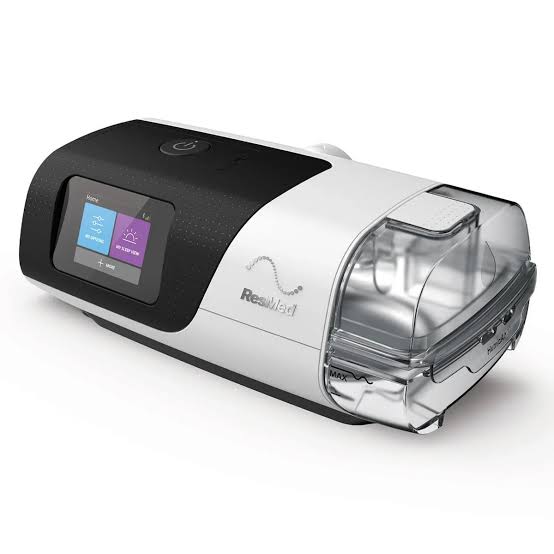
The resmed AirSense11 Autoset Elite is a modern CPAP sleep therapy device designed for people managing obstructive sleep apnea who want a simple, reliable, and digitally connected treatment experience. Built for both home and clinical use, it combines fixed-pressure therapy with smart comfort features such as integrated humidification, Climate Control support, and wireless connectivity for remote monitoring and therapy tracking. For many users, its biggest strengths are ease of use, compact design, and the ability to support more comfortable nightly therapy sessions.
This model is especially well suited for adults prescribed fixed-pressure CPAP therapy, including first-time users, long-term sleep apnea patients, and patients who want a cleaner interface than older-generation machines. The AirSense 11 platform is known for its touchscreen navigation and support features that simplify setup and daily use. In practice, it is often chosen by users who value quieter operation, consistent pressure delivery, and fewer manual adjustments during the night.
The estimated price range typically falls between $1,250 and $1,650 depending on supplier, bundle, and accessory package, with availability varying by region and insurance channel. The resmed AirSense11 Autoset Elite is widely sold through sleep clinics, durable medical equipment providers, and online CPAP retailers, making it accessible to both new buyers and replacement users.
Specifications
- Device type: Fixed-pressure CPAP machine for obstructive sleep apnea treatment.
- Pressure range: 4 to 20 cm H2O, with therapy delivered according to the prescribed setting.
- Humidification: Integrated heated humidifier with manual and climate-controlled operation.
- Water tub capacity: 380 mL maximum.
- Power supply: 65W power supply unit with AC input support for 100–240V, 50–60Hz.
- Connectivity: Wireless data transmission for therapy tracking and remote monitoring support.
- Safety: Automatic shutdown behavior in single-fault high-pressure conditions.
- Use case: Home and hospital therapy use for patients weighing more than 30 kg.
- Comparison point: Compared with the AutoSet version, the Elite model is the fixed-pressure option rather than the auto-adjusting APAP model.
In the AirSense 11 family, the Elite model focuses on stable prescribed pressure delivery, while the AutoSet model adds automatic pressure adjustment features. For users whose clinicians prefer a constant therapeutic pressure, the Elite is the more straightforward choice.
Detailed Description
The resmed AirSense11 Autoset Elite is built around a compact, user-friendly CPAP platform that prioritizes comfort and consistency. Air is drawn through the filter, conditioned through the humidifier system, and delivered through the tubing to the mask at the prescribed pressure. The machine’s integrated design reduces desk clutter and makes it easier to place on a nightstand without taking up much space.
Real-world use is centered on dependable nightly treatment. The humidifier helps reduce dryness in the nose and mouth, while climate features help create a more stable breathing environment. Users often appreciate the touchscreen interface because it simplifies menu navigation, therapy checks, and setup changes. The build quality feels solid for a home medical device, with durable plastics, a compact housing, and a practical layout for daily handling.
This model is a strong fit for patients who want a dependable CPAP machine with modern convenience features. The resmed AirSense11 Autoset Elite is especially useful for people who travel occasionally, need remote monitoring support, or want a machine that is easy to understand and maintain.
Setup Guide
- Place the device on a stable, level surface near the bed.
- Connect the power cord to the AC adapter and then to a wall outlet.
- Insert the humidifier tub and fill it with clean drinking-quality water up to the marked maximum line.
- Attach the air tubing securely to the device and connect the mask.
- Turn the machine on and confirm that the prescribed pressure setting appears correctly.
- Adjust comfort settings such as humidity level, ramp behavior, or climate control if enabled by your clinician.
- Follow the on-screen prompts for wireless setup if app pairing or remote monitoring is supported in your region.
Safety is essential during setup. Never overfill the water tub, and do not place the device where it can fall or get exposed to liquid. Use only approved accessories and follow the prescribed pressure settings exactly. If the machine does not start, check the power connection, tubing fit, and mask seal before assuming a fault.
For connectivity issues, restart the device and verify local wireless support. If the machine does not recognize the humidifier or tubing correctly, remove and reseat the parts firmly.
Troubleshooting
- Device will not turn on: Check the outlet, power adapter, and cable connections. Try a different wall socket if needed.
- Low airflow or weak pressure: Inspect the tubing for kinks, confirm mask fit, and make sure the filter is clean.
- Dry nose or mouth: Increase humidity gradually or confirm that the humidifier tub is filled properly.
- Water in tubing: Lower humidity settings or use the device in a cooler, more stable room environment.
- Leak warnings or noisy therapy: Refit the mask, replace worn cushions, and confirm hose connections are secure.
- No data sync: Check wireless availability, restart the device, and allow time for data upload after use.
Common error messages usually relate to tubing, humidifier, or power issues rather than major hardware failure. Preventive care includes weekly cleaning, regular filter replacement, and periodic inspection of the water tub and tubing. Warranty coverage and support options depend on the retailer and region, so users should contact their supplier, sleep clinic, or ResMed-authorized support provider for service help and replacement parts.
Pros & Cons
Pros
- Simple fixed-pressure CPAP therapy for patients who do not need auto-adjusting pressure.
- Integrated humidifier improves comfort and can reduce dryness during sleep.
- Touchscreen interface makes setup and daily use easy for beginners.
- Compact, modern design fits well on a bedside table.
- Wireless connectivity supports therapy tracking and remote care workflows.
Cons
- Not as flexible as the AutoSet version for users needing automatic pressure adjustment.
- Premium pricing may be high for self-pay buyers.
- Humidifier maintenance adds a small amount of daily and weekly upkeep.
- Some users prefer physical buttons over touchscreen controls.
In terms of value for money, the device is strongest for patients who already have a fixed-pressure prescription and want a reliable, comfort-focused machine. Compared with more affordable CPAP alternatives, it offers better usability and connectivity, though not always the lowest entry cost.
Customer Reviews
Typical user feedback for the resmed AirSense11 Autoset Elite is highly positive, with many buyers rating it around 4.5 out of 5 stars. Customers frequently praise the quiet operation, easy navigation, and improved comfort from humidification. One common testimonial is that the machine feels “much easier to use than older CPAP units,” especially for first-time users.
Common complaints usually focus on the price, the need for routine cleaning, and occasional frustration with connectivity or accessory compatibility. Some users also note that the touchscreen can be less convenient in the dark than simple physical controls. Most reviewers still recommend it for patients who want a dependable, modern CPAP device with a polished user experience.
Frequently Asked Questions
What is the resmed AirSense11 Autoset Elite used for? It is used for fixed-pressure CPAP therapy to treat obstructive sleep apnea.
Does it have humidification? Yes, it includes an integrated heated humidifier with climate features.
Is it good for beginners? Yes, it is well suited to first-time users because of its simplified touchscreen and guided setup.
Faqs
How do I set up resmed AirSense11 Autoset Elite for the first time?
What should I do if resmed AirSense11 Autoset Elite is blowing too much or too little air?
Why is resmed AirSense11 Autoset Elite making a rattling, whistling, or humming noise?
Can resmed AirSense11 Autoset Elite work with any CPAP mask and heated tubing?
How do I use the humidifier settings on resmed AirSense11 Autoset Elite without getting water in the mask?
What are the most common resmed AirSense11 Autoset Elite error issues and how do I fix them?
How often should I clean and maintain resmed AirSense11 Autoset Elite parts?
How can I get better sleep comfort from resmed AirSense11 Autoset Elite if I wake up during the night?
More resmed manuals
- Resmed S9 Auto 25 Positive Airway Pressure Device User Manual
- Resmed S9 Escape Positive Airway Pressure Device User Manual
- Resmed AirSense 10 Elite Plus Sleep Apnea Device User Manual
- Resmed S8 Auto 25 Airway Pressure Device User Manual
- Resmed S8 AutoSet Vantage Airway Pressure Device User Manual
- Resmed S8 Escape Airways Pressure Device User Manual
Leave a Comment