
Setup: Rollei DiaFilmScanner DF-S 100 SE User Manual
Content
Rollei DiaFilmScanner DF-S 100 SE
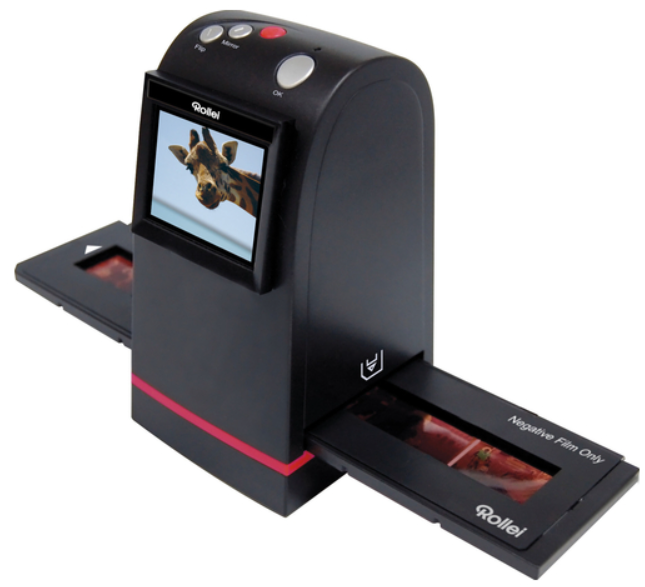
Introduction
The Rollei DiaFilmScanner DF-S 100 SE is a compact and user-friendly film scanner designed for private users who want to convert their 35mm film negatives and slides into high-quality digital images. This scanner is ideal for photography enthusiasts, hobbyists, and anyone looking to preserve old photographic memories in a digital format with ease. Its straightforward plug-and-play operation,, combined with detailed onboard controls, makes it accessible for users of all skill levels.
Among its key benefits, the DF-S 100 SE boasts a 5-megapixel sensor and a maximum optical resolution of 1800 dpi, delivering clear and vibrant scans suitable for digital archiving, social media sharing, and moderate-sized prints. The integrated 2.4-inch TFT color display allows previewing images instantly before scanning, enhancing user interaction and workflow efficiency. It supports both mounted slides and film strips, expanding its versatility.
Priced affordably, typically within the range of €80 to €110 depending on the retailer and region, the Rollei DiaFilmScanner DF-S 100 SE offers excellent value for those seeking a budget-friendly, reliable film scanning solution. It is widely available online and at photography specialty stores, making it a convenient choice for users looking to digitize their film collections without investing in expensive professional equipment.
Specifications
- Image Sensor: 5 megapixel CMOS sensor
- Lens: Multi-element precision lens
- Internal memory: 4MB Flash (not for saving images)
- Focus Range: Fixed focus
- Exposure Control: 7 levels of control
- Color Balance: 7 levels of control
- Scan Quality: 1,800dpi
- Data Conversion: 10 bits per color channel
- Scan Method: Single pass
- Light Source: Backlight (3 white LEDs)
- Interface: USB 2.0, TV-out (video 3.5mm jack)
- USB Configuration: Mass Storage Device Class/MSDC
- Power: 5V adapter, or USB power
- Dimensions: 82x86x152mm
- Weight: 0.41kg
- External memory: SD/MMC compatible (up to 32GB)
Compared to similar entry-level film scanners, the Rollei DF-S 100 SE offers competitive resolution and ease of use while maintaining an affordable price point. Its 1800 dpi optical resolution is sufficient for casual digitization but may fall short for professional-grade enlargements compared to higher-end models. However, it excels in portability and quick operation, making it a practical choice for home users.
Rollei DiaFilmScanner DF-S 100 SE-PRODUCT
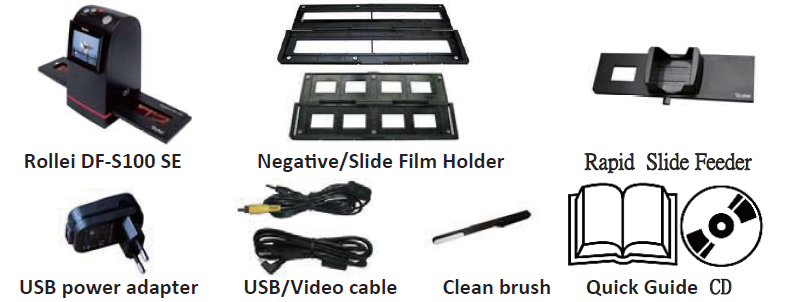
Note
- We strongly suggest using a clean, dry, non-alcohol-coated swab to clean the glass surface periodically to produce a clear image during operation.
- Clean dust from the FilmScanner back light, to use the clean brush to wipe the dust. Dust or dirt from the negative, slide Įlms and cover trays may aīect the scanned image quality. Please make sure the materials are cleaned before inserting them into the scanner.
- Please and recommend, processional purger from the photo store to clean the dust on films, if any, y to avoid damaging the only one copy of old films.
Install film into the film holder
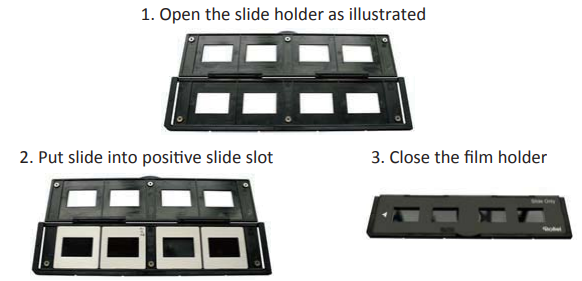
Install the Slide into holder
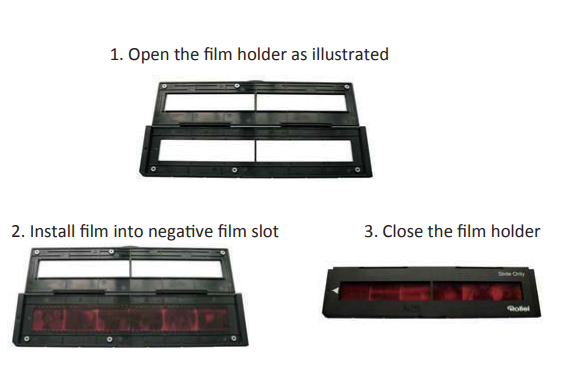
Install the Negative Film into holder
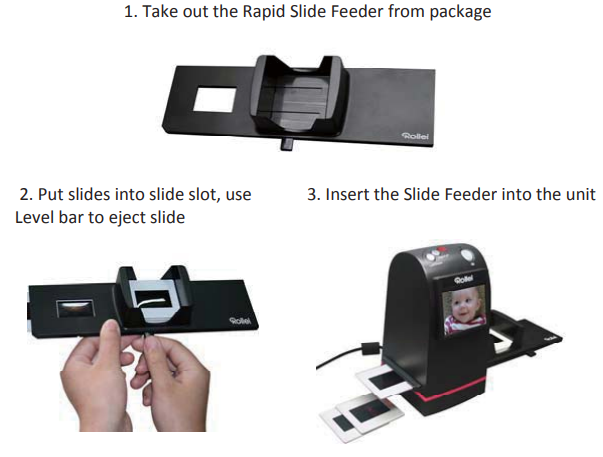
Install the Rapid Slide Feeder:
Troubleshooting Common Issues with the Rollei DiaFilmScanner DF-S 100 SE
- Scanner Not Recognized via USB: Ensure the scanner is properly connected and powered on. Try different USB ports or cables. Confirm that the device is set to USB mode; a USB icon should appear on the display.
- Blurry or Low-Quality Scans: Clean the film holders and scanner glass regularly to avoid dust spots. Use the included protective plates to minimize dust during scanning.
- Error Codes or Failed Scans: Restart the scanner and check if the film strip or slide is properly seated in the holder. Refer to the user manual for specific error codes if displayed.
- Preventive Measures: Store the scanner in a dust-free environment, handle films with care, and always use the protective covers when the scanner is idle.
The Rollei DiaFilmScanner DF-S 100 SE is designed for personal, non-commercial use and comes with a limited warranty typically covering manufacturing defects. For support, users can contact the official Rollei customer service or authorized retailers, ensuring access to timely assistance.
Pros and Cons of the Rollei DiaFilmScanner DF-S 100 SE
- Pros:
- Affordable price for a reliable 35mm film scanner
- Easy to use with a built-in preview screen
- Supports both negatives and mounted slides
- Compact and portable design
- USB 2.0 connectivity ensures quick data transfer
- Cons:
- Optical resolution limited to 1800 dpi; not suitable for professional large-format prints
- Color depth is limited to 8-bit per channel, which may affect color fidelity for advanced editing.
- TV output feature is outdated for most modern users
- Scan speed may be slower compared to higher-end models
Overall, the Rollei DiaFilmScanner DF-S 100 SE offers excellent value for budget-conscious users who want a straightforward scanner for personal film archives. While it lacks some advanced features found in pricier scanners, its balance of performance and price makes it a popular alternative to similarly priced devices.
Customer Reviews of the Rollei DiaFilmScanner DF-S 100 SE
Users generally praise the Rollei DiaFilmScanner DF-S 100 SE for its ease of use and decent image quality given the price. Many note the convenience of the integrated LCD preview that allows quick verification of scans before saving. Common positive feedback highlights the scanner’s ability to breathe new life into old slides and negatives with minimal setup.
On the downside, some users report limitations in scan resolution and occasional difficulties with dust or focusing, which are typical for scanners in this price range. Star ratings often hover around 4 out of 5, reflecting satisfaction balanced with realistic expectations. Customers frequently recommend it for casual digitization but advise professionals to seek higher-resolution alternatives.
Typical user recommendation: Ideal for those who want to digitize family photos and slides affordably without complex software or hardware requirements.
Faqs
How do I set up the rollei DiaFilmScanner DF-S 100 SE for the first time?
What should I do if the rollei DiaFilmScanner DF-S 100 SE is not scanning images correctly?
Can the rollei DiaFilmScanner DF-S 100 SE connect directly to a PC, and how do I transfer scanned images?
What types of film are compatible with the rollei DiaFilmScanner DF-S 100 SE?
How do I optimize image quality when scanning with the rollei DiaFilmScanner DF-S 100 SE?
Does the rollei DiaFilmScanner DF-S 100 SE support TV output for image preview?
What maintenance is required to keep the rollei DiaFilmScanner DF-S 100 SE functioning well?
Why does the live view on the rollei DiaFilmScanner DF-S 100 SE sometimes show a positive image instead of a negative?
Tags
Leave a Comment