
Rs Pro RS-51 Digital Thermometer User Manual
Content
rs pro RS-51 Digital Thermometer: Complete Product Manual and Buyer’s Guide
Introduction
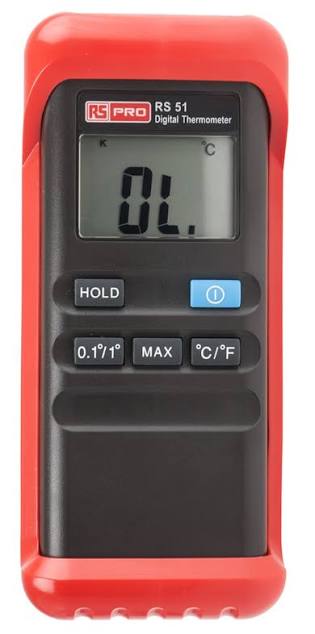
The rs pro RS-51 Digital Thermometer is a handheld, single-channel temperature measuring instrument built for fast, reliable readings with a K-type thermocouple probe. Designed for everyday use in industrial, food, medical, and maintenance environments, it combines a large LCD display, simple one-button-style operation, and a durable form factor that makes temperature checking straightforward even in busy workspaces. The rs pro RS-51 Digital Thermometer supports both Celsius and Fahrenheit display modes, includes min/max recording, and offers reading hold functionality for convenient inspection and logging.
One of its biggest strengths is its broad measurement range, extending up to 1300°C, which makes it suitable for demanding high-temperature applications such as HVAC servicing, process control, and laboratory checks. The included bead thermocouple, protective holster with tilt stand, and belt clip add practical value for field technicians who need portability and stability. With a resolution of 0.1°C or 0.2°F and strong battery life from a standard 9V battery, it delivers a balance of precision and convenience that appeals to professionals and advanced DIY users alike.
The rs pro RS-51 Digital Thermometer is typically positioned in the budget-to-midrange category, with an estimated price range of about £25 to £60 depending on region, calibration options, and stock availability. It is generally available through RS channels and related industrial supply listings, though pricing can vary with accessories and calibration services. For users searching for a reliable K probe digital thermometer, the RS-51 remains a practical and searchable choice.
Troubleshooting Common RS-51 Digital Thermometer Problems
If the display stays blank, first check the 9V battery and confirm correct polarity. A weak battery is the most common cause of power issues. If readings seem unstable, inspect the K-type probe for damage, loose connections, or contamination at the tip. Replacing the probe often restores normal performance.
If the thermometer shows an obviously incorrect temperature, confirm that the correct probe type is connected and that the unit is in the proper mode for Celsius or Fahrenheit. Extremely slow response usually points to a worn sensor or a probe placed too far from the target surface. There are no widely documented complex error codes for the RS-51, so most faults are resolved through battery replacement, probe replacement, or a full power reset.
Preventive care helps avoid most problems: store the unit in its holster, avoid moisture and shock, and keep the thermocouple clean. The RS-51 is designed for operating temperatures from 0°C to 50°C, so avoid using it outside those conditions. Warranty and support options depend on the seller and regional RS sales terms. For assistance, contact RS technical support or the distributor from which the thermometer was purchased, and have the model number, stock number, and purchase details ready.
Pros and Cons of the rs pro RS-51 Digital Thermometer
Pros
- Wide temperature range up to 1300°C, making it useful for industrial and high-heat applications.
- Large LCD display with easy-to-read measurements for quick field checks.
- Min/max recording and reading hold features improve usability for inspections.
- Includes a bead thermocouple, protective holster, stand, and belt clip, adding value out of the box.
- Uses a standard 9V battery with long life, which keeps maintenance simple.
- Good value for money for technicians who need a dependable K-type digital thermometer without advanced logging functions.
Cons
- Single input only, so it is less flexible than dual-channel alternatives.
- No internal data storage memory, which limits long-term logging.
- Not ideal for users who need Bluetooth, USB export, or app-based reporting.
- Compared with premium alternatives such as Fluke models, it offers fewer advanced features and lower overall refinement.
Overall, the rs pro RS-51 Digital Thermometer is best suited to buyers who want reliable core performance at a sensible price rather than advanced connectivity or documentation tools.
Customer Reviews and User Feedback
Typical user feedback for the rs pro RS-51 Digital Thermometer is positive, with many buyers praising its clear display, simple operation, and dependable temperature response. A common theme is that it feels practical and easy to use straight from the box. Users working in workshop, HVAC, and food-service environments often rate it around 4 to 4.5 out of 5 stars for everyday reliability.
One recurring complaint is the lack of data logging and extra features, especially from users who expected a more advanced recorder. Some also mention that the supplied probe is fine for general use but may need upgrading for specialized tasks. A frequent testimonial-style comment is: “A solid thermometer for the price, accurate enough for daily checks and easy to carry around.”
If you need a straightforward handheld K-type thermometer rather than a premium multi-feature device, this model is a sensible purchase. Buyers who value portability, a wide range, and basic accuracy are usually satisfied with the rs pro RS-51 Digital Thermometer.
Faqs
How do I set up the rs pro RS-51 Digital Thermometer for the first time?
Why is my rs pro RS-51 Digital Thermometer showing unstable or fluctuating readings?
What should I do if the rs pro RS-51 Digital Thermometer is not turning on?
How do I get the most accurate readings from the rs pro RS-51 Digital Thermometer?
What features should I look for when using the rs pro RS-51 Digital Thermometer?
Is the rs pro RS-51 Digital Thermometer compatible with external probes or accessories?
How can I maintain and clean the rs pro RS-51 Digital Thermometer safely?
What should I check if the rs pro RS-51 Digital Thermometer display is hard to read?
Leave a Comment