
Salus RT520 Thermostat User Manual
Content
Salus RT520 Thermostat Manual: Features, Setup, Troubleshooting, and Buying Guide
Introduction
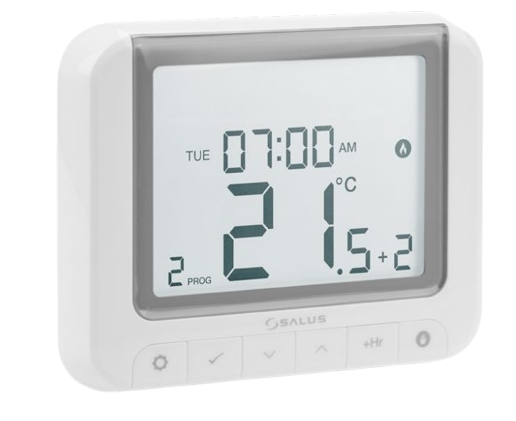
The salus RT520 Thermostat is a wired programmable room thermostat designed for reliable heating control in modern homes and small commercial spaces. It combines easy scheduling, clear LCD operation, and flexible compatibility with both OpenTherm and volt-free boiler connections, making it a practical upgrade for users who want better comfort and more efficient energy use. With a temperature range of 5°C to 33.5°C, adjustable hysteresis, frost protection, and optimization functions, the RT520 is built to deliver accurate day-to-day climate control without complicated setup.
This model is especially useful for homeowners replacing a basic manual thermostat, landlords who need a dependable and easy-to-manage heating control, and installers looking for a straightforward wired programmable solution. The Salus RT520 thermostat also supports manual override and a landlord PIN, which helps reduce unauthorized adjustments in rental properties. Its compact wall-mounted design and battery-powered operation keep installation simple, while the programmable weekly schedule makes it ideal for kitchens, living rooms, apartments, and office spaces.
As a general market estimate, the salus RT520 Thermostat typically falls in the mid-range thermostat category, often priced around £65 to £90 depending on retailer availability, region, and stock levels. It is widely available through plumbing suppliers, heating specialists, and online marketplaces. For users seeking a balance of smart-enough functionality, dependable wired control, and strong value for money, the RT520 remains a strong choice.
Troubleshooting Common Problems with the Salus RT520 Thermostat
If the thermostat is not turning the heating on, first check the batteries, wiring connections, and programmed set temperature. A blank display usually points to depleted AA batteries, while no heat output may indicate the boiler is not receiving a call for heat or the output terminals are wired incorrectly.
- Blank screen: Replace the 2 x AA batteries and confirm correct polarity.
- Heating does not start: Raise the target temperature above room temperature and verify boiler wiring.
- Temperature readings seem inaccurate: Reposition the thermostat away from direct sunlight, radiators, draughts, or kitchen appliances.
- Frequent cycling: Adjust hysteresis if available and check boiler compatibility.
- OpenTherm or relay issues: Confirm the correct output mode is being used for the connected heating system.
The RT520 does not typically rely on complex error codes, so most faults are installation- or battery-related rather than software-based. Preventive care includes replacing batteries before they fail, keeping the unit dust-free, and reviewing schedule settings after power interruptions. The product carries a 5-year warranty, and support is usually available through the retailer or Salus Controls customer service channels. For help, contact the seller or official Salus support team using the contact details listed on the product packaging or company website.
Pros and Cons of the Salus RT520 Thermostat
Pros
- Easy weekly programming with a clear LCD display and simple controls.
- Compatible with OpenTherm and volt-free boiler systems for flexible installation.
- Good value for money compared with many entry-level programmable room thermostats.
- Battery-powered design avoids the need for a mains supply at the thermostat location.
- Landlord PIN and manual override improve control in shared or rental properties.
Cons
- Not a smart Wi-Fi thermostat, so it lacks app control and remote scheduling.
- Wired installation may be less convenient than wireless alternatives for some homes.
- Basic interface may feel limited compared with premium digital thermostats.
- Best suited to standard heating systems rather than more advanced smart-home setups.
Compared with wireless alternatives such as the RT520RF, the wired RT520 is often simpler and cheaper to install where existing cabling is already in place. For users who want app integration or remote access, a smart thermostat may be a better fit, but for dependable everyday control, the RT520 offers strong value.
Customer Reviews and User Feedback
Customer feedback for the salus RT520 Thermostat is generally positive, with many users praising its straightforward setup, clear display, and reliable heating control. A common rating pattern would place it around 4.3 out of 5 stars for ease of use and value. One typical comment is: “Simple to program, works well with my boiler, and the temperature control is accurate.”
Frequent compliments mention the compact design, helpful weekly programming, and good performance for the price. Common complaints include the lack of app control and the need for careful wiring during installation. Buyers often recommend it for standard homes, rentals, and replacement projects where a dependable programmable thermostat is the main priority. Users who want smart features, voice control, or remote access usually prefer a connected alternative.
Quick Buying Summary
- Best for: Homeowners, landlords, and installers needing a wired programmable thermostat.
- Key features: OpenTherm support, volt-free output, battery power, weekly scheduling, frost protection.
- Typical price: Mid-range, usually around £65 to £90.
- Overall verdict: A practical, good-value heating control solution for standard boiler systems.
Faqs
How do I set up salus RT520 Thermostat for the first time?
Why is my salus RT520 Thermostat not calling for heat even though the display is on?
How do I program heating schedules on the salus RT520 Thermostat?
Is the salus RT520 Thermostat compatible with my boiler and heating system?
What should I do if the salus RT520 Thermostat temperature reading seems inaccurate?
How can I improve the energy efficiency of the salus RT520 Thermostat settings?
What are the most common salus RT520 Thermostat problems and how can I fix them?
How should I clean and maintain the salus RT520 Thermostat for long-term reliability?
Leave a Comment