
Secret Lab MAG-PCMNT-BLK Premium Pc Mount User Manual
Content
Secretlab MAG-PCMNT-BLK Premium PC Mount Manual and Product Guide
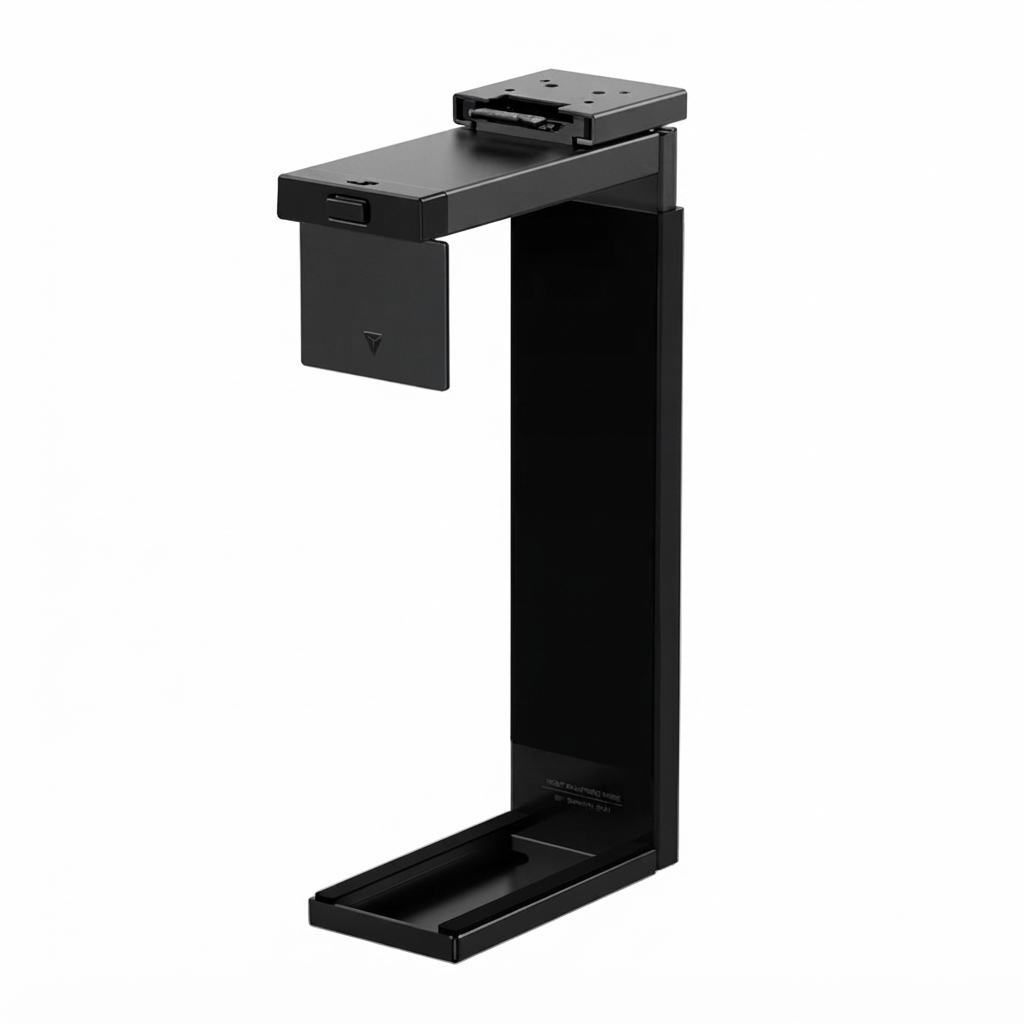
The secret lab MAG-PCMNT-BLK Premium Pc Mount is a desk-mounted tower holder designed exclusively for Secretlab MAGNUS Pro and MAGNUS Pro XL desks. It helps users free up floor space, improve cable management, and keep a gaming or workstation PC securely positioned beneath the desk. For users who want a cleaner setup and easier access to their system, the secret lab MAG-PCMNT-BLK Premium Pc Mount is a practical upgrade that combines a matte-black finish, steel construction, and tool-free adjustability for everyday convenience.
Its biggest advantages are compatibility with the MAGNUS ecosystem, a pull-pin height adjustment system, and a width clamp that accommodates a wide range of mid to full-size PC cases. The mount supports one PC with a height range of 354 to 543 mm, a width range of 170 to 300 mm, and a maximum weight of 25 kg. That makes it suitable for many ATX-class towers used for gaming, creative work, and high-performance productivity setups. Because it mounts directly under the desk, it also helps reduce clutter and can improve airflow around the case compared with a tower sitting on carpet or a tight floor corner.
This accessory typically appeals to gamers, streamers, editors, remote workers, and anyone building a premium desktop setup around a Secretlab desk. Estimated pricing generally falls in the mid-premium accessory range, often around $90 to $100 USD depending on region, taxes, and retailer availability. Stock can vary by market, and availability is usually best through Secretlab’s official store or approved regional sellers. For buyers already using the MAGNUS Pro platform, the secret lab MAG-PCMNT-BLK Premium Pc Mount is one of the most cohesive add-ons for a clean, professional-looking workspace.
Detailed Specifications for the Secretlab Premium PC Mount
- Model: MAG-PCMNT-BLK
- Finish: Matte black
- Compatibility: Designed exclusively for Secretlab MAGNUS Pro and MAGNUS Pro XL desks
- Supported PC size range: 354 to 543 mm height
- Supported PC width range: 170 to 300 mm
- Maximum load: 25 kg
- Approximate product weight: 3 to 4 kg
- Adjustment method: Pull-pin height adjustment and push-button clamp width adjustment
- Installation style: Tool-free desk attachment
- Orientation: Can be used on either side of the desk
- Build material: Steel structure for long-term durability
- Design intent: Under-desk PC storage, improved cable routing, and space optimization
In practical use, the mount is best for standard tower cases rather than oversized custom-loop builds. Compared with universal under-desk PC holders, the secret lab MAG-PCMNT-BLK Premium Pc Mount stands out for its desk-specific fit and cleaner integration with the MAGNUS ecosystem. Similar mounts from generic brands may offer broader desk compatibility, but they often lack the same cable-management synergy, finish quality, and integrated hardware experience.
Troubleshooting the Secretlab Premium PC Mount
Most issues with the mount are related to sizing, alignment, or improper clamping. If the PC does not sit evenly, recheck tower dimensions and make sure the case falls within the 354 to 543 mm height and 170 to 300 mm width limits. If the clamp feels loose, confirm that the width adjustment button has fully engaged and that the case panels are seated correctly inside the holder. If the system looks angled or unstable, remove the tower and reinstall it on a level surface before mounting again.
- Problem: PC does not fit. Fix: Measure the tower with front panels and feet installed, then compare against the supported size range.
- Problem: Height adjustment does not lock. Fix: Reposition the pull-pin and ensure it clicks into the intended slot.
- Problem: Side-to-side movement. Fix: Verify the clamp width is set tightly and the desk mounting points are secure.
- Problem: Desk clearance issue. Fix: Save a higher desk preset if the tower is taller than 44 cm to prevent floor collision when lowering the desk.
No formal error-code system is typically associated with this accessory. Preventive maintenance is simple: keep the mount clean, avoid overloading it beyond 25 kg, and inspect the fit after changing PC cases. Warranty coverage and support generally follow Secretlab’s regional accessory warranty policies. For assistance, contact Secretlab support through the official website or your local authorized retailer for order-specific help, replacement parts, or compatibility confirmation.
Pros and Cons of the Secretlab MAG-PCMNT-BLK Premium PC Mount
Pros
- Excellent space saving: Keeps the PC off the floor and clears room for leg movement, cleaning, and cable routing.
- Premium integration: Matches the MAGNUS Pro and MAGNUS Pro XL ecosystem for a cohesive workspace.
- Tool-free adjustment: Pull-pin and push-button controls make sizing fast and practical.
- Strong load support: Handles up to 25 kg, which covers many mainstream gaming towers.
- Clean aesthetic: The black steel design blends well with modern setups.
Cons
- Limited compatibility: Works only with Secretlab MAGNUS Pro desks, not with standard desks.
- Premium pricing: Costs more than generic under-desk PC holders.
- Size constraints: Very large or unusually shaped cases may not fit.
- Value depends on ecosystem: Best value is realized only when paired with a MAGNUS desk.
For users already invested in the Secretlab desk platform, the mount offers strong value for money because of its build quality and seamless fit. Buyers comparing it with universal alternatives should weigh convenience and finish quality against lower-cost flexibility.
Customer Reviews and Real-World Feedback
Typical user feedback for the secret lab MAG-PCMNT-BLK Premium Pc Mount is strongly positive, especially from people who want a cleaner desk setup. A common rating pattern is around 4.5 out of 5 stars, with praise focused on sturdiness, easy installation, and the benefit of getting the PC off the floor. Users often mention that the under-desk placement makes cable management easier and helps the workspace look more organized.
- “Very solid and premium feeling.” Users appreciate the steel construction and secure fit.
- “Perfect for my MAGNUS Pro setup.” Buyers like the seamless desk integration.
- “A little expensive, but worth it.” Many feel the finish and convenience justify the cost.
- “Check your case dimensions carefully.” The most common complaint is fitment with larger towers.
Overall, this accessory is best recommended for owners of compatible Secretlab desks who want a polished, practical PC mounting solution. It is especially appealing for gaming rooms, compact offices, and creator workstations where desk space and clean aesthetics matter.
Final Verdict: Is the Secretlab Premium PC Mount Worth Buying?
The secret lab MAG-PCMNT-BLK Premium Pc Mount is a well-designed accessory for users who want a stable, elegant, and desk-integrated way to mount a PC tower beneath the desk. Its size limits are reasonable, its adjustment system is user-friendly, and its premium build quality makes it a strong match for Secretlab’s MAGNUS lineup. If you already own a compatible desk and want a cleaner, more organized setup, this mount is an easy recommendation.
Faqs
How do I install the secret lab MAG-PCMNT-BLK Premium Pc Mount on my desk setup for the first time?
What desks and PC cases are compatible with the secret lab MAG-PCMNT-BLK Premium Pc Mount?
Why is my secret lab MAG-PCMNT-BLK Premium Pc Mount slipping or feeling loose after installation?
How can I route cables cleanly with the secret lab MAG-PCMNT-BLK Premium Pc Mount?
Does the secret lab MAG-PCMNT-BLK Premium Pc Mount affect airflow or cooling performance?
What should I do if the secret lab MAG-PCMNT-BLK Premium Pc Mount interferes with my chair movement or legroom?
How do I clean and maintain the secret lab MAG-PCMNT-BLK Premium Pc Mount for long-term use?
What are the main benefits of using the secret lab MAG-PCMNT-BLK Premium Pc Mount in a gaming or workstation setup?
Leave a Comment