
Pairing & Usage: Seflorgo Air02 Open Ear True Wireless Stereo Earbuds User Manual
Content
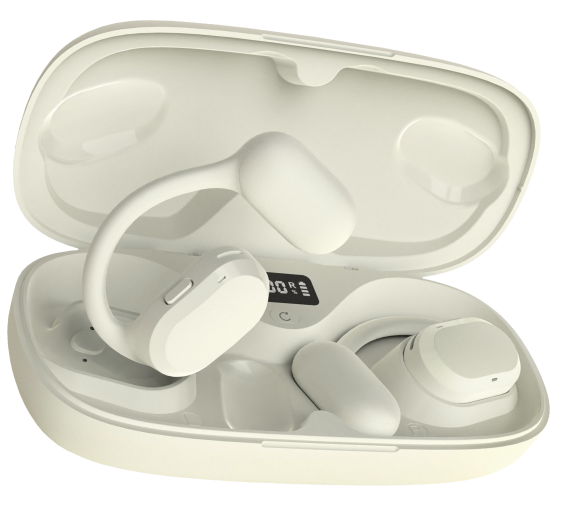
Self-Organic Air02 Open Ear True Wireless Stereo Earbuds
Introduction
The self-organizing Air02 Open Ear True Wireless Stereo Earbuds deliver a unique listening experience by combining open-ear comfort with advanced wireless technology. Designed to rest comfortably around your ears without entering the ear canal, these earbuds offer all-day wear without fatigue or blockage of ambient sounds. This makes them especially suitable for users who appreciate situational awareness — such as outdoor runners, cyclists, or office workers who need to stay alert while enjoying music or calls.
Featuring Bluetooth 5.4 chipset with advanced Digital Signal Processing (DSP), the Air02 earbuds ensure stable and interference-free wireless connectivity within a range of 10 to 20 meters. Their open-ear design promotes natural sound perception, reducing ear strain and allowing users to remain aware of their surroundings for safety and convenience. The earbuds come with a 600mAh charging case that provides multiple charges, extending battery life for several hours of uninterrupted listening.
With an estimated price range of approximately $50 to $70, the self-organizing Air02 Open Ear True Wireless Stereo Earbuds offer a competitive balance of affordability and advanced features. They are widely available online through multiple retailers, catering to audiophiles and casual users seeking a lightweight, sweat-resistant, and easy-to-use open-ear audio solution. Whether for fitness, commuting, or daily calls, the Air02 earbuds are designed to combine comfort, functionality, and modern wireless convenience.
Specification
- Model NO.: AIR02
- Bluetooth Chipset: Advanced DSP latest Bluetooth 5.4 Chip
- Operation Range: 10-20 Meters/33-66ft Without Obstacles
- Bluet(nth Protocols: HSP/HFP/A2DP/AVRCP
- Audio Codec: AAC/SBC
- Earbud Battery Capacity: 80mAh/3.7V
- Earbud Charging Time: 1-2H
- Earbud Stand-by Time: 90 Days
- Earbud Working Time Once Charged Fully: About 8-10H (70% Volume)
- Battery Icon: Earbuds Power Display for IOS System Devices and Most Android Devices
- Charge Case Battery Capacity/Charging Time: 600mAh/ 1.5H
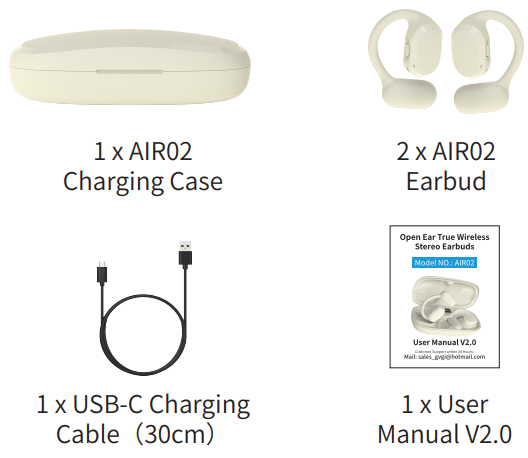
Package Contents
Product Overview


About Charging
When you get the item and take out the AIR02 earbuds, the earbuds should be fully charged.
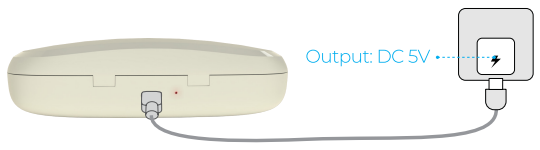
- Please plug the AIR02 charging case into your cellphone USB charger or Power Bank,, or PC/Laptop to charge the case.
- There is a battery level digital display (0%-100% of Battery Capacity) when you charge the case. When it is 100, that means the case battery is fully charged.
- It will take about 1.5-2 hours to charge the case fully till Red light changes to Blue light.
- If the earbuds are low on battery and please put them into the charging case and close the case, and the earbuds will be charged. It will take about 1-2 hours to charge them fully.
- The earbuds, it can provide about 8-10 hours of playing time once it is fully charged. The actual playing time may vary with different settings, usage methods, and environments.
- For the charging case, it can charge the earbuds 3-4 times once the case is fully charged.
TIPS:
- Only when you close the case, the case will charge the earbuds automatically until they are fully charged.
- Please keep the charging port dry before charging to avoid damaging the earbuds.
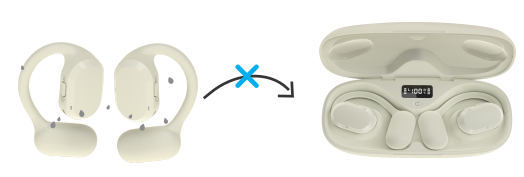
Don't put the earbuds into the charging case once they earbuds are wet.
Basic Operation
Power ON
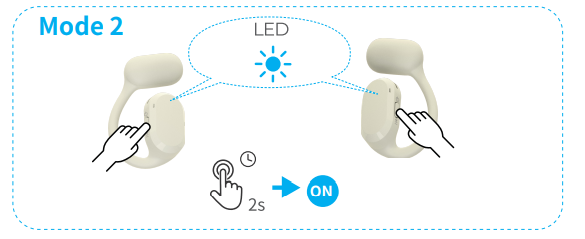
- MODEL 1: When you open the charging case and the earbuds will be turned on automatically and enter into pairing or reconnection status with Blue & Red flashing alternately.
- MODE 2: When the earbuds are not in the charging case and in power off status, please press and hold the MFB button of the Left/Right earbud for 2-3 seconds each to turn them on.
TIPS:
Whether Model 1 or Model 2, once they are powered on, the left earbud and right earbud will flash the Blue LED,, and then they are connected to each other("TWS Connected" voice prompt). You can see only the left or only the right earbud to be flashing the LED for pairing or reconnection.
Power OFF
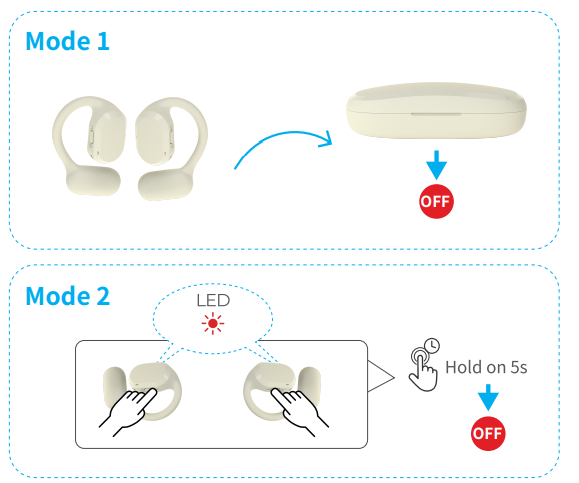
- MODEL 1: When you put the earbuds into the case and close the case and the earbuds will be turned off and charged automatically.
- MODE 2: When the earbuds are not in the charging case and in power-on status, please press and hold the MFB button of only the Left or only the Right earbud, for 5 seconds to turn them off together.
Please note, however, that when the earbuds are playing music or making a call, Mode 2 is disabled and they can't be switched off.
Pairing & Connection
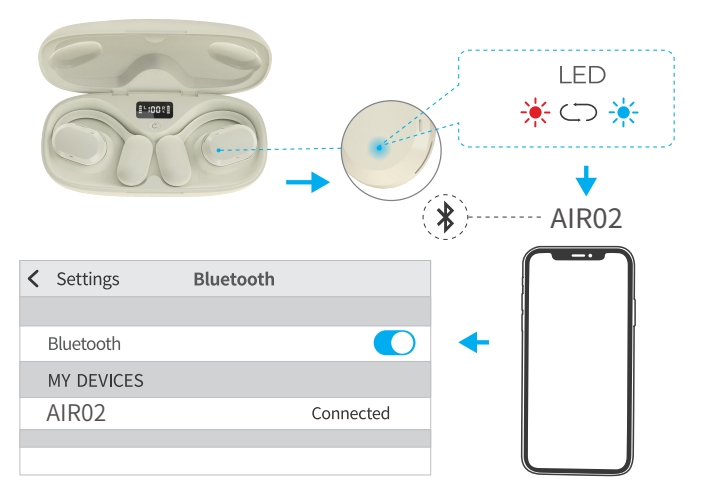
- Please open the charging case, and the AIR02 earbuds will enter into pairing status, and you will see the right earbud or the left earbud flashing Blue & Red LED alternately.
(Please note that at this moment, the right earbud and the left earbud will be paired with each other and so you only see one of the Earbuds, the left or the right,, in flashing LED.) - Turn on the Bluetooth function of your cell phone in the settings menu.
- For iOS: Settings>Bluetooth>On
- For Android: Settings>Bluetooth>On
- Search for the Bluetooth Devices and select and click "AIR02".
- Enter the code "0000" (Four Zero) or "1234" if needed.
- If pairing is successful, the LED indicator light will go out.
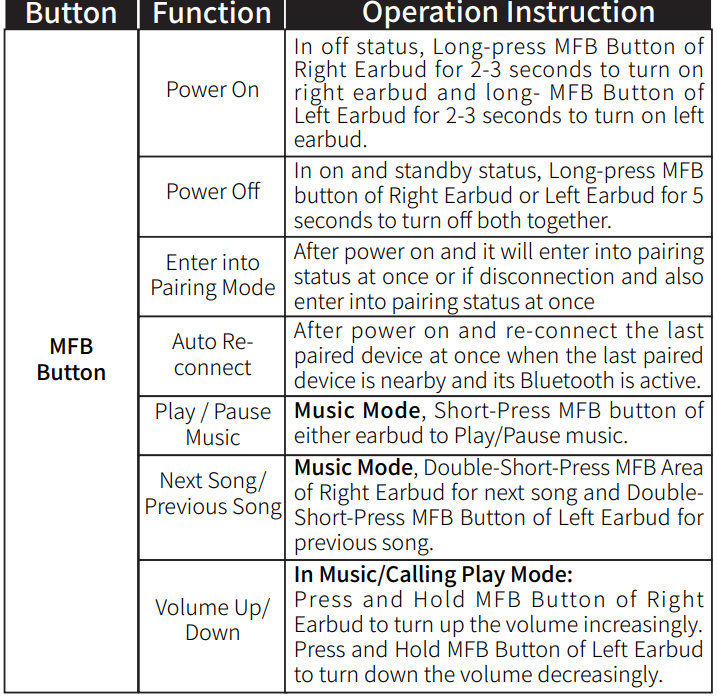
MFB Button Operation
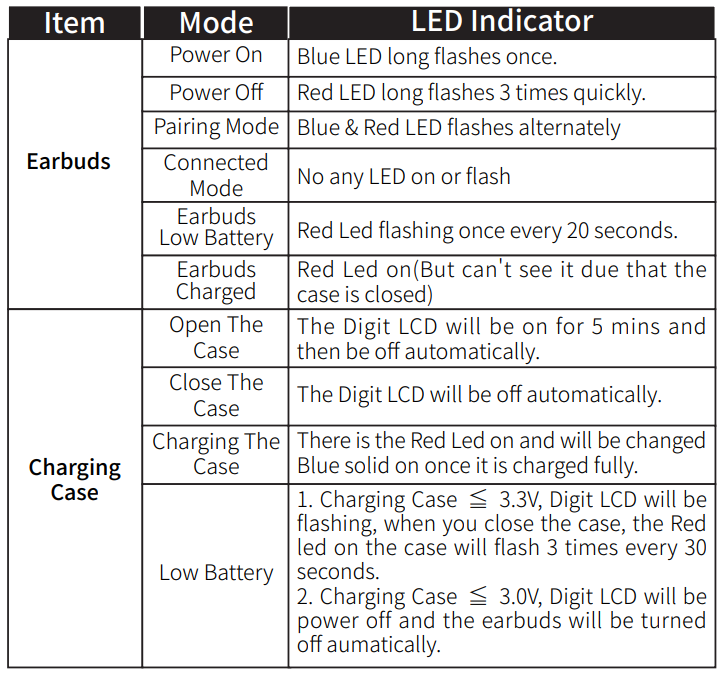
LED Indicator
Volume Synchronization Function
TAIR02 Earbuds support the Volume Synchronization Function for IOS and Android Smart devices, but for some Android phones, you may go into the Bluetooth settings of the phone to activate this.
Reset and Clear the Pairing Records
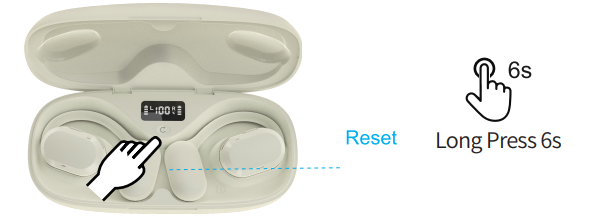
If there is the any pairing or function issue, please long-press the Reset Button for 5-6 seconds until the both of earbuds flash the Blue LED once and which means that the both of earbuds have reset and have cleared the pairing records.
TIPS:
- Once you have completed the Reset action and please forget the AIR02 from the Bluetooth list on your cellphone to set up the pairing and connection again.
- Double-tab the Reset Button, the Digit LCD will flash
Troubleshooting
My AIR02 will not power on.
Please put the earbuds into the charging case and recharge them, and make sure the AIR02 has enough battery power. Open the case, and the earbuds will turn on automatically.
I am having trouble pairing and connecting to my device.
Please check the following:
- Please make sure that the Bluetooth function of your device is normal, and if possible, you can pair other Bluetooth headsets or headphones with your device and check that it is right.
- If necessary, please turn off the Bluetooth function of your other devices, such as your cellphone that had paired with AIR02, to avoid AIR02's wrong reconnection and not enter into pairing status. Please keep AIR02 in pairing status with the Blue & Red LED flashing alternately.
This is very important! - Please put the earbuds into the charging case and close and then open the case to try it again.
After pairing with the phone, I can't hear any music from AIR02, or the volume is very low.
Please check the following:
- Ensure that the pairing is correct, and the AIR02 earbuds are connected to the correct phone or device.
- Verify that the music volume is audible on both your Bluetooth device and sound system. Adjust the volume accordingly.
- Make sure your audio device is set to play music via Bluetooth. Some devices, such as computers, may require manually selecting the music or speaker output mode.
- If the issue persists, place the earbuds into the charging case, close it, and then open the case to try the connection again.
The item does not work properly.
- Please put the earbuds into the charging case and close and open the case to try it again.
- Please delete the AIR02 from the Bluetooth list of your device and set the connection again.
I think the range is not long enough as expected.
- Normally,, the range is 33-66ft (10-20m) indoors without any obstacles.
- Bluetooth range can be affected by physical obstructions (walls, people, etc.), wireless interference (Wi-Fi routers, Wireless TV adapters, etc.) also depends on your smartphone device.
If you have the following issues, please trouble you to tell us more details by mail, and we have the best customer service to stbybyy to support you within 24 hours.
- No Sound / Not Working.
- Pairing & Connecting.
- Audio Related.
- Operational Questions.
- Doesn't hold a charge or can't be turned on
Warranty
This Product is covered by our Product and Labor warranty for 12 months from the date of its original purchase. If manufacturing defects occur, please contact our support team immediately to launch a warranty claim. We will instruct you on how to return the defective unit back to us for repair or replacement. The following are excluded from our warranty cover:
- Device purchased as 2nd hand, used, or from unauthorized sellers.
- Damage resulted from misuse and abusive action.
- Damage resulted from Chemical, fire, radioactive substance, poison, or liquid.
- Damage resulted from a natural disaster.
- Damage caused to any 3rd party, person, object, or beyond.
Pros & Cons of seflorgo Air02 Open Ear True Wireless Stereo Earbuds
Pros
- Comfortable Open-Ear Design: Unlike traditional in-ear buds, the Air02 rests outside the ear canal, reducing ear fatigue and allowing ambient sounds for safety during outdoor activities.
- Advanced Bluetooth 5.4 Connectivity: Provides a stable wireless connection with low latency and a generous operation range of up to 20 meters.
- Long Battery Life with Charging Case: The 600mAh charging case can recharge the earbuds fully 3-4 times, supporting extended use throughout the day.
- Built-in Microphone for Hands-Free Calls: Enables clear communication without needing to hold your phone, ideal for work or exercise.
- Value for Money: Priced competitively compared to alternatives like Soundcore AeroFit 2 or Monster Open Ear Earbuds, offering comparable features at a lower cost.
Cons
- Single Device Pairing Only: Unlike some competitors supporting multipoint connections, the Air02 earbuds connect to one device at a time, limiting simultaneous device use.
- Limited Bass Performance: The open-ear design naturally reduces bass impact compared to in-ear models, which might disappoint bass enthusiasts.
- No Active Noise Cancellation: These earbuds prioritize ambient awareness over noise isolation, which might not suit users wanting full noise blocking.
- Basic Touch Controls: Controls and features are functional but less advanced compared to premium models, offering app-based customization.
Customer Reviews & Feedback for seflorgo Air02 Open Ear True Wireless Stereo Earbuds
Users generally praise the self-organizing Air02 Open Ear True Wireless Stereo Earbuds for their comfort and open-ear design, highlighting how they allow safe listening during outdoor activities. The lightweight feel and stable Bluetooth 5.4 connection receive positive remarks, with many users noting clear call quality thanks to the built-in microphone.
Common complaints include the lack of multipoint connection, limiting convenience for users switching between devices, and the absence of deep bass response, which some listeners miss compared to traditional in-ear buds. Some users also mention a learning curve with touch controls and occasional audio latency during video playback.
Overall, the earbuds receive average ratings around 4 out of 5 stars, with testimonials recommending them for fitness enthusiasts, commuters, and anyone needing situational awareness without sacrificing wireless audio freedom.
Faqs
How do I set up seflorgo Air02 Open Ear True Wireless Stereo Earbuds for the first time?
What should I do if my seflorgo Air02 Open Ear True Wireless Stereo Earbuds are not working properly?
Can I use seflorgo Air02 Open Ear True Wireless Stereo Earbuds with my iPhone?
How often should I clean seflorgo Air02 Open Ear True Wireless Stereo Earbuds?
What are the key features that make seflorgo Air02 Open Ear True Wireless Stereo Earbuds different?
How do I optimize the sound quality of seflorgo Air02 Open Ear True Wireless Stereo Earbuds?
Can I use seflorgo Air02 Open Ear True Wireless Stereo Earbuds during exercise or in the rain?
How do I manage battery life for seflorgo Air02 Open Ear True Wireless Stereo Earbuds?
Leave a Comment