
Startup: Segway Ninebot Gokart Kit N4MZ98 User Manual
Content
Segway Ninebot Gokart Kit N4MZ98
Introduction
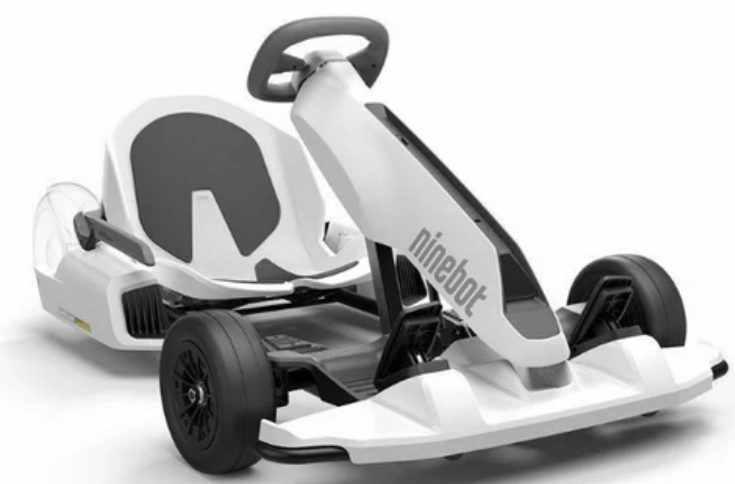
The Segway Ninebot Gokart Kit N4MZ98 is an innovative and exciting product that transforms your Ninebot S, S+, or S Max into a high-performance go-kart. Designed for thrill-seekers and fun enthusiasts, this kit is perfect for both kids and adults looking to elevate their riding experience. The estimated price of the Segway Ninebot Gokart Kit N4MZ98 is around $299, and it has been available in the market since its launch in 2020.
This kit is designed to enhance the functionality of your Ninebot scooter, turning it into a versatile and entertaining vehicle. With its sturdy construction and ergonomic design, it ensures a comfortable and safe ride. The kit is easy to assemble and can be used on various terrains, making it an ideal choice for both indoor and outdoor activities.
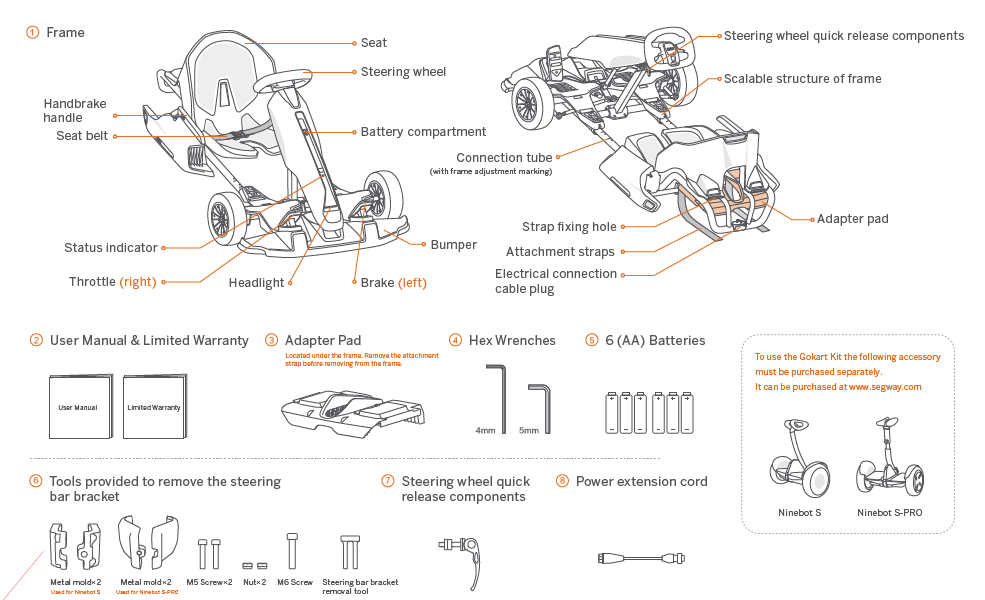
Packing List
Assembling your Gokart (Requires two adults to assemble)
Operating the Ninebot S/S-PRO
- The Gokart is assembled by attaching the Gokart Kit to a Ninebot
- S/S-PRO. Before assembly of the Gokart, please review the Ninebot S/S-PRO User Manual and follow all instructions contained in it. Once the Ninebot S/S-PRO has been properly activated and charged, you can begin assembly of the Gokart.
Update the Ninebot S/S-PRO firmware
Install the app
Download the Segway-Ninebot app (hereinafter referred to as the app) by any of the following methods:

Your mobile phone requires Bluetooth 4.0 or later, iOS system 8.0 or later, or Android™ 4.3 or later.
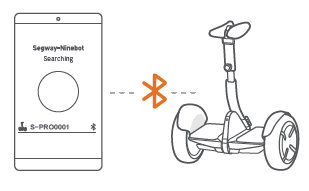
Pair your mobile phone and the Ninebot S/S-PRO
- Turn on the phone's Bluetooth.
- Press the power button to turn on the Ninebot S/S-PRO.
- Open the app to search for and connect your Ninebot S/S-PRO.
Update firmware and switch modes
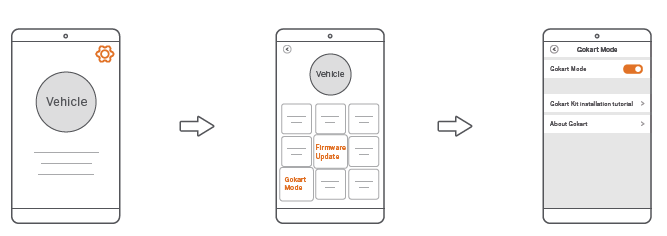
- In the upper right corner of the app, tap Settings - Firmware Update.
- On the Ninebot settings page, tap "Gokart mode".
- Enable "Gokart mode".
This firmware update does not involve activation of the Ninebot S/S-PRO. If you need to use the Ninebot S/S-PRO, please refer to the Ninebot S/S-PRO User Manual for related operations.
Remove the steering bar from the Ninebot S/S-PRO
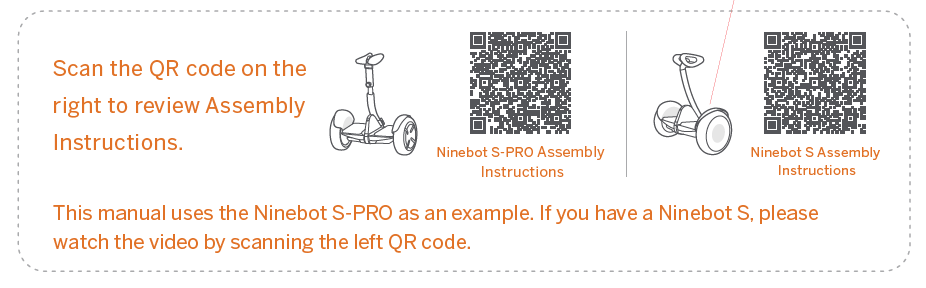
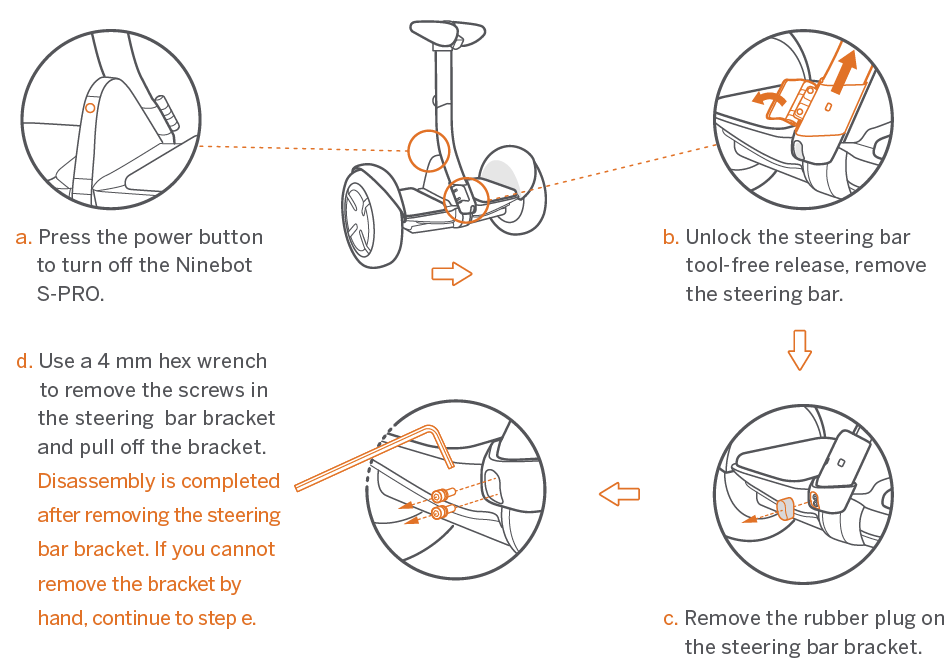
Use the tools provided to remove the steering bar bracket from the Ninebot S-PRO.
The steps are as follows:
- Place the steering bar bracket removal tool into the screw holes on the steering bar bracket.
- Fasten the two metal molds onto the lower part of the steering bar bracket by inserting the two nuts from the right and the two M5 screws from the left; tighten with a 4mm hex wrench.
- Insert the M6 screw into the screw hole on the front of the metal molds, tightening with a 5mm hex wrench. Continue tightening the screw until the steering bar bracket falls off the Ninebot S-PRO.
Check the status of the Ninebot S-PRO.
Refer to the chapter “Maintenance” in the Ninebot S-PRO User Manual to ensure that the tire performance, the battery level, and the running status of the Ninebot S-PRO are normal.
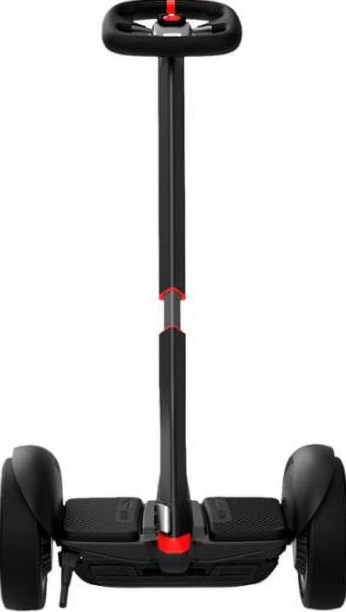
Ninebot S-Max
Packing List
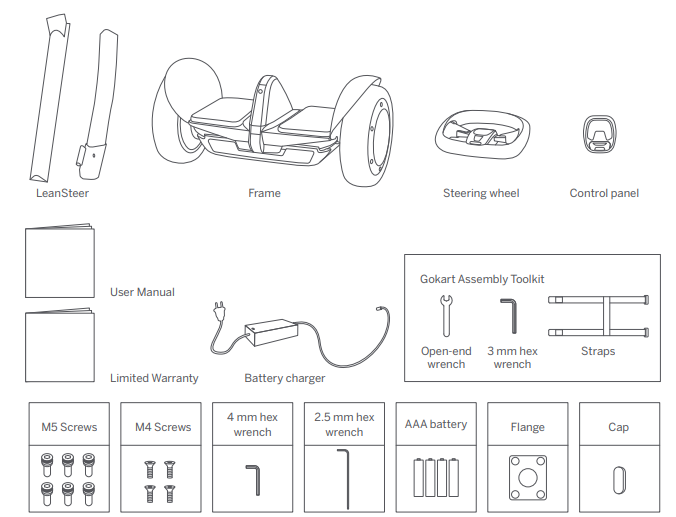
Diagram
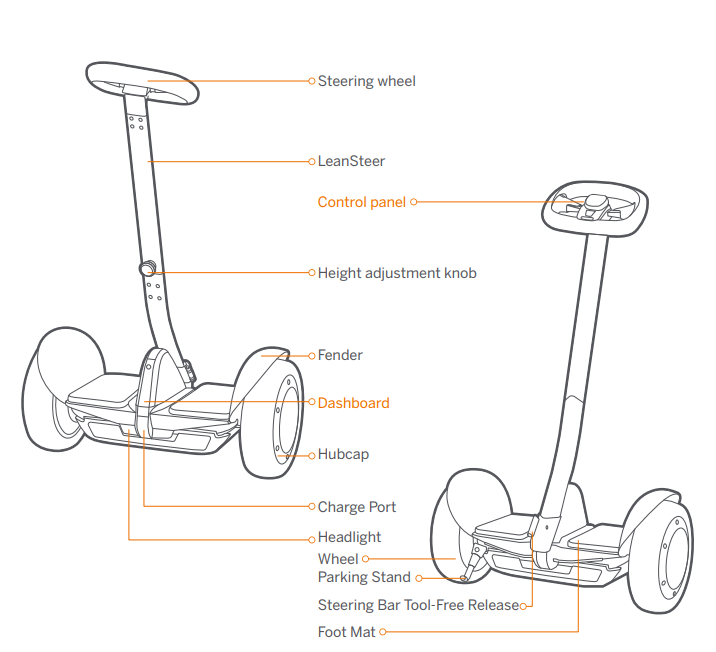
Assembling, Adjustment, and Replacement
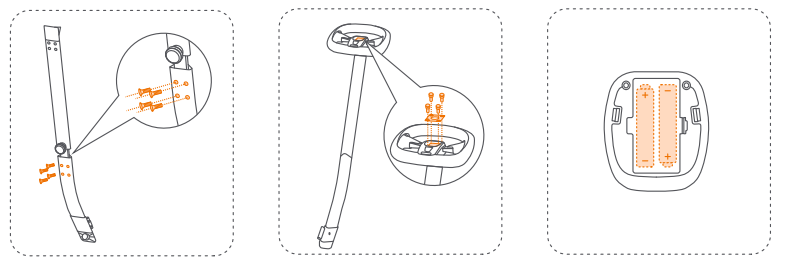
Install the LeanSteer
- Insert the LeanSteer’s upper section into the lower section, then tighten the four M4 screws with the 2.5 mm hex wrench.
- Align the flange with the holes on the steering wheel and tighten it with four M5 screws with the 4 mm hex wrench.
- Open the battery cover of the control panel. Place in two AAA batteries. Snap the cover.
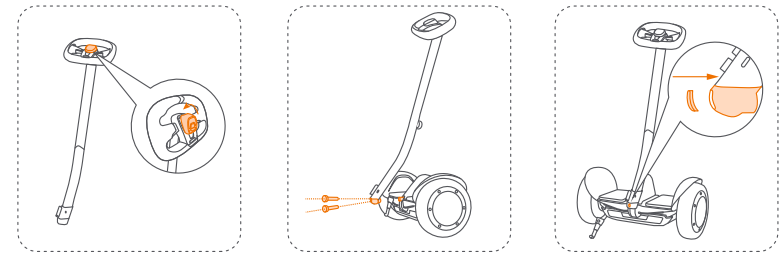
- Press the control panel into the center of the steering wheel.
- Insert the LeanSteer into the vehicle body and tighten the two M5 screws with the 4 mm hex wrench.
- Secure the cap.
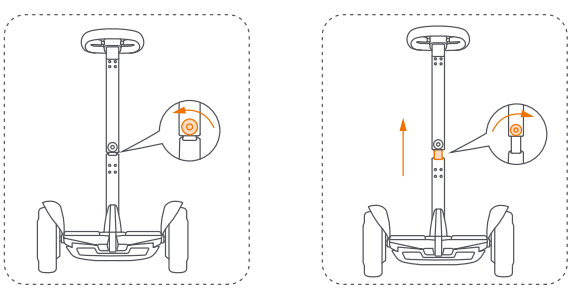
Adjust the Height
- Rotate the height adjustment knob counter-clockwise.
- Lift the LeanSteer to the desired height. Rotate the knob clockwise to tighten.
Replace the straps
S-Max can be assembled with the Ninebot Gokart Kit to become a go-kart. When assembling the S-Max with the Ninebot Gokart Kit, you need to replace the straps to fit the Gokart Kit.
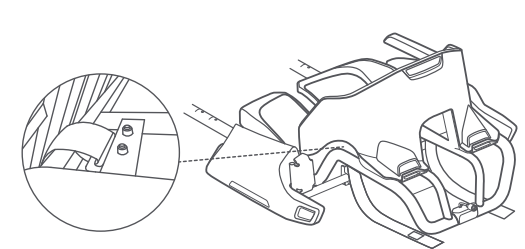
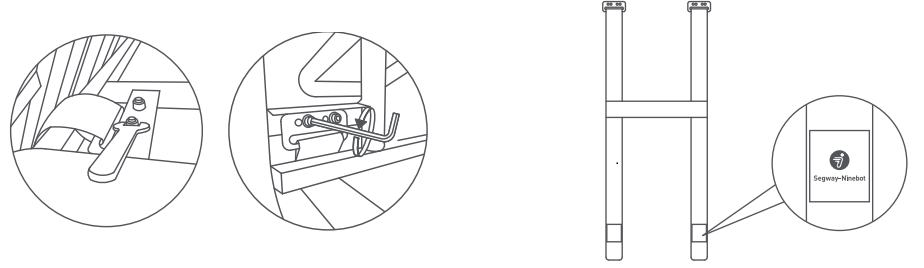
- Use the open-end wrench to tighten the nut, then remove the two bolts on both sides with the 3 mm hex wrench.
- Place the straps with the logo side facing out.
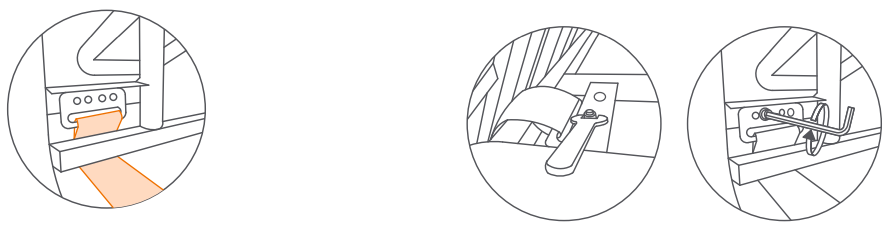
- As shown below, pass the straps through the frame.
- Tighten the nut and the four bolts.
Warnings and Cautions
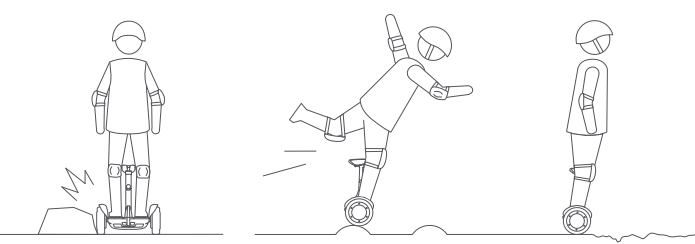
- Avoid contacting obstacles with the tire/wheel.
When traversing small bumps or uneven terrain, maintain a moderate speed of 2–6 mph (3–10 km/h) and keep your knees bent. Do not go too slow or too fast; otherwise, you may lose control and fall.
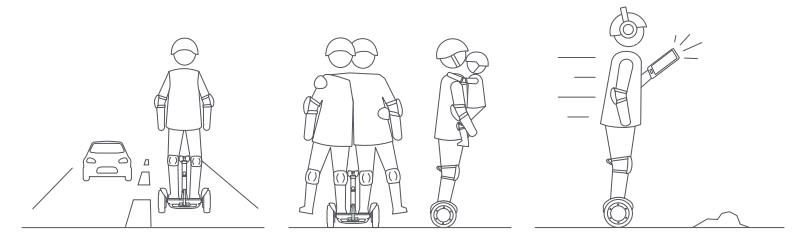
- DO NOT ride on public roads, motorways, or highways unless the local laws or regulations have exceptions.
- For one rider only. DO NOT ride double or carry any passengers. DO NOT carry a child.
DO NOT use a mobile phone or wear earphones when riding.
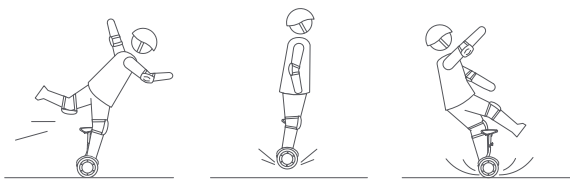
- DO NOT attempt stunts of any kind. Always keep both feet on the foot mats.
- Maintain contact with the ground at all times. Do not jump or attempt stunts.
DO NOT ride on low traction surfaces (including, but not limited to, wet ground, loose sand, loose gravel, and ice).
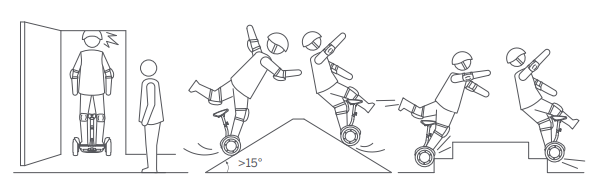
- Watch your head when passing through doorways.
- Avoid slopes steeper than 15°.
- DO NOT ride over holes, curbs, steps, or other obstacles.
Maintenance
Cleaning and Storing
Use a soft, wet cloth to wipe the mainframe clean. Hard-to-remove dirt can be scrubbed with a toothbrush and toothpaste, then cleaned with a soft, wet cloth. Store your vehicle in a cool, dry place. Do not store it outdoors for extended periods of time. Exposure to sunlight and temperature extremes (both hot and cold) will accelerate the aging process of the plastic components and may reduce battery life.
WARNING
- Do not wash your Gokart Pro or S-Max with alcohol, gasoline, acetone, or other corrosive/volatile solvents. These substances may damage the appearance and internal structure of the vehicle. Do not wash your vehicle with a power washer or high-pressure hose.
Make sure the Gokart Pro or S-Max is powered OFF, the charging cable is unplugged, and the rubber cap on the charge port is tightly sealed before cleaning; otherwise, you may expose yourself to electric shock or damage the electronic components.
Battery Pack Maintenance
- Do not use battery packs of other models or brands;, otherwise, there may be safety risks.
- Only use a Ninebot or Segway-approved charge cable. Please use it properly within the rated range.
- Do not place the battery pack in the fire. Doing so will cause battery failure, overheating, or even fire and explosion.
- Do not store or charge the battery at temperatures outside the stated limits (see Specifications).
- Do not discard or destroy the battery. Refer to your local laws and regulations regarding battery recycling and/or disposal.
- Remember to charge the battery after each use. Completely draining the battery may cause permanent damage to the battery.
- NOTE
Typically, a fully charged battery should retain charge for 120-180 days when in standby. Electronics inside the battery record the charge-discharge condition of the battery; damage caused by over-discharge or under-discharge will not be covered by the Limited Warranty.
A well-maintained battery can perform well even after many miles of riding. Charge the battery after each ride and avoid draining the battery completely. When used at room temperature (70°F [22°C]), the battery range and performance are at their best; whereas using it at temperatures below 32°F (0°C) can decrease range and performance. Typically, at -4°F (-20°C) range can be half that of the same battery at 70°F (22°C). The battery range will recover when the temperature rises. More details are available in the App. - WARNING
- Do not attempt to disassemble the battery. Risk of fire. No user-serviceable parts.
Do not ride when the ambient temperature is outside th operation temperature (see Specifications) because
low/high temperatures will limit the maximum power/torque. Doing so could cause personal injury or property damage due to slips or falls.
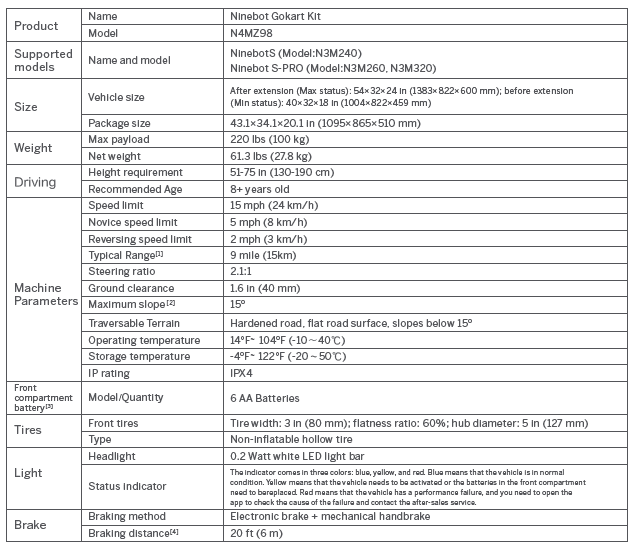
Specifications
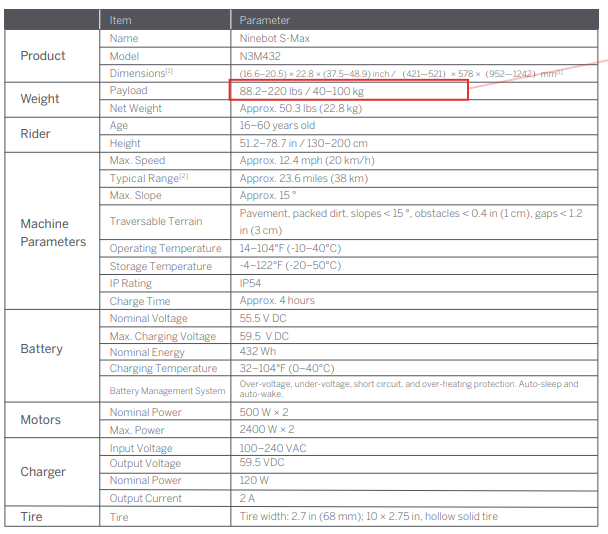
Troubleshooting
If you encounter any issues with your Segway Ninebot Gokart Kit N4MZ98, here are some common problems and solutions:
- Issue: Frame not aligning properly.
Solution: Check the alignment pins and ensure they are securely locked into place. Refer to the user manual for detailed instructions. - Issue: Braking issues.
Solution: Inspect the brake cables and pads. Clean or replace them if necessary. Ensure proper adjustment of the brakes as per the manual. - Issue: Steering column not adjusting.
Solution: Check for any blockages or misalignments. Apply lubricant to moving parts if necessary.
Always follow safety guidelines and wear protective gear when operating the go-kart.
Pros & Cons
Pros:
- Easy to assemble and disassemble
- Adjustable steering column and seat for comfort
- Durable and lightweight frame
- Compatible with multiple Ninebot scooter models
- Enhances riding experience with high-performance capabilities
Cons:
- May require additional maintenance compared to standard scooters
- Higher cost compared to some other conversion kits
- Some users may find it bulky when disassembled
Customer Reviews
Customers have generally praised the Segway Ninebot Gokart Kit N4MZ98 for its ease of assembly, comfort, and performance. Many users appreciate the adjustable features and the overall fun experience it provides. However, some users have noted that it can be a bit pricey and may require more frequent checks on the frame and braking system.
A common complaint is the weight and bulkiness of the kit when disassembled, which can make storage a bit challenging.
Faqs
What scooters is the Segway Ninebot Gokart Kit N4MZ98 compatible with?
How fast can the go-kart go?
How much does the Segway Ninebot Gokart Kit N4MZ98 cost?
Is the go-kart kit easy to assemble?
What safety features does the go-kart kit include?
Can I use the go-kart on different terrains?
How do I adjust the steering column and seat?
What should I do if I encounter braking issues?
Is there a weight limit for using the go-kart?
Where can I find troubleshooting guides for common issues?
Tags
More segway manuals
Leave a Comment