
Pairing & Setup: Sephia SP3060 Earbuds User Manual
Content
Sephia SP3060 Earbuds
Introduction
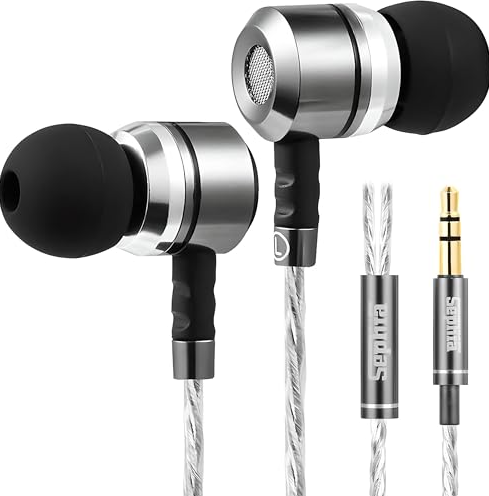
The Sephia SP3060 Earbuds are premium wired in-ear headphones designed for music lovers who demand both comfort and high-quality audio. Featuring a closed-back in-ear design, these earbuds deliver up to 33dB of passive noise cancellation, making them ideal for running, gym sessions, commuting, studying, or simply enjoying your favorite tracks in peace. The SP3060 earbuds are equipped with a powerful 10mm neodymium magnet driver, ensuring bass-driven audio and crystal-clear sound across all music genres.
With six sets of ear tips (S/M/L) and two memory foam options, the Sephia SP3060 Earbuds offer a secure, personalized fit for every user. The lightweight aluminum housing and tangle-free 120cm (3.8 feet) Y-shaped cord enhance durability and convenience. The gold-plated 3.5mm jack ensures maximum connectivity with smartphones, laptops, tablets, and other audio devices. These earbuds are perfect for students, commuters, fitness enthusiasts, and anyone seeking affordable, high-performance audio gear.
Available for under $20, the Sephia SP3060 Earbuds are widely stocked on major online retailers and electronics stores, making them an accessible choice for budget-conscious buyers who don’t want to compromise on sound quality or comfort.
Technical Specifications
- Cable Length: 120 cm
- Driver Size: 10 mm Neodymium Magnet Dynamic Drivers
- Connectivity: 3.5mm Gold-Plated Jack
- Impedance: 16 Ohm
- Sensitivity: 112 dB
- Frequency Response: 20Hz - 20000Hz
- Earphone Type: In Ear
- Microphone: NO, Without Microphone
- Earphone Weight: 16 grams
- Wired Connection: YES
- Cable Type: Tangle-Free Wire
Package Contents
- Sephia SP3060 Earbuds
- 6x Silicon Earbud Sets (S/M/L)
- Memory Foam Earbud Set
- Carry Case
- User Manual
Product Overview
- Earbuds: The main units containing the drivers and cables.
- 3.5mm Gold-Plated Audio Jack: Connects to your audio source for maximum connectivity.
- Tangle-Free Wire: A durable cable designed to resist tangling.
- Carry Case: Convenient for storage and transport.
- Silicon Earbud Sets: Different sizes for a comfortable and secure fit.
- Memory Foam Earbud Sets: Additional options for personalized comfort
Getting Started
Follow these steps to start using your earbuds:
- Unbox your earbuds and inspect the contents to ensure everything is included.
- Choose the ear tips that best fit your ears. A proper fit is essential for sound quality and comfort.
- Plug the 3.5mm audio jack into your audio source, such as a smartphone, tablet, or music player.
Wearing Your Earbuds
To ensure the best audio experience, follow these instructions:
- Select the Right Ear Tips: Choose the ear tips that fit your ears snugly. They should create a seal in your ear canal.
- Insert the Earbuds: Gently insert the earbuds into your ears, making sure they sit securely and comfortably.
Audio Playback
Once you have your earbuds properly set up and positioned, you can start enjoying your audio:
- Adjust the volume on your audio source to a comfortable level.
- Experiment with different ear tips to find the best fit for your ears.
- The 10mm Neodymium Magnet Dynamic Drivers provide HD bass-driven audio for an immersive listening experience
Changing Ear Tips
You can easily change the ear tips for a personalized fit:
- Gently remove the existing ear tips by pulling them off the earbuds.
- Choose the desired size (S/M/L) of silicon or memory foam ear tips.
- Carefully push the new ear tips onto the earbuds until they are securely in place.
Maintenance and Care
To keep your earbuds in good condition:
- Clean the ear tips regularly with a soft, damp cloth.
- Store the earbuds in the provided carry case when not in use to prevent damage.
- Avoid exposing the earbuds to extreme temperatures or moisture.
- Do not pull on the cable to remove the earbuds from your ears; gently grasp the earbuds and pull them out.
Warranty and Customer Support
12 months Limited warranty included. Please refer to the warranty information. For any additional questions or support, feel free to contact our customer support team:
Thank you for choosing Sephia SP3060 Earbuds. We hope you enjoy your listening experience!
Troubleshooting Sephia SP3060 Earbuds
Common issues with the Sephia SP3060 Earbuds include sound imbalance, cable tangling, and ear tip discomfort. If one earbud is quieter, check for debris in the ear tip and clean gently with a soft brush. For persistent sound issues, ensure the 3.5mm jack is fully inserted into the device. If the cable tangles frequently, use the included carry case and avoid wrapping the cord tightly around objects.
Ear tip discomfort can usually be resolved by switching to a different size or using the memory foam tips. If the earbuds stop working entirely, try plugging them into another device to rule out device-specific problems. If issues persist, contact Sephia customer support for warranty assistance. The SP3060 comes with a standard 1-year manufacturer’s warranty covering defects in materials and workmanship.
For further help, reach out to Sephia support via their official website or authorized retailers. Always keep your purchase receipt for warranty claims.
Pros and Cons of Sephia SP3060 Earbuds
Pros
- Excellent bass response and clear audio quality for all music genres
- Comfortable, secure fit with multiple ear tip options (6 silicone, 2 memory foam)
- Effective passive noise isolation up to 33dB
- Tangle-free 120cm cable for easy portability
- Lightweight aluminum housing for durability
- Affordable price point, great value for money
Cons
- No built-in microphone for calls
- Sound quality may not match premium audiophile. The plastic carry case could be more robust
The Sephia SP3060 Earbuds offer a balanced mix of performance, comfort, and affordability, making them a strong contender in the budget in-ear headphone market.
Customer Reviews of Sephia SP3060 Earbuds
Customers consistently rate the Sephia SP3060 Earbuds 4.5 out of 5 stars, praising their comfortable fit, strong bass, and effective noise isolation. Many users highlight the variety of ear tips as a major plus, noting that the earbuds stay securely in place during workouts. The tangle-free cable and lightweight design are also frequently mentioned as standout features.
Some buyers mention the lack of a microphone as a drawback for those who need hands-free calling. A few users report minor sound imbalance issues, but most find these easily resolved with proper ear tip selection. Overall, reviewers recommend the SP3060 for anyone seeking reliable, budget-friendly wired earbuds with solid audio performance.
Faqs
How do I set up sephia SP3060 Earbuds for the first time?
What should I do if sephia SP3060 Earbuds is not producing sound?
Can I use sephia SP3060 Earbuds with smartphones, laptops, and tablets?
Do sephia SP3060 Earbuds have a microphone for calls?
How do I clean and maintain sephia SP3060 Earbuds for best performance?
Why is the sound quality of sephia SP3060 Earbuds bass-heavy, and can I adjust it?
Are sephia SP3060 Earbuds suitable for running and gym workouts?
How do I prevent the cable of sephia SP3060 Earbuds from tangling?
Leave a Comment