
Si Smart Outlet 43132 User Manual
Content
si Smart Outlet 43132: Product Manual and Complete Buyer Guide
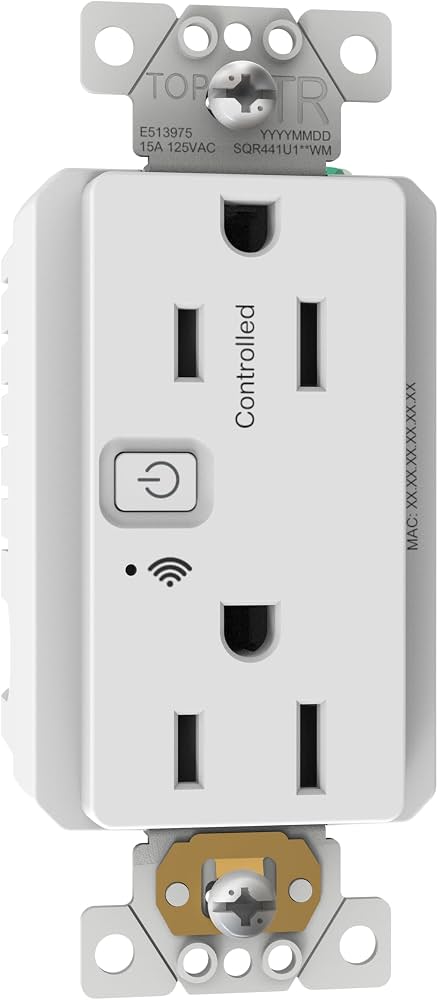
The si Smart Outlet 43132 is a Zigbee smart outlet designed to add app-based control, power monitoring, and smart-home integration to standard plug-in devices. It is a strong fit for users who want to automate lamps, fans, small appliances, or shading equipment while keeping a reliable always-on power connection for the second receptacle. The model is especially appealing in homes and installations that already use Zigbee-compatible hubs or smart-home ecosystems.
One of the biggest advantages of the si Smart Outlet 43132 is its combination of smart control and energy reporting. It supports Zigbee 3.0 connectivity and is commonly used as a smart receptacle and a mesh-network router, which can help improve network stability in larger smart-home setups. This makes it useful for homeowners, integrators, and automation enthusiasts who want more than a basic Wi‑Fi plug. It also works well in rooms where the outlet needs to support both automation and uninterrupted power for another device.
Typical buyers include smart-home users, shade and screen automation customers, and anyone looking for a Zigbee outlet with energy monitoring. Use cases include remote switching, scheduled automation, voice assistant integration through compatible hubs, and tracking device power usage. The estimated price range is generally around the mid-range smart outlet category, often near $250 for the SI-branded version, though market pricing and availability can vary depending on retailer, region, and stock levels. Availability is typically through specialty smart-home and automation retailers, with limited mainstream retail presence.
Specifications for si Smart Outlet 43132
- Model: 43132
- Brand: Jasco / SI ecosystem compatibility
- Wireless protocol: Zigbee smart outlet with energy reporting support
- Power input: 125VAC, 60Hz
- Load rating: Up to 15A total load, with resistive capacity listed at 1800W
- Motor load support: Up to 1/2 HP motor load in supported applications
- Outlet design: One controlled outlet and one always-on outlet
- Smart features: Switch control, power reporting, energy monitoring, and power-on behavior settings
- Networking role: Zigbee router capability for extending mesh coverage in supported setups
- Compatibility: Works with Zigbee hubs and compatible automation platforms
- Typical use case: Smart control of lamps, fans, and small appliances
In performance terms, the si Smart Outlet 43132 is best suited for standard residential loads rather than heavy-duty appliances. Compared with basic smart plugs, it offers a more installation-friendly outlet format and better ecosystem value for Zigbee users. Compared with many Wi‑Fi smart plugs, it can be more stable in larger smart-home networks because it supports Zigbee routing. Its energy monitoring also makes it more useful than simple on/off outlet devices for users who want insight into consumption patterns.
Troubleshooting the si Smart Outlet 43132
If the outlet does not respond, first confirm that the circuit has power and that the connected device is within the supported load range. A common issue is pairing failure, which is usually solved by putting the outlet into inclusion mode again and making sure the Zigbee hub is close enough during setup. If the smart outlet appears offline, power-cycle the outlet and check whether other Zigbee devices are operating normally to rule out network mesh problems.
For energy reporting issues, verify that the outlet is actually connected to a supported platform that can read power and energy data. If the outlet shows erratic readings or does not remember its previous state, review the power-on behavior settings in the app or hub. There are no widely published consumer error codes for this model, so most fixes are based on pairing, load, and network checks rather than code-based diagnostics. Preventive measures include avoiding overloads, keeping the firmware or hub software updated, and using the outlet within its rated electrical limits.
Warranty coverage and support depend on the seller and region, so buyers should keep proof of purchase and registration details. For help, the SI product page lists customer support at 512-832-6939, Monday through Friday, 8AM to 6PM. If the unit was bought through a distributor or home-improvement retailer, the retailer may also provide return or exchange support.
Pros and Cons of the si Smart Outlet 43132
Pros
- Reliable Zigbee smart outlet design for stable smart-home integration
- Energy monitoring and power reporting add practical usage insight
- One controlled outlet plus one always-on outlet increases flexibility
- Works well as a Zigbee router to strengthen mesh networks
- Good value for users already invested in Zigbee automation
- Suitable for lamps, fans, and other everyday connected devices
Cons
- More expensive than many entry-level Wi‑Fi smart plugs
- Best experience depends on having a compatible Zigbee hub
- Not ideal for high-draw appliances beyond its rated limits
- Availability can be inconsistent compared with mass-market brands
- Setup may be less convenient for users who prefer app-only Wi‑Fi devices
Overall, the si Smart Outlet 43132 delivers strong value for smart-home users who prioritize network reliability, energy tracking, and Zigbee compatibility. It compares favorably with simpler smart plugs, but alternatives may be cheaper if energy reporting and mesh routing are not needed.
Customer Reviews of si Smart Outlet 43132
Customer feedback for the si Smart Outlet 43132 is generally positive, with many users praising the outlet’s solid build quality, Zigbee reliability, and helpful energy monitoring. A common rating pattern is around 4 out of 5 stars, especially from buyers who use it in structured smart-home setups. One typical comment is: “Works exactly as expected with my Zigbee hub, and the power reporting is a nice bonus.”
Common complaints usually focus on price and the need for compatible hubs rather than direct Wi‑Fi control. Some users also mention that setup can take a few attempts if the Zigbee mesh is weak. Buyers who already have a Zigbee ecosystem tend to recommend it more strongly than users looking for a simple plug-and-play outlet. For best results, it is a good purchase for users who want a dependable smart outlet with monitoring, not just basic remote switching.
Frequently Asked Questions About the si Smart Outlet 43132
What is the si Smart Outlet 43132 used for? It is used to control and monitor plug-in devices such as lamps, fans, and small appliances through a Zigbee smart-home system.
Does it support energy monitoring? Yes, it can provide power reporting and energy usage data when paired with a compatible platform.
Is it good for Zigbee mesh networks? Yes, its router functionality can help extend Zigbee coverage in supported setups.
Where should it be used? It works best indoors with standard 125VAC household loads and compatible automation systems.
Final Verdict
The si Smart Outlet 43132 is a practical, feature-rich smart outlet for users who want more than basic remote on/off control. With Zigbee support, power monitoring, and strong compatibility with automation setups, it stands out as a dependable choice for smart-home upgrades. If your goal is reliable outlet control with energy insight and mesh-network benefits, this model is a solid option.
Faqs
How do I set up si Smart Outlet 43132 for the first time?
Why is my si Smart Outlet 43132 not connecting to Wi-Fi or the app?
What devices can I safely use with si Smart Outlet 43132?
How do I reset si Smart Outlet 43132 when it stops responding?
Can si Smart Outlet 43132 work with voice assistants and smart home routines?
How can I improve the response speed of si Smart Outlet 43132?
What should I check if si Smart Outlet 43132 turns devices on and off unexpectedly?
How do I maintain si Smart Outlet 43132 for long-term reliability?
Tags
Leave a Comment