
Pairing & Setup: Simdog Dinow D56 Earbuds User Manual
Content
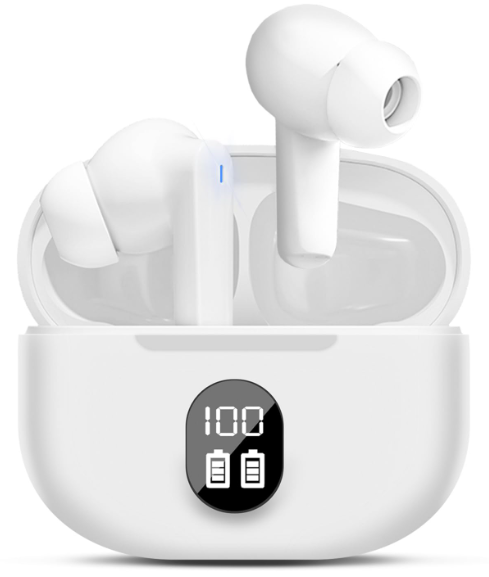
Simdog dinow D56 Earbuds
Introduction
The simdog dinow D56 Earbuds represent a blend of cutting-edge technology and user-centric design, tailored for music enthusiasts, commuters, and active lifestyle users demanding exceptional sound quality and comfort. These wireless earbuds leverage Bluetooth 5.3 connectivity to deliver seamless pairing, low latency, and stable transmission, ensuring rich audio clarity and immersive listening.
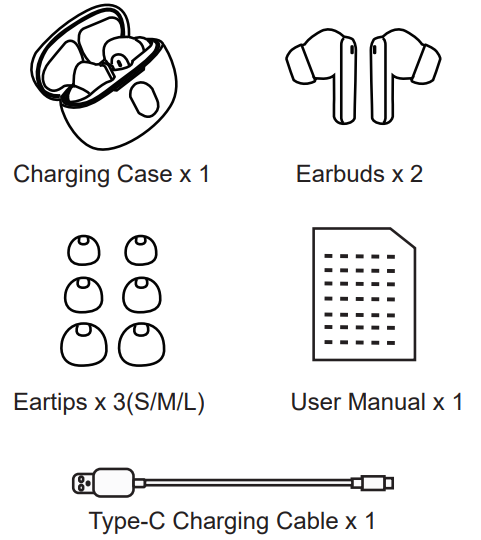
Equipped with ergonomically designed eartips available in three sizes (S, M, L), the D56 earbuds provide a secure and comfortable fit for extended wear. The earbuds support essential audio profiles including HFP, A2DP, and AVRCP, making them compatible with a wide range of smartphones and devices. Their lightweight design, combined with a portable charging case,, offers convenience whether you are on the move, working out, or relaxing at home.
Key benefits include long battery life with multiple full charges from the compact case, superior Bluetooth 5.3 efficiency, and user-friendly touch controls for playback and calls. Priced competitively in the mid-range segment, the Simdog Dinow D56 Earbuds are widely available through online marketplaces and electronics retailers, offering excellent value for money to budget-conscious consumers seeking quality wireless earbuds.
Packing List
Parameter
- Model Name: D56 Wireless Earbuds Bluetooth: V5.3
- Support: HFP/A2DP/AVRCP
- Transmission Range: 33 feet(without obstacle) Case Battery Capacity: 200mAh
- Earbuds Battery Capacity: 30mAh
- Music Time(Earbuds): About 4H
- Charging Case Time: 1-1.5H
- Input: 5V/1A
- Frequency Range: 20Hz~20KHz
- Speaker Sensitivity: 93±3dGB
- Impedance: 16Ω±15%
Product Overview
First-use
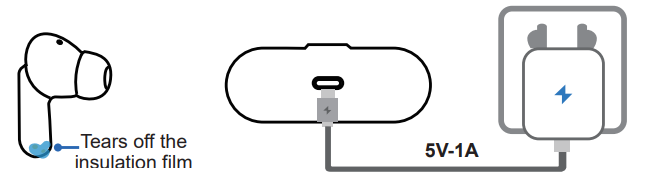
Before the first use, please tear off the isolating film from the earbuds. Put the earbuds into the case, then charge both earbuds and the charging case via the supplied Type-C charging cable for at least 10 minutes (or after not being used for a long time), do not take out the earbuds during this period.
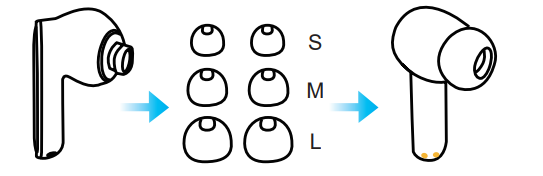
The earbuds come with 3 different-sized ear tips. You can select a suitable size for a a secure fit.
Please use the 5V-1A charger or computer USB for charging; do not use fast charging.
Switch from one device to another..
Each time when you power on your earbuds, they will automatically connect to your last successfully connected device if available within the Bluetooth range. If you wanna switch between devices, please first turn off/disconnect the Bluetooth of the last device.
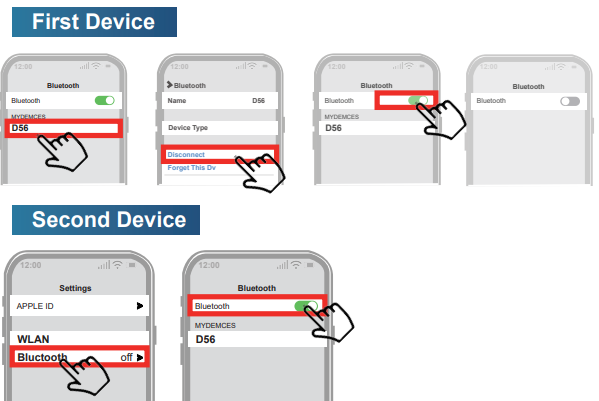
If you cannot find your buds in the list, you might need to reset the earbuds.
Mono mode
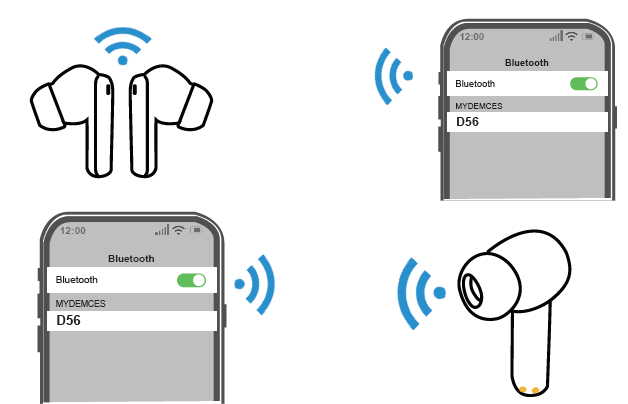
- These earbuds cannot only be used together, but also can be used individually.
- If you want to use single mode, just take one earbud out of the case and connect to your phone; it will be OK.
- Or when you are using it with Dual mode, turn off one earbud manually or put one earbud back into the charging case.
Operation Tips
Maintenance
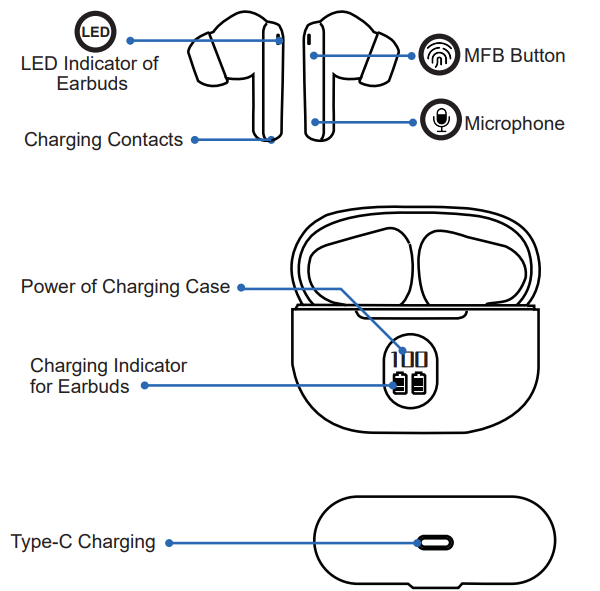
After a period of use, the charging metal contacts of the earbuds may be contaminated with sweat and dirt, resulting in the earbuds not being able to power on, charge, or having connection issues.
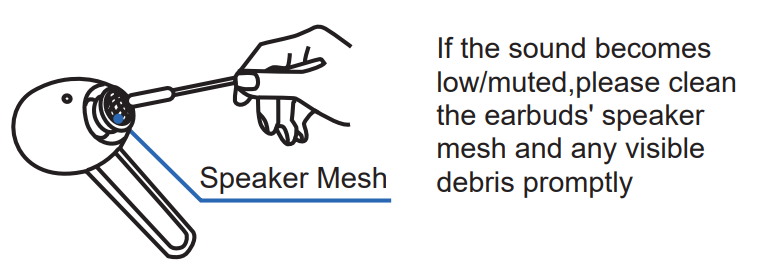
If the earbuds won't charge properly, use a cotton swab or alcohol pads to clean the magnetic charging contacts on the earbuds and the case.
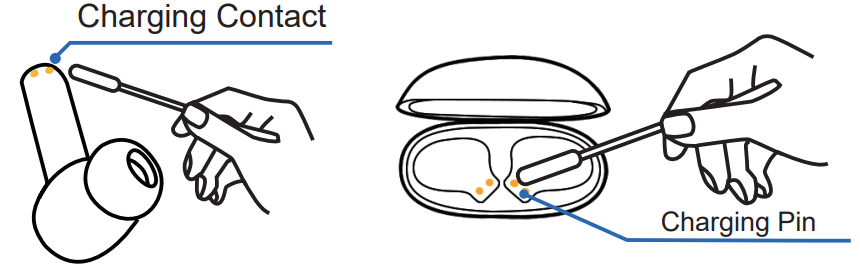
- If the earbuds have been unused for more than 3 months, we recommend that you charge them.
- Do not disassemble earbuds.
- Do not expose the earbuds to high or low temperatures.
- Avoid free fall or violent shock to the device. Keep the device away from sources of fire.
- Do not place the device in water(please dry the earbuds with a soft cloth or air them when water enters the device). If soaking in sea water, rinse with fresh water and then dry). Use it after 2 hours.
Troubleshooting Simdog Dinow D56 Earbuds: Common Issues and Solutions
Users of the Simdog Dinow D56 Earbuds may occasionally face connectivity or audio issues. Common problems include:
- Bluetooth pairing failure: Reset the earbuds by placing them back in the charging case and holding the multifunction button for 10 seconds. Ensure your device’s Bluetooth is enabled and that past paired devices are cleared.
- One earbud not working: Clean the charging contacts and ensure both earbuds are charged. Re-pair the earbuds by removing them from paired devices and reconnecting.
- Audio dropouts or delays: Keep the device within a 10-meter range and avoid physical obstructions. Update device firmware if available.
Preventive measures include regular cleaning of the earbuds and the charging case,, and avoiding exposure to moisture. The simdog dinow D56 comes with a standard 12-month warranty covering manufacturer defects. For support, users can contact the official customer service via the email provided in the product manual or reach out through the retailer’s help desk.
Activation & Warranty
180 days free replacement for damaged, defective items. Please activate via email below within 15 days.
E-mail:hcaftersales007@yeah.net
Pros & Cons of Simdog Dinowow D56 Earbuds
Pros
- Advanced Bluetooth 5.3 technology: Ensures stable and fast wireless connectivity.
- Comfortable fit with multiple eartip sizes: Ideal for prolonged use without discomfort.
- Competitive pricing: Offers strong value compared to premium brands.
- Long battery life and portable charging case: Supports all-day use and convenient recharging.
Cons
- Limited noise cancellation features: May not perform as well in very noisy environments.
- Basic touch controls: Some users report occasional unresponsiveness.
- Firmware updates are not frequently available: They may affect compatibility with future devices.
Compared to alternatives in the same price range, the Simdog Dinow D56 Earbuds shine with their Bluetooth 5.3 connectivity but fall slightly short on advanced features like active noise cancellation found in higher-end models.
Customer Reviews and Feedback on Simdog Dinow D56 Earbuds
Users consistently praise the Simdog Dinow D56 Earbuds for their clear sound quality and comfortable fit, often highlighting the earbuds’ suitability for workouts and daily commutes. Star ratings average around 4 out of 5, reflecting a generally positive reception.
Common compliments include reliable Bluetooth connection and impressive battery performance. However, some users note occasional touch control glitches and wish for more robust noise isolation. Purchase recommendations frequently emphasize the earbuds as a budget-friendly alternative for quality wireless audio without the premium price tag.
Overall, customer testimonials reinforce that the Simdog Dinow D56 are a well-rounded choice for users seeking affordable, dependable wireless earbuds with modern connectivity features.
Faqs
How do I set up simdog dinow D56 Earbuds for the first time?
What should I do if simdog dinow D56 Earbuds is not connecting to my device?
Can I use simdog dinow D56 Earbuds with non-Bluetooth devices?
How do I optimize battery life on simdog dinow D56 Earbuds?
What are the key features that make simdog dinow D56 Earbuds different?
How do I clean and maintain simdog dinow D56 Earbuds?
Why is one simdog dinow D56 Earbud not working or charging?
Can I use simdog dinow D56 Earbuds for phone calls and voice assistants?
Tags
Leave a Comment