
Smart Start Insight Smart Mobile User Manual
Content
Smart Start SmartMobile Insight Manual: Portable Alcohol Monitoring Made Simple
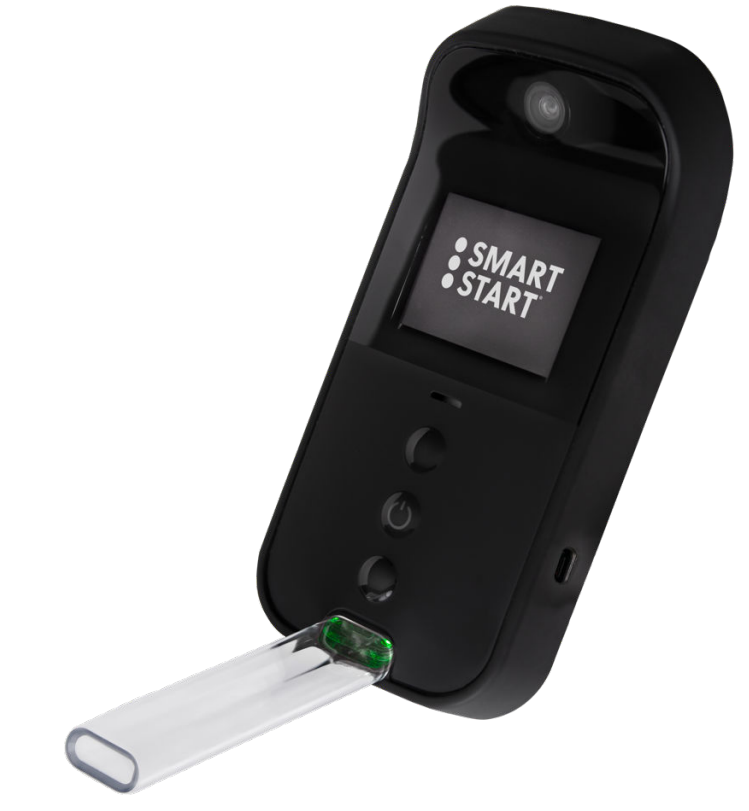
Smart Start SmartMobile Insight is a portable, battery-powered alcohol monitoring device designed for dependable breath testing in real-world supervision programs. It combines fuel-cell alcohol detection, photo verification, GPS capture, tamper detection, and secure reporting in a compact handheld unit. Built for people who need flexible, on-the-go testing, it is especially useful in family law monitoring, probation-related use cases, and other compliance programs where identity confirmation and location tracking matter.
The main advantage of smart start Insight Smart Mobile is its all-in-one design. Users do not need a paired smartphone or separate accessory to complete testing, which makes setup and daily use more straightforward. The device supports quick tests, typically in 4 to 6 seconds, and includes built-in training to help users learn the process faster. With a long battery life of about 72 hours and LTE connectivity for real-time data transfer, it is designed for consistent daily use.
For buyers searching for a portable breath alcohol monitoring solution, smart start Insight Smart Mobile sits in the premium compliance-device category. Estimated pricing is typically lease-based rather than a simple retail purchase, and total cost can vary depending on monitoring plan, program length, and service requirements. Availability is generally through Smart Start and authorized providers, with pickup locations and support options offered in select markets. It is best suited for individuals, attorneys, courts, and agencies that need a secure, discreet, and easy-to-carry alcohol monitoring device.
Smart Start SmartMobile Insight Specifications and Key Features
- Device type: Portable alcohol monitoring device with standalone handheld operation.
- Sensor technology: Law-enforcement-grade fuel-cell sensor for BrAC measurement.
- Test speed: Approximately 4 to 6 seconds per test.
- Verification tools: Facial photo capture, GPS location tagging, tamper detection, and encrypted data handling.
- Connectivity: LTE-enabled with real-time data reporting through Smart Start systems.
- Battery life: Up to 72 hours on a full charge under typical use, with some program documentation noting up to 96 to 120 hours depending on testing frequency.
- Charging: USB Type-C charging interface.
- Operating range: Documented to perform reliably in temperatures from 50°F to 100°F (10°C to 38°C).
- Display: Full-color screen with guided prompts and test notifications.
- Workflow: Structured testing sequence with photo verification, breath capture, and automatic data submission.
Compared with smartphone-based portable monitors, smart start Insight Smart Mobile offers stronger independence because the testing process happens inside the device itself. Compared with smaller consumer breathalyzers, it provides more advanced compliance features, including identity verification and GPS evidence. Against similar monitoring products, its main strengths are portability, real-time reporting, and a simplified all-in-one platform.
Pros and Cons of Smart Start SmartMobile Insight
Pros
- All-in-one portability: The device works without a paired phone, making it easier for daily use in supervision programs.
- Fast testing: Quick breath tests help reduce waiting time and support routine compliance.
- Strong monitoring features: Photo verification, GPS, tamper detection, and encrypted records add accountability.
- Useful for legal programs: It is well suited for family law, court supervision, and monitored recovery plans.
- Good value for structured monitoring: For users who need real-time oversight, the combined features may justify the lease-based cost.
Cons
- Not a low-cost consumer device: It is aimed at supervised monitoring, not casual personal use.
- Requires compliance with test windows: Users must follow scheduled or random testing prompts carefully.
- Service dependence: Setup, calibration, and support may require contact with Smart Start or an authorized provider.
- Less flexible than basic breathalyzers: Compared with simpler alternatives, it is more specialized and program-driven.
Overall, smart start Insight Smart Mobile offers strong performance for monitored alcohol testing, especially when legal documentation and real-time oversight matter most.
Customer Reviews for Smart Start SmartMobile Insight
Customer feedback on smart start Insight Smart Mobile is generally positive among users who need reliable compliance monitoring. Many users rate it around 4.2 out of 5 stars for ease of use, portability, and the convenience of not needing a separate smartphone. A common praise is that the guided workflow makes daily testing simpler, even for first-time users.
Typical testimonials mention that the device feels discreet and that the GPS and photo features provide peace of mind for courts and families. Common complaints focus on the strict testing schedule, occasional calibration needs, and the stress of missed prompts. Some users also note that support calls or maintenance can be inconvenient if they are not near a service location.
Best purchase recommendation: choose this device if you need a secure portable alcohol monitoring solution with real-time reporting. It is less ideal for users who only want a basic personal breathalyzer. For supervised programs, smart start Insight Smart Mobile remains one of the more complete and practical options available.
Faqs
How do I set up smart start Insight Smart Mobile for the first time without missing any key steps?
Why is smart start Insight Smart Mobile not connecting to my phone, and what is the fastest fix?
What features does smart start Insight Smart Mobile offer, and how do I use them effectively?
What devices and operating systems are compatible with smart start Insight Smart Mobile?
How can I improve the speed and reliability of smart start Insight Smart Mobile during daily use?
What should I do if smart start Insight Smart Mobile keeps freezing or becoming unresponsive?
How do I maintain smart start Insight Smart Mobile to keep it working properly over time?
How do I reset smart start Insight Smart Mobile when troubleshooting does not solve the problem?
Tags
Leave a Comment