
How to Use: Smart Wristband3 SmartWatch User Guide
Content
Smart Wristband3 SmartWatch
Introduction
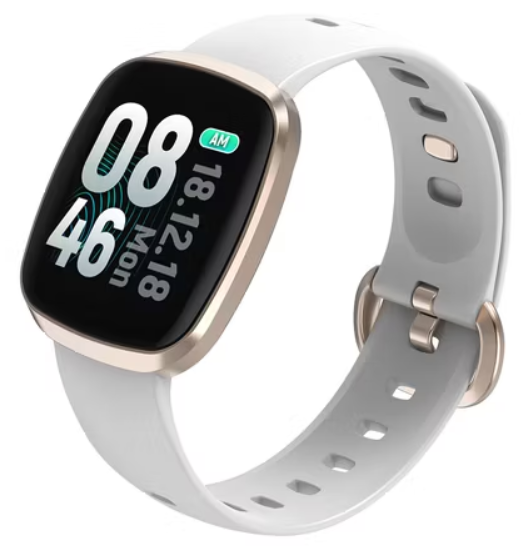
The smart wristband3 SmartWatch is a cutting-edge wearable designed to enhance your health and fitness journey while providing seamless integration with your daily activities. This innovative device is perfect for fitness enthusiasts, busy professionals, and anyone seeking to monitor their well-being more effectively. Key benefits include comprehensive health tracking, notification management, and a user-friendly interface. The smart wristband3 SmartWatch is compatible with both Android and iOS devices, offering a versatile experience for users across different platforms. With an estimated price range between $50 to $100, it's an affordable option for those looking to upgrade their fitness routine. It is widely available on major online platforms and in-store at various retailers.
Specifications
The smart wristband3 SmartWatch boasts impressive features that set it apart from similar products:
- Health Tracking: Monitors step count, sleep patterns, heart rate, and exercise routines.
- Notification Management: Supports call, SMS, and app reminders, ensuring you stay connected without needing your phone.
- Compatibility: Works with both Android (4.4 and higher) and iOS devices.
- Design and Build: Sleek design with a user-friendly interface, suitable for everyday wear.
- Performance Metrics: Offers accurate health data tracking and reliable notification services.
Compared to other smartwatches in the same price bracket, the **smart wristband3 SmartWatch** excels in its comprehensive health monitoring capabilities and seamless integration with various apps.
Device requirements
This product supports devices with iOS 9.0, Android 4.4 and above, and Bluetooth 4.0. Android 6.0 and above devices need to open the GPS permission to use.
Charging
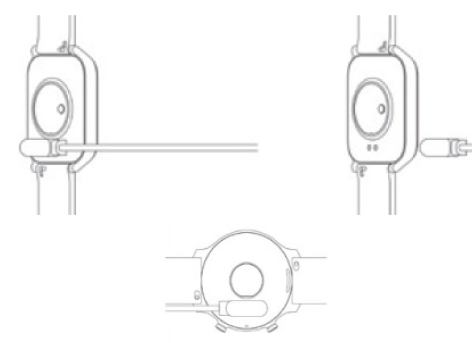
In order to ensure good charging contact, please keep the metal contact free of dirt, oxidation,, and impurities. If the device is idle for a long time, please remember to recharge at least once a month.
- a. Please align the magnetic absorption line with the metal sheet of the bottom shell, and the magnet will automatically charge the positive and negative electrodes.
- b. Please ensure that the charging contact is free of dirt and impurities. If there is, please wipe it clean to avoid affecting the charging.
- c. Plug the USB into the 5V500MA charging stand, and it can be fully charged in 2-3 hours.
How to connect smart smartwatch to a mobile phone
- Power on: Charge or press the smart watch side button for 3 seconds.
- Install APP: Scan QR code through mobile phone, or search "Smart Wristband 3" APP in Apple store, Google store, and APP store to download and install.
How to connect a smartwatch to a mobile
- APP: First, put the smart watch close to the mobile phone, and then turn on the Bluetooth and GPS of the mobile phone according to the APP connection guide. Then search the APP for the Bluetooth name is "Smart Watch". Click the smart watch to connect. Set persona information according to the APP prompts, and allow the APP to obtain mobile location authority to complete the connection.
Apple device connection:
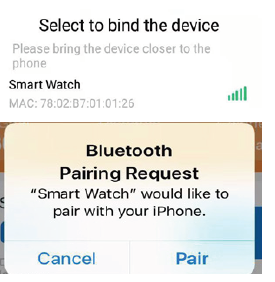
After the smart watch and Apple App are connected for the first time, the "Bluetooth pairing request" will be prompted. Please click "Pair" to complete the connection. After pairing, it is allowed to display a notice to check whether the Bluetooth settings are connected. Then enter the system to check whether the sharing notice is turned on, and then the smart watch can receive from IOS system push calls, SMS, QQ, WeChat,, and other notification reminders; otherwise can not receive the reminders.
Android device connection:
When connecting with the Android system, you need to open the APP background operation permission in the mobile phone manager or system settings (please open the options such as self-start, high power consumption, white list, etc.); otherwise, the APP will be cleared by the system, and the connection with the smart watch will be disconnected. For details, please refer to the help background operation solution).
Unbind:
Unbind Android device: Click Unbind on the app device to unbind the smart watch and the app.
Unbind Apple device: Click on the device in the app to unbind the smart watch and the app; Enter the phone settings-Bluetooth, click the exclamation mark behind the name Smart Watch, and click Ignore this device in the pop-up dialog box. Disconnect the smart watch completely, and at the same time, you will not receive the information notification pushed by Apple
Precautions
- In theory, the smart watch supports operating systems iOS 9.00, Android 4.4 or above, and Bluetooth 4.0 devices, but not all mobile device models. Please refer to the actual conditions for details.
- The product is charged with 5V500MA. It is strictly forbidden to use the overvoltage load power supply to avoid hardware damage.
- The smartwatch battery is built-in and cannot be removed. Please do not try to replace the battery.
- The operating environment of the wristband is 0℃ to 45℃ ; Charging temperature: 0℃ to 45℃ .
- Please note when wearing: if you have sensitive skin oorr wearing the wristband too tightly, you may feel uncomfortable.
- Please wipe the smart watch dry before charging. Otherwise, it will lead to failure or corrosion of the charging contact point..
Hey,
Please feel free to contact us if any issuesthee the operation. We will reply within 24 hours. Thank you.
Contact us at: Efolen_aftersales@163.co.m.
Troubleshooting
Common issues and solutions for the **smart wristband3 SmartWatch** include:
- Connection Issues: Ensure your device is properly paired with the smartwatch. Restart both devices if necessary.
- Data Accuracy: Calibrate the device regularly to ensure accurate readings.
- Notification Problems: Check app settings to ensure notifications are enabled.
For further assistance, refer to the user manual or contact customer support via email: support@smartwristband3.com. The **smart wristband3 SmartWatch** comes with a one-year warranty covering manufacturing defects.
Pros & Cons
Pros
- Affordable: Offers high-quality features at a budget-friendly price.
- Comprehensive Health Tracking: Provides detailed insights into your fitness and well-being.
- Seamless Notifications: Keeps you connected without needing your phone.
Cons
- Limited Battery Life: Requires frequent charging.
- Not Suitable for Medical Purposes: Designed for general health monitoring, not medical diagnostics.
- Compatibility Issues with Some Apps: May not work with all third-party apps.
Overall, the **smart wristband3 SmartWatch** offers excellent value for money, making it a great choice for those seeking a reliable fitness companion.
Customer Reviews
Users praise the **smart wristband3 SmartWatch** for its ease of use and comprehensive health tracking features. With a rating of 3.7 out of 5 stars on Google Play, it is well-regarded for its affordability and functionality. Common praises include its compatibility with multiple devices and its ability to track sleep patterns effectively. However, some users have noted issues with battery life and occasional connectivity problems. Overall, it's a solid choice for casual fitness enthusiasts.
For those considering purchasing, the **smart wristband3 SmartWatch** is a great option for anyone looking to enhance their fitness routine without breaking the bank.
Faqs
How do I set up the smart wristband3 SmartWatch for the first time on my Android or iOS device?
What should I do if my smart wristband3 SmartWatch is not syncing data with the app?
Can the smart wristband3 SmartWatch track my heart rate continuously during exercise?
Is the smart wristband3 SmartWatch compatible with all smartphones and operating systems?
How can I optimize the battery life of my smart wristband3 SmartWatch during daily use?
What steps can I take if the smart wristband3 SmartWatch screen freezes or the device restarts unexpectedly?
How do I properly clean and maintain my smart wristband3 SmartWatch to ensure durability?
What are the key features of the smart wristband3 SmartWatch that enhance daily health tracking?
Leave a Comment