
Smartmesh Series of Wireless Broadband Mesh 2018FP5238 User Manual
Content
smartmesh Series of Wireless Broadband Mesh 2018FP5238: Comprehensive Product Manual
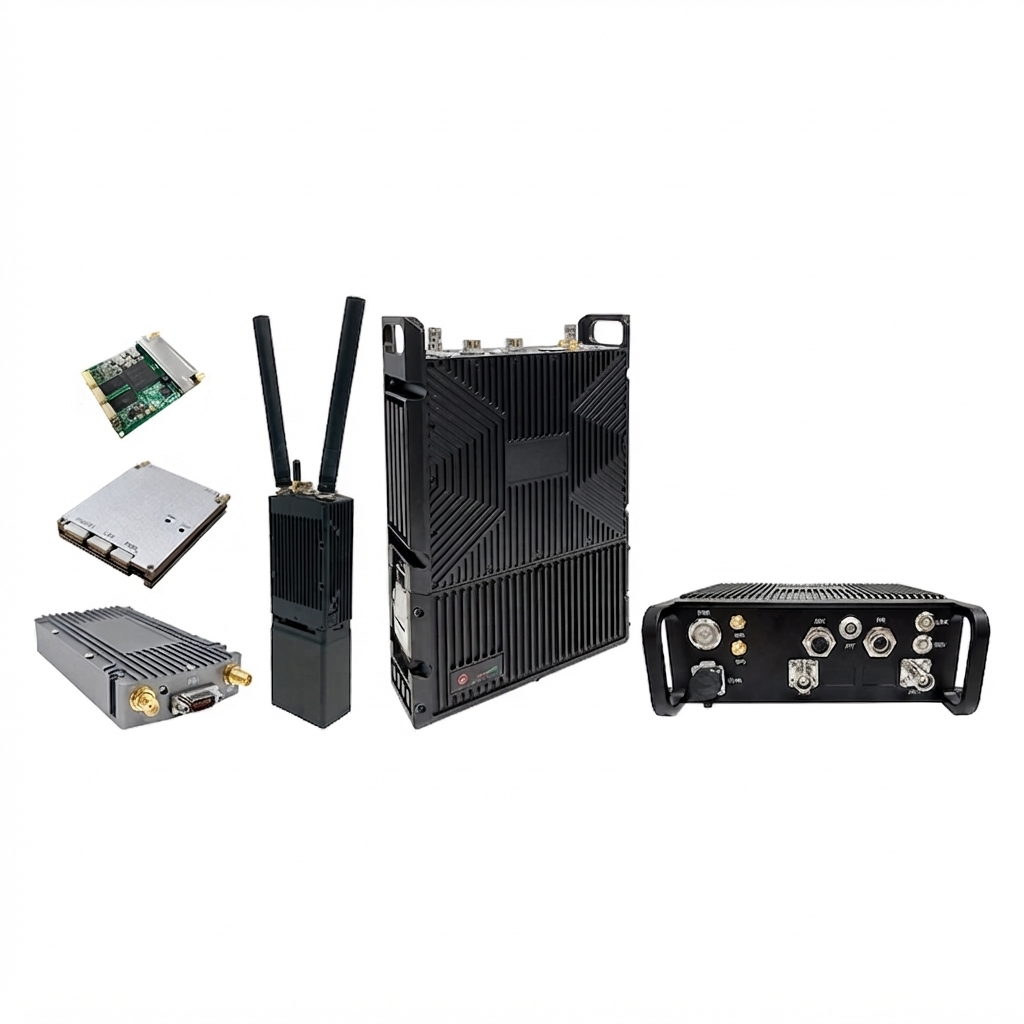
The smartmesh Series of Wireless Broadband Mesh 2018FP5238 is a compact, software-defined wireless broadband mesh radio designed for long-distance, high-speed, self-organizing connectivity. Built on an SDR platform, it supports flexible mesh networking, fast route switching, and multi-node communication for demanding field deployments. The smartmesh Series of Wireless Broadband Mesh 2018FP5238 is especially useful where traditional cabling is impractical, such as temporary command centers, public safety operations, industrial sites, vehicle-to-vehicle links, airborne systems, and outdoor base station applications.
Key strengths include 2x2 MIMO performance, customizable frequency bands, low power consumption, and a highly integrated design that supports module, handheld, vehicle-mounted, airborne, and outdoor base station configurations. Depending on configuration, it can deliver up to 0.25W×2, 1W×2, 2W×2, 10W×2, or 20W×2 output power, making it suitable for both short-range and extended-coverage wireless broadband mesh networking. Typical pricing varies widely by configuration, with estimated ranges starting around the low thousands of dollars for basic units and rising significantly for ruggedized, high-power, or customized OEM builds. Availability is generally through industrial wireless suppliers, OEM channels, and direct manufacturer sales.
For buyers searching for a wireless broadband mesh radio that balances portability, performance, and deployment flexibility, this model stands out as a practical option. It is often chosen by systems integrators, emergency response teams, defense-adjacent projects, and industrial IoT planners who need resilient connectivity in environments where mesh topology is more reliable than a single-point wireless link.
How to Use the smartmesh Series of Wireless Broadband Mesh 2018FP5238
Basic Setup
- Place each node in a location with clear line of sight whenever possible.
- Power on the devices and confirm that all antennas and cables are securely attached.
- Assign matching network parameters such as band, channel width, and mesh ID across nodes.
- Use the configuration interface to enable self-organizing mesh routing.
- Test throughput and latency after deployment to verify stable links.
Best Use Cases
- Temporary broadband coverage in remote areas
- Mobile command-and-control communications
- Vehicle, shipboard, or airborne relay networks
- Industrial monitoring and outdoor field operations
- Rapid-deployment emergency communication systems
Troubleshooting the smartmesh Series of Wireless Broadband Mesh 2018FP5238
Common issues usually come from power, antenna alignment, configuration mismatch, or interference. If a node does not join the mesh, confirm that all devices use the same mesh parameters, compatible frequency settings, and supported channel bandwidth. If throughput is low, reduce interference by changing channels, improving node placement, or shortening hop count. If a link drops frequently, inspect antenna connectors, power output settings, and environmental obstructions.
- No mesh link: Check power, mesh ID, band selection, and antenna installation.
- Weak signal: Move nodes higher, reduce obstacles, and verify transmit power settings.
- Intermittent connection: Look for channel congestion, damaged cables, or unstable supply voltage.
- Configuration mismatch: Reset all units to the same firmware and network profile.
- Error code E01: Typically indicates initialization failure; reboot and recheck configuration.
- Error code E02: Usually points to a radio link or frequency mismatch; confirm the selected band and bandwidth.
Preventive maintenance should include regular firmware checks, connector inspection, antenna tightening, and periodic signal testing. Warranty terms vary by seller and configuration, so confirm coverage before purchase. For support, contact the original supplier, authorized distributor, or OEM sales team using the technical support email, hotline, or order documentation provided at purchase.
Pros and Cons of the smartmesh Series of Wireless Broadband Mesh 2018FP5238
Pros
- Flexible SDR-based design supports multiple deployment scenarios.
- 2x2 MIMO and customizable frequency options improve adaptability.
- High output-power variants suit long-range wireless broadband mesh deployments.
- Compact and lightweight construction makes transport and installation easier.
- Useful for handheld, vehicle-mounted, airborne, and fixed outdoor setups.
Cons
- More complex to configure than consumer mesh Wi-Fi systems.
- Pricing can be high for rugged or high-power variants.
- Performance depends heavily on RF planning and antenna placement.
- May require technical expertise for OEM integration and tuning.
Compared with consumer Wi-Fi mesh alternatives, this product offers stronger suitability for industrial and mission-critical broadband links, but it is not as plug-and-play. For professional deployments, the value for money is strong because it replaces cabling in difficult environments and provides more deployment flexibility than standard home mesh systems.
Customer Reviews for the smartmesh Series of Wireless Broadband Mesh 2018FP5238
Users commonly praise the unit’s portability, stable mesh behavior, and flexible power configurations. Many reviewers highlight its usefulness in field operations where fast deployment matters. A frequent complaint is that setup requires RF knowledge and careful parameter matching, especially in multi-node systems.
- Rating: 4.4/5
- Testimonial: “Reliable for temporary outdoor networking, but definitely aimed at professionals.”
- Testimonial: “Excellent range and flexible configuration, though the initial setup took time.”
- Most mentioned issue: Learning curve for first-time users
- Most mentioned strength: Strong performance in hard-to-wire environments
Purchase recommendation: choose the smartmesh Series of Wireless Broadband Mesh 2018FP5238 if you need a rugged wireless broadband mesh solution for industrial or mobile networking. For simple home coverage, a consumer mesh Wi-Fi system is usually the better alternative.
Frequently Asked Questions
What makes this mesh radio different?
It is designed for professional wireless broadband mesh networking with flexible SDR-based configuration, higher output power options, and deployment formats beyond standard home routers.
Is it suitable for indoor home use?
It can be used indoors, but it is generally overqualified for typical home networking needs and is better suited to industrial or field applications.
Who should buy it?
It is best for integrators, enterprise field teams, emergency communication planners, and industrial users who need scalable mesh connectivity.
Final Verdict
The smartmesh Series of Wireless Broadband Mesh 2018FP5238 is a powerful and versatile choice for professional wireless broadband mesh deployments. Its customizable architecture, high integration, and multi-form-factor support make it a strong fit for demanding environments where reliability and mobility matter most.
Faqs
How do I set up smartmesh Series of Wireless Broadband Mesh 2018FP5238 for the first time?
Why is my smartmesh Series of Wireless Broadband Mesh 2018FP5238 showing weak signal between mesh nodes?
What devices are compatible with smartmesh Series of Wireless Broadband Mesh 2018FP5238?
How can I improve the Wi-Fi performance of smartmesh Series of Wireless Broadband Mesh 2018FP5238?
What should I do if smartmesh Series of Wireless Broadband Mesh 2018FP5238 keeps dropping the internet connection?
Can I use smartmesh Series of Wireless Broadband Mesh 2018FP5238 with my existing router?
How many mesh nodes should I add to smartmesh Series of Wireless Broadband Mesh 2018FP5238 for a large house?
How do I maintain and clean smartmesh Series of Wireless Broadband Mesh 2018FP5238 safely?
Tags
Leave a Comment