
Setup: Souyie P99 Smart Watch User Manual
Content
Souyie P99 Smart Watch
Introduction
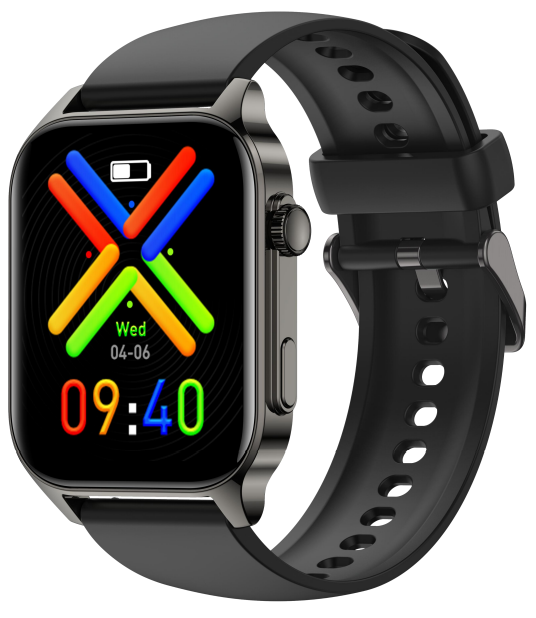
The Souvie P99 Smart Watch is a versatile, advanced wrist-wearable device designed to enhance everyday health and connectivity for active men and women. Featuring a large 1.91-inch HD display and precision sensors, it offers comprehensive health tracking, including heart rate, blood pressure, and true infrared blood oxygen monitoring. Its voice assistant and Bluetooth calling capabilities provide seamless smartphone integration, making it ideal for tech-savvy users who want both fitness insights and communication convenience on the go.
This smartwatch is especially suited for fitness enthusiasts, professionals seeking hands-free connectivity, and health-conscious individuals. It supports in-depth sleep analysis and multi-sport tracking to help users optimize their daily routines and wellness goals.
Available at an affordable price range typically between $50 to $80, the Souyiee P99 offers premium features often found in more expensive models. It is widely available through online retail platforms and official Souyie distributors, making it accessible globally for Android and iOS users.
Charge and Activate
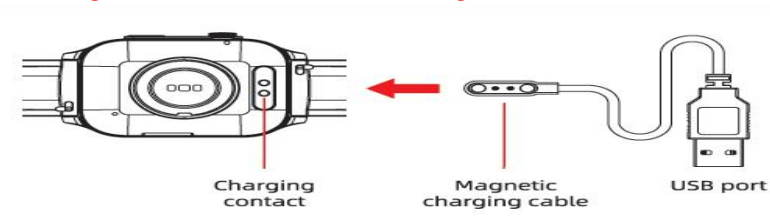
- Please align the magnetic charger with the magnetic hole on the back of the watch until the charging Reminder appears on the watch screen.
- Please charge the watch for 5 hours before using it for the first time.
Wear Correctly
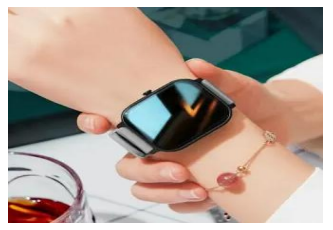
Please ensure that your watch is at least one finger above your wrist bone and that the sensor on the back touches your skin.
Button and Touchscreen
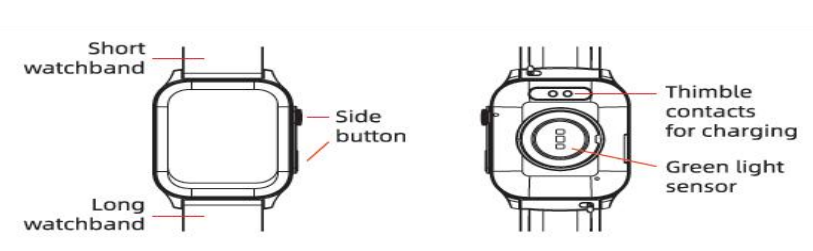
KNOB BUTTON
- Long-press to turn on the watch in the off state.
- In power on mode, long-press to display the shutdown page, and slide the screen to shut down.
- When in other interfaces, press the button to return to the watch desktop.
Bluetooth Connection
APP Using Tips:
- Please use official applications to download the " FitCloudPro" APP and avoid using third-party applications to download.
If you download the APP from a third-party application or browser, spam ads may pop up and require you to provide credit card information.
【Please do not click and do not provide credit card information】 - When connecting, the Bluetooth pairing request and notifications request appear on your phone. Please click【Pair】and【Allow】.
- Log in to the APP and fill in the correct information of gender, birthday, height, weight, etc. (*Incorrect information will affect the accuracy of health and activity Data.)
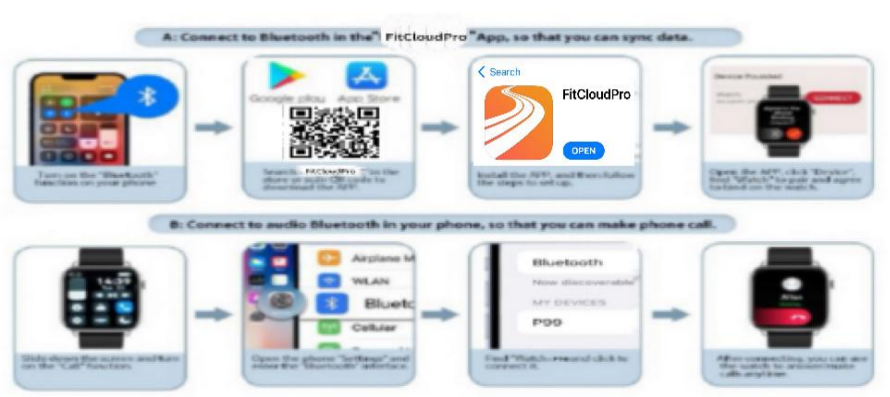
Connection steps
- Step A. Connect to Bluetooth in the FitCloudPro App(for data transfer)
- Turn on the【Bluetooth】function of your phone.
- Search【FitCloudPro】in the store or scan the QR code on the user manual or watch to download the APP.
- Open the APP, click【Add Device】, find【Watch】to pair,, and agree to bind on
the watch.
- Step B. Connect to Bluetooth audio in your phone (for answering/ dialing/ listening to music)
- Slide down the screen and turn on the【Call audio】function.
- Open the phone【Settings】and enter the【Bluetooth】interface.
- Find watch 【P99】and click to connect it.
Phone Permission Settings
For iOS
- Location: After turning on, the APP can obtain the local weather conditions and synchronize them to your watch .
- Contacts: After turning on, you can add frequently used contacts to the APP,, and it will be synced to your watch for quick calls.
- Photos: After turning on, you can choose any photo in your phone to customize the watch face.
- Bluetooth: After turning on, the APP can be ready for pairing with the watch.
- Camera: After turning on, enter the remote camera function on the APP, and shake the watch to activate e the remote camera.
- Siri & Search: After turning on, you can use the watch to wake up Siri to perform quick operations.
- Background App Refresh: After turning on, the system will update the newest version of FitCloudPro synchronously.
Specifications of the Souyie P99 Smart Watch
- Display: 1.91-inch HD full-color touchscreen
- Processor: Upgraded ultra-low power Realtek 8762D chip for efficient performance
- Sensors: True infrared blood oxygen monitor, 24/7 heart rate sensor, blood pressure monitor, sleep tracker
- Connectivity: Bluetooth 5.0 with call and message notifications, supports Bluetooth calling and contact syncing
- Battery: Long-lasting lithium-polymer battery with optimized power management
- Build: Slim aluminum alloy chassis with comfortable TPU silicone strap; IP68 waterproof rating..
- Compatibility: Supports Android and iOS devices via the GloryFit app
- Additional features: Voice assistant, multi-sport modes, step and calorie tracking
- Performance metrics: Accurate health data with continuous monitoring and historical data logging in the app
- Comparison: Larger screen than many mid-range smartwatches; infrared SpO2 sensor offers enhanced accuracy over typical optical sensors
Troubleshooting fothe r the Souyieie P99 Smart Watch
- Watch not syncing or found: Ensure Bluetooth and GPS on phone are active; confirm GloryFit app permissions for location and notifications; restart Bluetooth on both devices and reconnect through the app.
- No alerts or notifications: Verify notification reminders are enabled in the app; grant notification permissions in phone settings; for Android, allow background app activity to avoid disconnections.
- Measurement inaccuracies: Sit still, ensure the watch is snug on your wrist, and stay calm during readings; avoid movement for reliable heart rate and blood oxygen data.
- Error codes: The watch typically does not display error codes, but may show sensor or connection failure,s which can often be resolved by rebooting or re-pairing the device.
- Preventive measures: Avoid wearing in hot water or prolonged swimming to preserve waterproof integrity; regularly clean charging contacts; use the supplied charger only.
- Warranty and support: The souyie P99 usually comes with a standard one-year manufacturer warranty covering defects; customer support is accessible via the official souyie website and authorized sellers.
- Contact: For assistance, users can reach out via Souyie’s customer service email or support section on their official website.
Pros & Cons of the Souyie P99 Smart Watch
- Pros:
- Large, crisp 1.91" HD touchscreen for easy navigation and clear visibility.
- Advanced true infrared blood oxygen monitoring offers superior accuracy compared to standard sensors.
- Comprehensive health tracking, including heart rate, blood pressure, sleep stages, and multi-sport modes.
- Bluetooth calling and voice assistants provide hands-free, convenient communication.
- IP68 waterproof rating suitable for everyday use and light water exposure.
- Lightweight aluminum alloy body with a th comfortable TPU band for extended wear.
- Affordable price point delivering premium features common in higher-end smartwatches.
- Cons:
- Display uses plastic rather than glass, which may be less scratch-resistant.
- Limited message reply capability—calls can be answered,, but text replies are not supported natively.
- Some Android users report occasional Bluetooth disconnections requiring app permission adjustments.
- Measurement data intended for reference only; not a substitute for medical-grade devices.
Customer Reviews of the Souyiee P99 Smart Watch
Users generally praise the Souvie P99 Smart Watch for its accurate health monitoring and affordability. Many highlight the large HD screen and ease of use via the GloryFit app as strong points. Fitness enthusiasts appreciate the detailed sleep tracking and multi-sport modes, while professionals value Bluetooth call functionality for hands-free convenience.
Common complaints include the plastic screen's susceptibility to scratches and occasional Bluetooth instability on some Android models. Some customers note the inability to reply to messages directly from the watch as a limitation. Overall, the smartwatch receives average ratings around 4 out of 5 stars, with recommendations focused on users seeking a budget-friendly, feature-rich health tracker and smartwatch.
Tags
Leave a Comment