
How to Pair: Spark Neo Headphones User Manual
Content
Spark NEO Headphones
Introduction
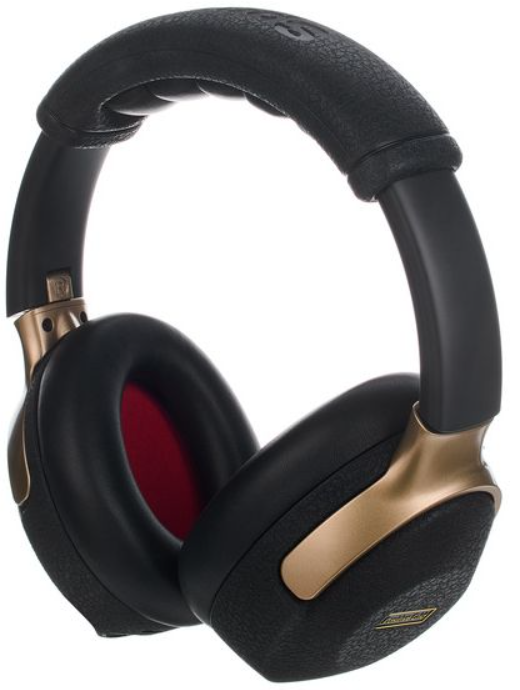
Introducing the Spark NEO Headphones, a revolutionary wireless smart guitar headphone system designed for musicians seeking a seamless and immersive musical experience. These headphones combine advanced AI-powered amp modeling with true wireless connectivity, offering a unique blend of pro-level tone, total freedom, and a personalized sound experience. With access to 33 authentic amp models and 43 versatile effects, Spark NEO caters to guitarists and bassists alike, providing a rich, detailed sound that captures every nuance of your playing.
Targeted at musicians who demand portability and precision, Spark NEO is ideal for practicing, jamming, or streaming music. Available since February 2025, these headphones are priced around $199 and offer a travel-friendly design with a battery life of up to eight hours for Bluetooth audio and six hours for guitar and Bluetooth combined. The Spark NEO integrates with the Spark app, allowing users to fine-tune their tone and access a wide range of effects and amp models.
Product Specification
SPARK NEO HEADPHONES AUDIO SPECIFICATIONS
- FREQUENCY RESPONSE
20Hz - 20kHz - STEREO/MONO
Stereo - MAXIMUM SOUND PRESSURE LEVEL
100dB SPL (@ 1KHz) - Drivers
ABF (Advanced Bio Fiber) Diaphragm Driver Size: 40mm - TOTAL IMPEDANCE
32 ohms
BATTERY
- CHARGING TIME
- Spark NEO Headphones :
3.5 hours @ 5V/2A USB-C Charger - Wireless Transmitter(TX) :
2 hours @ 5V/2A USB-C Charger
- Spark NEO Headphones :
- PLAY TIME
- Spark NEO Headphones :
- Bluetooth audio up to 8 hours of playtime
- Guitar & Bluetooth audio up to 6 hours playtime
- Wireless Transmitter(TX) :
Up to 13 hours of playtime
- Spark NEO Headphones :
INCLUDED IN THE BOX
- BOX CONTENTS
- Spark NEO Headphones
- Wireless Transmitter USB-C Cable
- Get Started Card
- Safety Instructions
WIRELESS TRANSMITTER(TX)
SPECIFICATIONS
- FREQUENCY RANGE
2.4GHz - SAMPLE RATE
24-bit, 48kHz - FREQUENCY RESPONSE
20Hz - 20kHz - DYNAMIC RANGE
115dB - LATENCY
3.8ms - TRANSMISSION RANGE
Line of sight 5 meters
CONTROLS AND CONNECTIVITY
PANEL CONTROLS
- Spark NEO Headphones :
- Main Power Button / Bluetooth Pair Button
- Preset Selector
- Guitar Volume Control Buttons (+/-)
- Built-in Wireless Receiver(RX) Power Button
- Wireless Transmitter(TX) :
- Power Button
- ONBOARD EFFECTS
- 33 Amp Models
- 43 Effects
- (Noise Gate, Compressor/Wah, Distortion,
- Modulation/EQ, Delay, Reverb)
- WIRED CONNECTIVITY
- 1/4" Guitar Input
- WIRELESS CONNECTIVITY
- Positive Grid Proprietary Wireless Audio(2.4GHz)
- Bluetooth Audio
- PHYSICAL UNIT
- WEIGHT
- Spark NEO Headphones : 370g
- Wireless Transmitter(TX) : 38.6g
- DIMENSIONS
- Spark NEO Headphones
- 203.5 x 166 x 79.7mm
- Wireless Transmitter
- 107.3 x 25.4 x 27.25mm
SOFTWARE
- MOBILE APPS
- Spark App for iOS and Android (included)
- Spark App Core Features
- Spark AI
- Auto Chords
- ToneCloud®
- Tuner
- Spark App for iOS and Android (included)
Spark NEO Headphones Control Panel
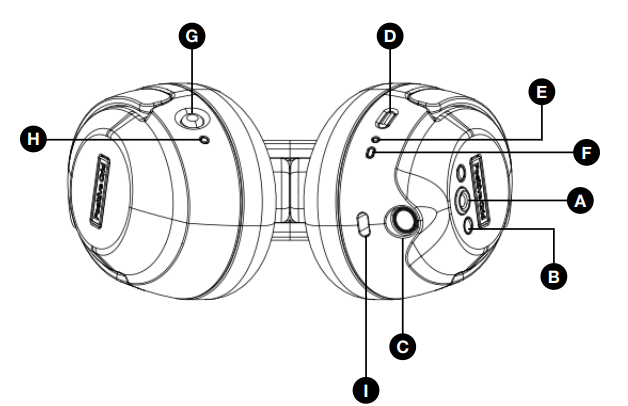
(A) Preset Selector
Press the button to select one of four presets on Spark NEO Headphones. These presets can also be customized in the Spark app.
(B) Guitar Volume Control (- / +)
Adjust the guitar volume (Controls only guitar volume).
(C) Guitar Input
- Plug in your guitar with a standard 1/4” (6.3mm) guitar cable.
(D) Power / Bluetooth pairing button
- Hold to turn on or turn off Spark NEO Headphones
- While powered on, tap the button to start Bluetooth pairing
(E) Bluetooth LED Indicator
- Indicates the status of your Bluetooth audio connection:
- Solid Blue: Connected
- Flashing Blue: Pairing
- Off : No connection
(F) Power LED Indicator
- Indicates power and battery status.
- Solid Green: Powered on or fully charged
- Solid Red: Low battery
- Flashing Red/Yellow/Green: Charging
(G) Built-in Wireless Receiver(RX) Power Button
- Hold to turn on/off the Built-in Wireless Receiver(RX)
- Built-in Wireless Receiver(RX) will turn off automatically to conserve battery after 15 seconds if it detects no connection to Wireless Transmitter(TX)
(H) Wireless Receiver LED Indicator
- Indicates Built-In Wireless Receiver(RX) connection status
- Solid Blue: Connected
- Flashing Blue: Pairing
- Green/yellow flash alternately: Mute
(I) USB Type-C charging port
- Connect to the USB charger to charge your Spark NEO Headphones
- Connect to your computer to perform firmware updates
Spark NEO Wireless Transmitter(TX) Control Panel
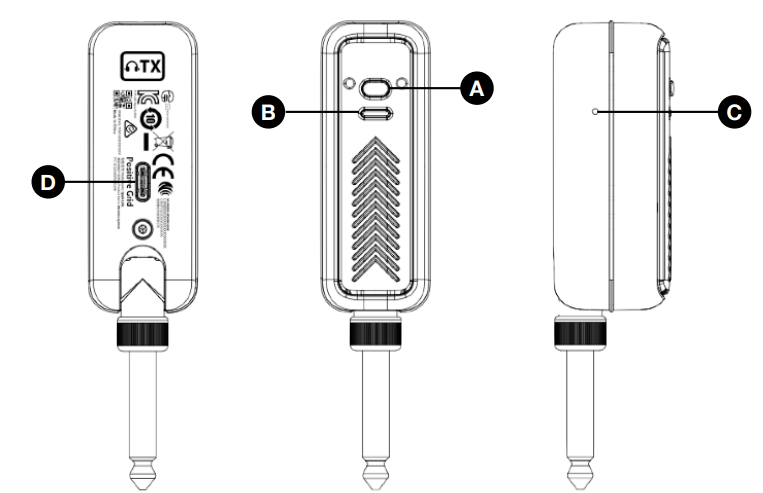
(A) Power Button
- Hold to turn the Wireless Transmitter(TX) on or off
- While powered on, tap to mute or unmute the Wireless Transmitter(TX)
- While powered on, double-tap to re-pair with Spark NEO Headphones
(B) LED Indicator
- Solid Green: Powered on or fully charged
- Solid Red: Low battery
- Flashing Red/Yellow/Green: Charging
(C) Pin-Hole Reset Button
- Use a pin to push the button in the hole to engage manual shutdown
(E) USB Type-C Charging Port
- Connect to the USB charger to charge your Wireless Transmitter(TX)
IMPORTANT NOTES
Please note that Spark LINK is not compatible with Spark NEO Headphones or Wireless Transmitter(TX).
Using Spark NEO Headphones with your guitar
Plugging In Wirelessly To Spark NEO Headphones
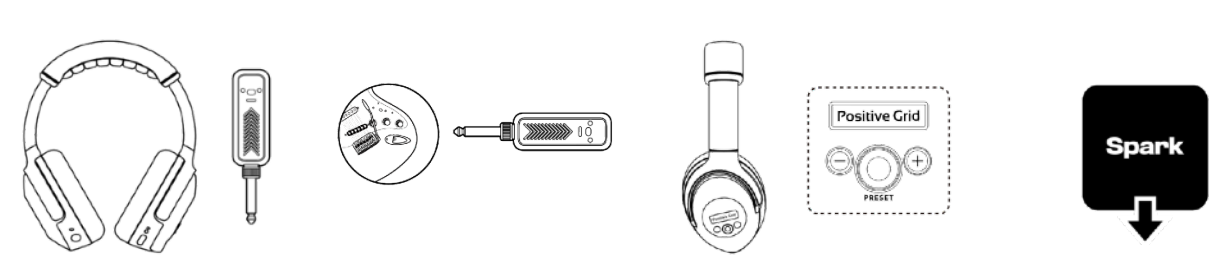
- Power on Spark NEO Headphones and the Wireless Transmitter (TX).
- The Built-in Wireless Receiver(RX) in the headphones will activate when the headphones are powered onn anwilllil connect to the Wireless Transmitter tter(TX) automatically.
- Plug the WirelessTransmitter(TX) into your guitar..
- Select one of the four presets using the Preset Selector button on the rightthe right ear..
- To access more tones or create your own, download the Spark app using the QR code on page 9 or search for “Spark amp” in the Apple App Store or Google Play Store.
Using A Guitar Cable With Spark NEO Headphones
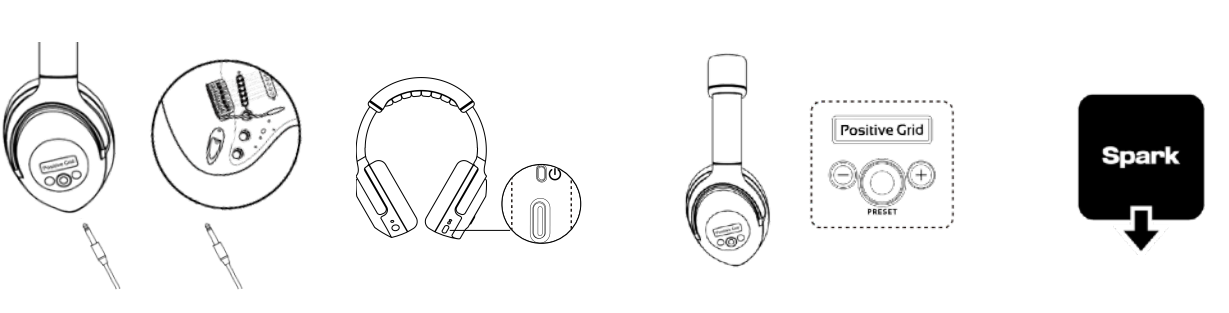
- Plug a standard ¼” (6.3mm) guitar cable into your Spark NEO Headphones.
- Plug the other end of the cable into your guitar.
- Power on Spark NEO Headphones
- Select one of the four presets using the Preset Selector button on the rightthe right ear.
- To access more tones or create your own, download the Spark app using the QR code on page 9 or search for “Spark amp” in the Apple App Store or Google Play Store.
Using Spark NEO Headphones with your guitar
Adjusting The Guitar Volume
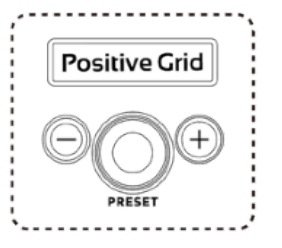
- Use the "+" and "-" buttons to adjust the guitar volume. To prevent accidental activation, these buttons will only function when there is an active guitar sound input. If no guitar sound is detected, the volume setting will remain unchanged.
Using Spark NEO as Wireless Bluetooth® Headphones
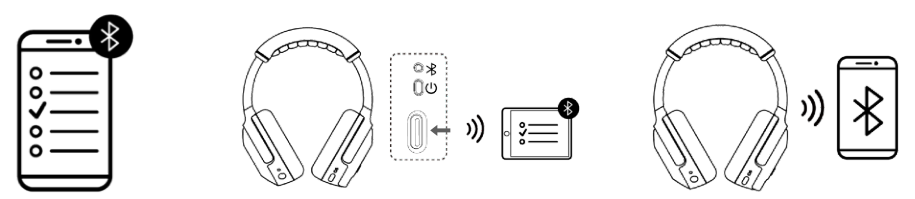
- Make sure to turn on Bluetooth in your mobile device settings.
- Press the Power/Pair button on the right ear to start Bluetooth pairing and select “Spark NEO Audio” from the list of scanned devices.
- Once paired, Spark NEO headphones can play music from the Spark app or a selected streaming platform.
- When connected via Bluetooth, use your mobile phone’s volume controls to adjust Bluetooth music playback level.
- Spark NEO Headphones will automatically pair with the last device they connected to. If the last device is not available, Spark NEO Headphones will automatically connect to a device that has been previously paired.
Factory Reset
- Completely power off the Spark NEO Headphones.
- Press and hold the Preset Button and Power Button simultaneously for 5 seconds until the Power LED starts flashing white.
- Note: At this time, you may cancel the factory reset by quickly tapping the Power or Preset button.
- Long-press the Preset or Power Button until the Power LED blinks twice,, and the factory reset will be complete.
Force Shutdown & Restart
If Spark NEO Headphones runs into an issue where the knobs/buttons don't respond oemitts unusual noise, follow the steps below to force a shutdown and restart Spark NEO Headphones.
- Remove the any USB connection to Spark NEO Headphones.
- Hold the Power/Pair button for over 10 seconds.
- Release the Power/Pair button, and hold it again to turn Spark NEO Headphones on.
Troubleshooting Spark NEO Headphones
Common issues with Spark NEO Headphones often involve connectivity or audio quality. Here are some troubleshooting tips:
- Pairing Issues: Ensure the headphones and transmitter are adequately charged and in close proximity during pairing. Restart both devices if necessary.
- Audio Lag: Spark NEO's latency is minimal at 3.8ms, but if you experience lag, check for interference from other devices in the 2.4GHz frequency range.
- Distorted Sound: Adjust the volume levels and ensure the guitar input is properly connected.
For further assistance, contact Positive Grid support via their website. Spark NEO Headphones come with a warranty that covers manufacturing defects, offering peace of mind for users.
Pros and Cons of Spark NEO Headphones
Pros
- Advanced AI-Powered Amp Modeling: Offers 33 authentic amp models and 43 effects for a wide range of tonal options.
- Seamless Wireless Connectivity: 2.4GHz wireless technology with low latency ensures uninterrupted performance.
- Portability and Durability: Lightweight design with reinforced joints, making it perfect for travel.
Cons
- Battery Life Limitations: May not last a full day of continuous use.
- Cost: Priced at $199, which might be steep for some users.
- Interference: Can be susceptible to interference from other devices on the 2.4GHz frequency.
Spark NEO Headphones provide excellent value for money, especially for those seeking a versatile and high-quality wireless guitar solution.
Customer Reviews for Spark NEO Headphones
Spark NEO Headphones have received positive reviews for their sound quality, portability, and AI-powered features. Users praise the seamless wireless connectivity and the expansive range of amp models and effects available through the Spark app. However, some users note that the battery life could be longer and that the price might be a barrier for casual musicians.
Common praises include the rich, detailed sound and the convenience of being able to practice or jam without cables. Some users mention occasional connectivity issues, but these are generally resolved with restarts or adjustments to the environment.
Overall, Spark NEO Headphones are recommended for serious musicians looking for a premium wireless guitar experience.
Leave a Comment