
Setup: Speedlink SL-860200-BK Gaming In-Ear Headphone User Manual
Content
Speedlink SL-860200-BK Gaming In-Ear Headphone
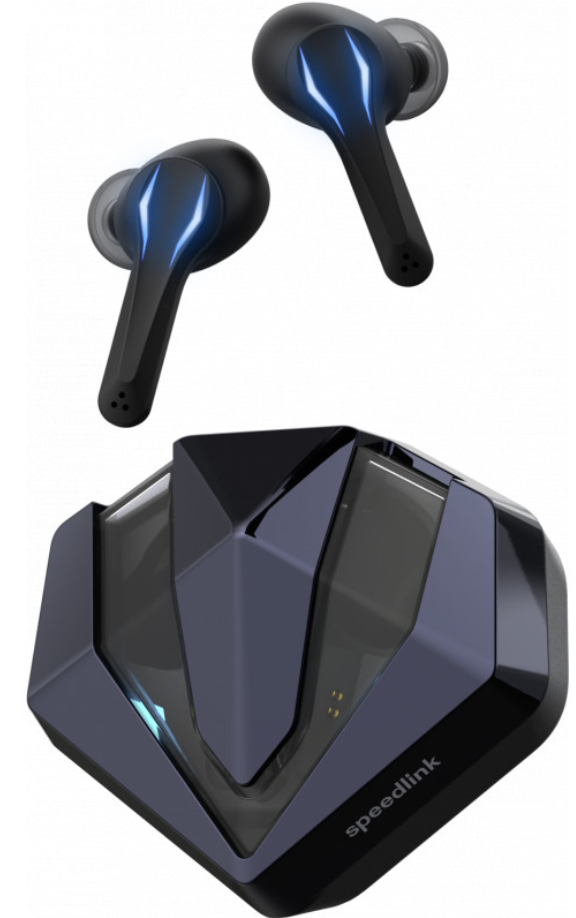
Introduction
The speedlink SL-860200-BK Gaming In-Ear Headphone offers a cutting-edge wireless audio solution tailored for gamers seeking immersive sound with ultimate freedom of movement. Designed as a true wireless in-ear headset, it combines convenience with gaming-specific features such as low input lag game mode, dynamic stereo sound, and integrated LED lighting effects that enhance the gaming atmosphere. Its splash-proof design ensures durability during intense gaming sessions or mobile use, making it ideal for both desktop and on-the-go gaming enthusiasts.
This model targets competitive and casual gamers who value clear voice communication alongside game audio, supported by a sensitive microphone and 12mm driver units delivering a frequency response from 20Hz to 20kHz. The compact charging case with USB-C support provides extended playtime and portability. Priced competitively in the mid-range segment, typically around the €50-70 mark depending on retailer and region, these headphones are widely available through online gaming accessory stores and major e-commerce platforms.
Whether you are engaged in fast-paced first-person shooters or immersive RPGs, the speedlink SL-860200-BK Gaming In-Ear Headphone is engineered to meet the demands of modern gamers looking for a balance between style, comfort, and performance, enhanced by touch sensor controls and customizable lighting.
Earphones Specification
- Bluetooth Version: V5.0
- Working Frequency: 2.402GHz-2.480GHz
- Bluetooth Distance: > = 10M|
- Waterproof Rating: IPX5
- Battery: Polymer Battery 3.7V, 50mAh
- Charging Box: 3.7V, 500mAh|
- Charging Time: 1H for Earphones, 1H for Charging Case
- Playing Music/Call Time: 5 Hours (depends on music style and volume)
- Supporting Protocol: A2DP 1.3/AVRCP 1.6/AVDTP 1.3/AVCTP 1.4/GAVDP 1.3/HFP 1.7 HSP 1.2/SPP 1.2/GATT 1.0|
Product Display
- Power on: Open Lid and earbuds boost up automatically, or lolong-pressFB FB for 3s, there is a “power on” prompt tone.
- Power off: Put back into the the case and close the lid, earbuds are automatically off, or long-press MFB for 5s, there is a “power off” prompt tone.
- Single Click: Left earbuds (L) Volume Down, Right earbuds (R) Volume Up. There is a beep at maximum or minimum volume.
- Double Click: Play/Pause; Answer Call/Hang up Call; Reject call when in calling mode.
- Triple Click: Left earbuds (L) Skip Back, Right earbuds (R) Skip forward.
- Voice Assitance: Long-press Left(L) for 2s to wake up Siri with a beep, long-press for 2s to exit Siri with a beep.
- Game Mode: Long press Right (R) for 2s, prompt “Beep Game mode” to enter game mode; Long press for 2s, prompt “Music mode ”to enter music mode.
- Factory Reset: Earbuds on and unconnected, quickly click MFB for 5 times to clear pairing data, both earbuds LED lights are on, automatically off after 3s. Put the earbuds back in the charging case, close the lid, open the lid, and connect again.
Bluetooth Pairing Instructions
- L&R earbuds Pairing: Left and Right earbuds auto pair, Master earbud quickly flashes when paring succeeds, slave earbud light goes off.
- Connect to device: both earbuds go off when connected to the o device. Search for Bluetooth name “VEATOOL MD012”, cli,ck, and connect.
- Automatically connect back: After the first connection is successful, the earbuds will connect to the last paired phone by default.
Maintenance
- The recommended operating temperature range is: 0-35 degrees; excessive cold, overheating, or high temperature environments will reduce battery life and affect product performance.
- Do not use under thunderstorms.
- After a long period of non-use, please charge it before use.
- Please use a dry soft cloth to clean the earbuds.
- If there is water or sweat at the notch, wipe it with a dry cloth;, it will not affect normal use.
Common Problem
- The earbuds cannot be paired with the mobile phone. Please check whether the earbuds are in pairing or back-to-back mode, and check the mobile phone Bluetooth search function.
- The earbuds cannot be turned on. Please check if the earbuds are fully charged and charge them.
- Can I replace the battery of the earphones?
No, these earbuds use a non-removable battery. - Can I use the earbuds while driving?
You can use earbuds while driving, while driving and minimize the volume. - The earbuds are disconnected from the phone. The effective distance of these earbuds is 10 meters indoors. If the distance between the mobile phone and the earbud exceeds 10 meters or there are multiple obstacles, the earbud and the mobile phone will be disconnected. Please keep the earbud within the effective distance.
- After the earbuds are connected to a computer or mobile phone, hear different sounds?
Because Bluetooth is a wireless technology, it is very sensitive to objects between the earbuds and the connected device . Please check whether there are metal or other objects in the connection range that affect the connection. - After the Bluetooth earbuds are connected to the mobile phone, can the earphones be used to control the applications on the mobile phone?
The software settings of device applications may be different, so that the functions of individual applications do not support the earphone control.
Pros & Cons of the speedlink SL-860200-BK Gaming In-Ear Headphone
- Pros:
- True wireless design with low input lag game mode for seamless gaming performance.
- 12mm drivers provide clear stereo sound with good speech intelligibility, ideal for voice chat and gaming audio.
- Touch sensor controls allow intuitive management of playback, calls, and lighting without interrupting gameplay.
- Splash-proof build enhances durability for daily use and mobile gaming scenarios.
- Compact USB-C charging case offers portability and convenient charging on the go.
- Customizable LED lighting adds a dynamic visual element attractive to gamers.
- Cons:
- Bass performance is moderate and may feel lacking for music enthusiasts or games with rich soundtracks.
- Sound profile leans towards an emphasis on upper midrange frequencies, which can make audio feel slightly tinny or hollow in some cases.
- Touch controls, while innovative, may require adaptation and can be inconsistent depending on paired devices.
- Battery capacity of 50mAh per earbud limits continuous playtime compared to some competitors.
- Compared to over-ear gaming headsets, in-ear design may offer less noise isolation and less immersive soundstage.
Customer Reviews and Feedback on speedlink SL-860200-BK Gaming In-Ear Headphone
Users often praise the speedlink SL-860200-BK Gaming In-Ear Headphone for its comfortable fit and reliable wireless connectivity during gaming sessions. Many highlight the convenience of touch controls and the appealing LED lighting as strong features. The stereo sound clarity and microphone quality receive positive remarks, particularly for voice chat clarity in multiplayer environments.
However, some customers report dissatisfaction with the bass response, describing it as underwhelming for music playback or games with heavy sound effects. A few users have noted occasional touch control sensitivity issues and the relatively short battery life as limitations. Overall, the product averages around 4 out of 5 stars, with many recommending it for gamers seeking a budget-friendly, stylish in-ear wireless headset primarily focused on communication and gameplay rather than audiophile-level sound.
Faqs
How do I pair my speedlink SL-860200-BK Gaming In-Ear Headphone with my smartphone for the first time?
Why is the microphone not working on my speedlink SL-860200-BK Gaming In-Ear Headphone during calls or gaming?
Can I use the speedlink SL-860200-BK Gaming In-Ear Headphone for PC gaming, and how do I set it up?
How do I activate and use the Gaming Mode on my speedlink SL-860200-BK Gaming In-Ear Headphone?
What should I do if my speedlink SL-860200-BK Gaming In-Ear Headphone has connectivity issues or frequently disconnects?
How do I control playback and calls using the touch controls on the speedlink SL-860200-BK Gaming In-Ear Headphone?
How can I maximize the battery life of my speedlink SL-860200-BK Gaming In-Ear Headphone?
Are replacement ear tips available for the speedlink SL-860200-BK Gaming In-Ear Headphone, and how do I choose the right size?
Leave a Comment