
Sphere MICROWAVE OVEN P90D25EP-H3 User Manual
Content
Sphere MICROWAVE OVEN P90D25EP-H3: Product Manual and Buying Guide
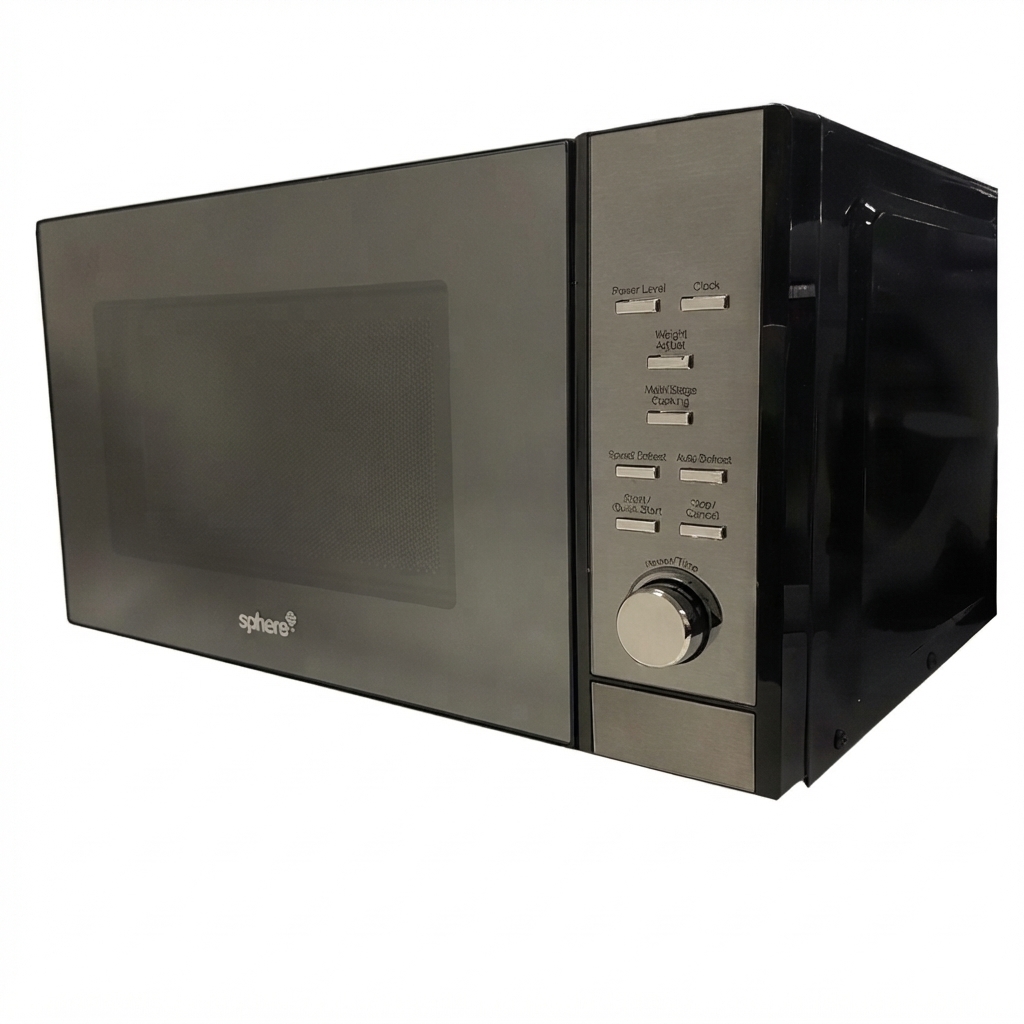
The sphere MICROWAVE OVEN P90D25EP-H3 is a compact 25-litre microwave designed for caravans, RVs, and smaller kitchens that need dependable everyday cooking power. With 900W output, a digital control panel, five power levels, express cooking, defrost modes, and a child safety lock, it balances convenience with practical performance. Its mirror-finish door and white interior give it a clean, modern look, while the push-button door and turntable system make it easy to use for quick reheating, frozen meals, drinks, and simple one-dish cooking.
This model is especially well suited to travellers and mobile households that need a microwave oven with a modest footprint and reliable operation on standard 230-240V power. The sphere MICROWAVE OVEN P90D25EP-H3 is also a strong fit for users who want a straightforward digital microwave without the complexity of grill or convection functions. Typical pricing varies by retailer and region, but current market listings place it roughly in the mid-range budget category, around AUD $215 to $230 in some Australian RV stores, while other markets show comparable pricing near the equivalent of USD 140 to USD 170 depending on shipping and availability. Stock levels can fluctuate because this unit is commonly sold through caravan and RV appliance specialists.
For shoppers comparing compact microwaves, this model stands out for its 25-litre capacity, 900W cooking power, and RV-friendly size. If you are looking for a practical caravan microwave oven that is easy to operate and maintain, the sphere MICROWAVE OVEN P90D25EP-H3 remains a solid choice.
Troubleshooting Sphere MICROWAVE OVEN P90D25EP-H3 Common Problems and Fixes
If the microwave does not start, check that the door is fully closed, the timer is set, and the unit is plugged into a live 230-240V outlet. If food heats unevenly, make sure the glass turntable is seated correctly and avoid overloading the cavity. If the display is on but the oven does not heat, try resetting the appliance by unplugging it for a few minutes and confirm that the selected power level is not set too low.
Common microwave issues include a locked control panel, which can usually be resolved by following the child-lock sequence in the user manual, and a noisy turntable, which often means the roller ring needs cleaning or repositioning. Some digital microwave ovens may show basic fault indications such as door-related errors, power interruption warnings, or keypad response problems; in most cases, these are corrected by checking the door latch, power supply, or control settings. Preventive care includes wiping spills immediately, using microwave-safe containers, keeping vents clear, and avoiding empty operation.
Warranty coverage is typically one year through the retailer or distributor, though terms may vary by region. For help, contact the seller where the unit was purchased or the caravan appliance support team listed on the retailer invoice. Keep the model number P90D25EP-H3 and product code 700-06052 ready when requesting service.
Pros and Cons of the sphere MICROWAVE OVEN P90D25EP-H3
Pros
- 25-litre capacity is generous for a compact caravan microwave oven and handles standard plates and meal containers well.
- 900W output delivers fast reheating and efficient everyday cooking for soups, vegetables, leftovers, and frozen meals.
- Digital controls, express cooking, and defrost options make it easy for beginners and frequent users alike.
- Child safety lock adds family-friendly protection, especially in shared or mobile living spaces.
- Mirror-finish styling gives the appliance a premium look compared with basic silver countertop microwaves.
Cons
- No grill or convection function, so it is less versatile than combination microwave ovens.
- Designed primarily for RV and compact installations, so it may not suit larger kitchen layouts.
- At 13.9kg, it is not the lightest option in the compact microwave category.
- Price can be higher than entry-level countertop models, but the build and caravan-friendly format help justify the cost.
Overall, the sphere MICROWAVE OVEN P90D25EP-H3 offers good value for money if you need a reliable 25L digital microwave for travel or small-space use. Compared with cheaper alternatives, it feels more purpose-built for caravans and RVs, while more advanced models may offer grill functions at a higher price.
Customer Reviews of the sphere MICROWAVE OVEN P90D25EP-H3
Customer feedback is generally positive, with many users praising the microwave’s size, simple controls, and attractive mirror finish. Typical ratings for similar retailer listings sit around 4 out of 5 stars, with buyers highlighting quick heating performance and easy defrosting as standout features.
Common compliments include “great for caravan use,” “heats evenly,” and “looks more expensive than it is.” A few users mention that the digital panel can take a little getting used to, and some wish it included grill functionality. The most frequent complaints are usually about stock availability, shipping costs, or the lack of advanced cooking modes rather than the microwave’s core performance.
For buyers wanting a compact, dependable microwave oven for RV life or a small kitchen, this model is often recommended as a practical mid-range choice. If you want straightforward cooking, easy cleaning, and a modern finish, the sphere MICROWAVE OVEN P90D25EP-H3 is a sensible purchase.
Faqs
How do I set up the sphere MICROWAVE OVEN P90D25EP-H3 for the first time?
Why is my sphere MICROWAVE OVEN P90D25EP-H3 not heating food properly?
What microwave-safe containers should I use with the sphere MICROWAVE OVEN P90D25EP-H3?
How do I clean and maintain the sphere MICROWAVE OVEN P90D25EP-H3 safely?
What should I do if the sphere MICROWAVE OVEN P90D25EP-H3 display or buttons stop responding?
How can I get faster and more even cooking with the sphere MICROWAVE OVEN P90D25EP-H3?
What installation and power requirements does the sphere MICROWAVE OVEN P90D25EP-H3 need?
How do I use the preset cooking modes on the sphere MICROWAVE OVEN P90D25EP-H3 effectively?
Leave a Comment