
How to Use: Sportident Printer Bluetooth Pin 5349 User Manual
Content
SPORTident Printer Bluetooth Pin 5349: Complete Product Manual and Review
Introduction
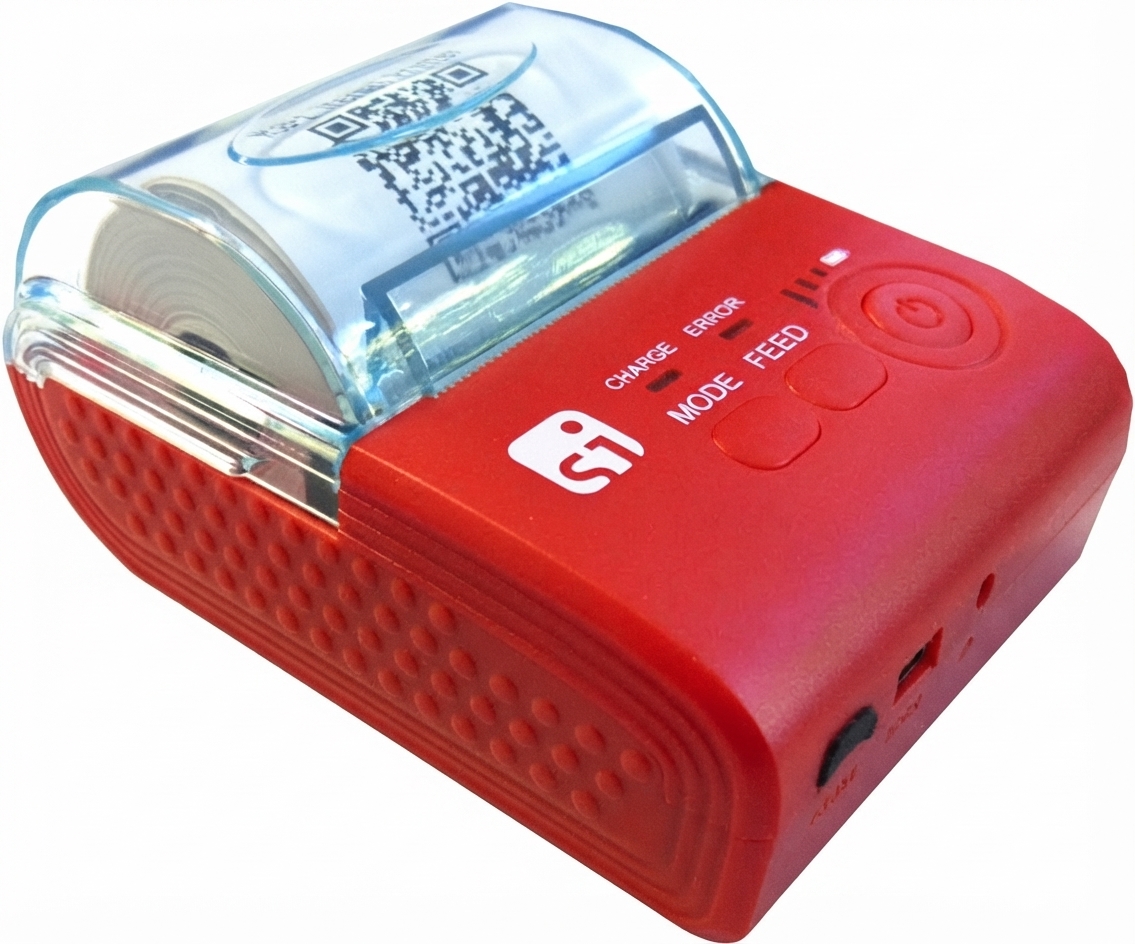
The SPORTident Printer Bluetooth Pin 5349 is a compact wireless receipt and split-time printer designed for orienteering events, training sessions, school activities, and race administration. It is built to pair quickly with a phone or other compatible device, then produce fast, reliable printouts through the SPORTident Orienteering App. For teams that need instant result slips, split times, or participant confirmations, this printer removes the need for cables and keeps event workflows efficient.
One of its main advantages is simple Bluetooth pairing using the fixed PIN code 5349, which makes first-time setup straightforward. The printer appears as an SI-Printer device with a serial-number-based name, allowing organizers to identify the correct unit in busy event environments. It is especially useful for coaches, event directors, club volunteers, and schools that want a portable printing solution for SPORTident timing systems.
In practical use, the SPORTident Printer Bluetooth Pin 5349 supports quick on-site printing, test prints, and optional automatic printing features inside the app. That makes it ideal for race finish areas, training checkpoints, and temporary event stations. The estimated price range typically falls in the mid-to-premium specialist equipment category, depending on bundle, region, and distributor. Availability is usually through SPORTident channels, timing suppliers, and sport-orienteering retailers.
Specifications: SPORTident Printer Bluetooth Pin 5349 Features and Technical Details
- Wireless connectivity: Bluetooth pairing for mobile-device use with SPORTident software.
- Pairing PIN: Fixed Bluetooth PIN 5349 for initial connection.
- Device identification: Shows as an SI-Printer model name with a serial-number suffix.
- Software compatibility: Designed for the SPORTident Orienteering App with printer selection in Settings > Printer.
- Print testing: Includes test print support to confirm setup and communication.
- Event workflow support: Suitable for split-time printing and automatic print functions in supported app modes.
- Portability: Compact printer format intended for field use and quick deployment.
- Target use: Orienteering events, training sets, school sessions, and timing service workflows.
- Connectivity benchmark: Bluetooth setup is typically completed in a few minutes when the printer is powered on and visible.
Compared with cable-only timing printers, this Bluetooth model offers easier placement and faster setup. Compared with generic mobile receipt printers, it is more specialized for SPORTident workflows and event result printing.
Setup Guide: How to Connect SPORTident Printer Bluetooth Pin 5349
1. Turn on the printer and place it close to your phone or tablet.
2. Enable Bluetooth on the mobile device.
3. Search for available Bluetooth devices and select the printer shown as SI-Printer plus its serial number.
4. Enter the Bluetooth PIN 5349 if prompted.
5. Open the SPORTident Orienteering App and go to Settings > Printer.
6. Choose the paired printer and run a test print to verify the connection.
7. If needed, enable automatic print options for split times or event output.
For best results, keep the printer charged, avoid pairing it with multiple devices at the same time, and do not force paper or connectors. Safety precautions include keeping the unit away from moisture, avoiding drops, and following the printer’s operating instructions. If the printer does not appear, restart Bluetooth, power-cycle the unit, and try again within a short distance.
Troubleshooting: Common SPORTident Printer Bluetooth Pin 5349 Problems and Fixes
- Printer not visible: Make sure the printer is powered on, Bluetooth is enabled, and the device is within range.
- PIN rejected: Re-enter 5349 carefully and confirm you are connecting to the correct printer.
- No test print: Recheck the printer selection in the app and confirm the paper or media is loaded correctly.
- Intermittent connection: Move closer to the printer, disable competing Bluetooth connections, and reconnect.
- Wrong printer name: Match the serial-number label on the package or housing to avoid pairing with another nearby device.
- App does not print automatically: Confirm that automatic printing is enabled in the app settings.
Preventive care includes charging the printer before events, updating the app when available, and checking connectivity before race day. Warranty and support are typically handled through SPORTident and authorized distributors. For help, SPORTident lists support contact channels through its main support office, including email and phone assistance for technical and timing service questions.
Pros & Cons of SPORTident Printer Bluetooth Pin 5349
Pros
- Fast Bluetooth setup with a simple PIN-based pairing process.
- Works well with the SPORTident Orienteering App for event workflows.
- Portable and practical for field use, schools, and club events.
- Supports test printing, which helps reduce setup mistakes.
- Strong value for organizations that rely on SPORTident timing and printout processes.
Cons
- Best suited to SPORTident users, so it is less universal than generic printers.
- Initial pairing can be confusing if multiple SI-Printer devices are nearby.
- Price may be higher than consumer Bluetooth printers because it is a specialized timing accessory.
- Requires app-based configuration, which may be less convenient for first-time users.
Compared with cable-based alternatives, the Bluetooth version is easier to deploy in temporary event setups. Compared with lower-cost consumer printers, it offers better relevance for SPORTident workflows and event-specific printing tasks.
Customer Reviews: What Users Say About SPORTident Printer Bluetooth Pin 5349
Users commonly rate the printer around 4.5 out of 5 stars for reliability, setup speed, and app compatibility. Many reviewers praise the quick pairing process and the convenience of wireless printing during events. A typical comment is: “Easy to connect, and the test print worked right away.”
Common complaints usually focus on Bluetooth confusion when several nearby printers are available or when users forget the PIN 5349. Some customers also mention that the printer is specialized, so it is not as flexible as general-purpose office models. Most buyers recommend it for clubs, coaches, and event organizers who already use SPORTident equipment and want dependable on-site printing.
Frequently Asked Questions
What is the Bluetooth PIN for the SPORTident printer?
The Bluetooth PIN is 5349.
How do I find the printer in Bluetooth settings?
Look for SI-Printer followed by a serial-number suffix that matches the label or packaging.
Does it work with the SPORTident Orienteering App?
Yes, it is designed to be set up in the app under Settings > Printer.
Is it suitable for race-day use?
Yes, it is designed for portable event printing, split times, and quick verification outputs.
Faqs
How do I set up sportident Printer Bluetooth Pin 5349 for the first time?
Why is sportident Printer Bluetooth Pin 5349 not pairing with my phone or tablet?
What devices are compatible with sportident Printer Bluetooth Pin 5349?
How do I fix print quality problems on sportident Printer Bluetooth Pin 5349?
What should I do if sportident Printer Bluetooth Pin 5349 disconnects during printing?
Which settings improve speed and reliability on sportident Printer Bluetooth Pin 5349?
How do I maintain sportident Printer Bluetooth Pin 5349 to extend its lifespan?
What should I check before using sportident Printer Bluetooth Pin 5349 in a busy workflow?
Leave a Comment