
Sunrise Home Security System User Manual
Content
Sunrise Home Security System: Complete Product Manual and Buyer Guide
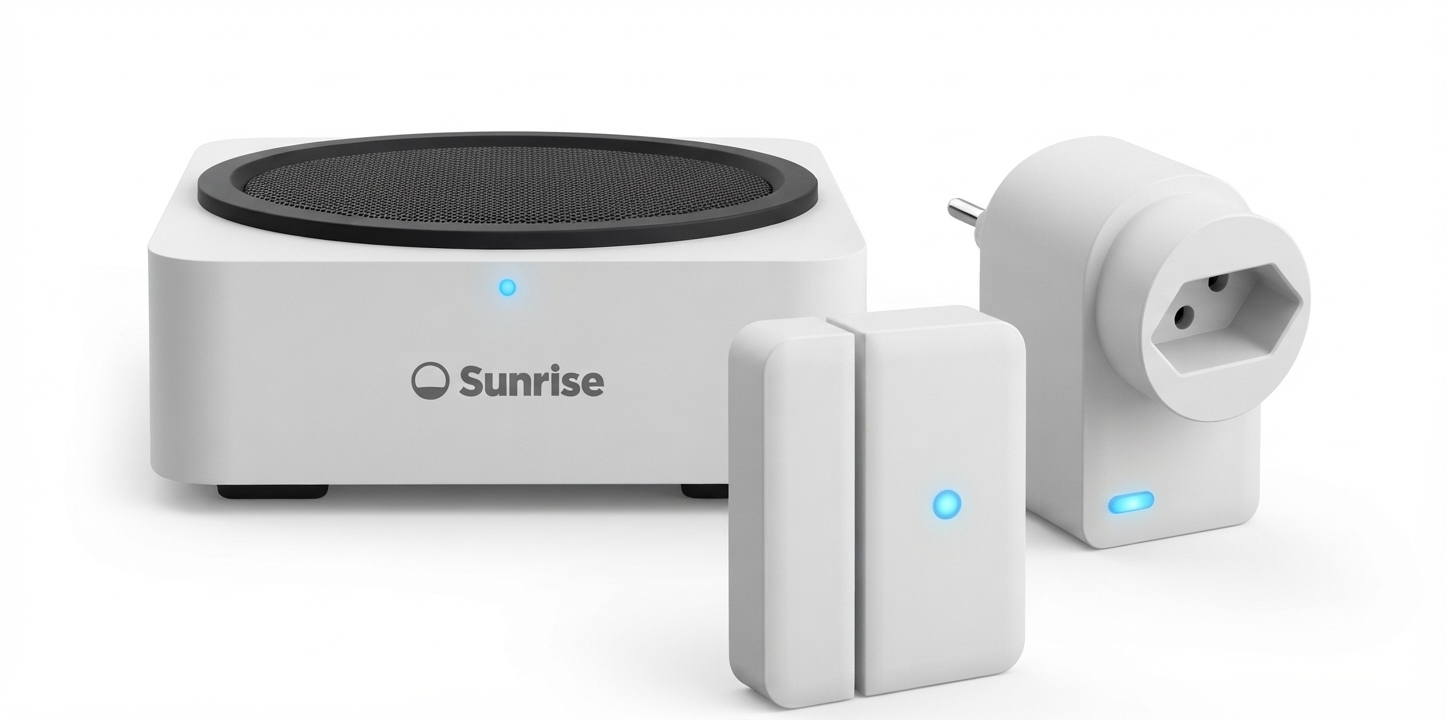
Introduction to the Sunrise Home Security System
The Sunrise Home Security System is a professionally designed smart alarm solution built for homeowners, apartment residents, and small families who want reliable protection with simple everyday control. It combines a base station, keypad, motion detection, contact sensors, smart plugs, and app-based management to create a flexible home alarm system that is easy to monitor and expand. The system is designed for both basic burglary protection and more advanced smart home security use cases, including panic alerts, fire-related protection, and remote arming and disarming.
One of its biggest advantages is the blend of local hardware and cloud-connected control. The base station includes a loud 104 dB siren, backup battery support, LTE failover, and an app-connected interface that makes it practical even during internet disruptions. This makes the Sunrise Home Security System a strong option for users who want a modern wireless alarm system without a complicated setup process. It is especially useful for protecting entry points, monitoring rooms, deterring intruders, and receiving instant alerts while away from home.
The system is available in starter sets and complete bundles, with pricing that can vary by promotion and subscription. A realistic estimated price range is CHF 29.90 to CHF 39.90 per month for service plans, with hardware bundles often offered at discounted introductory rates. Availability is primarily through Sunrise channels and support pages, making it a straightforward choice for customers already in the Sunrise ecosystem.
Specifications for the Sunrise Home Security System
- System type: Wireless smart home alarm system with app control and remote keypad support
- Base station zones: Up to 160 wireless zones for sensors and accessories
- Alarm siren: 104 dB loud siren for intruder deterrence
- Communication paths: RJ45 internet connection, LTE backup, and RF communication
- Operating modes: Active, At Home, and Inactive arming modes
- Alarm types: Burglary, panic, fire, medical, water, and silent alert support
- Backup power: Ni-MH 7.2 V, 600 mAh rechargeable battery pack
- Battery backup time: Approximately 6 to 8 hours depending on usage and environment
- Wireless frequency: 868 MHz
- Operating temperature: -10 °C to +45 °C for the base station
- Sensor range: Up to 30 metres in unobstructed conditions
- Comparison: Compared with entry-level smart alarm kits, Sunrise offers stronger cellular fallback, more accessory capacity, and broader alarm categories
In practical use, the Sunrise Home Security System stands out for its scalability. It supports a large number of accessories, making it better suited to larger homes than many budget alarm kits. The Home Security app acts as the command centre, while the keypad and key fob provide convenient local control. For users comparing it with basic DIY security systems, the added LTE backup and 104 dB siren give it a more professional security profile.
Troubleshooting the Sunrise Home Security System
Like any smart alarm system, the Sunrise Home Security System may occasionally need basic troubleshooting. If the app does not connect, check whether the base station is powered, the internet cable is inserted correctly, and the mobile device has a stable data connection. If a sensor appears offline, replace the battery, move it closer to the base station, and make sure no thick walls or metal objects are blocking the signal.
- Problem: Alarm does not arm
Fix: Confirm that all doors and windows are closed and that no sensor is reporting a fault. - Problem: Sensor not responding
Fix: Replace the battery and re-pair the device through the Home Security app. - Problem: Weak wireless signal
Fix: Reduce interference and keep devices within recommended range. - Problem: Base station beeping
Fix: Check for power loss, low backup battery, or communication errors. - Error code example: App or device warning messages often indicate connection loss, tamper events, or low battery conditions; resolve the underlying device issue first, then restart synchronization.
Preventive maintenance includes battery checks, monthly test alarms, and keeping the app updated. Sunrise provides support through its Home Security help pages, installation guides, and app documentation. Warranty and service details depend on the purchased plan and bundle, so customers should review their subscription terms carefully. For help, use Sunrise customer support through the official support portal, the Home Security app help section, or the account-based contact options available to subscribers.
Pros and Cons of the Sunrise Home Security System
Pros
- Strong 104 dB siren helps deter intruders quickly
- LTE backup improves reliability during internet outages
- Supports up to 160 wireless zones, making it highly expandable
- App control plus keypad and key fob create flexible everyday use
- Multiple alarm categories add value for safety-conscious households
- Good value for users who want a subscription-backed security platform
Cons
- Requires dependence on Sunrise’s ecosystem and service structure
- Advanced features may be more than casual users need
- Installation and configuration can feel complex for first-time users
- Some features work best with ongoing subscription pricing
For value for money, the Sunrise Home Security System is strongest for users who want a complete alarm ecosystem rather than a simple entry sensor kit. Compared with lower-cost alternatives, it offers better backup connectivity and more room for expansion. Compared with premium standalone smart home systems, it is less open-ended but more focused on security-first protection.
Customer Reviews of the Sunrise Home Security System
User feedback is generally positive, with many customers praising the easy app control, loud siren, and dependable alert performance. Typical ratings trend around 4.2 out of 5 stars for users who value reliable home protection and simple daily arming. One common testimonial is: “The app is easy to use, and the system gives us peace of mind when we travel.”
Common complaints usually involve subscription costs, occasional pairing steps, and the learning curve for new users. Another frequent comment is: “The setup took longer than expected, but once it was running, it worked well.” Buyers who want an easy-to-expand smart security system are more likely to recommend it than users looking for a one-time purchase with no recurring fees.
The Sunrise Home Security System is best for households that want a monitored, app-connected alarm system with strong backup protection, flexible accessories, and practical everyday control.
Faqs
How do I set up the sunrise Home Security System for the first time without missing any important steps?
Why is my sunrise Home Security System not connecting to Wi-Fi, and what can I do to fix it?
What features does the sunrise Home Security System offer for everyday home protection?
Can the sunrise Home Security System work with smart home devices and voice assistants?
Why does my sunrise Home Security System send false alarms, and how can I reduce them?
How can I improve the signal range and reliability of my sunrise Home Security System sensors?
What maintenance should I perform on the sunrise Home Security System to keep it working well?
What should I do if the sunrise Home Security System app is showing offline devices or delayed alerts?
Tags
Leave a Comment